
A few years ago, most AI tools only answered questions. Today, they can search company files, write and run code, update records, and send messages for employees. Every new task can give the AI more access, and for attackers—more ways to misuse it. AI model security is the practice of protecting AI models, and the data and tools they depend on, from tampering, theft, and misuse. This article covers the main threats, the frameworks that address them, and practical steps to reduce risk.
AI model security: key takeaways
- Protect more than the model. Training data, model files, retrieval systems, APIs, and connected tools all create possible entry points for attackers.
- Know the difference between threats. Data poisoning changes what a model learns, while prompt injection tries to redirect its behavior during use.
- Limit access and autonomy. Give models only the data and permissions they need, and check sensitive actions outside the model.
- Test beyond accuracy. Ordinary benchmarks can miss security risks so add adversarial testing and AI model security scanning.
What is AI model security?
AI model security means protecting AI models and the components that influence how they learn, respond, and operate. That includes training data, model weights, software dependencies, and access to deployed models. It also covers what happens when an application built on a model reads external content or uses tools. Both the NSA and the UK National Cyber Security Centre (NCSC) recommend treating AI security as a responsibility that lasts through the whole lifecycle, from development to deployment and maintenance.
Because this definition covers both the model and the application around it, attacks fall into 2 groups:
- Model-level attacks target the model itself: its training data, learned behavior, files, or weights. The damage stays in the model until it is fixed or replaced.
- Application-level attacks target the system that uses the model, such as prompts, retrieved content, outputs, or tool permissions. They influence individual responses without changing the model.
Suppose an attacker adds manipulated examples to a training dataset. The model learns the wrong behavior, so any future response can be affected, and the fix starts with controlling and checking training data.
Now, suppose an attacker hides instructions in a document that an AI assistant later retrieves. The model stays unchanged, but the responses that use that document are affected. Here, the fix is to control which content the assistant can read and what it is allowed to do with it.
Both attacks can produce unsafe answers, but stricter training data controls won’t stop the second attack, and tighter retrieval permissions won’t stop the first.
Why AI model security matters now
AI tools are no longer limited to answering questions. Businesses connect them to knowledge bases, code repositories, customer records, and workflows. Each new connection gives the AI system more access and provides attackers with more ways to cause damage if they can manipulate it.
Attackers have already started to exploit these connections. In September 2026, the Google Threat Intelligence Group reported on malware that planted malicious configuration files to make AI coding assistants run attacker-selected commands during routine use. The same report described investigations in which attackers stole proprietary AI assets, including a healthcare company’s AI model and drug research. In other words, both the tools around models and the models themselves are now targets.
Regulators are raising expectations as well. The EU AI Act includes cybersecurity, accuracy, and robustness requirements for high-risk AI systems, with the relevant rules scheduled to apply from December 2027 or August 2028, depending on the system category As a result, organizations will need to show that their AI systems are secure, not only that a pilot worked and accuracy scores were acceptable.
Key AI model security vulnerabilities and threats
The threats below follow the 2 groups described earlier. The first 4 threats mainly target the model and its supply chain The rest exploit how a deployed application interacts with users, data, and business systems.
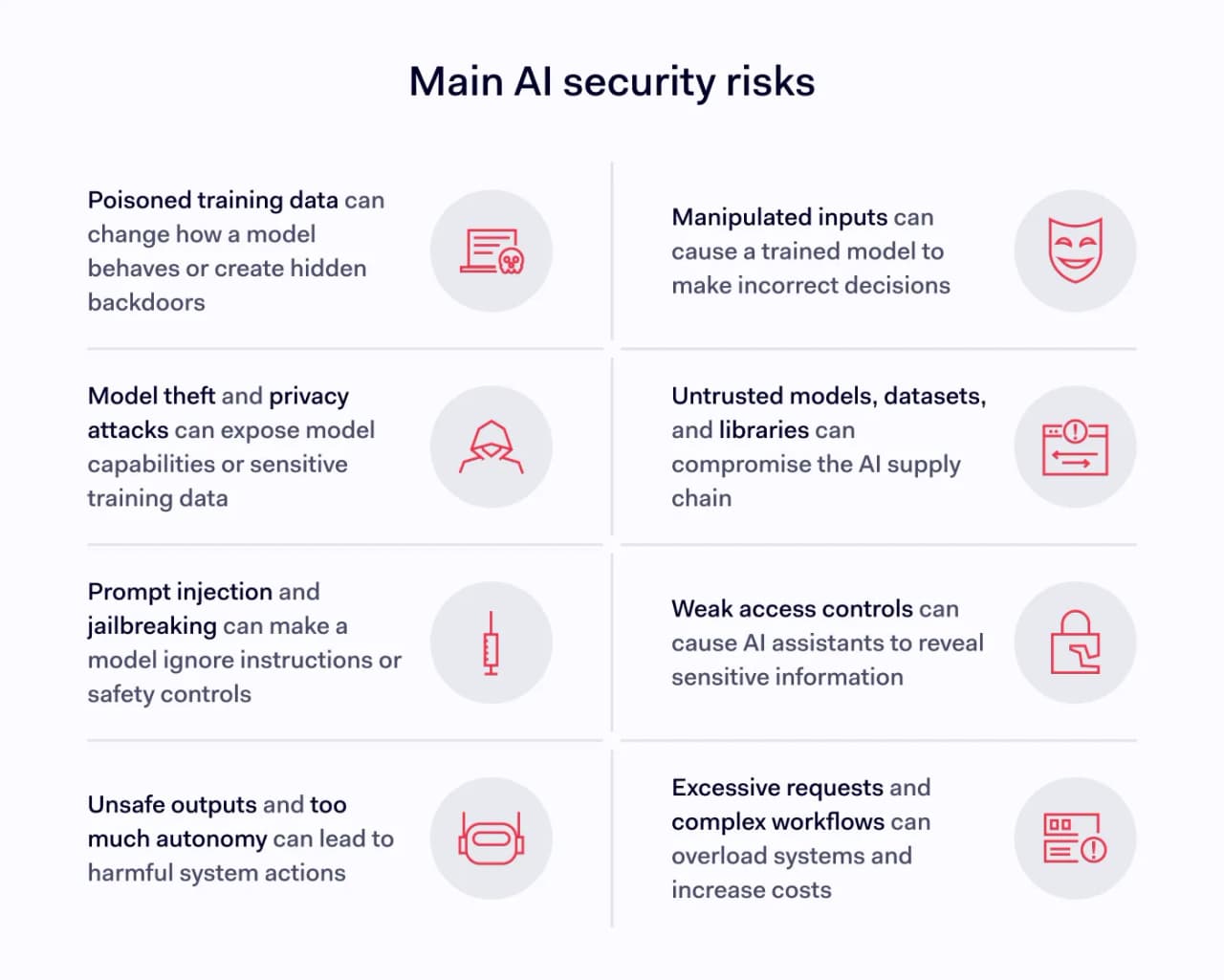
1. Data poisoning and backdoors
Attackers can manipulate training or fine-tuning data to influence what a model learns. The result may be misleading answers, reduced accuracy, or a hidden behavior that only activates when a particular trigger appears. A backdoored model can perform normally on everyday tests, which makes the problem difficult to spot.
2. Evasion and adversarial inputs
Unlike poisoning, evasion attacks happen after training. In these attacks, an attacker changes an input to make a model classify or interpret it incorrectly, for example, to get past a detection system, without changing the model itself. The NIST adversarial machine learning taxonomy treats these attacks separately, because protecting training data won’t stop manipulated inputs at runtime.
3. Model theft and privacy attacks
A model is valuable intellectual property, and attackers can target it in more than one way. They may steal its files or weights from storage, or send many queries to an API to recreate some of its capabilities.
Privacy attacks target the training data instead:
- Membership inference tries to determine whether a specific record was in the training set.
- Model inversion and training-data extraction may expose information the model learned or memorized.
These attacks don’t always recover exact records or weights, but they can still expose proprietary or personal information.
4. Compromised AI supply chains
Third-party models, datasets, libraries, and adapters can introduce risks before a model is even deployed. Some model file formats can run code when loaded, so importing an untrusted model file can itself cause a security incident. The NCSC recommends scanning and sandboxing third-party models and serialized weights However, a file scan only looks for unsafe code. It can’t detect a backdoor the model learned during training.
5. Prompt injection and jailbreaking
What if a document tells your AI assistant to ignore its own instructions and send company data somewhere else? That is an example of indirect prompt injection where malicious instructions are hidden in content the model reads, such as emails, web pages, or retrieved files. In contrast, direct prompt injection comes from what a user types into the application, while jailbreaking usually means trying to bypass a model’s safety restrictions.
The NCSC warns that current LLMs don’t reliably separate instructions from untrusted data. Filters help, but they can’t remove the risk completely. How much damage a successful injection causes depends on which systems and actions the assistant can access.
6. Sensitive information leaks and weak retrieval
AI assistants often search internal files to answer questions, but not every employee should see every document. If retrieval permissions are too broad, a model may receive and disclose information the user was never authorized to access. Exposed system prompts can also reveal internal instructions or secrets, which is why the OWASP advises against storing credentials in prompts For retrieval-augmented generation (RAG), permissions must be enforced before sensitive content reaches the model.
7. Unsafe outputs and excessive AI agency
Model-generated text becomes a vulnerability when an application passes it directly into a shell command, database query, or web page. The OWASP lists risks such as SQL injection, cross-site scripting, and remote code execution from improper output handling. The risk is higher when an AI agent can also send emails, change business records, or delete files without human approval. A model shouldn’t be able to authorize a risky action simply because it suggested that action itself.
8. Resource abuse and unexpected costs
Attackers don’t have to steal data to cause harm. Repeated API requests, unusually large inputs, or expensive agent workflows can overload systems and increase bills. OWASP calls this “Unbounded Consumption.” Rate limits help, but businesses also need limits on execution time, tool calls, and spending across an entire workflow.
Not every wrong answer is an attack. When an AI system behaves unexpectedly, keep in mind that models can produce incorrect answers on their own. Performance can also change as real-world data changes over time. Investigate the cause before treating an issue as poisoning or compromise.
AI model security frameworks and standards
Several frameworks and standards describe the risks and recommend controls, but they serve different purposes. A framework for managing an AI program, for example, won’t necessarily tell developers how to test for prompt injection. That is why most organizations combine resources for oversight, secure development, and technical testing.
- NIST AI Risk Management Framework helps organizations govern, map, measure, and manage AI risk. Its Generative AI Profile adds guidance specific to GenAI.
- OWASP Top 10 for LLM and GenAI Applications highlights risks such as prompt injection, data disclosure, and excessive agency. OWASP also publishes a separate list for agentic applications.
- NCSC and CISA secure AI development guidance covers secure design, development, deployment, and ongoing maintenance.
- MITRE ATLAS documents adversarial AI tactics and techniques, while NIST’s attack taxonomy helps teams describe threats consistently.
- ISO/IEC 42001 sets requirements for an AI management system, while ETSI EN 304 223 sets baseline cybersecurity requirements for AI systems.
It also helps to know what each resource can and can’t prove. For example, ISO/IEC 42001 certification shows that an organization manages AI in a structured way. However, it doesn’t prove that a specific chatbot resists prompt injection. Technical controls and testing, covered in the next section, are still essential.
AI model security best practices
Frameworks describe what to protect; best practices describe how to do it day to day. The following AI model security best practices address both model-level and application-level risks.
1. Know what AI assets you have
Start with an inventory of models, versions, training datasets, external dependencies, prompts, APIs, and connected tools. Assign an owner to each and log changes, so you can investigate problems and restore a known version. Next, identify how attackers could reach each asset. For example, a public chatbot and an internal coding agent with repository access don’t need identical security plans.
2. Protect training data and use AI model security scanning
Restrict who can change training and fine-tuning data. Keep a history of its sources and changes, and use integrity checks, such as hashes and digital signatures, where appropriate. For external model files, AI model security scanning can help detect unsafe code in supported formats before those files enter trusted systems. Keep the limits in mind: a clean scan doesn’t rule out learned backdoors, and a valid signature only shows who published a file, not that it is safe.
3. Secure models, endpoints, and infrastructure
Require authentication and authorization for model APIs and administrative interfaces. Restrict access to model weights, encrypt sensitive assets in storage and transit, and keep dependencies and hosting environments patched. Encryption protects stored files, but it won’t stop attackers from recreating a model through repeated queries. To reduce that risk, monitor API usage and limit suspicious or high-volume requests.
4. Apply permissions before retrieval
An internal AI assistant should only retrieve information the requesting employee is allowed to see. Apply user and tenant permissions at the retrieval step, rather than asking the model to decide which documents are confidential. Validate the sources added to the retrieval system, and log which documents were used. A system prompt that says “don’t disclose secrets” is no replacement for access control
5. Limit agent permissions and validate outputs
Follow the principle of least privilege for AI agents, just as you would for employees. An assistant that drafts emails doesn’t automatically need permission to send them, and one that reads records may not need to edit them. Downstream systems should check each requested action on their own, and sensitive actions should require human approval. Validate outputs before using them in commands, queries, or web pages, and keep passwords and API keys out of prompts.
6. Run realistic security tests
Accuracy testing shows how well a model performs a task, not how it behaves under attack. Test prompt injection, unauthorized data retrieval, data leaks unsafe tool use, and costly workflows in an environment that matches production. Microsoft’s research on red teaming 100 generative AI products stresses the importance of deployment context and human expertise. Track successful attacks and legitimate requests that were wrongly blocked, and retest after major changes.
7. Monitor activity and prepare for recovery
Even with strong controls, some attacks will get through, so plan for detection and recovery. Look for unusual usage patterns, unexpected tool calls, suspicious output, and changes in model behavior. Protect the logs too, because they may contain confidential information. Set limits on request volume, execution time, and total workflow costs. Finally, document how your team will restrict access, preserve evidence, and restore a known-good version after an incident.
AI model security solutions: which tools help?
Several of these practices can be supported by dedicated tools. No single product protects every part of an AI system, so it helps to group tools by what they do and check each one’s risk coverage and compatibility with your environment.
Prompt protection and guardrails
These tools inspect what goes into and comes out of a model. Microsoft Prompt Shields detects attacks in user prompts and external documents, while Google Cloud Model Armor inspects prompts and responses for several risks. Amazon Bedrock Guardrails supports configurable content, prompt-attack, and sensitive-information policies. These tools reduce exposure, but they don’t replace proper permissions or secure application design.
AI model security posture management
AI model security posture management focuses on the environment around the model. It helps organizations discover AI workloads and find weaknesses in their configuration and exposure. For example, Microsoft Defender for Cloud assesses areas such as identity, external access, and data-related attack paths. However, these checks cover the deployment environment, so the model’s learned behavior still needs separate testing.
Testing tools and AI model security training platforms
Testing tools help teams find weaknesses before attackers do. Microsoft PyRIT helps teams run adversarial tests against generative AI, while the Adversarial Robustness Toolbox supports testing predictive models. For model files, ModelScan checks supported formats for potentially unsafe code. AI model security training platforms and resources, including Microsoft’s AI Red Team guidance, can help developers and security teams practice identifying risks.
Whatever the category, compare tools on the same points: which threats they cover, how often they block legitimate requests, what they log, and what happens when the tool fails or is unavailable.
How to address gen AI model security risks
If you’re not sure where to begin, start with the AI system that has the most sensitive access or the most powerful actions. Identify who can use it, which data it retrieves, which tools it can run, and what would happen if an attacker manipulated its responses. The answers will show where to tighten permissions, testing, and monitoring first.
AI model security isn’t a one-time assessment, because models, data sources, and agent capabilities change quickly. Build protection into every stage, from trusted training data to safe tool execution and incident recovery. That way, your organization can use AI without giving attackers more access than they should ever have.