NordLayer cloud Firewall solutions
Control remote access to your organization’s internal resources and cloud tools by specifying who can connect and via which gateways.
- Ensure only authorized users can access your SaaS services and private networks.
- Allow remote workers to access your on-premises infrastructure securely.
- Deploy quickly without additional hardware.

14-day money-back guarantee
OVERVIEW
What is a cloud firewall
Cloud firewall is another name for firewall as a service (FWaaS). Similar to a traditional firewall, a cloud firewall is designed to prevent or lessen unauthorized access to private networks by blocking potentially harmful network traffic. Similar to how traditional firewalls create a barrier around an organization’s internal network, cloud-based firewalls create one around cloud platforms, infrastructure, and applications (cloud firewalls can enable organizations to securely access on-premises infrastructure while working remotely).
INSIDE LOOK
How NordLayer’s cloud firewall works
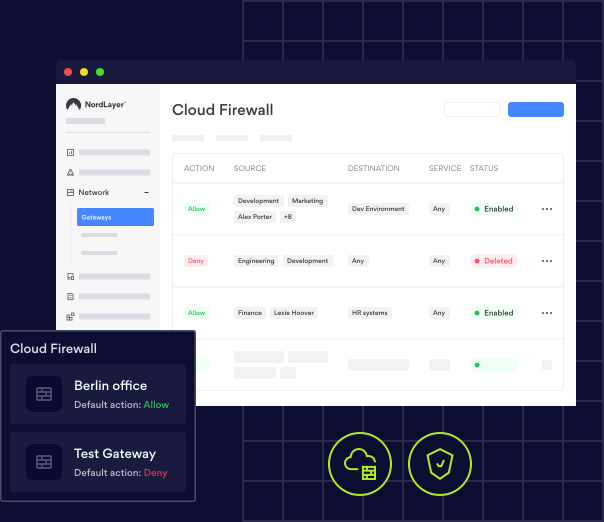
NordLayer’s cloud firewall allows organizations to set up custom security rules for their virtual private gateways, helping them protect their hybrid infrastructures and network resources from both internal and external threats. With micro-segmentation and granular network controls, IT administrators can define access rules for entire teams or individual members, reducing the risk of unauthorized access and boosting overall network security.

Get a real-time look at how NordLayer protects businesses
Explore features like custom DNS, dedicated IP, VPN split tunneling, and more, all in real-time with our interactive Control Panel demo

NordLayer + CrowdStrike: secure your network and endpoints all at once
With threats coming from all sides, your business can’t afford to leave anything unprotected. NordLayer and CrowdStrike secure both your company network and employee devices, so your teams stay safe and productive.
Monitor and control who can access your company network.
Stop threats like malware and phishing with AI-powered protection.
Keep your business compliant with the latest data security standards.


VALUE
The benefits of NordLayer’s cloud firewall

Scalability, availability, extensibility
Because a cloud firewall does not contain any hardware, it can easily adapt to the changing needs of the business it’s protecting and scale together.

Simplified operations
A cloud-based firewall service can easily integrate into existing hybrid cloud environments, making it very simple to create and apply firewall rules. There are only a handful of rules applied to the gateway, which eliminates the need to manage the entire company network.

Automatic updates
Because FWaaS extends the full range of firewall capabilities to the cloud, there is no hardware to look after. Management is centralized over one cloud-based Control Panel.
QUALITY GUARANTEE
A cloud firewall the experts keep recommending
Join 15,000+ teams worldwide who trust NordLayer’s award-winning cloud firewall for reliable, expert-endorsed network protection.

REAL-LIFE EXAMPLES
Common use cases for cloud-based firewalls
As more businesses migrate their data and applications to the cloud, it makes sense to move firewalls there as well. Cloud-based firewalls are the solution best suited to adapt to this evolving environment and provide optimal security.
Using cloud firewall rules, organization owners can define who has access to internal cloud resources. With firewall as a service (FWaaS), businesses can allow remote workers to access only what is necessary while blocking everything else.
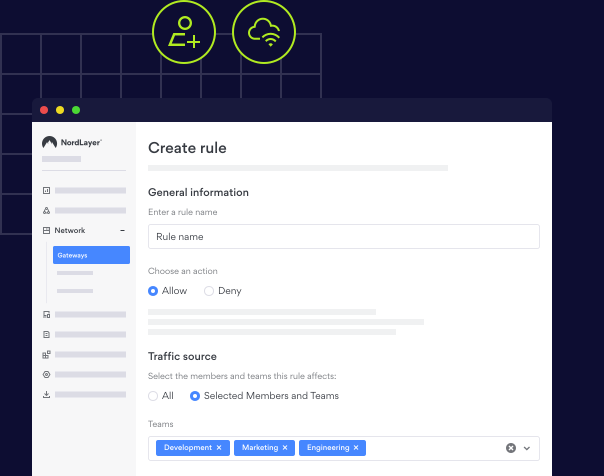
NordLayer allows for granular control. Organization owners can create firewall rules at the virtual private gateway level to grant or deny access to specific internal or external internet resources. These rules can apply to individual members or entire teams, and can be configured based on the traffic source (the user), the destination (the resource the user wants to access), and the service (the port or protocol being used).
DNS filtering by category blocks malicious websites and filters out sites containing harmful or inappropriate content. Managers can choose which types of content should be inaccessible to employees on company-managed networks, and the DNS filters will handle the rest. This strengthens the security of company data and protects team members from malicious activity and phishing websites.
By monitoring and controlling traffic across networks, cloud-based firewalls can help prevent unauthorized access, detect suspicious activity, and stop potential data breaches before they can impact your business.
Get our Premium plan to enhance your network security with a cloud firewall

COMPARED
Cloud firewalls (FWaaS) vs. traditional firewalls
Back in 2020, Gartner® projected that by 2025, 30% of new distributed branch office firewall deployments would switch to FWaaS, up from less than 5% in 2020. Based on this, we can expect FWaaS to become more popular than traditional network firewalls in the future. The schemes below will provide a better understanding of the differences between these two solutions.

Cloud firewalls (FWaaS)
- Very easy to set up, as there are no physical components
- Effortless scalability
- Vendor handles all maintenance
- Dynamic, risk-based security policies follow your users everywhere without a complicated matrix of policy and network configurations

Traditional firewalls
- May require technical expertise to set up
- Requires additional hardware and deployment in order to scale
- IT department responsible for maintenance
- Inconsistent firewall policies that do not follow users
ENABLING
How to enable cloud firewall with NordLayer?
- 1
Register.
- 2
Choose the Premium plan with a server with a dedicated IP.
- 3
Create gateways.
- 4
Navigate to the cloud firewall settings and manage firewall rules.
NEW FEATURE
NordLayer’s cloud firewall is a part of the unified cloud security service edge
Secure service edge (SSE) is a framework that contains multiple features that secure and protect a business network. Network security solutions like FWaaS, CASB, SWG, and ZTNA are combined into a single, cloud-native service via the SSE framework. Secure business data, resources, and all users in your network by adopting the SSE framework.
OUR REPUTATION
See why IT leaders choose NordLayer
In Security Service Edge category
NordLayer has been very accommodating in terms of our needs. They are flexible to cater timing of payments and also providing exclusive support
Everything is super efficient and easy: negociations, setup, dashboard, accounting, support
Very easy to set up and use and is very reliable. There are good security options to enable the configuration comply with security policies.
NordLayer in numbers
15,000+
Businesses protected
10 min
Average time to deploy
40+
Global service locations
Be the first to experience the added security of our firewall-as-a-service feature
Try our cutting-edge firewall, risk-free.

14-day money-back guarantee
OTHER RESOURCES
Cloud firewall resources


ADDITIONAL INFO
Frequently asked questions
A cloud-based firewall takes the hardware out of network security, so there’s no physical technology to buy or maintain, and you can set it up in minutes rather than weeks. Coverage scales with your team, so adding users or locations doesn’t mean adding equipment. Updates and patches roll out automatically in the background, which keeps protection current without any effort from your side. You manage every rule from a single dashboard. And because policies follow your people rather than a physical office, everyone gets the same protection, whether they work from headquarters, home, or anywhere else.
Firewalls fall into 3 broad categories. Hardware firewalls are physical appliances that sit at the edge of your network and filter traffic for everyone behind them. Software firewalls run on individual devices and protect that single machine wherever it connects. The third type is a firewall in the cloud, delivered as a service and hosted by a provider, which protects cloud resources, applications, and distributed teams without any equipment on site. Plenty of organizations still combine all 3, though cloud firewalls have become the natural fit for teams whose people and data no longer sit in one building.
No, because a firewall on cloud infrastructure and a VPN solve different problems and are strongest when used side by side. A VPN encrypts the connection between a user’s device and your network, so data stays private as it travels, even over untrusted networks. A firewall decides which traffic is allowed through in the first place, filtering connections against the rules you set. One protects the path, the other controls who can use it. NordLayer brings both into a single platform, giving your team encrypted connections along with precise control over the resources they can reach.
Not automatically. Cloud providers secure the infrastructure their services run on, but protecting your own data, applications, and users inside that environment stays your responsibility under the shared responsibility model. That’s the gap firewall-as-a-service (FWaaS) solutions are designed to close, delivering full firewall protection as a cloud service rather than a box on your premises. You get control over inbound and outbound traffic, consistent policy enforcement across every cloud resource you use, and the same standard of protection you’d expect from a traditional network firewall, with none of the hardware to look after.
A cloud firewall solution guards against the threats that target your network, your users, and your data. It blocks unauthorized access by filtering every connection against your rules, so only approved users, devices, and destinations get through. It flags and stops suspicious activity, such as outbound traffic heading to unknown or malicious destinations, which is often the first sign of a breach in progress. It also keeps users away from harmful sites and risky downloads. All of this applies to cloud and on-premises resources alike, so your whole environment is covered from one place.
NordLayer’s cloud-managed firewall protects everything your business runs on, including SaaS applications, IaaS and PaaS workloads, on-premises resources, and remote devices, across as many cloud providers as you use. Whether your setup sits in one cloud, several, or a mix of cloud and on-site infrastructure, the same rules apply consistently everywhere. Protection is delivered through the NordLayer desktop and mobile apps on Windows, macOS, Linux, Android, and iOS, so your team simply needs to be connected through the app. The browser extension doesn’t carry cloud firewall coverage, so the app is the one to use.
NordLayer’s FWaaS solutions let you build up to 110 rules in total, with a maximum of 100 active at any one time. Each rule either allows or denies traffic to the destinations you specify, and rules are read from the top of the list downwards, with the first match deciding what happens. That makes ordering important, so your most specific rules belong near the top, and your broader ones further down. You can add around 20 destinations to a single rule, which is a useful way to group similar services and keep your list short and easy to follow.
Anything that doesn’t match a rule falls through to the default action, which you choose yourself. Set it to “Allow” and unmatched traffic passes freely, so your rules act as a list of exceptions to block. Set it to “Deny” and anything you haven’t explicitly permitted is blocked, giving you a stricter allowlist approach where only approved traffic gets through. It’s worth deciding this deliberately, since it shapes how the rest of your rules behave. You can change the default action whenever you need to from the Control Panel, so it’s easy to tighten things up as you go.