Summary: VDI works through a full chain of systems, from user access to hypervisor control, and every stage can expose the environment to risk.
VDI security can improve endpoint control, but it also creates central points of failure. When desktops run inside a company data center or cloud environment rather than on each person’s laptop, files can be kept off the laptop, and one team can manage every desktop from a single point. The trade-off is that a small number of central systems now have control of everything. If an attacker breaks one of them, the damage can reach many users at once.
Common VDI security risks include:
Flaws in the internet-facing gateway that outside users connect through (for example, unpatched software with a known bug)
Stolen passwords and stolen login sessions
Laptops or personal devices that are already infected
Data leaking out through features like clipboard copy or file downloads
Attacks that reach the underlying software that runs all the virtual desktops (the hypervisor)
This article explains what VDI is, why organizations adopt it, its main security risks, best practices for a secure VDI setup, and an alternative worth considering.
What is VDI?
Virtual desktop infrastructure hosts user desktops as virtual machines inside a data center or cloud environment. A user connects over the network to a desktop that runs on a powerful shared computer in the data center, rather than running an operating system directly on a laptop. The laptop or thin client acts as a screen and keyboard, while the “real” work happens remotely. It’s a bit similar to watching a live video feed of a computer that is located somewhere else. You see the screen, and you control it, but the machine itself never leaves the data center.
Desktops come in two main types:
Persistent desktops work like a normal personal computer. Each user keeps the same virtual machine, and it remembers their settings, files, and installed programs between sessions.
Non-persistent desktops are built fresh each time from a master template (called a base image) and revert to the standard image after a configured shutdown, restart, or reset. Every session starts clean.
Deployment methods also differ in how users share machines. Some give each user a private virtual machine of their own. Others use a pooled setup, where a group of desktops is shared on demand, and several users can even run on one shared copy of the operating system at the same time.
Close the tabs on browser threats. Open one for security
Your first line of defense starts at the Enterprise Browser
VDI is popular because it puts desktop management in one place and supports flexible ways of working. Below are some of the common benefits.
Files can remain centrally stored. VDI can keep most applications and data in a data center or cloud environment (but redirection and transfer features can still move data to endpoint devices). Keeping applications and most data central means less of it ends up on endpoint devices, which helps a lot when a laptop is lost or stolen.
Support for remote workers and BYOD. Employees and contractors can reach a standardized desktop from many kinds of hardware, which makes VDI useful for remote work and personal devices (bring your own device, or BYOD).
Standardized configuration. Desktops built from a common template are easier to patch, monitor, and reset than a large number of individually managed physical desktops.
Faster setup. New desktops can be created in minutes, and non-persistent desktops wipe changes after each session. It keeps machines consistent and makes it quick to give a new hire or contractor a working desktop.
However, none of these benefits makes a deployment secure on its own.
Key VDI security risks
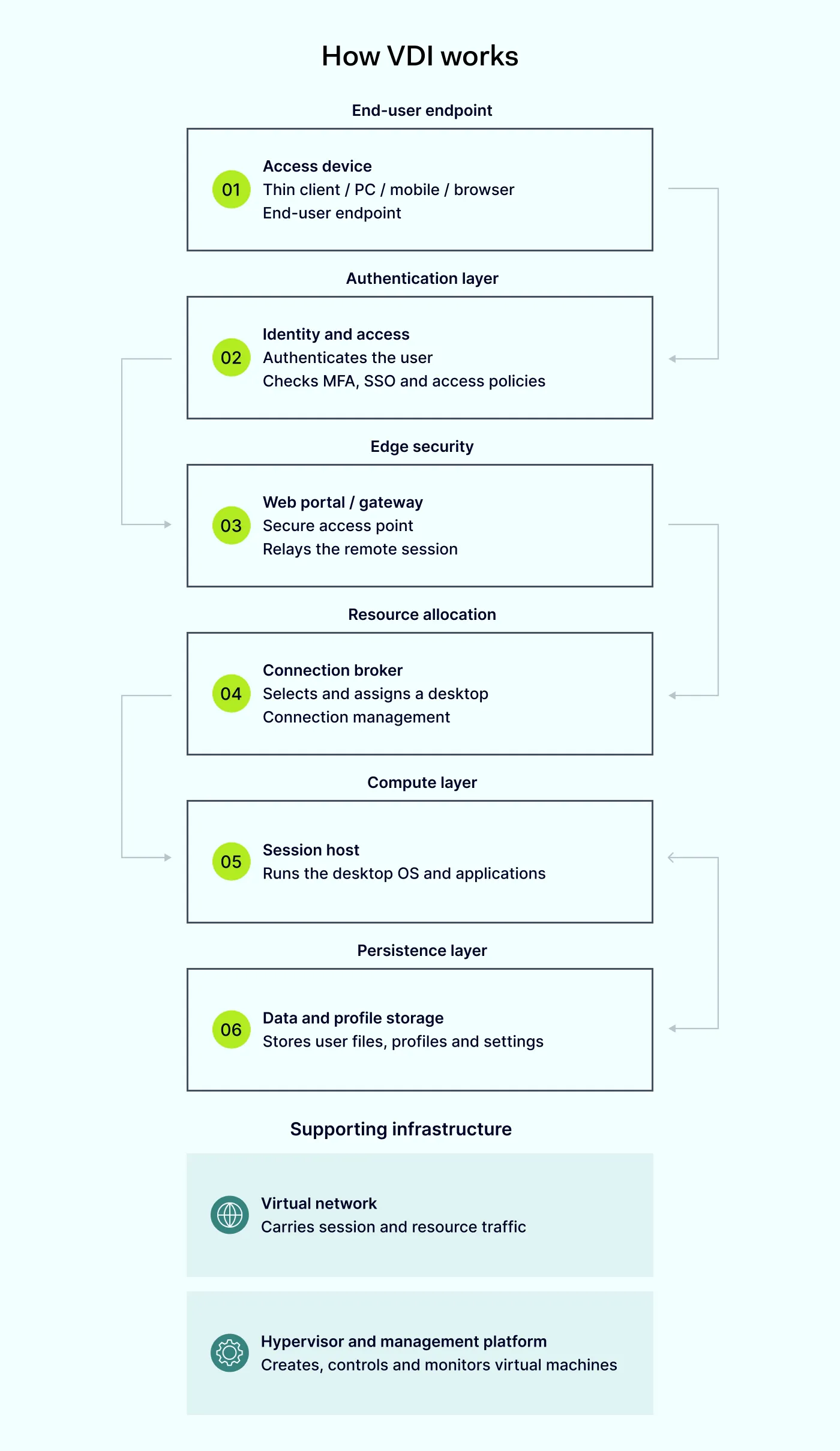
Like a chain, VDI runs from the access device, to the login service, to the web portal or gateway, to the connection broker (the component that matches a user to an available desktop), to the session host (the server the desktop runs on), to corporate data, to profile storage (where user settings and files are kept), to the virtual network, and finally to the hypervisor and management software that control everything. The bad news is that each link in this chain carries its own risk.
Internet-facing gateways and access portals are often targeted first. These are the components that accept connections from outside, such as VMware Unified Access Gateway, Citrix NetScaler, or a similar access broker. Because they face the internet, a successful break-in lands an attacker inside a trusted session rather than only on the outer edge of the network. Log4Shell exploitation of VMware Horizon and the CitrixBleed flaw in NetScaler both led to serious incidents involving movement across the internal network and data theft.
A stolen login gives an attacker the same access as an employee. VDI access depends on a valid account, so a stolen password can hand over everything that person can reach. Multi-factor authentication (MFA) does not stop every case. In the CitrixBleed attacks, for example, intruders stole session cookies (the small tokens a system issues after a successful login to keep a user signed in), which let them take over active sessions without the password or the MFA device.
A compromised laptop stays a problem even when files are located in the data center. VDI keeps files off a laptop, but it cannot make an already-infected laptop safe. Malware or a remote-control operator on that device can use the live session, watch the screen, and control the keyboard and mouse. A 2026 campaign against US law firms showed cybercriminals taking over personal laptops, opening legitimate VDI clients, and stealing large volumes of documents from inside the session.
Convenience features can carry data out of the protected environment. The idea that data never leaves the data center is often too absolute. Data can be moved out through clipboard copy-and-paste, redirected local drives, USB storage, printing, downloads, browser uploads, or mapped network drives.
A session host is still a normal computer that can be infected. The session host is the server the desktop runs on, and it runs a full Windows or Linux operating system with applications and network access, just like any office PC. All the usual threats apply: ordinary malware, malicious websites, and bugs that let a user gain more rights than they should.
A single bad master image can spread to every desktop built from it. The base image is the master template used to create new desktops, so it saves a lot of manual setup. But this efficiency can also be a weakness. If the base image is infected or misconfigured, every new desktop inherits the problem. Offline images can also fall behind on updates, and snapshots (saved point-in-time copies of a machine) may hold sensitive data from disk or memory. And restoring an older snapshot can even bring malware back.
The management software controls everything, which makes it the highest-value target. The management plane is the admin software used to build images, start and stop virtual machines, and control the hypervisors. In deployments a company runs itself, this is one of the most dangerous parts to lose. A Mandiant analysis of VMware vSphere showed how linking it directly to Active Directory (the company’s central user directory) can turn an Active Directory break-in into full control over hypervisors, virtual machines, and storage.
Sharing one operating system means one flaw can hit several users. In pooled, multi-session VDI, several users run separate sessions on the same server and operating system instance. A software vulnerability or over-privileged account can therefore affect other users on that host. Giving a user local administrator rights on a shared host is especially risky because those rights can reach across other users’ sessions and files.
Traffic between virtual machines can slip past normal network monitoring. Two virtual machines on the same physical server can “talk” to each other without their traffic passing through the firewalls and monitoring tools that watch the regular office network, which creates a blind spot. Session hosts also often have wide-open outbound internet access unless the company deliberately restricts it with firewalls or web filters. This can let a compromised desktop act as a launch point for theft and movement across the network.
Shared storage lets one stolen account reach many users’ files. Profiles and shared storage hold user settings, browser data, cached documents, and saved application state, all kept on central file shares rather than on the desktop itself. One compromised VDI account can browse those shares and copy or steal what it finds—so file-share permissions and network access need control.
Non-persistent desktops can erase the evidence an investigation needs. A desktop that is destroyed at logout takes useful forensic traces with it, along with the attacker’s changes. Short-lived desktops also tend to reuse the same computer names and can take a while to register in security monitoring tools, which leaves gaps and duplicate records that make an investigation harder.
One outage can stop a whole workforce. VDI concentrates operational risk. An outage or attack against the gateway, broker, login service, or hypervisor can stop many employees from working at the same time. Ransomware groups such as DarkSide and LockBit have used exposed remote-access systems and VDI flaws to get in. Ransomware that runs at the hypervisor level can knock out many machines at once.
Old software and unclear ownership create gaps. VDI is sometimes used to keep legacy applications alive by running an old, unsupported operating system in a controlled virtual machine, which extends the life of software that will not run on modern systems. However, virtualization does not fix the security holes in that old system. With cloud-hosted VDI, the provider secures the physical hardware and the control plane (the back-end service that runs the platform), while the customer still owns identities, devices, applications, session hosts, configuration, and network policy.
Common attack methods against VDI
Documented VDI attacks often use several recurring stages.
First comes the way in. An attacker exploits an unpatched gateway, steals a password or an active session cookie, or takes over a laptop and rides its live connection into the desktop. In some cases, they reach the management software through the company’s user directory.
Once inside, they look around, listing file shares and mapped drives to find valuable data. Then, they collect the documents they want and copy them out through the same convenience features a normal user relies on, such as downloads or clipboard transfers.
When you know the attackers’ most common path, you can see why the controls in the next section focus on both the entry points and what an attacker can reach after getting in.
VDI security best practices
A secure VDI deployment needs controls across the whole chain, not only on the desktop. The measures below cover the areas that matter most.
Strengthen identity. The US CISA recommends phishing-resistant MFA, such as FIDO security keys or certificate-based login, above all for administrators. Conditional access rules should check the user, the device, the location, and how risky a sign-in looks. Administrator accounts should be kept separate from everyday accounts. After any suspected break-in, revoke tokens and end active sessions right away.
Control access devices. For desktop pools that handle sensitive or regulated data, it is worth requiring company-managed and compliant devices, running endpoint protection on the connecting device, and blocking unauthorized remote-control tools. How much personal-device (BYOD) access to allow should depend on how sensitive the data is.
Harden gateways and brokers. Every internet-facing component, such as a gateway, portal, or load balancer, belongs on an inventory so nothing is forgotten. Known exploited bugs need fast patching, direct exposure of the remote desktop protocol (RDP, the built-in Windows remote access feature) should be removed, admin interfaces should be locked down, and it helps to keep web and network monitoring in front of the gateway.
Protect session hosts. Treat each session host like any office computer. Antivirus and endpoint detection and response (EDR) tools should run on it, the operating system and applications should be patched on a schedule, users should not have local administrator rights, and an application allowlist should make sure only approved software can run.
Manage images carefully. Only a small, trusted group should be able to change base images. Keep a version history, scan and test each image before rollout, strip out any stored passwords or keys, and patch base images on a fixed schedule so new desktops start up-to-date.
Restrict data movement. Clipboard, drive, printer, and USB redirection should be set to match how sensitive each pool is, browser uploads limited, file shares given the least access needed, and alerts raised when someone downloads data in bulk.
Secure the management plane. Microsoft and others advise a separate management network, strong MFA with privileged-access controls, clear separation of admin roles, protection for emergency break-glass accounts, and audit logs sent off the platform so an attacker cannot erase them.
Segment networks and storage. Desktop pools, management, storage, and production traffic each deserve their own network segment. Outbound access should be filtered, and profile storage is safer behind private connections that are not reachable from the open internet.
Plan detection and recovery. Bring together events from identity, gateway, session, host, storage, network, and management systems, and account for the short-lived, name-reusing nature of VDI desktops when doing so. Keep backups protected from tampering, and test recovery of the whole service chain, not just the desktop machines.
Skipping one link can undo the protection of the others. As an attacker only needs one weak point to get in, strong identity, patched gateways, controlled data movement, and good logging work best together.
Is there a simpler alternative to VDI?
VDI addresses a real problem, which is unmanaged or risky endpoint devices reaching sensitive data and applications, and it solves it by hosting full virtual desktops in a controlled data center or cloud environment. But as we saw, hypervisor management, virtual machine patching, image maintenance, network complexity, and added lag all become ongoing work, and every risk has to be managed.
For teams that mainly use browser-based applications, a secure enterprise browser may provide a less infrastructure-heavy option than a full VDI deployment. It suits remote workers and contractors who mainly need web-based and SaaS applications. Rather than streaming a whole desktop from the data center, a secure enterprise browser gives the user a locked-down browser that reaches internal tools and web applications, and it applies company policy right at the point where data would enter or leave a session, such as during a download, an upload, or a clipboard copy.
NordLayer Browser is a secure enterprise browser. When users reach VDI web sessions or web tools through it, it can address these risks:
Data leakage through file transfers, camera, and microphone access. Administrators can allow or block uploads and downloads based on the website, web application, user group, and transfer direction. Microphone and camera control can also restrict website access to these devices according to defined rules.
Data leakage through clipboard actions and unattended sessions. Browser policies can control copy-and-paste actions handled by NordLayer Browser. Browser session timeout can end inactive sessions, while browser-based authentication verifies users before granting access. (VDI-native clipboard controls can still be required for the remote session clipboard channel.)
Phishing and malicious websites. NordLayer Browser can block known dangerous or phishing websites before they load, including fake pages designed to imitate a VDI login portal. File download control can separately allow or block downloads according to domain and policy rules.
Unsafe access from BYOD and contractor devices. A controlled work browser can provide authenticated access to internal web tools through secure gateways without full management of the personal device. Access policies can restrict these resources to approved NordLayer Browser sessions, so users who try to connect through an unmanaged browser cannot reach them. This protection applies to browser activity, not to native (installed) VDI clients.
Shadow ITand unapproved browser activity.Web activity monitoring records the domains users visit, while the browser extension tracking feature records installed extensions. Domain blocking can prevent access to specified websites, and the browser activity log can show visited domains, extensions, connections, user actions, and failed login attempts.
However, let’s be clear about the limits. A secure enterprise browser works well when the job is done inside a browser, which today covers a large share of business tools, email, and internal web apps. But it is not a full replacement for people who rely on installed desktop software, specialized applications that only run on Windows or Linux, heavy local processing, or old legacy programs. In those cases, VDI, or a mix of both, still makes sense.
So, for many organizations, VDI remains the right choice. For deployments that stay on VDI, two different NordLayer products can reduce several of the risks above.
The wider NordLayer network platform, which is separate from the browser, can establish a secure connection to the VDI environment and apply additional zero-trust network access (ZTNA) controls.
Device posture security can check devices against defined rules and block network access when they fail.
When VDI access is routed through NordLayer virtual private gateways, network segmentation and cloud firewall rules can restrict which teams and network resources can communicate with the VDI environment.
And when a VDI resource is connected to NordLayer and restricted to approved virtual private gateway IPs or private network paths, NordLayer can reduce direct public exposure (a dedicated IP enables allowlisting, but does not provide private access by itself).
Overall, the NordLayer Browser and VDI protect different parts of the access process. The browser can secure browser-based work, including access to web applications and web-based VDI sessions. Native VDI controls remain responsible for features within the remote session, such as drive, USB, printer, clipboard, and file redirection.
Whether you keep VDI, replace parts of it with a secure enterprise browser, or run both together, the principle stays the same. Verify the user and the device, grant the least access needed, and assume any session or endpoint could already be compromised.
It can be, because data stays central and configuration is standardized, but it is not automatically safer. VDI concentrates risk in shared components, so weak identity, unpatched gateways, or a compromised image can affect many users at once.
Can malware infect VDI?
Yes. A session host runs a normal operating system that faces the same malware, browser, and application risks as any endpoint. Non-persistence removes local changes after logout, but does not stop malware from acting during the session.
Does VDI prevent data loss?
Not by itself. Downloads, clipboard transfers, redirected drives, printing, and browser uploads can all carry data out. Data loss prevention tools and a strict redirection policy are still needed.
Is non-persistent VDI safer?
It reduces long-term local state, but it places more trust in the base image and can weaken forensic visibility, because short-lived desktops disappear and reuse names.
Does VDI replace zero-trust network access?
No. VDI can support a zero-trust approach, but the design must still verify both user and device, restrict access to individual resources, and avoid granting trust based on network location alone.
What is the greatest VDI security risk?
There is no single answer, but internet-facing gateway flaws and stolen credentials or session tokens cause many of the most serious incidents, because both give attackers access inside a trusted environment.
Anastasiya Novikava
Cybersecurity Copywriter
Anastasiya is a cybersecurity copywriter with a decade of experience in content marketing. She creates product comparisons, threat research and statistics, white papers, customer case studies, and educational content, with a focus on AI threats, data breach prevention, and compliance frameworks (DORA, GDPR, NIS2).