Secure every add-on with browser extension management
See every extension your team installs, block the ones that put you at risk, and enforce extension policy per user, team, or organization, all from a single Control Panel.

14-day money-back guarantee
Featured in


What is the NordLayer Browser extension management?
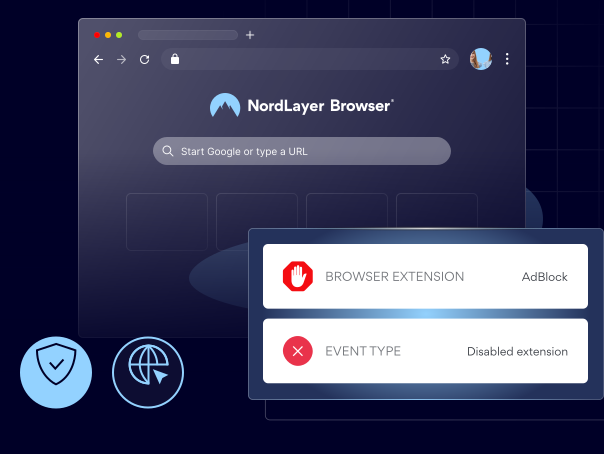
NordLayer Browser extension management gives your security and IT teams full visibility and control over which browser extensions employees can install and run. This lets you see every extension in use, block the risky ones, force-install the tools your teams need, and apply one clear policy across the whole organization.
benefits
Why IT and security teams choose us for browser extension control
Once every extension is visible, you can identify the risky ones, hold your environment to a single standard, and stay in control of browser-based work.

See what browser add-ons your teams use every day
Track every installed extension and remove unapproved tools the moment they appear, so you never discover a risky add-on months after it arrived.

Prevent data leakage through over-permissive extensions
Block any extensions that can read page content, capture the clipboard, intercept downloads, or reach sessions, so risky add-ons are stopped at install time, not after a breach.

Let teams use GenAI and productivity tools safely
Give your people a curated list of approved extensions, so they get the AI assistants and productivity tools they want while you keep the security you need.

Win back many admin hours and cut the support load
Replace chasing extensions across devices and reviewing install requests one by one with a centralized policy, so manual work and repeat tickets fall away.

Prove extension control for compliance and audits
Keep a clear, exportable record of which extensions are in use, who has them, and which are approved, so audits start from evidence instead of guesswork.
See, block, and control every browser extension
HOW IT WORKS
From visibility to control in 3 steps
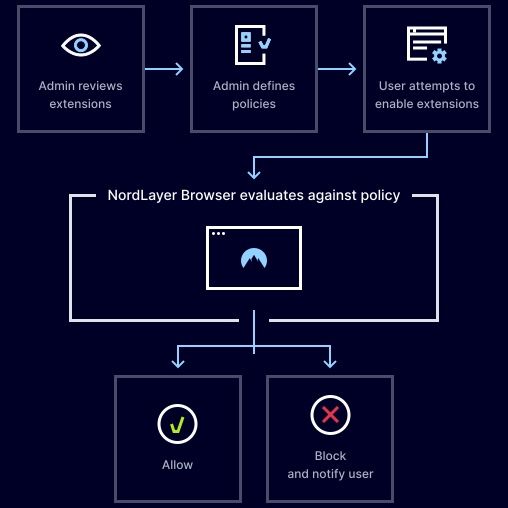
Enable extension management for your whole organization or selected teams from the NordLayer Control Panel, so coverage starts the moment you switch it on.

Step 1: Choose who’s covered
Enable extension management for your whole organization or selected teams from the NordLayer Control Panel, so tracking kicks in the moment users open the browser.

Step 2: Review what is running
See every installed and active extension in the dashboard, so you know exactly what your people are using and can assess the risk each tool carries.

Step 3: Apply your policy
Set allow, block, or force-install rules per user, team, or organization, so the right extensions are in place, and the risky ones never get to run.
SEE THE VALUE
This is what changes when you deploy
The right enterprise browser shouldn’t just protect your organization. It should be easy to deploy, simple to manage, and worth the investment from day one.

Your whole org covered by the end of the day
Roll out NordLayer Browser across your entire org in a single sprint. No staged migrations, specialist implementation teams, or months of planning required.

Your security infrastructure doesn’t need to change
NordLayer Browser works alongside your IdP, SSO provider, and existing security stack, so you can easily apply browser-level protection across your entire network.

Your IT team never touches an agent or extension
Security is built into the browser itself. There are no agents on endpoints, no extensions to manage, and no ongoing maintenance pulling your IT team away from the work that matters.

Your team works the same way they always have
NordLayer Browser looks and feels like the browser your team already uses. Adoption happens naturally because there’s nothing new to learn and no resistance to manage.

You get enterprise-grade protection without the cost
Get the same session-level governance, DLP, and access controls that legacy enterprise browsers charge 6 figures for at a price that’s easy to approve.
GET MORE INSIGHTS
Read more about browser extension management
CYBERSECURITY LEARNING CENTER
What is a browser extension?

CYBERSECURITY LEARNING CENTER
Browser security explained

CYBERSECURITY LEARNING CENTER
Browser vulnerabilities, exploits, and attacks explained
Additional info
Frequently asked questions
Turn it on from the Control Panel by activating the feature for your whole organization or for specific user groups. From then on, every installed and active extension in the NordLayer Browser shows up automatically in your dashboard, ready for you to apply policy.
Some extensions can reach sensitive data such as page content, clipboard information, downloads, and session activity, so without control, they can quietly lead to data leakage or unauthorized data collection.
It covers every installed and active extension in the NordLayer Browser, including third-party productivity, AI, screenshot, and utility extensions your team may have added on their own.
Yes, admins can view installed and active extensions directly in the dashboard, giving clear visibility into exactly which tools are in use inside the browser environment.
Security teams can review detected extensions, evaluate their risk level, and decide whether to allow, restrict, or block them based on organizational security policies.
Yes, admins can block individual extensions by ID or block everything outside an approved allowlist, and blocked extensions cannot be installed or run in the NordLayer Browser.
Yes, allow, block, and force-install rules can be applied per user, team, or organization-wide, so different roles get the right access under one consistent standard.
All extensions installed and active in the NordLayer Browser, including third-party productivity, AI, screenshot, and utility extensions.