Prevent accidental leaks with browser clipboard control
Define where employees can copy data from and where they can paste it, so sensitive information never lands in untrusted online apps or websites.

14-day money-back guarantee
Featured in


What is clipboard control?
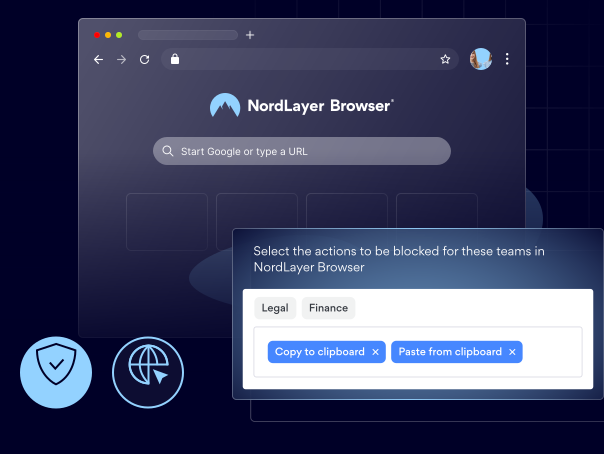
Clipboard control is a feature of the browser DLP solution that lets you manage how users copy and paste data within the NordLayer Browser.
Organizations can use it to either block all copy-and-paste actions or create granular policies that allow doing so only in approved web applications, domains, or user groups. This helps prevent the exposure of sensitive data in unsanctioned SaaS and AI tools and personal accounts.
How does in-browser clipboard control work, exactly?
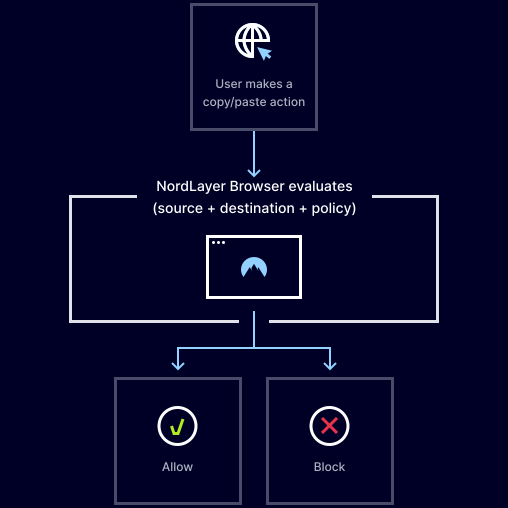
Unless copy/paste is fully disabled, the feature evaluates each clipboard action against predefined organizational policies. When a user tries to copy or paste content in the browser, the clipboard control does the following:
- Checks the source (where the data is copied from)
- Identifies the destination (where the data is being pasted)
- Applies rules based on the domain, application, or user group
- Blocks or allows the clipboard action
benefits
Here’s how clipboard control improves your company’s security

Prevents unwanted exposure of sensitive data
Keeps sensitive information from being shared in ways that go against the company policy.

Gives you more control over how data is moved
Enables admins to decide where data can be copied from, where it can be pasted, and who can perform these actions.

Reduces human error and risky behavior
Protects you against accidental data exposure by removing reliance on user judgment for copy-and-paste decisions.

Maintains productivity while minimizing risk
Allows regular clipboard use where permitted and blocks only risky transfers, so your team can work without delays.

Supports regulatory compliance
Helps organizations ensure sensitive data is handled in line with the latest regulations and company policies.
Prevent leaks via copy/paste with NordLayer Browser
WHAT YOU GET
Why choose NordLayer Browser to secure your business?

Get built-in protection
Keep sensitive data shared inside the browser protected—without installing add-ons, agents, or extra software.

Reduce IT resources
Quickly secure BYOD and remote access without requiring any complex network setups that drain IT hours and budget.

Streamline compliance
Centralize governance with full visibility of in-browser SaaS activity and get clear audit trails to simplify compliance and reporting.

Keep things consistent
Standardize and enforce strict browser policies across all users and devices, and give your admins full visibility over what’s happening in your SaaS workspace.

Eliminate risky workarounds
Deploy a browser with every rule, permission, and approved apps built in, so users never need to use personal accounts, unauthorized extensions, or risky workarounds.
Additional info
Frequently asked questions
Yes. With clipboard control, admins can set rules to allow or block copy-and-paste actions on specific websites, online applications, or user roles.
If a user attempts to paste data into a website or application that is not permitted by policy, the browser will immediately block the action and prevent the data from being shared.
Yes. Clipboard policies can be applied per user group to match the users’ roles, departments, and levels of access to sensitive data.
Clipboard control is particularly useful for workflows involving customer data, internal business systems, financial records, HR platforms, and other browser-based applications that handle sensitive information.
No. Copy/paste works as usual in approved applications. Restrictions only apply when data is moved to unapproved destinations.
No. Clipboard policies are enforced at the browser level and cannot be bypassed by users.