Best VDI alternatives: DaaS, enterprise browsers, and virtualized applications
Aistė Medinė
Summary: Is traditional VDI holding your security and growth back? Discover the top modern VDI alternatives and learn what to consider when choosing a truly secure remote access tool for your team.
3 alternatives are outpacing traditional virtual desktop infrastructure (VDI): desktop as a service (DaaS), enterprise browsers, and virtualized app delivery. VDI met the demands of secure remote access for years, but as infrastructure costs grew, scaling became painful, and zero trust raised the bar, it couldn’t keep up. Traditional VDI now pushes your security team into compliance-heavy operational work, and when modern threats demand agility and users expect seamless access, that overhead starts to look less like an asset and more like a liability.
Below, we’ll break down each alternative and show you how to reduce the complexity, secure your access points, and build a remote work strategy that matches today’s security and scalability needs.
Key takeaways
The high costs of hardware and the constant administrative effort make traditional VDI setups a bottleneck for modern teams.
Moving away from VDI allows you to stop trusting "locations" and start verifying every single identity with the zero-trust framework, which lowers your risk.
Modern alternatives like DaaS and enterprise browsers reduce the lag and friction that often drive employees to bypass security protocols.
Tools that allow you to limit connections to specific apps—rather than the whole network—ensure that one compromised account doesn't lead to a total breach.
As work moves to the web, the business browser is emerging as the most direct way to secure sensitive data without managing full virtual desktops.
What is VDI, exactly?
Virtual desktop infrastructure (VDI) is a system where virtual desktops are hosted on centralized servers—usually on-premises—and delivered to end-users over a network to access from their devices. It’s similar to running a separate operating system instance (OS instance) for every employee, but those instances live in your data center, not on their laptop.
A decade ago, the solution to centralizing control and managing environments was VDI. It delivers a full, persistent remote desktop experience. However, this level of control comes with a catch: it requires huge upfront hardware costs, nonstop infrastructure management, and painful operational expenses. This is what defines the complexity of traditional VDI solutions and why organizations are now seriously considering simpler, more flexible VDI alternatives.
Why organizations rethink VDI and consider alternatives
Traditional VDI solutions were built for a different time—one where everyone was working inside the company office walls. That model no longer aligns with how modern organizations operate. It’s a necessary strategic shift driven by three core pressures: cost, complexity, and an inability to deliver the enhanced security modern work demands.
Here are the critical reasons security leaders are ditching the old way and looking for high-impact VDI alternatives:
1. The cost and complexity
Even if the promise of VDI was centralizing control, the reality is that it centralizes overhead. The initial hardware investment is only the starting point. You are continuously funding capacity planning, managing license keys, and fixing server issues.
VDI demands persistent investment in compute, storage, and networking. These high costs drain the budget that should be allocated to innovation, not maintenance. Managing the entire VDI technology stack, from the core to individual virtual desktops, is also a full-time, resource-heavy job.
2. The security model is outdated
VDI offers containment, but its security model is fundamentally flawed for the world we live in. It assumes security once users access the system, which is exactly the type of assumption zero trust was designed to eliminate.
VDI lacks the native security features needed for modern access control. Achieving real data security for sensitive data means costly third-party layering, which only complicates things and increases risk. VDI solutions simply cannot match the granular control and segmentation that modern tools provide out of the box.
3. Friction kills the user experience
A security tool that frustrates users is one they are more likely to bypass. For many teams, VDI has become synonymous with slow logons and frustrating performance lag.
Users access their remote desktop and immediately face latency, which slows down workflow and frustrates employees doing crucial remote work. Simple tasks become cumbersome. The friction quietly undermines adoption, forcing IT to constantly deal with help desk tickets instead of strategic projects.
VDI alternatives mean a new way to handle remote access. The goal is simple: get zero-trust security and reduce infrastructure maintenance. If you’re ready to stop maintaining legacy VDI solutions and start enabling secure, seamless remote work, these are the high-impact solutions you need to evaluate now:
Secure enterprise browsers
This is the newest, most disruptive entry into the access game. Instead of streaming a bulky virtual desktop or application from a distant server, the enterprise browser makes the endpoint itself a hardened control point for remote access, policy enforcement, and threat containment baked directly into the browsing layer, and some with built-in isolation.
It’s a natural fit for teams that spend most of their day in SaaS and web-based applications. And the timing matters: the NordLayer 2026 Web-Threat Report found that 82% of IT teams dealt with at least one browser-linked security incident in the past year alone, making the case that remote access needs a purpose-built solution, not a legacy VDI stack or an unmanaged browser.
Advantage
Limitation
Zero trust from the first click.Zero-trust browsers are built with integrated security features to isolate web sessions, control data transfer, and prevent malware—adding a critical layer of protection for every web-based application.
Web-only access. This model is highly effective but only supports web-based applications (SaaS, internal web apps).
Simple user experience. It feels just like using a regular browser, instantly boosting user experience and adoption for remote teams.
Not a full desktop replacement. It cannot run traditional local client-server applications that require a full operating system environment.
Operational efficiency. You simplify employee onboarding and centralize policy management into one place. This gives IT clear visibility and control over browsing, reducing the time and resources usually spent on manual troubleshooting.
Virtualized applications (app streaming)
This is the lighter, more focused cousin of VDI. Application virtualization lets your team stream just the specific legacy apps they need, not a whole remote desktop. Each application runs on a remote server while only the interface is streamed to the user’s device, no local installation needed.
As a replacement for VDI, it’s a natural fit when your team doesn’t need a full desktop environment. IT keeps centralized control over patching and updates, and users get access from any endpoint without ever touching the underlying system.
Advantage
Limitation
Targeted delivery. You only publish the application, which simplifies licensing and reduces the bandwidth required compared to full VDI.
Limited scope. While it solves the problem for isolated apps (like a specific finance tool), it doesn’t scale well or manage the modern user workflow that requires multiple tools.
Better performance. Because you’re only streaming the application window, user access generally feels quicker than trying to run an entire virtual desktop instance.
Still infrastructure. You still need to host and manage the underlying operating system and application server, which means a high maintenance effort.
Desktop as a service (DaaS)
Desktop as a service (DaaS) is essentially VDI migrated and managed by a cloud provider (like AWS, Azure, or Google Cloud). It’s one of the primary VDI alternatives for companies that like the VDI model but don’t want to own the hardware.
Teams connect from any device through a browser or lightweight client, and the cloud provider manages things like infrastructure, capacity, patching, and updates. That lifts a significant operational burden off IT. Most platforms support both persistent and non-persistent desktops and tie into existing identity providers and cloud storage, so there’s no need to rebuild your authentication or data access setup.
Advantage
Limitation
No hardware costs. You remove the capital expense and the painful reality of managing physical servers, allowing for easier scaling of your remote work strategy.
OS management is still yours. The provider manages the infrastructure, but you still manage the operating system images, application patching, and user environments—the core complexity of VDI remains.
Pay-as-you-go model. Shifts the financial model from CAPEX to OPEX, offering greater elasticity for seasonal or project-based teams.
High run rate. While upfront hardware costs are gone, the cloud consumption model can lead to unpredictably high costs if resources aren’t meticulously managed.
When VDI still makes sense
Not every organization is ready for a full VDI replacement, and not every use case calls for one. In sectors where data protection regulations are strict and corporate data must stay within controlled infrastructure, traditional VDI usage still earns its place. Healthcare, finance, and government organizations often fall into this category, where the ability to keep desktop workloads and sensitive data on-premises is a requirement.
VDI remains a solid option when you need to enable remote access to full desktop environments running multiple legacy applications, handle GPU-heavy workloads, or operate within air-gapped networks. The overhead is real, but so is the control. A smarter question is whether your current secure access strategy uses VDI where it’s actually needed, or stretches it across use cases where a simpler alternative could protect corporate data just as well with a fraction of the effort.
Things to consider when choosing modern remote access tools
Migrating away from legacy VDI solutions is a major decision. Before adopting any of the VDI alternatives like enterprise browsers or Desktop as a Service, you need to apply a rigorous checklist.
Forget marketing buzzwords and focus on the practical outcomes. The tool you choose must:
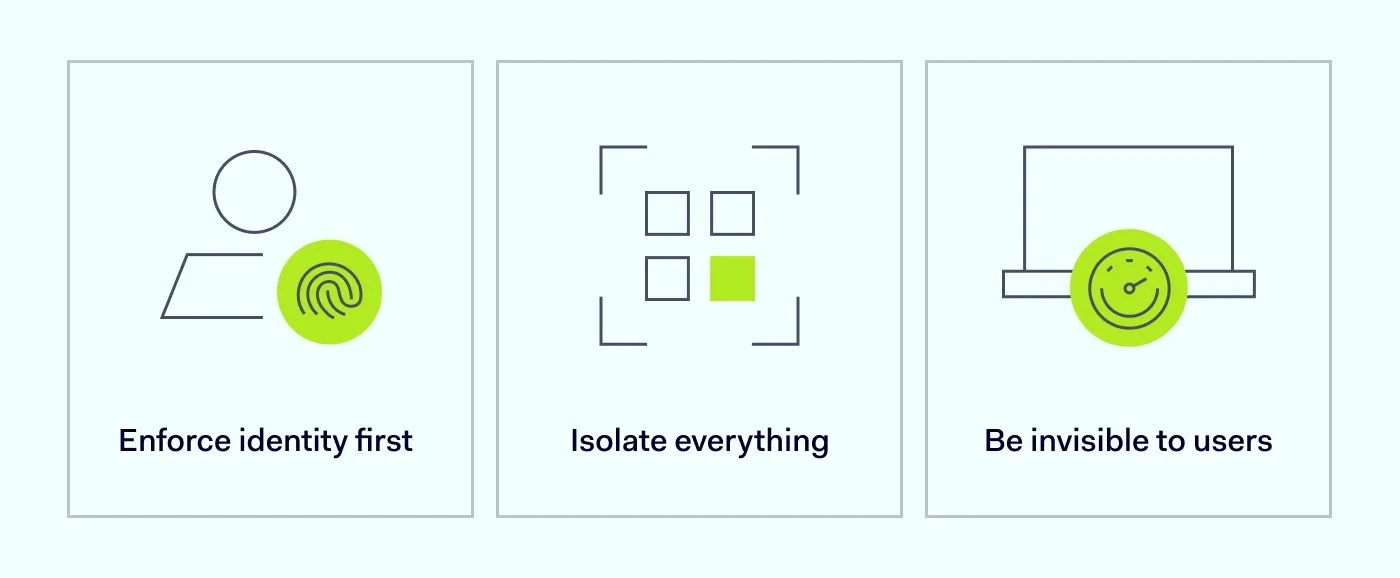
Enforce identity first. Does it check who the user is, every time? Demand zero-trust access built on continuous identity verification and seamless integration with your existing SSO. No more trusting an employee just because they’re connected.
Isolate everything. Can you limit access down to a single application? Look for micro-segmentation capabilities to ensure users access only what they need, keeping breaches isolated and protecting sensitive data. Make sure it logs everything for compliance.
Be invisible to users. If the tool is clunky, people will avoid it. Insist on fast, reliable remote access and a simple implementation process that doesn’t create tickets for IT or ruin the employee’s workflow.
VDI alternative: NordLayer Browser
Traditional VDI locks your team into high infrastructure costs and operational complexity just to deliver secure remote access. NordLayer Browser takes a different approach: instead of spinning up virtual desktops, it turns the browser itself into a managed, policy-driven workspace.
IT gets real-time visibility into every session, web app, and browser extension across the organization, including those that were never approved. Clipboard actions, downloads, uploads, and screen capture are controlled at the browser level, so sensitive data never leaves without authorization. And contractors, BYOD users, and remote teams access internal web tools through a secure browser without managed devices or complex onboarding workflows.
When to choose NordLayer Browser over traditional VDI
If your team primarily works in SaaS and web-based applications, a full virtual desktop would be excessive. NordLayer Browser gives you the same level of control over corporate data without the infrastructure behind it. Here’s where it fits best:
BYOD environments. Employees using personal devices get secure access to company resources without IT needing to manage or provision their hardware.
Contractor and third-party access. Bring external workers into your systems quickly and securely, with policy-driven controls in place from day one, no lengthy onboarding or device enrollment required.
Distributed and remote teams. Teams working from anywhere connect to internal tools through a secure browser, with identity verification for every session.
Shadow ITand data loss prevention. IT gets visibility into unapproved web apps and browser extensions, with granular controls over how data moves in and out of sensitive workflows.
Compliance-driven organizations. Session-level controls and audit logs give your security team the documentation they need without building it on top of a VDI stack.
For teams that need secure access, not a full desktop, NordLayer Browser gets you there with a fraction of the setup and none of the VDI infrastructure overhead.
Aistė Medinė
Editor and Cybersecurity Copywriter
An editor and writer covering cybersecurity, particularly the human side of cybercrime. Aiste writes about social engineering, phishing, threat prevention, zero trust (ZTNA), secure remote access, network security, and cybersecurity for businesses. She’s especially curious about the clever ways attackers manipulate people, and what businesses can do about it.