9 data security best practices to protect company data
Agnė Srėbaliūtė
Summary: 9 data security best practices for modern businesses: from classification and least-privilege access to encryption, backups, monitoring, and framework alignment.
Data security best practices include classifying sensitive information, enforcing least-privilege access, encrypting data, and training employees to spot everyday risks. Together, these measures lower the risk of a breach and keep company information under your control.
Keeping business data secure has become harder as employees use cloud apps and personal devices for work. A single weak password, an account with too many permissions or a file sent to the wrong address can open the door to hackers.
A sound data security strategy pulls 3 things together: practical policies, technical safeguards, and the day-to-day awareness of the people using your systems. Here are 9 best practices to help you build one.
Why data security matters
Companies handle valuable information every day, from customer records and employee details to financial documents, intellectual property, and business plans. If this information falls into the wrong hands, businesses may face financial losses, legal penalties, operational disruption, and damage to customer trust.
Data breaches don’t always result from sophisticated cyberattacks. Weak access controls, misconfigured systems, outdated software, and human error can also expose sensitive information.
Good data security practices help organizations reduce these risks, meet regulatory requirements, and control how their information is collected, stored, and shared.
9 data security best practices
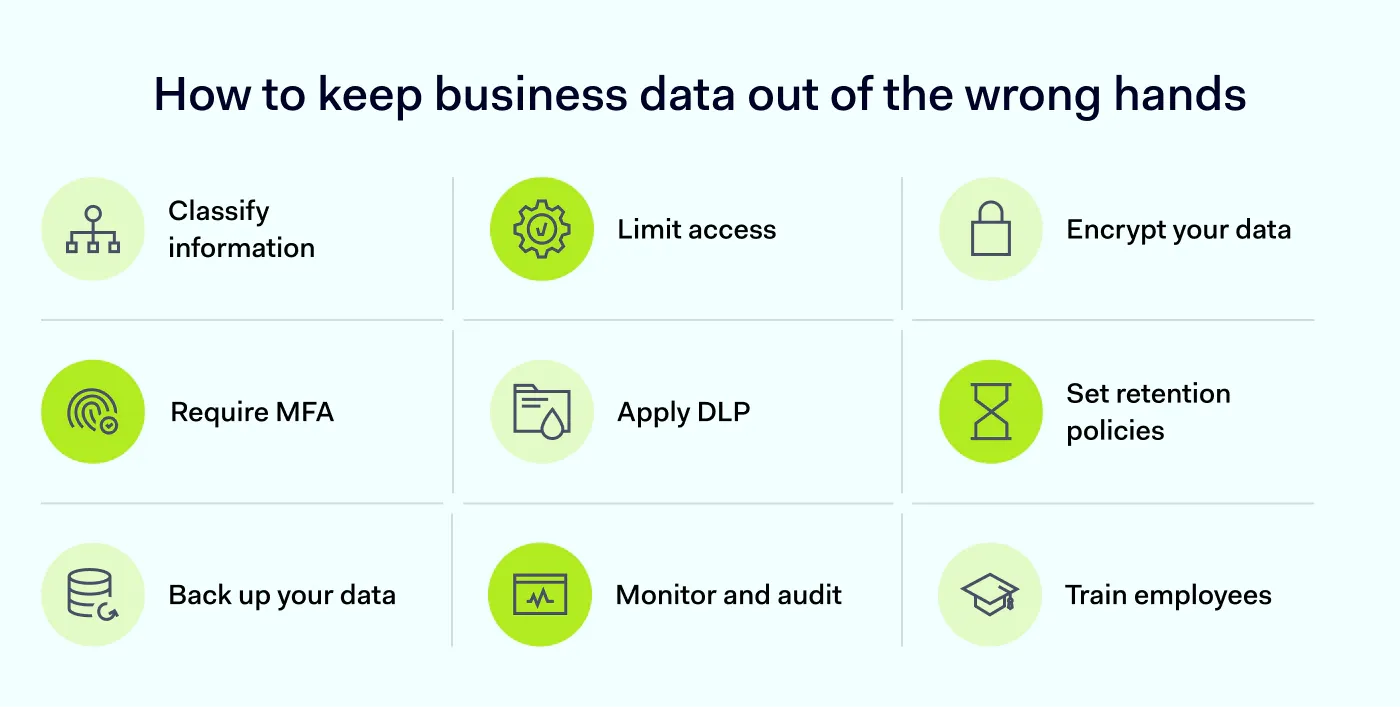
Protecting company data requires more than one security tool or policy. The following practices can help reduce exposure and improve your organization’s data protection.
1. Classify and inventory your data
You should know what information your company has and where it’s stored, otherwise, you won’t be able to protect it. Start by identifying the data your organization collects, creates, and processes. This may include customer information, employee records, financial documents, credentials, and proprietary business information. Record where each type is stored, who owns it, and which systems or applications can access it.
Then classify and tag that data based on sensitivity and risk level. Two customer spreadsheets may look identical on the surface, but one holding payment details carries far more risk than one with mailing addresses, and their labels should reflect that difference. A typical scheme uses 4 tiers:
Public. Information approved for public distribution, such as published blog posts.
Internal. Information intended for employees, such as internal procedures.
Confidential. Business information available only to authorized people, such as financial reports or customer records.
Restricted. Highly sensitive information, such as credentials, payment details, or regulated personal data.
Data classification isn’t just a labeling exercise. The tier a piece of data falls into should shape where it’s stored and who can access it. Restricted data may need an encrypted, access-logged system, while internal data can be kept in a standard collaboration tool.
2. Enforce least-privilege access
Not every employee needs access to every company file, application, or system. The principle of least privilege (PoLP) means giving users only the permissions they need to perform their jobs.
Use role-based access control (RBAC) to assign permissions based on employees’ responsibilities. For example, members of the finance team may need access to payment records, while marketing employees may only need approved campaign materials.
Review permissions regularly, especially when employees change roles or leave the organization. Remove unnecessary access promptly, and avoid shared accounts that make it harder to identify who performed an action.
Applying least privilege reduces the amount of sensitive information an attacker can access if an account is compromised or misused.
Encryption makes data unreadable to anyone without the right decryption keys. It’s an important safeguard whether information stored on a company device, parked in cloud storage, or moving across a network. Use encryption in both situations:
Data at rest. Protect information stored on laptops, servers, databases, and cloud storage using a widely adopted standard such as AES-256.
Data in transit. Encrypt information as it moves between devices, users, applications, and networks. Enforce TLS 1.2 or higher on all public-facing services and internal APIs that handle sensitive data.
Encryption keys also need protection of their own, so keep access tightly restricted and stick to established protocols. One thing encryption won’t do is stop a legitimate account from being misused, so pair it with authentication and access controls to cover that.
4. Require multi-factor authentication wherever sensitive data is accessed
Passwords alone aren’t enough to protect company accounts. If an attacker steals or guesses an employee’s password, they may gain access to business applications and sensitive information.
Multi-factor authentication (MFA) adds another verification step before granting access. Depending on the method, employees may need to confirm their identity through an authenticator app, a hardware security key, or another approved factor.
Enable MFA for email, cloud storage, collaboration platforms, administrative accounts, and other services that contain sensitive data. Use phishing-resistant methods, such as passkeys or hardware security keys, where available.
5. Apply data loss prevention (DLP)
Access controls determine who can access information. Data loss prevention (DLP) helps businesses control how it is used, shared, or transferred.
With DLP solutions, organizations can identify sensitive information and monitor how it moves across supported channels. Depending on the solution, DLP can detect or restrict actions such as:
Uploading confidential files to unauthorized cloud services
Copying sensitive information to external applications
Sending protected documents through email
Transferring files to removable storage or unapproved destinations
Configure DLP policies according to your organization’s data classification and security requirements. Start with the information that would cause the most harm if exposed, and test policies to avoid disrupting legitimate work.
Keep your data safe: get the DLP guide
Simple steps to protect sensitive data, prevent breaches, and stay compliant
Keeping information longer than necessary increases the amount of data that could be exposed in a breach. It can also create additional storage, compliance, and management challenges.
Define how long different types of information should be retained based on business needs and legal requirements. For example, customer records, financial documents, and employee information may require different retention periods.
Once data is no longer needed, delete it securely or anonymize it where appropriate. Make sure your retention rules also cover backups, cloud storage, employee devices, and third-party services.
A clear retention policy cuts unnecessary data exposure and makes information easier to manage.
7. Back up critical data and plan for recovery
Even the best preventive controls can fail, so businesses need a recovery plan as part of data security.
Follow the 3-2-1 backup rule: keep at least 3 copies of important data on 2 different types of media, with one copy stored offsite or in an isolated cloud environment. This approach limits the risk of damage from ransomware, hardware failure, and accidental deletion, because a single incident is unlikely to reach every copy at once.
Test restores on a regular schedule, not only when something goes wrong. A backup is not useful if recovery doesn’t work. Document who is responsible for restoring each system, how long recovery should take, and which data needs to be restored first.These decisions are much harder to make during an active incident.
8. Use continuous monitoring and regular audits
Security controls are effective only if you know that they’re working. Continuous monitoring helps businesses identify unusual activity, suspicious access attempts, and potential security issues before they turn to breaches.
Monitor important events such as repeated failed logins, unexpected permission changes, unusual file transfers, and access from unfamiliar devices or locations. Centralize relevant logs so security teams can investigate incidents and identify patterns.
For example, NIST SP 800-53 stresses analyzing audit records in context. A single failed login means little, but the same account failing across three regions in 5 minutes tells a different story. Pair log collection with behavioral analysis to catch signs of data misuse that rule-based alerts often miss, such as a user suddenly downloading 10 times more files than usual.
Regularly audit permissions, configurations, and security policies to check if they still meet your requirements. Align these audits with the industry regulations that apply to your business (GDPR,HIPAA,PCI DSS,SOC 2,ISO 27001, or others). This way, the same evidence supports both internal review and external certification. Use monitoring alerts to trigger investigations, not as automatic proof of malicious activity.
9. Train employees on data security regularly
Even well-configured security systems can’t prevent mistakes. Employees may click phishing links, share information with the wrong recipient, reuse passwords, or upload confidential files to unauthorized applications.
Regular training helps employees recognize these risks and understand how to handle company information responsibly. Cover practical topics such as:
Recognizing phishing attempts and suspicious links
Creating and protecting strong passwords
Handling sensitive information and sharing files securely
Identifying unauthorized applications and shadow IT
Reporting suspected data leaks or security incidents
Don't limit training to employee onboarding. Short, relevant sessions and realistic exercises can help employees apply security practices in their daily work.
Align your program with a recognized framework
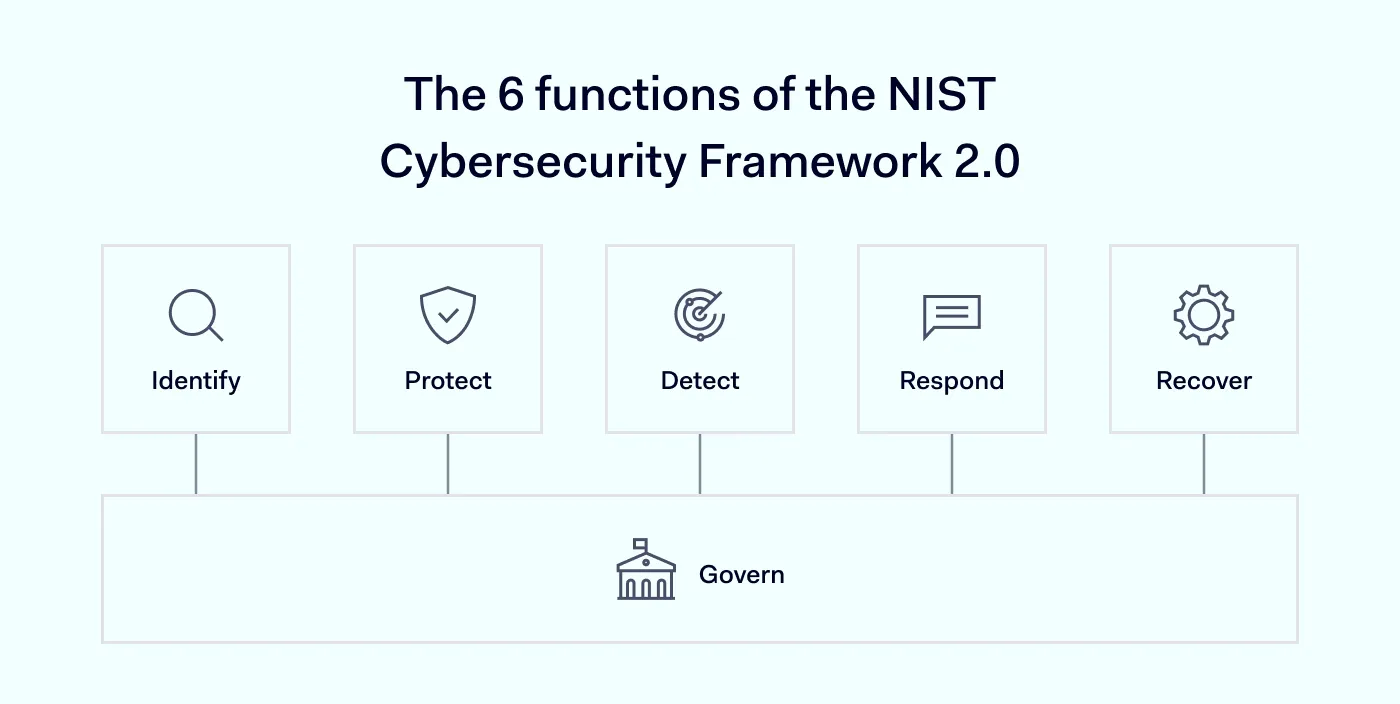
Picking practices one by one works, but mapping them to an established framework makes the blind spots easier to surface and explain to auditors, executives, and new team members. The NIST Cybersecurity Framework organizes security activity into 6 functions, and most of the practices above map to one of them:
Identify—classification and inventory
Protect—access controls, encryption, MFA, and DLP
Detect—monitoring and audits
Respond—incident response procedures
Recover—backups and recovery testing
Govern—data classification scheme, retention policy, roles and accountability
Govern was added in the 2024 update and sits across the other 5. It covers the policies, roles, and risk decisions that shape how the rest of the program runs.
Using a framework also makes it easier to communicate progress over time. Instead of reporting that “we added a new tool,” you can show how a specific capability reduced exposure in a named function, and which risks that affects.
With a framework in place and the practices above working together, the next question is how to apply them consistently across a distributed workforce.
How NordLayer helps protect company data
To secure company data, businesses need control over who reaches their resources and what happens to information once it’s in motion. NordLayer tightens both areas through its network security and access management capabilities.
Several of the practices above connect directly to what NordLayer offers:
Access controls and network segmentation. Apply role-based permissions and restrict access to specific networks and resources with the cloud firewall and virtual private gateways. This helps organizations follow least-privilege principles.
Multi-factor authentication. Add another layer of identity verification before anyone accesses company resources.
Encrypted traffic. Protect data in transit between employees and company resources using AES-256 and ChaCha20 encryption.
Device posture security. Check whether a device meets your security requirements before it’s allowed onto the network.
Data loss prevention support. Combine access controls, traffic encryption, and NordLayer Browser DLP policies to curb unauthorized data transfers. Browser policies can restrict actions such as file uploads, downloads, and clipboard operations.
Security visibility. Review access events through activity monitoring and audit logs to support security investigations.
NordLayer gives distributed teams a single way to secure connections, manage access, and keep security policies consistent wherever people work. Paired with employee awareness and the broader practices covered above, it helps businesses shrink their exposure and protect sensitive data.
After spending a decade writing across media, PR, and advertising, Agne has been specializing in technology and cybersecurity content, focusing on IP address management, networking, zero trust, and internet infrastructure. She helps businesses understand complex technologies through clear, engaging, and sometimes creative content.