Summary: A DLP policy tells your tools what to protect and how. Learn the key components, build your own in 7 steps, and prevent data breaches.
Having data loss prevention (DLP) tools doesn’t automatically mean an organization can prevent data breaches. These tools can monitor activity, detect sensitive data, and block transfers, but they need rules telling them what to look for and how to respond. A DLP policy provides those rules.
It defines which data needs protection, who can access it, how it can be handled, and what happens when someone breaks the rules.
What is a DLP policy?
A data loss prevention (DLP) policy is the rulebook for how company data can be accessed, used, shared, and protected. It spells out which data counts as sensitive and sets the controls and procedures to prevent leaks, unauthorized movement, or use.
In practice, a data loss prevention policy connects business requirements with technical enforcement. It tells employees how they should handle sensitive information and gives clear instructions for DLP to detect and respond to risky activity.
For example, a company might define customer payment information as highly sensitive. Its DLP policy could require that this information only be stored in approved systems and prohibit employees from uploading it to personal cloud storage. The organization’s controls can then enforce those requirements by monitoring transfers and blocking prohibited actions.
A DLP policy can cover data at rest, in use, and in transit. Its rules may apply to stored files, information employees access or copy, and data being transferred through email, browsers, cloud applications, or other channels.
Why your organization needs a DLP policy
A data loss prevention policy is really a governance framework. Without one, different teams end up making their own calls about what counts as sensitive data, who should see it, and which activities are allowed.
A clear policy helps an organization:
Define what needs protection. Not all company data has the same value or sensitivity. A policy establishes which information, such as customer records, financial information, credentials, or intellectual property, requires additional controls.
Set consistent handling rules. Employees should know where sensitive information can be stored, which tools they can use to share it, and what actions are prohibited.
Assign responsibility. Security teams can manage DLP tools, while data owners, managers, and employees have clearly defined responsibilities.
Support compliance. Regulations and industry standards may require organizations to protect specific types of sensitive information and report data breaches within set timeframes. A documented policy helps translate those requirements into internal rules.
Create a basis for incident response. When a potential violation occurs, predefined procedures help teams determine its severity and decide what action to take.
Manage third-party access. Vendors, contractors, and partners may handle company data, so the policy should set requirements for external access and data sharing.
A policy also creates accountability. Employees and security teams have a shared framework for making decisions about data protection, without relying on individual judgment.
A data loss prevention policy should reflect an organization’s business, regulatory requirements, and technology environment. Most DLP policies cover the same core sections:
Purpose and scope. Explains why the policy exists and which employees, contractors, systems, applications, and types of company data it covers.
Data classification. Defines categories such as public, internal, confidential, and restricted, with examples of sensitive data belonging to each category.
Roles and responsibilities. Specifies who owns the policy, who manages DLP controls, who approves exceptions, and which employees and managers are responsible for what.
Data handling requirements. Defines how sensitive information can be stored, accessed, copied, transmitted, shared, and disposed of.
Access requirements. Establishes who can access sensitive data and under what conditions. Access should generally follow the principle of least privilege.
Technical controls. Documents the DLP tools and other controls used to enforce the policy across endpoints, networks, cloud services, email, and browsers.
Monitoring and enforcement. Defines what activity is monitored, which actions trigger alerts or blocks, and how violations are recorded.
Incident response. Describes how suspected data loss incidents are reported, investigated, contained, and documented.
Exceptions. Establishes when an employee or team can request an exception, who approves it, and how long it remains valid.
Training and awareness. Explains how employees learn the policy and how often training is required.
Policy review. Defines when the policy is reviewed and what events, such as regulatory changes, new technology, or incidents, should trigger an update.
These components turn a data loss prevention policy from a general document that sits on a shared drive into a practical framework that teams actually use daily.
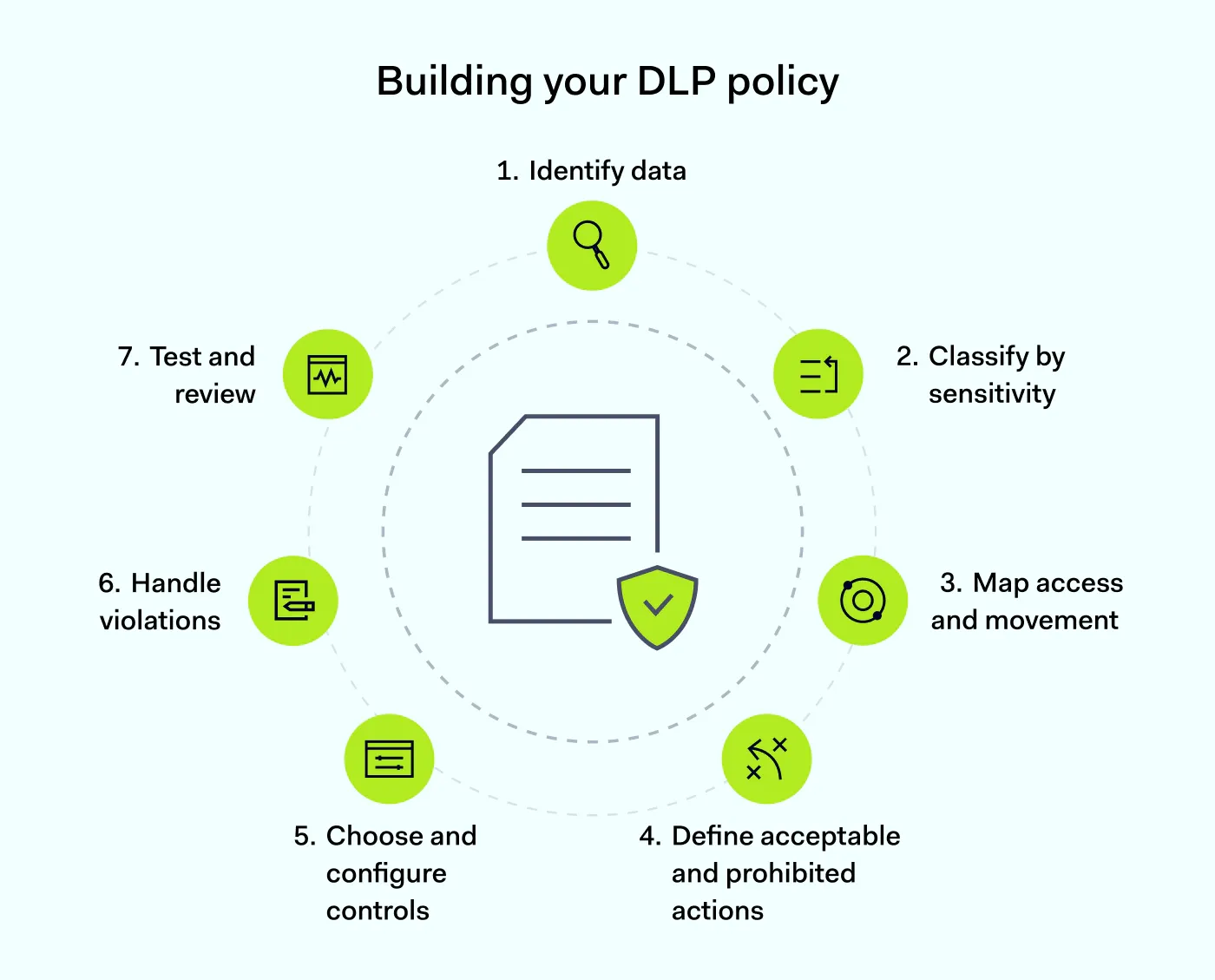
How to create a DLP policy
Creating a DLP policy doesn’t have to mean writing a long document first and figuring out enforcement later. Start with the data and risks, then build rules around them.
1. Identify your sensitive data
Start by making an inventory of the information your organization needs to protect. This may include personal data, financial records, customer information, credentials, source code, trade secrets, and other intellectual property. Then, consider where this sensitive data is stored, who uses it, and which applications or services it moves through.
2. Classify data by sensitivity
Create a classification system that employees can understand and apply consistently. For example, you might use the following categories: Public, Internal, Confidential, and Restricted. Define what belongs in each category and what protection each level requires. This gives your DLP controls something concrete to enforce.
3. Map data access and movement
Document who needs access to each type of sensitive information and how that information moves through the organization. Look at common channels such as email, cloud storage, collaboration platforms, removable media, and web applications. This can reveal where existing data access rules don’t match actual workflows.
4. Define acceptable and prohibited actions
Turn your findings into specific rules. For example, your policy might allow employees to upload confidential documents to an approved corporate SaaS application but prohibit uploads to personal cloud storage. Another rule could allow copying sensitive information between approved applications while blocking transfers to unapproved websites.
Specific rules are easier for employees to follow and easier for DLP tools to enforce.
5. Choose and configure your controls
Map each rule to a technical control. Depending on your environment, this could include endpoint DLP, email security, cloud controls, browser controls, access management, or network monitoring. The goal isn’t to block everything. Rather, controls should enforce the organization’s actual data security requirements without getting in the way of legitimate work.
6. Define how violations are handled
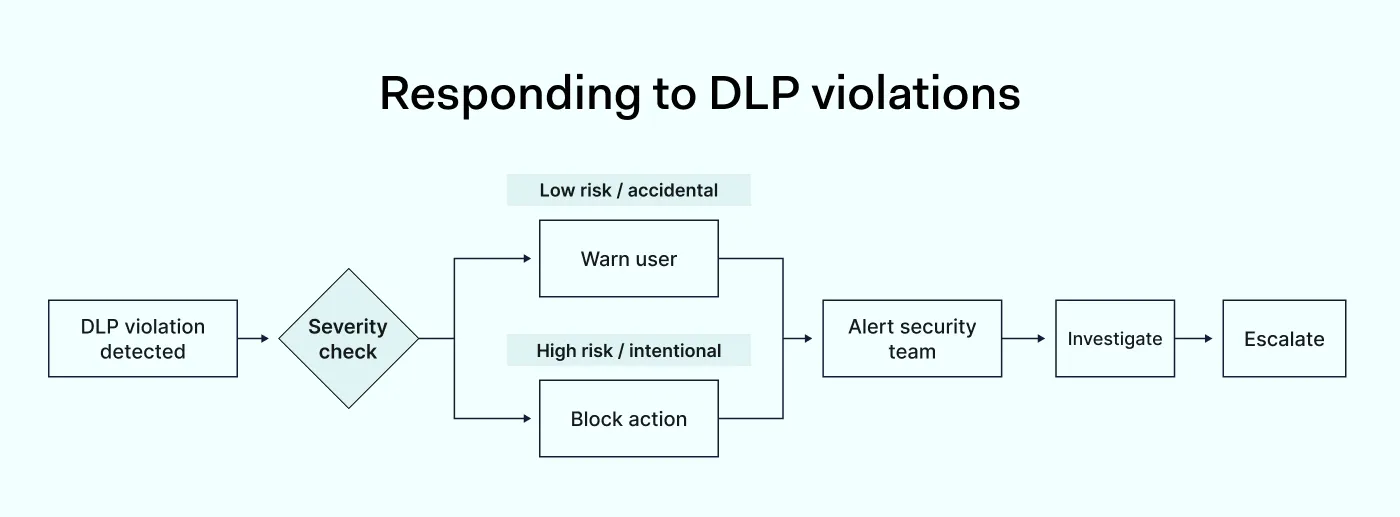
Decide what happens when someone breaks a rule. For example, a low-risk, accidental action might generate a warning, while an attempt to deliberately transfer highly sensitive information could trigger an immediate block and security investigation. Document who receives alerts, how incidents are investigated, and when escalation is required.
7. Test and review the policy
Test your rules against real-world scenarios before rolling them out company-wide. Check for false positives, gaps, and workflows that the policy unintentionally disrupts. Review the policy regularly and update it when your business, technology, regulations, or data handling practices change.
Keep your data safe: get the DLP guide
Simple steps to protect sensitive data, prevent breaches, and stay compliant
The basic framework stays the same across industries, but data protection priorities and rules change depending on a business’s needs.
Healthcare. A healthcare provider could classify patient records as restricted sensitive data. The provider’s policy might limit access to authorized staff only, prohibit uploads to unapproved services, and require specific procedures for sharing health information.
Finance. A financial organization could apply strict controls for payment card information, financial records, and customer data. The organization’s policy might block attempts to copy sensitive financial data to removable storage or unapproved applications.
SaaS and technology. A technology company may treat source code, credentials, product designs, and customer information as sensitive data. The company’s policy could restrict access to repositories and prevent employees from transferring source code to personal accounts.
Legal. A law firm could classify client case files and confidential communications as restricted. The firm’s policy might limit data access to assigned teams, restrict printing, and require the use of approved systems for sharing documents.
The takeaway: there’s no universal DLP policy. The same framework needs to be adapted to the organization’s data, workflows, regulatory requirements, and risk tolerance.
What happens when a DLP policy is violated?
A DLP violation happens when someone handles data in a way the policy doesn’t allow. This could be accidental, such as uploading a confidential document to an unapproved application, or intentional.
The response should depend on the severity of the violation, the sensitivity of the data, and the user’s intent. A practical, tiered approach might look like this:
Warn. For low-risk or accidental violations, notify the user and explain the relevant policy.
Block. Prevent the action when it creates a significant risk of exposing sensitive data.
Alert. Notify the security team when an event requires investigation.
Investigate. Review the activity, the data involved, the user context, and whether the action was intentional.
Escalate. Apply disciplinary, legal, or regulatory procedures when appropriate.
Clear escalation rules make the incident response process more consistent and help security teams tell the difference between a real threat and a simple mistake.
How the NordLayer Browser supports your DLP policy
Defining DLP policy rules is only half the job—an organization also needs controls capable of enforcing them. That matters even more now that most sensitive work happens inside browsers and cloud applications.
The NordLayer Browser adds browser-level data loss prevention tools that let administrators apply policy-based rules to how data is handled on specific websites and applications. The controls cover file downloads and uploads, clipboard activity, and microphone and camera access:
File download control lets administrators define rules by domain, app, user group, or transfer direction.
Clipboard control can allow or restrict copy-and-paste functionality in approved applications and websites.
Microphone and camera control can restrict access to a device’s microphone or camera on specific websites, based on rules the admin defines.
These controls help enforce the rules of your data loss prevention policy directly where employees interact with web-based services.
The NordLayer Browser also provides visibility into browser activity and can apply DLP policies across corporate, BYOD, and contractor devices without full endpoint agents or VPNs required.
A well-written policy defines what your organization expects. The right controls turn those expectations into everyday data security practices, keeping sensitive information, company data, and intellectual property within the boundaries your organization has established.
Agnė Srėbaliūtė
Senior Cybersecurity Copywriter
After spending a decade writing across media, PR, and advertising, Agne has been specializing in technology and cybersecurity content, focusing on IP address management, networking, zero trust, and internet infrastructure. She helps businesses understand complex technologies through clear, engaging, and sometimes creative content.