In 2026, Twingate alternatives include NordLayer, Check Point Harmony SASE, Tailscale, Zscaler Zero Trust Exchange, and Palo Alto Prisma Access. All these products offer secure access to private apps, cloud resources, and internal networks. But they differ in how many network security features they include beyond remote access, as well as in deployment model and access control depth. For an organization, the best fit usually depends on whether it needs a simple solution for a small team or broad granular policy controls for a large environment.
Disclaimer: This article is based on publicly available user feedback gathered on April 13, 2026, from platforms including Gartner Peer Insights™, G2, and vendor websites. Our methodology prioritized the most recent user reviews available on these platforms. For Gartner, we reviewed the 5 newest reviews if available. For G2, we analyzed the 10 newest reviews for each product as of April 13, 2026. Both positive and negative reviews were included to reflect a balanced view, though the number of relevant reviews varied by vendor. As competitor offerings and user sentiment may evolve, NordLayer does not guarantee the accuracy or completeness of this information and recommends verifying details directly with each provider.
Twingate overview
Twingate presents itself as a zero-trust network access platform. Its mission is to replace broad VPN-style connectivity with application-level access control, identity checks, and device-aware policies, while keeping resources invisible by default.
In short, the platform is built for remote access to an organization’s internal tools, applications, and servers.
Insufficient logs: no advanced search or filtering for incident investigation.
Problematic mobile device management (MDM) deployment. Difficult setup on NinjaRMM, Intune, and Jamf.
DNS features feel underdeveloped to some users.
Update disruptions. Client updates sometimes require reinstalls.
Meaningful support requires higher-tier plans.
Limited support for the Asia-Pacific region (users must triage issues outside business hours).
Disclaimer: This review is based on third-party user reviews from Gartner Peer Insights™ and G2, accessed on April 13, 2026. NordLayer is not responsible for the accuracy or completeness of competitor information, which may change over time.
Now, let’s look at Twingate alternatives.
1. NordLayer
NordLayer overview
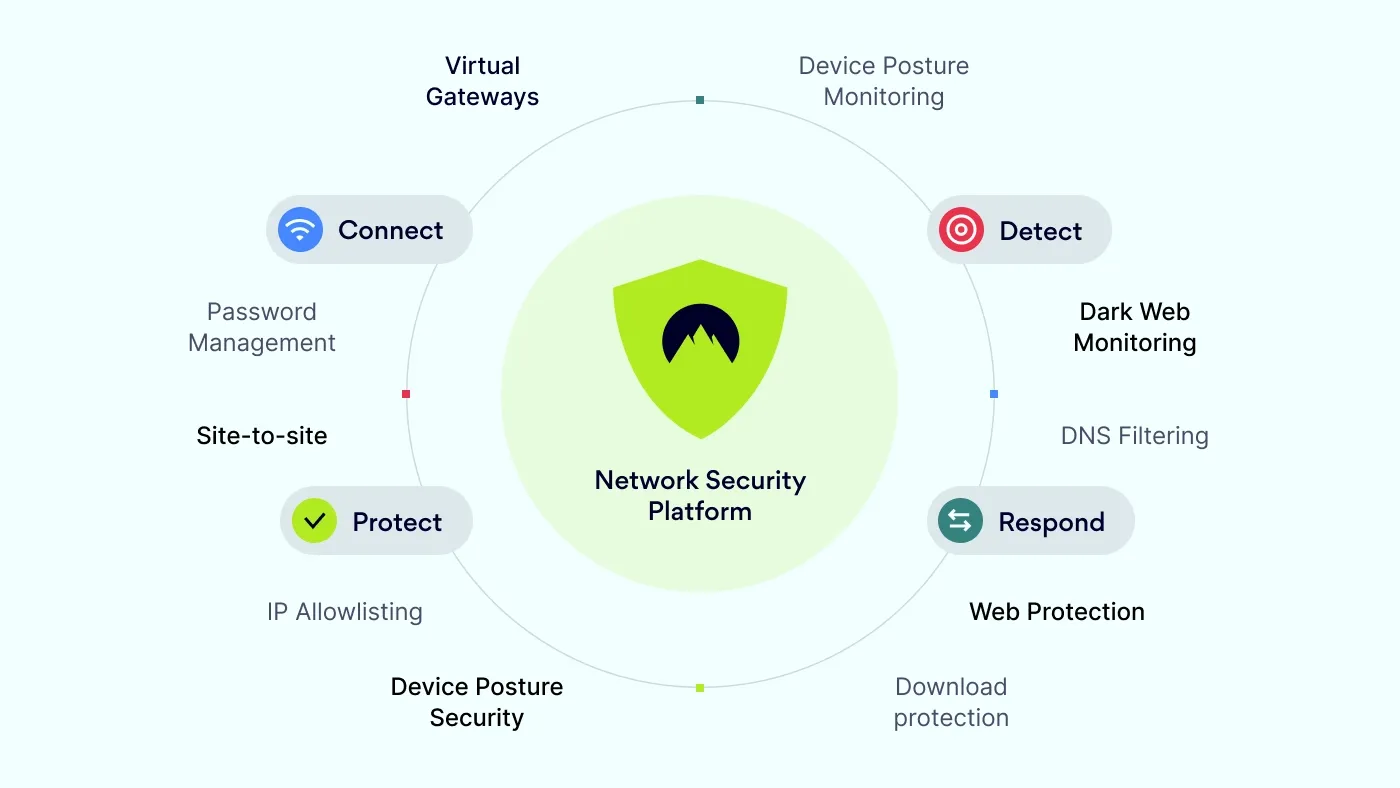
NordLayer is a network security platform that provides secure remote access, Zero Trust Network Access (ZTNA), and access control capabilities, along with threat prevention and device posture controls. It is part of the Nord Security ecosystem, which can be extended with threat intelligence and password management solutions.
NordLayer offers a practical way to deploy remote access policies without on-premise hardware. It provides teams with secure access to servers, internal tools, and SaaS apps.
Most mentioned NordLayer product strengths
Some of the strengths users mention most are:
Zero Trust Network Access (ZTNA) with MFA, Device Posture Monitoring, and Dedicated IP.
Centralized management.
Full security stack, which includes a Cloud Firewall, Secure Web Gateway for safe internet access, Threat Protection, and network segmentation features.
Wide server range with plenty of country options and easy Dedicated IP setup.
Most mentioned overall NordLayer benefits
Users often highlight these benefits:
Ease of use, with an intuitive interface and simplified onboarding for both technical and non-technical employees.
Quick, low-effort deployment that requires no hardware and almost no ongoing maintenance.
24/7 customer service and extensive setup documentation.
Stable performance with fast connections, even when many users are connected.
Compliance and integration support, with features that help meet standards like ISO 27001 and SOC 2 Type II, plus smooth identity provider integration (e.g., Okta, Google).
What makes NordLayer stand out?
According to NordLayer’s website, the platform offers robust Zero Trust Network Access (ZTNA) features as well as traditional VPN functionality. These technologies complement each other.
Key solutions:
NordLynx—a high-speed VPN protocol available for all plans.
Threat Protection blocks malicious sites, stopping known threats before they reach users.
Device Posture Security prevents users from accessing the network through non-compliant devices.
Download Protection detects and removes malware, ransomware, and other threats.
Drawbacks of NordLayer
Users noted these limitations:
Limited advanced configuration for custom networking rules and split tunneling.
Team admins sometimes lack settings and cannot reset MFA.
Costs feel high for small teams.
Slow or dropped connections on unstable networks or Linux.
NordLayer reviews
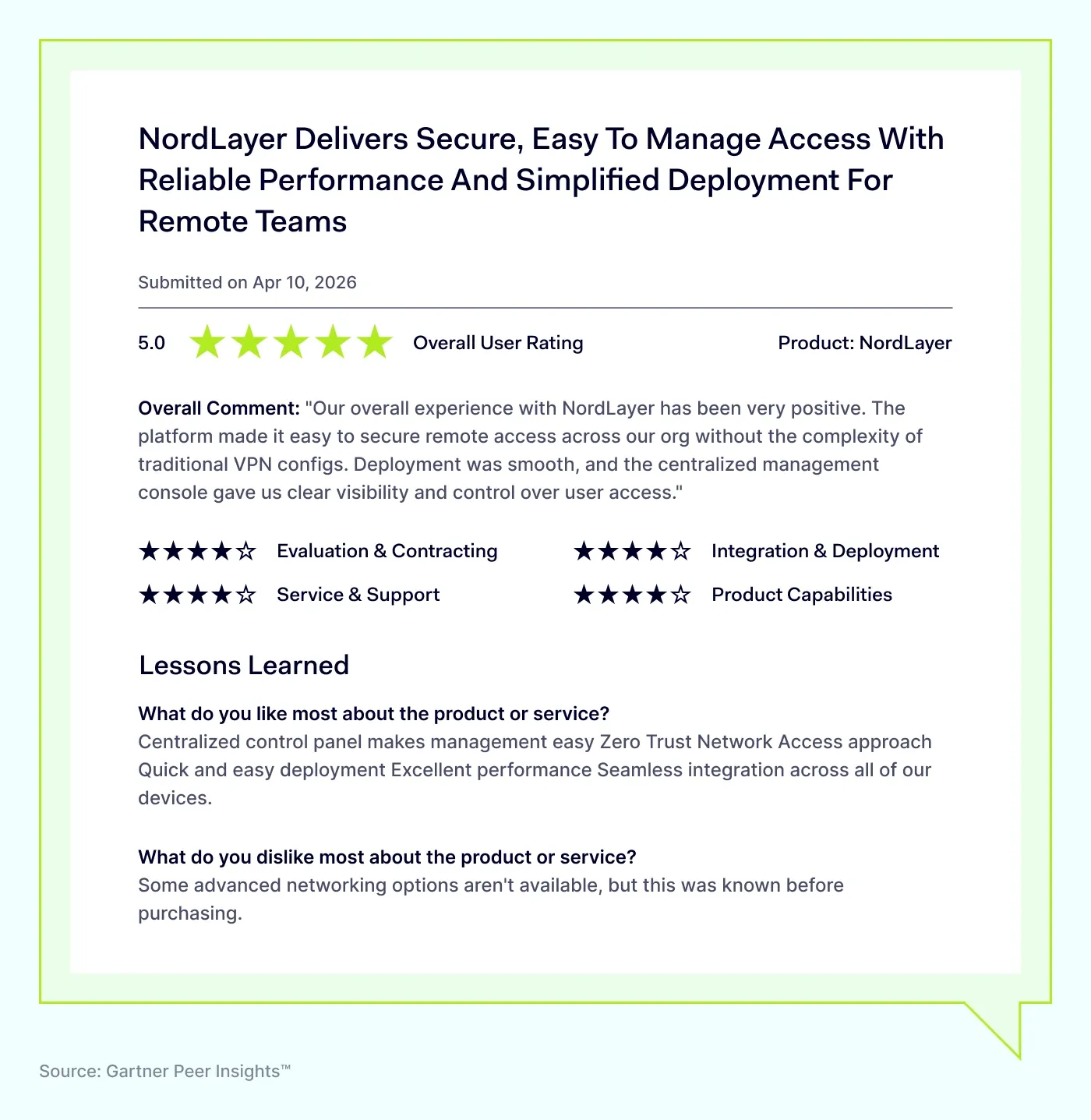
NordLayer receives strong positive feedback as a ZTNA provider. Users appreciate its network security features combined with usability.
NordLayer is rated:
4.6 out of 5 on Gartner Peer Insights™
4.3 out of 5 on G2
NordLayer pricing
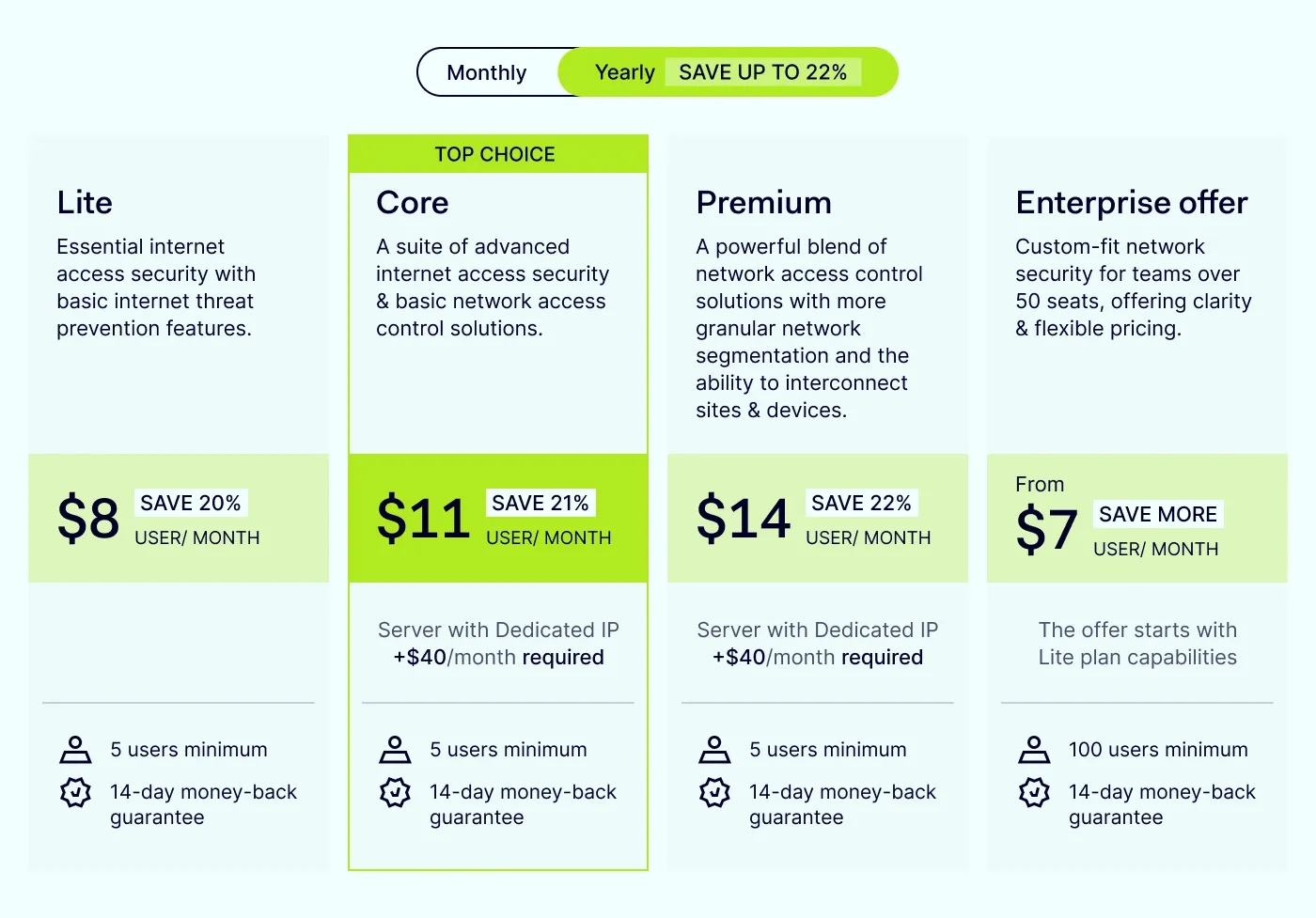
NordLayer’s plans start at 5 users and, according to its pricing page, include:
Up to 1 Gbps server performance,
40+ shared gateway locations,
Session Duration Control, MFA, Always On VPN, and SSO across tiers.
Web Protection (phishing prevention, malicious site blocking)
Download Protection to catch malware
VPN protocol variety, with NordLynx included on all plans
Higher plans add broader remote access solutions and control options, such as:
Virtual Private Gateways and Dedicated IPs
IP Allowlisting
Cloud Firewall
Device Posture Monitoring (visibility into which devices connect to the company network and whether they meet compliance standards)
Device Posture Security (automatic access denial for users with non-compliant devices)
Site-to-Site and Cloud LAN
Custom DNS for network-wide access rules
Exact feature availability depends on the tier.
Disclaimer: This information is based on NordLayer’s website and third-party user reviews from Gartner Peer Insights™ and G2, accessed on April 13, 2026. NordLayer aims to provide accurate and up-to-date information but is not responsible for any inaccuracies from third-party sources.
Take your network security to the next level—protect your organization with NordLayer now!
Check Point positions Harmony SASE as a cloud-based SASE platform that provides secure access for remote users and branch offices through zero trust, SaaS security, SD-WAN, and a global private backbone, all managed from a central console. The product is aimed at organizations that want one platform for remote access, policy enforcement, and broader security operations.
Most mentioned Harmony SASE product strengths
ZTNA-driven secure access with identity-based controls and SWG features.
Centralized management.
CASB-style SaaS security that detects shadow IT and misconfigurations.
Device posture checks.
Global Private Backbone that makes remote connections feel local.
Strong traffic visibility for monitoring and enforcing network security policies.
Most mentioned overall Harmony SASE benefits
Intuitive interface with a simple dashboard.
Strong security with minimal complexity.
Once configured, consistent performance with noticeable latency reduction.
High scalability with granular security for remote and branch users.
Full-mesh global connectivity across branches and cloud environments.
Drawbacks of Harmony SASE
High pricing for medium-sized businesses.
Complex initial setup.
Parts of the interface lack intuitiveness, and troubleshooting often requires support.
Some SASE capabilities feel less mature than competitors.
Rigid policy and logging customization; false positives can block legitimate traffic.
Slow support response times.
Drilling into user logs requires too many steps.
Disclaimer: This review is based on third-party user reviews from Gartner Peer Insights™ and G2, accessed on April 13, 2026. NordLayer is not responsible for the accuracy or completeness of competitor information, which may change over time.
Tailscale describes itself as a WireGuard-based connectivity platform that gives users direct, encrypted remote access to devices, services, and networks without relying on a centralized access server. Its model centers on a mesh architecture, identity-based authentication, and granular access control. It is often used for access to internal tools, subnet-connected resources, and servers that teams want to reach without exposing them to the public internet.
Most mentioned Tailscale product strengths
Peer-to-peer WireGuard connectivity regardless of network or public IP status.
Subnet routing that gives easy access to devices without a Tailscale client.
Multi-platform support, which includes Apple TV, Macs, cloud servers, and VMs.
Most mentioned overall Tailscale benefits
Fast, lightweight setup with thorough, clear documentation.
Intuitive dashboard and UI, easy to understand and flexible.
Rapid onboarding.
Reduced IT management effort compared to more complex solutions.
Drawbacks of Tailscale
High cost at scale.
Cumbersome for large networks; DNS routing and ACLs don't scale well.
Limited mobile access: some users cannot properly reach machines from phones.
Disclaimer: This review is based on third-party user reviews from G2, accessed on April 13, 2026. NordLayer is not responsible for the accuracy or completeness of competitor information, which may change over time.
4. Zscaler Zero Trust Exchange
Zscaler Zero Trust Exchange overview
Zscaler describes Zero Trust Exchange as a cloud-native platform that brokers one-to-one connections between authorized users and applications based on identity, context, and business policy. According to Zscaler, this approach supports secure remote access to private applications without exposing users, apps, or data to the internet. Rather than working like a traditional VPN or single access server, the platform applies least-privileged connections through its distributed cloud service.
Most mentioned Zscaler Zero Trust Exchange product strengths
Zero-trust architecture that continuously validates user access.
Least-privilege access model.
Identity-centric policy enforcement with granular access controls.
Fully cloud-based deployment without any hardware required.
Secure IoT and B2B session support.
Most mentioned overall Zscaler Zero Trust Exchange benefits
Lightweight and easy to use with a smooth interface.
Strong cloud-based security for remote and hybrid users.
Poor integration with firewalls. Separate, manually synced policies are sometimes required.
Limited log filtering and diagnostics.
No logout alerts, multi-user device issues (user scalability challenges).
Excessive authentication prompts and captchas disrupt workflows.
Steep learning curve for support teams due to complex traffic paths.
Disclaimer: This review is based on third-party user reviews from Gartner Peer Insights™ and G2, accessed on April 13, 2026. NordLayer is not responsible for the accuracy or completeness of competitor information, which may change over time.
5. Palo Alto Prisma Access
Palo Alto Prisma Access overview
Palo Alto Networks describes Prisma Access as a cloud-delivered security platform for protecting users, applications, data, and devices across headquarters, branch offices, and remote work. According to Palo Alto Networks, it enables secure remote access to cloud and data center applications, with centralized policy management and cloud-delivered inspection. The service is positioned for organizations that want security controls from one platform instead of relying on separate tools or an on-prem access server.
Most mentioned Palo Alto Prisma Access product strengths
All-in-one security platform combining ZTNA, SASE, NGFW, CASB, and DLP.
Consistent policy enforcement across all users, apps, and locations.
Real-time threat detection with URL filtering, sandboxing, and WildFire updates.
Strong Palo Alto ecosystem integration with centralized Panorama management.
Deep cloud logging and analytics for compliance and incident response.
Most mentioned overall Palo Alto Prisma Access benefits
Broad geographic reach with global POPs and minimal latency.
Reliable once configured, less complex than other perimeter solutions.
Strong pre- and post-sales support with quick issue resolution.
Positive end-user experience.
Drawbacks of Palo Alto Prisma Access
High cost, difficult for smaller organizations and weaker economies.
Complex and time-consuming initial setup.
Overwhelming interface; powerful but not intuitive to navigate.
Limited troubleshooting visibility. Diagnosing issues requires multiple tools and logs.
Vendor lock-in risk.
Licensing can be complex: pricing may vary by users, features, and, in some cases, bandwidth.
Variable performance by location, depending on the nearest POP load.
Inconsistent support responsiveness.
Disclaimer: This review is based on third-party user reviews from Gartner Peer Insights™ and G2, accessed on April 13, 2026. NordLayer is not responsible for the accuracy or completeness of competitor information, which may change over time.
Choosing among the Twingate alternatives usually comes down to how many access control, visibility, and bundled security features your team needs. Most options here cover the basics of secure remote access solutions. They differ in how they handle identity integrations, branch connectivity, device checks, reporting, and policy depth.
NordLayer and Tailscale are typically easier for teams that want faster rollout and simpler daily administration. Check Point Harmony SASE, Zscaler, and Palo Alto Prisma Access are broader platforms that suit large environments with heavier policy and compliance demands. They generally require more planning and budget. For readers comparing alternatives to Twingate, the right choice is usually the one that doesn’t add more operational complexity than the team can realistically maintain.
Disclaimer: The information in this article is provided for informational purposes only, is based on publicly available user reviews, product documentation, and online sources accessed on April 13, 2026, and should not be considered definitive or permanent. The views presented reflect aggregated user opinions and are not endorsements.
While we strive for accuracy and completeness, Nord Security Inc. and its affiliates make no guarantees regarding the information's accuracy, completeness, or suitability. We do not undertake, warrant, or represent that any product, or its feature, is or will remain publicly regarded as better or worse than other options, serve any purpose, or has mentioned features, benefits, strengths, and limitations for any period of time. Product features, pricing, and other details may change, and we advise readers to verify these directly with vendors. Readers should conduct their own research and seek independent advice before making purchasing decisions. We disclaim liability for any errors, omissions, or actions taken based on this information. The inclusion of competitor products does not imply affiliation or endorsement, and all trademarks mentioned are the property of their respective owners.
Anastasiya Novikava
Cybersecurity Copywriter
Anastasiya is a cybersecurity copywriter with a decade of experience in content marketing. She creates product comparisons, threat research and statistics, white papers, customer case studies, and educational content, with a focus on AI threats, data breach prevention, and compliance frameworks (DORA, GDPR, NIS2).