
A clientless VPN offers organizations a way to grant employees secure access to internal resources without installing software on every device. In this article, we'll see what a clientless VPN is, how it works, what are its pros and cons, and how to deploy one.
Clientless VPN definition
A clientless VPN is a browser-based solution that lets authenticated users reach specific private applications without a VPN client installed on their device. A clientless VPN usually uses a web portal, reverse proxy, or application proxy to mediate access to approved resources over HTTPS/TLS (instead of placing the device on the corporate network through a full tunnel).
In vendor documentation, you'll mostly see the term “clientless SSL VPN” – although the browser channel now relies not on SSL but on TLS (the protocol behind HTTPS). Similar terms are: agentless VPN, browser-based VPN, web portal VPN, SSL portal VPN, or clientless access. They all mean the same thing: a user opens a web browser, authenticates to a VPN gateway, and works with approved web applications.
Some of the main features of a clientless VPN are:
- First and foremost, browser-based access. Clientless VPN means that a normal browser handles secure connections. On the endpoint, there's no installer or agent.
- In terms of architecture, a clientless SSL VPN is a portal of bookmarks and/or a reverse proxy that rewrites application URLs so users reach internal apps through an external address.
- TLS encryption. The traffic between the browser and the VPN gateway travels over HTTPS.
- Most clientless SSL VPN products have identity-driven access: they integrate with SSO, MFA, and identity providers.
- Unlike a full tunnel, a clientless VPN has an application-level scope, meaning that a user's access is limited to defined web-based applications.
How does a clientless VPN work?
The flow of a clientless VPN session is quite straightforward.
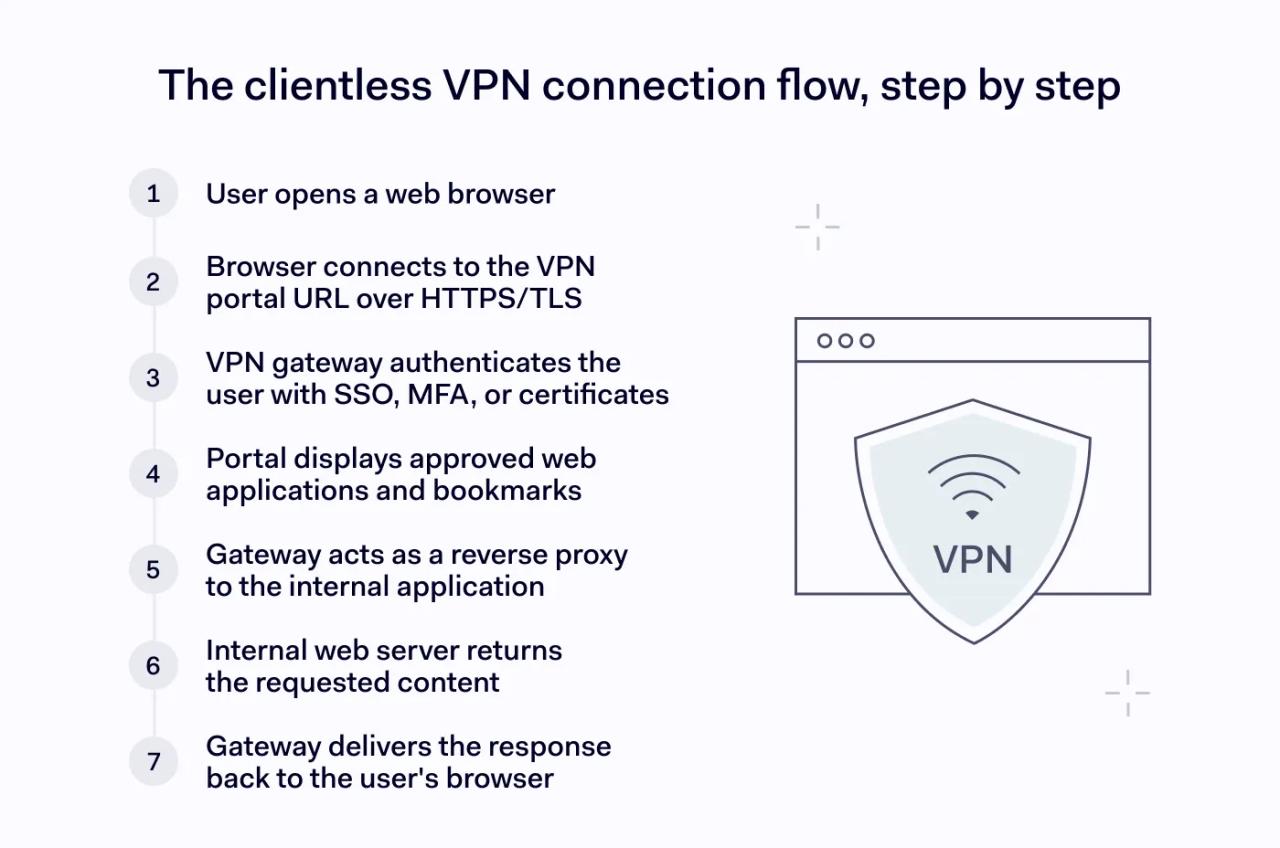
- The user opens a browser and visits the public address of the VPN server or app portal.
- The VPN gateway authenticates the user.
- The portal lists approved apps. Each user sees only the web-based applications that policy allows for their role or group.
- The gateway proxies the request. The clientless SSL VPN fetches the resource on behalf of the user, rewrites links if needed, and returns the page through the browser.
- The session stays inside the browser. The user never is on the internal network directly. All network access to the backend app is brokered by the gateway.
For non-web protocols (RDP, SSH, VNC), the gateway sometimes runs an HTML5 client inside the browser tab.
Benefits of clientless VPNs
The main benefit of a clientless VPN is giving secure remote access to users who cannot or should not install corporate software on their device – such as contractors and BYOD users.
- Users simply open a web browser and log in.
- The onboarding is fast. A new user can start working within minutes after the admin grants permission to the relevant web applications.
- Any device with a current web browser can connect.
- A clientless VPN exposes specific web-based applications rather than the whole network. It reduces the blast radius if a user is compromised.
- No VPN client to maintain means less version drift, compatibility issues, and the support load for IT teams.
All in all, clientless VPNs are a good choice for small and growing organizations. The tool offers a fast path to secure remote access with less overhead.
Limitations of clientless VPNs
In many cases, a clientless VPN is not a universal replacement for a full tunnel. The portal model falls short in several scenarios as it trades feature depth for simplicity.
- Limited protocol support. A clientless SSL VPN handles HTTP/HTTPS very well and supports several additional protocols. But many client apps, custom ports, and machine-to-machine traffic often need a full VPN client.
- Vendors recommend a clientless VPN for one trusted application rather than open-ended browsing because reverse proxies rewrite pages. It often can break JavaScript, single-page apps, or features that depend on the Same Origin Policy.
- Endpoint security management is harder because without an agent on the device, the VPN gateway has limited visibility into an endpoint's patch level.
- Similarly, downloads, copy/paste, and screenshots take place outside the gateway. If there's no browser-side controls, then sensitive data can leave the session.
- There are performance ceilings: latency-sensitive workloads such as VoIP, large file transfers, or graphic-heavy RDP sessions can suffer compared with a native tunnel.
In short, a clientless VPN is rarely the right tool when a user needs deep network access or a wide range of protocols.
Clientless VPN vs. client-based VPN vs. site-to-site VPN
These three approaches solve different problems:
- A clientless VPN connects a browser session to specific apps.
- A client-based VPN connects a single device to a private network.
- A site-to-site VPN connects two networks together.
Aspect | Clientless VPN | Client-based VPN | Site-to-site VPN |
|---|---|---|---|
Best for | Contractors, BYOD, partners | Employees on managed laptops | Branch office to HQ links |
Endpoint software | None, just a web browser | Installed VPN client | None on user devices |
What gets connected | Browser session to selected web applications | Device to corporate network | Office network to office network |
Typical scope | One or a few apps per user | Full or segmented network access | Network-to-network |
Endpoint security visibility | Limited | High when paired with posture checks | N/A for end users |
Performance for heavy apps | Moderate | Strong | Strong |
Setup effort for users | Very low | Medium | None for end users |
For example, for a marketing contractor who only needs the internal CMS, a clientless VPN is a good fit. A full-time engineer who runs internal APIs is better served by a client-based VPN. And a site-to-site VPN will be helpful for a retail chain that links thirty stores to a central data center.
Clientless VPN use cases
Secure access for third parties
External developers, auditors, and consultants often need short-term access to a few apps. A clientless VPN grants that access through a web browser without any software install. It respects the contractor's own device policy.
Secure browser-based access for unmanaged devices
Employees who use a home computer or a personal tablet can reach internal web applications safely. The VPN gateway treats the device as untrusted, applies MFA and organization's policy, and limits the session to approved resources.
Web app and intranet access
Internal portals, ticketing systems, webmail, dashboards, and admin consoles work naturally inside a web browser. A clientless SSL VPN publishes web-based applications without changing the apps themselves.
Emergency remote access
When a storm, outage, or travel disruption stops people reaching the office, a clientless VPN gets staff productive. Anyone with a web browser and credentials can continue work within minutes.
Mergers, acquisitions, and short-term integrations
When two companies need to share several apps before full IT integration, a clientless VPN provides controlled secure remote access without merging networks or rolling out a new VPN client on either side.
Clientless VPN implementation best practices
A clientless VPN is as safe as the controls around it. Below are some practices that help improve a clientless SSL VPN deployment.
- Require MFA for every user. A password is not enough for an internet-facing VPN server. IT teams should pair the identity provider with MFA.
- Patch the gateway. Remote access servers are high-value targets for hackers. Vendor patches should be applied quickly.
- Use least-privilege access policy Grant each user or group access only to the web applications they need. It's better to avoid rules that expose the whole intranet.
- Use modern TLS and valid certificates. IT teams should disable old SSL and weak cipher suites.
- Add continuous verification. Static login checks are not enough. Continuous verification re-evaluates session signals such as IP changes, geolocation, device posture and behavior to revoke the session when risk rises. Pair it with short session lifetimes to limit exposure if a device is lost.
- Strengthen endpoint security where possible. Even without an agent, you can require an updated web browser and enforce browser isolation for risky sessions – it will help reduce the impact of browser attacks
- Restrict data movement. Apply data loss prevention (DLP) tools, remote browser isolation (RBI) and download controls in the portal so that sensitive data doesn't leak to unmanaged devices.
- Log and monitor every session. Send authentication events to your SIEM. You should review anomalies and tie alerts to incident response playbooks.
- Isolate the VPN gateway in a demilitarized zone (DMZ). Teams should control which internal hosts the VPN server can reach. It works well in combination with continuous verification of inbound traffic and helps keep lateral movement contained.
- Treat clientless VPN as a step on the path to zero trust. Identity-aware proxies and per-app policies map well onto ZTNA principles.
In short, a clientless VPN gives organizations a fast way to deliver secure remote access through a web browser. It works well for selective access to web applications for contractors, for BYOD scenarios, and when it's paired with MFA, strong TLS, and continuous verification. It can be a bridge between legacy remote access and a zero-trust architecture