Endpoint security management: how to control risk across every device
Aistė Medinė
Summary: Master endpoint security management by centralizing device visibility and automating your defense to protect a distributed team.
Most people believe that securing the office network is the only way to keep a business safe, but the reality of modern work is that the “office” is now wherever an employee happens to be: at home, in a coffee shop, or at an airport gate. Because of this change, every device can now become a weak point, and if you don’t keep an eye on those entry points, your centralized security measures won’t count for much.
In this guide, we’re going to get right to the point: what you need to do to stay in control, what slows down IT teams, and how integrating tools like NordLayer and CrowdStrike can help you manage everything from one place.
So, what is endpoint security management?
Endpoint security management is the process of finding, verifying, and protecting every device that connects to your network from one central location. This includes all of the company’s laptops and phones, as well as IoT hardware and personal devices that employees bring to work under a bring-your-own-device (BYOD) policy.
Traditional network security focuses on the entry points to a physical office. This approach, on the other hand, uses endpoint security and management tools, including endpoint detection and response (EDR) to enforce detailed endpoint management policies no matter where a user is. IT teams can manage remote access and protect sensitive data without slowing down the system by combining patch management, access control, and real-time monitoring.
Why is endpoint security management critical for modern operations?
Checking a box for an audit isn’t the primary justification for centralizing your security. That’s because when every employee functions as their own branch office, every unpatched laptop or unauthorized phone becomes a risk that eventually forces you into manual, one-off fixes. The only way to break that cycle and move toward a predictable setup is by using endpoint management solutions.
Lower operational effort and cost
The sheer volume of devices in a remote team makes manual management a drain on your resources. Since you can’t afford to treat every laptop as a standalone project, you need endpoint management solutions that let you oversee the entire inventory from one place. This consolidated view naturally cuts down on the hours spent on basic maintenance, which in turn keeps your overhead from spiraling every time a new device enters the mix.
Better efficiency through automation
Once you’ve regained that time, you can use automation to keep your standards consistent without extra effort. This speed is a major factor in maintaining control, especially since you don’t want to be configuring devices one by one during a hiring surge or after a newly discovered vulnerability. By using endpoint security solutions to enforce policies automatically, you reduce the repetitive tasks that usually stall IT operations, freeing up your team for work that actually moves things forward.
Faster mitigation of threats
With those automated policies running in the background, your ability to shut down an actual attack becomes much more immediate. Every second counts during an incident, and having endpoint protection and EDR active means your systems can identify unusual behavior the moment it happens. Because you’re alerted in real time, you can isolate a compromised device or push a critical update in minutes rather than hours.
For these functions to actually matter, they have to work together as a single system rather than a collection of separate tools. When these features are integrated, they create a workflow that naturally moves from initial visibility to active, real-time protection.
Centralized console and unified visibility. You can’t secure a device if you don’t know it exists on your network, which is why the first step is always maintaining a real-time inventory of every laptop, smartphone, and mobile device. Once you have this complete picture, it becomes much easier to spot unauthorized personal devices or outdated hardware that shouldn’t be interacting with your data in the first place.
Policy management. Having that visibility is only useful if you can act on what you see by defining endpoint management policies. These rules allow you to set a baseline of security—like disk encryption or specific access requirements—that every device must meet before it can connect. If a device falls out of compliance, the system can automatically restrict its remote access until the issue is fixed.
Patch and vulnerability management. Keeping those policies effective requires maintenance, particularly when it comes to patch management. By automating the deployment of critical updates, you ensure that a known security hole is closed across all endpoint devices before someone has a chance to exploit it.
Endpoint telemetry and health monitoring. Even a patched device can behave unpredictably, which is why continuous security management relies on constant telemetry. By monitoring system performance and behavior in real time, you can catch the early warning signs of an infection, such as a laptop suddenly trying to communicate with a malicious server.
Access control and posture checks. To ensure that only healthy devices are interacting with your sensitive data, you need to verify their status at the moment of login. If the device passes, it’s granted access; if not, it’s blocked until it meets your organization’s standards.
Reporting for audits and stakeholders. All of this activity needs to be documented, not just for your own records, but to prove compliance to stakeholders. Automated reporting takes all the data from your device management efforts and turns it into a clear audit trail. This makes it simple to show exactly how your endpoint security stands at any given moment.
Endpoint security management policies
Endpoint security policies define which devices can access company systems and what security requirements they must meet. They should cover company-owned endpoints, servers, mobile devices, and approved BYOD devices.
A typical policy should address:
Device inventory and enrollment. IT teams should maintain an up-to-date record of devices, owners, operating systems, and management status.
BYOD requirements. Personal devices should meet defined security rules before they can access company data.
Access controls. Devices should meet authentication and screen-lock requirements. Local administrator rights should be restricted, and privileged access can be managed through PAM controls.
Security settings. Policies can require disk encryption, firewalls, antivirus or EDR, approved applications, and restrictions on removable media.
Patch management. Organizations should set deadlines for operating system and software updates. NIST recommends prioritizing patches by risk, while CISA advises prioritizing vulnerabilities in its Known Exploited Vulnerabilities Catalog.
Device compliance. A zero-trust approach treats device health as one factor in access decisions. Devices that fail policy checks can have access restricted until the issue is fixed.
Exceptions: Any exception should have an owner, business reason, approval, and expiry date.
Policies also need regular review as operating systems, device types, access methods, and security requirements change.
Common endpoint security challenges
The old idea of a “secure office” doesn’t mean much when your team is scattered across home offices and transit hubs. Now that the central office isn’t the only place people work from, the idea of just building a wall around it doesn’t cut it. Endpoint security management is less about those physical boundaries and more about addressing the security gaps that happen when your team is spread out.
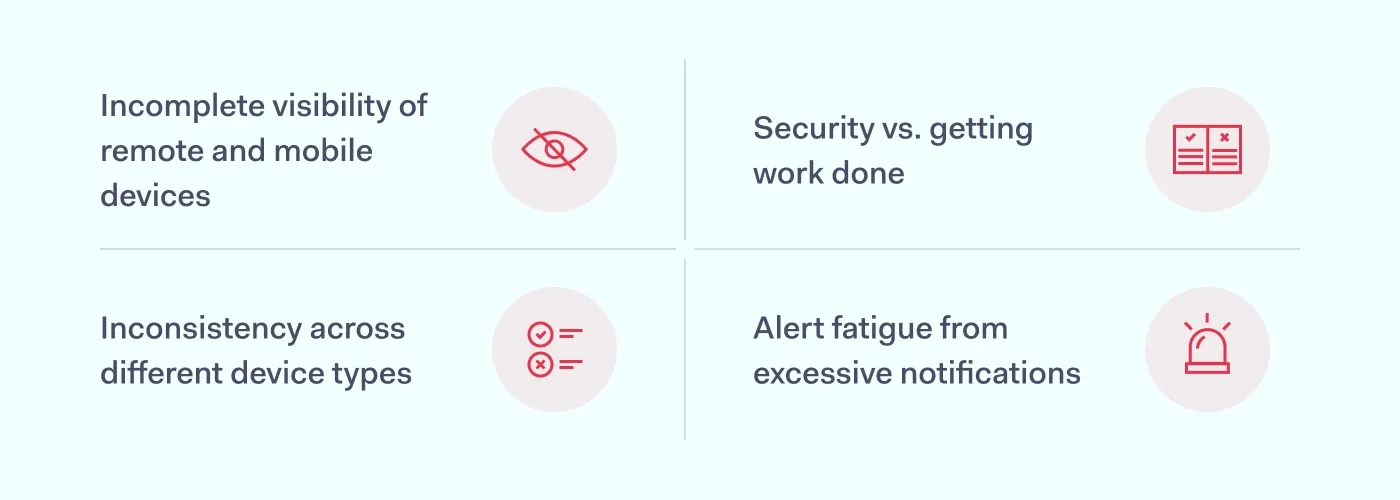
Incomplete visibility of remote and mobile devices
Because remote work makes it so easy to lose track of which laptops or mobile devices are currently interacting with your data, blind spots naturally start to form where unpatched software can stay for months. This lack of oversight eventually turns a single forgotten tablet into a breach, simply because nobody knew it was still connected.
Inconsistency across different device types
Consistency is nearly impossible to maintain when your network is flooded with a mix of company-issued gear and BYOD equipment. Since every smartphone brand and OS version handles security management in its own way, your team inevitably ends up wasting time on manual workarounds for individual users. This stalls your broader device management because you’re too busy troubleshooting a single person’s compatibility issues to enforce high-level protections across the board.
Security vs. getting work done
Strict endpoint management policies only work if they don’t actually get in the way of a deadline. If your security measures feel too intrusive—like slowing down system performance or requiring constant re-authentication—employees will eventually look for ways to get around them. This move toward shadow IT is a direct reaction to that frustration, and it typically results in the transfer of private information into unprotected accounts where you have no visibility.
Alert fatigue from excessive notifications
Even a solid endpoint security setup can become a risk if it generates more data than your team can actually process. When your system is constantly flagging minor configuration changes alongside genuine threats, it’s only a matter of time before a critical alert gets buried in the noise. This fatigue slows down your response time, which is exactly what a hacker is counting on to move through your network before anyone thinks to look.
Endpoints vs. endpoint security vs. endpoint management
These terms get mixed up often, and that’s usually where gaps start. Clarifying them matters because each one solves a different problem, and mistaking one for another leaves parts of your setup exposed.
Term
What it means
Main role
Examples
Endpoints
Devices that connect to company systems and data.
Provide users and services with access to business resources.
Laptops, desktops, phones, tablets, servers
Endpoint security
Security controls that protect endpoints from attacks and unauthorized access.
All 3 areas depend on each other. Organizations first need visibility into their endpoints, then security controls to protect them and management processes to keep those controls and device settings up to date.
Connecting endpoint and network security with NordLayer and CrowdStrike
The biggest problem with having separate tools for your network and your devices is that they usually don’t talk to each other. For example, if a laptop gets infected, it might still have a perfectly valid connection to your private servers because the network layer has no idea the hardware is compromised.
When you use NordLayer and CrowdStrike, the network finally knows what’s happening on the device. NordLayer handles the actual access—deciding who can reach which data—while CrowdStrike provides endpoint protection on the device.
The main advantage here is centralized management—you can manage your CrowdStrike Falcon licenses directly through the NordLayer platform to keep your billing and seat management in one place, while the tools themselves work together to handle threats.
Using NordLayer’s Custom Integrations feature, you can set up automated responses between the two services. For example, if CrowdStrike detects a threat on a device, the integration can automatically log the affected user out and disconnect them from your gateways. This stops a threat from moving through your network in seconds, cutting out the manual work that usually slows you down during an incident.
FAQ
What’s the difference between EDR and endpoint security management?
Endpoint security management is the broad framework used to handle the day-to-day administration of devices, including patch management, software updates, and endpoint management policies. Endpoint detection and response (EDR) is a specific security tool within that framework that focuses on monitoring for active threats and automatically reacting to suspicious behavior in real time.
Do small businesses need endpoint security management?
Yes. Smaller teams often have less visibility into how employees are using personal devices or mobile devices for work, making them an easy target for credential theft. Centralizing your device management helps a small IT team maintain a consistent security standard across the company without needing to manually check every machine.
What should endpoint security management cover for remote workers?
At a minimum, it should include automated patch management to keep software updated without user intervention, and strict access control to verify a device’s health before it connects to the network. It also needs to cover mobile devices and bring-your-own-device (BYOD) equipment to ensure that personal hardware doesn’t turn into a breach.
Aistė Medinė
Editor and Cybersecurity Copywriter
An editor and writer covering cybersecurity, particularly the human side of cybercrime. Aiste writes about social engineering, phishing, threat prevention, zero trust (ZTNA), secure remote access, network security, and cybersecurity for businesses. She’s especially curious about the clever ways attackers manipulate people, and what businesses can do about it.