A dynamic IP address is an Internet Protocol (IP) addresstemporarily assigned to a device by a network, which can change over time. Internet service providers (ISPs) and networks assign dynamic IP addresses automatically, making them the default for most internet connections.
Dynamic IPs make it easier to manage networks without manually assigning a permanent address to every device. They’re also harder for cybercriminals to track, since the address tied to a device can change over the course of days or weeks. But how do they work, what are their limitations, and when might a business need a static IP instead?
Dynamic IP definition
A dynamic IP address is one that’s assigned to a device for a limited time. Unlike a static IP address, which stays the same, a dynamic IP can change when the network reassigns it.
Every device connected to a network needs an IP address to send and receive data. Dynamic addressing lets networks reuse available addresses as devices connect and disconnect without requiring an administrator to configure each device manually.
Most home internet connections use dynamic IP addresses by default. Businesses can also use them, depending on their network setup and access requirements.
Public vs. private IP addresses
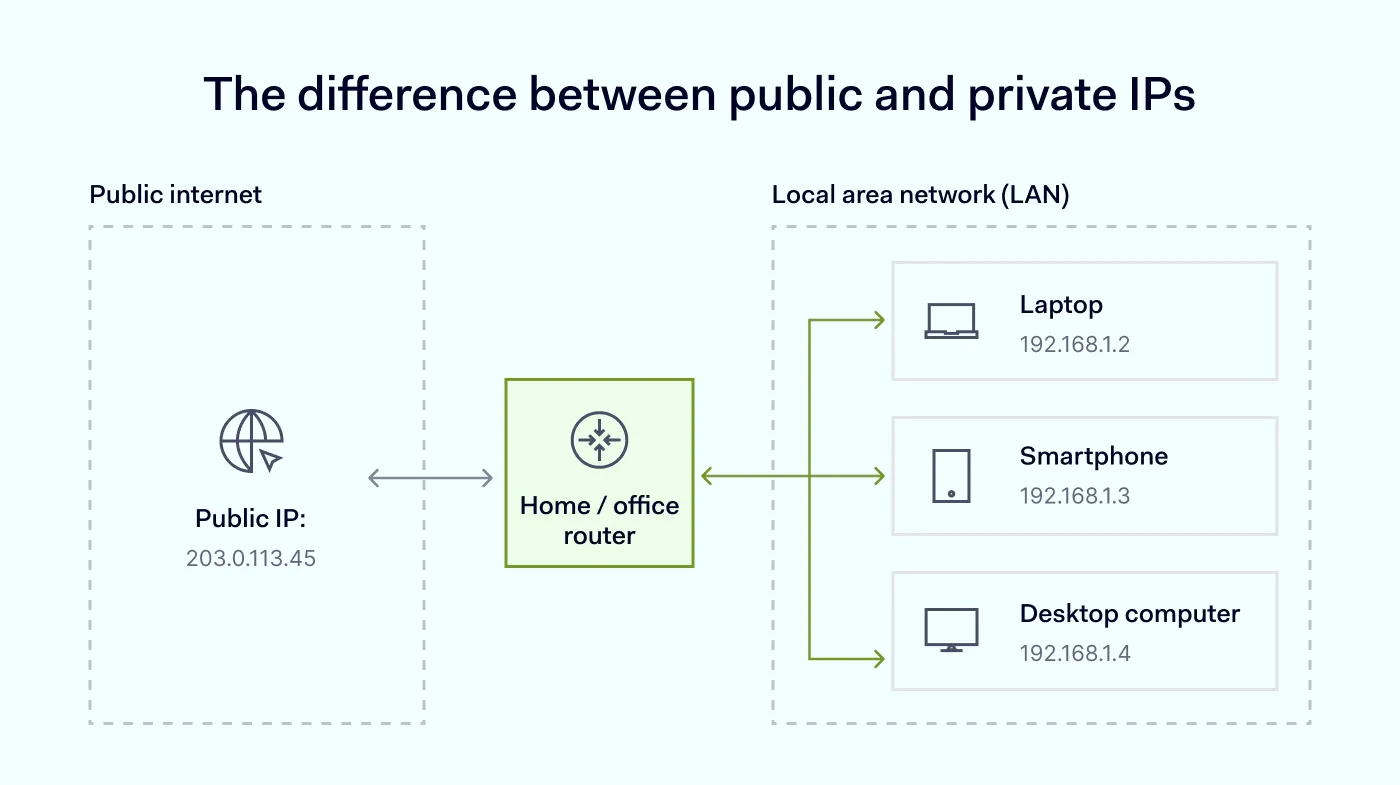
IP addresses differ based on where are they used. IP addresses can be public, which are used to identify a device on the internet, or private, which are used within a local area network (LAN), such as a home or office.
Public IPs are assigned by your ISP and are visible to the outside world; private IPs are assigned by your router and only route traffic inside the local network. Both public and private addresses can be dynamic or static, depending on how the network is configured.
How does a dynamic IP address work?
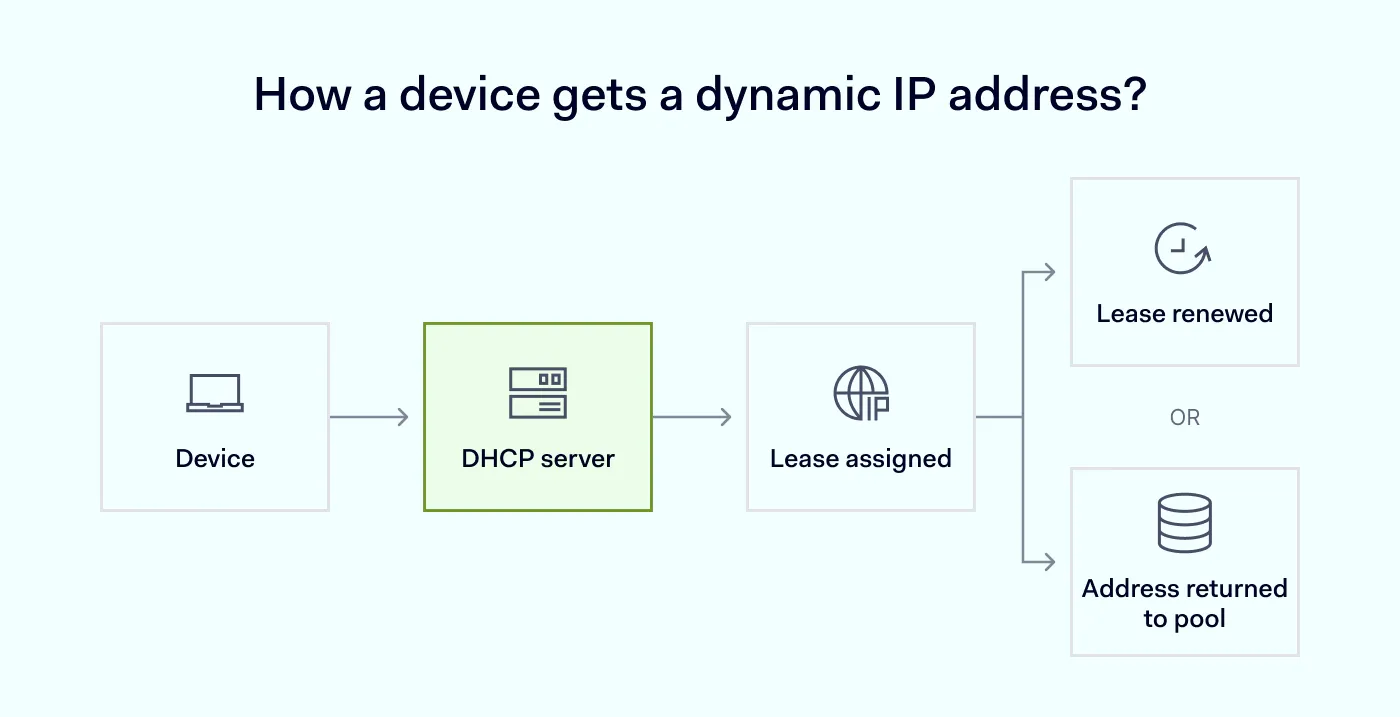
Dynamic IP addresses are usually assigned through the Dynamic Host Configuration Protocol (DHCP). A DHCP server manages a pool of available IP addresses and assigns one to a device when it joins a network.
Here’s what the process looks like:
A device connects to the network. Your laptop, phone, or another device requests an IP address.
The DHCP server offers an address. It selects an available address from its pool and offers it to the device.
The device receives a lease. The server assigns the address for a specific period, known as a lease. The device can use it while the lease remains valid.
The lease is renewed, or the address is reassigned. The device usually renews its lease automatically. If it disconnects or its lease expires, the address may eventually return to the available pool and be assigned to another device.
A dynamic IP address doesn’t necessarily change every time you connect to the internet. The same address may remain assigned for days, weeks, or longer. However, it can change when a lease expires and isn’t renewed, a router or modem reconnects, network settings change, or an ISP reallocates addresses.
The exact timing depends on the network and its DHCP configuration.
How to check if you have a dynamic IP address
To find out whether your connection uses a dynamic IP:
Check your router settings. Look for the internet or WAN connection settings to see whether the IP is assigned automatically through DHCP.
Contact your ISP. Ask whether your connection has a dynamic or static public IP address.
Compare your public IP over time. Check it using an online IP lookup tool, such as WhatIsMyIP.com, on different days. If the address changes, it is dynamic, although an unchanged address doesn’t prove that it’s static.
Restart your router. Power cycling your router or modem often triggers the ISP to assign a new public IP. If the address changes after a restart, you’re on a dynamic connection.
Most connections use dynamic addressing unless a static IP was specifically requested and configured by the ISP or set manually in the network settings.
Dynamic IP addresses offer several practical advantages to individuals and organizations:
Automatic configuration
A DHCP server assigns addresses without requiring manual setup for every device. When a laptop, phone, or printer joins the network, it receives a working IP address within seconds. This removes a repetitive admin task and lowers the chance of human error, such as two devices being assigned the same address by mistake.
Efficient address management
Networks can reuse addresses when devices disconnect, helping conserve the available IP address pool. Because leases expire and return to the pool, the same range of addresses can serve a much larger number of devices over time. This matters most in offices, on campuses, and on public networks, where devices connect and disconnect throughout the day.
Lower costs
ISPs typically include dynamic IP addresses with standard internet connections, but may charge extra for static IP addresses. For most home users and many small businesses, the default dynamic setup covers everyday needs without added fees. Teams only pay more when a specific use case (such as hosting a service or configuring strict access policies) requires a fixed address.
Easy scalability
Devices can join and leave a network without administrators having to assign each one a permanent address. This makes dynamic addressing well suited for growing teams, guest networks, and environments with a mix of company-owned and personal devices. As the device count rises, the DHCP server automatically allocates addresses in the background.
Suitable for everyday internet use
Browsing, streaming, video calls, and many cloud applications work normally with dynamic IP addresses. These services identify users through accounts, sessions, and tokens, not through a fixed IP. For the vast majority of day-to-day business and personal activities, a changing address causes no disruption at all.
Harder to track
Because the address changes periodically, dynamic IPs give cybercriminals a smaller window to profile a specific device or map it to a user over time. A static IP, as opposed to a changing one, can be easier for attackers to monitor and target over longer periods. While this isn’t a complete defense—real security still depends on firewalls, authentication, and access controls—a shifting IP does add a small layer of unpredictability.
Drawbacks of a dynamic IP address
Dynamic addressing works well for most routine connections, but a changing IP address can create challenges for some business needs:
Less predictable remote access. Services that rely on a specific IP address may stop accepting connections when that address changes, unless the setup accounts for dynamic addressing.
More difficult IP allowlisting. If a firewall or third-party service only allows access from approved IP addresses, a changing address may require updates to the allowlist.
Additional configuration for hosted services. A consistent public IP is essential for workloads like hosting websites and running email servers, as DNS records and sender reputation depend on a stable address. Running a server or making a resource accessible through a changing public IP may require a workaround, such as dynamic DNS.
Less consistent identification. An IP address alone is less useful as a persistent identifier because it can be reassigned to different connections.
These are operational drawbacks, not security flaws. A dynamic IP works well for most business connections, and the challenges above only matter when a service specifically depends on a fixed, predictable address.
Searching for a dedicated/fixed IP to power your business?
Both address types let devices communicate over a network. The main difference is whether the assigned IP address can change.
Feature
Dynamic IP
Static IP
Address assignment
Usually automatic
Configured to remain fixed
Changes over time
Can change
Stays the same
Administration
Minimal manual setup
May require additional configuration
Best suited for
Everyday internet access
Services that need a consistent address
A dynamic IP is usually sufficient for regular internet use. A static IP address is more practical when a business needs a consistent address for remote access, IP allowlisting, or hosting services.
If a dynamic address is used to host a service, dynamic DNS can help by updating a domain name’s DNS records when the public IP changes. However, dynamic DNS doesn’t turn a dynamic IP into a static one.
For businesses that need the predictability of a fixed address without giving up the flexibility of dynamic assignment elsewhere, a network security platform can offer both options side by side.
Dynamic IP support for business networks with NordLayer
Businesses don’t always need a fixed IP address to secure their connections. NordLayer’s shared gateways use dynamic IP addresses by default, giving teams secure internet access without requiring every connection to use a dedicated, fixed address.
NordLayer also supports dynamic public IPs for site-to-site connections. A branch office, warehouse, or other remote location can establish a secure site-to-site link to the rest of your network, even if its ISP-assigned public IP changes over time—instead of needing a static IP at every location.
If your organization needs a consistent public IP address, NordLayer also offers a dedicated IP for business. A dedicated IP provides your company with an address that stays the same, making it easier to configure IP allowlisting and manage access to internal resources.
You can choose the option that best fits your network requirements:
Dynamic IPs through shared gateways: suitable when your team doesn’t need a dedicated, fixed public IP address.
Dynamic IPs for site-to-site: suitable when a branch office or remote site needs to securely connect to your network, even if its ISP assigns a changing public IP.
Dedicated IP: suitable when your business needs a consistent IP address for access policies, remote connections, or other services that depend on a stable address.
Whether you use dynamic or static IP addresses, choose a setup that fits the way your team connects to company resources and manages access—and talk to NordLayer about which gateway option matches your network.
Agnė Srėbaliūtė
Senior Cybersecurity Copywriter
After spending a decade writing across media, PR, and advertising, Agne has been specializing in technology and cybersecurity content, focusing on IP address management, networking, zero trust, and internet infrastructure. She helps businesses understand complex technologies through clear, engaging, and sometimes creative content.