Summary: Sites, NordLayer’s cloud-based site-to-site, securely connects remote networks, offices, branches, and cloud environments—now without the need for a static IP.
Today, every organization, no matter how big or small, faces the same challenge: ensuring secure connections between several distributed sites. The most common solution is to use a VPN. However, the type of VPN depends on the company’s network architecture and the type of network.
If you want to securely connect multiple remote networks, offices, branches, and cloud environments, NordLayer Sites is the option to explore.
NordLayer Sites: site-to-site VPN connectivity
NordLayer Sites allows you to create an encrypted site-to-site VPNconnection between several networks, such as an HQ, a branch office, a data center, or a cloud environment, that doesn’t expose traffic to the public internet. This way, users can securely reach shared systems, internal apps, and files as if they were on the same site.
The feature also gives you visibility into tunnel operations, enabling real-time monitoring, data usage evaluation, and IKE rekey tracking. As a result, tunnel management and troubleshooting are easier.
A new capability: supporting dynamic IP addresses
Setting up a site-to-site tunnel has traditionally required a remote router, firewall, or server with a static public IP address. However, many organizations don’t use static IP addresses because they often incur an added cost with many ISPs. Also, requesting and maintaining one for every site isn’t always practical, especially for smaller branches or managed locations.
With our latest updates, Sites now removes that requirement. It now supports remote locations with dynamic public IP addresses. This means you no longer need astatic public IP to set up a site-to-site tunnel. However, keep in mind that a NordLayer’s dedicated IP is still required to manage and secure the gateway itself.
How does NordLayer’s Sites work?
You can enable Sites by connecting NordLayer’s virtual private gateway to a company’s router, firewall, or cloud VPN gateway.
Cloud-based site-to-site also makes it possible to configure a server with a dedicated IP to connect with cloud service providers like AWS, Google Cloud, or Azure.
Remote user connection
Connection from a company branch
Connection from HQ
Whether they are in the branch office, HQ, or a remote location, users with VPN access can connect to the company network and access the added internal resources and the on-site devices connected to the router or firewall, even if those devices don’t support a VPN connection.
NordLayer’s site-to-site feature requires a virtual private gateway and the remote location’s configuration details. Once the tunnel is established, IT admins can monitor its health and performance in real time through live tunnel status dashboards. This includes visibility into tunnel phase states (Phase 1 and Phase 2) and IKE rekey processes, which help resolve encryption mismatches or negotiation errors more efficiently.
Understanding dynamic IP site-to-site
By default, a NordLayer Sites tunnel requires that the remote end (e.g., your office router, firewall, or server) have a static public IP address. You can enter it in the “Remote IP” field when creating a site.
However, if you don’t have a static IP and your remote location has a dynamic IP that changes regularly, you can still build a site-to-site tunnel by entering 0.0.0.0 in the “Remote IP” field.
When the remote IP is set to 0.0.0.0, the NordLayer server doesn’t wait for a tunnel from a fixed address. The site will accept an IPsec connection from any public IP, provided the peer has the correct pre-shared key and encryption settings. This setup is typically called a dynamic peer tunnel configuration.
In practice, it comes down to who starts the connection and how the peer proves its identity.
How is NordLayer Sites different?
Traditional WAN companies use an all-to-one architecture: every remote office and resource connects back to a single central point—usually headquarters.
These organizations rely on legacy site-to-site setups, where employees connect to the network’s main hub to access internal company resources from different locations. While this architecture delivers interconnectivity, it lacks the flexibility and connectivity modern businesses need. It also comes with downsides for network performance, efficiency, and scalability. NordLayer Sites was built to solve exactly that.
As a cloud-based network access solution, Sites offers more advantages than legacy site-to-site setups:
Faster deployment and lower expenses. The feature is hardware-free and compatible with hardware-based or hybrid infrastructures. Functionalities can be deployed within minutes and don’t require high costs and long delivery times, focusing on time-to-value for the organization.
No dependency on a static IP. With dynamic IP support, sites with broadband, mobile, or LTE connections can be brought onto the network without paying for or provisioning a static IP.
Simplified management for growing site counts. The Sites feature can be configured through the Control Panel, so adding new offices, branches, or cloud environments doesn’t require re-architecting the network each time.
Maintained security and productivity levels. Sites distributes encrypted user traffic to company resources based on the nature of the request without affecting connection quality, instead of bulk processing all users to a primary point of connection and allocating to requested resources afterward.
User traffic distribution. The feature decreases the heavy traffic load by directing users to the internet resources, internal data centers, servers, or applications in a more streamlined manner. Therefore, the increased remote user traffic peaks don’t impact performance quality as with a traditional site-to-site setup.
Real-time tunnel monitoring and visibility into IKE rekey states give MSPs and IT admins the insight they need to reduce troubleshooting time across multiple managed sites.
Benefits of site-to-site VPN
Site-to-site VPN lets organizations connect networks—offices, branches, data centers, and cloud environments—over the public internet via an encrypted tunnel. It can be implemented on top of your existing infrastructure and provides the following benefits:
Increased network security
Encrypted, authenticated tunnels between sites help protect data in transit between offices, branches, and cloud environments from interception or tampering.
Streamlined business operations
Site-to-site VPN is deployed and managed centrally through the NordLayer Control Panel, and it doesn’t require configuring or maintaining dedicated hardware at every location. The live tunnel status view helps teams spot and address disruptions before they affect connected sites.
Flexible deployment
Cloud-based site-to-site configuration is a beneficial add-on to the company networks, even for largely hardware-based ones. The reaction-to-action time to solve challenges is shorter. It requires minimal resources and provides a solution based on business needs within minutes.
Plus, phase-specific diagnostics (Phase 1 and 2 status) allow for faster troubleshooting of tunnel negotiation and encryption configuration issues, boosting operational efficiency.
Also, organizations with dynamic internet connections can now get the same reliable site-to-site connectivity that was previously limited only to those with a static public IP.
How to enable NordLayer Sites
Setting up the feature is simple. First, create VPN gateways in the Control Panel to act as network entry points. You can then assign specific teams or roles to each gateway. For seamless cooperation of teams, configure the site-to-site tunnel for each of your company’s locations.
Once the feature is configured, you get visibility into tunnel health through the State and Status tables available in the Control Panel. These include IKE rekey state data and traffic volume indicators that allow you to assess tunnel stability and performance over time. For more technical information, visit our Help Center article.
How to set up site-to-site with a dynamic IP
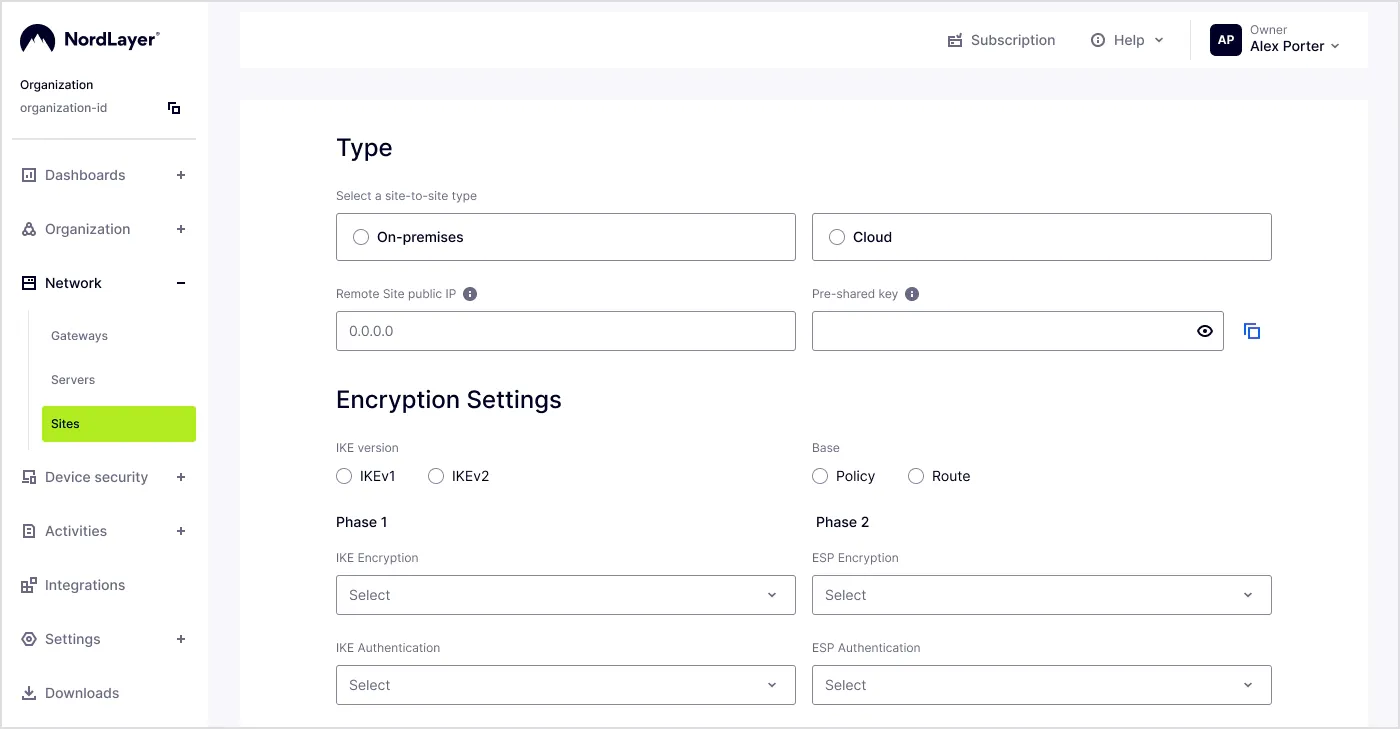
Admins can create a site via the Control Panel. Here is how to set it up:
Go to the Network section on the left and click Sites.
Click Create Site.
Fill in the details:
Site name. Give your configuration a name.
Dedicated server IP. Pick the gateway IP that will terminate the tunnel.
Type of site-to-site setup. Select On-premises and enter your router or firewall model.
Remote ID. Provide the identity of your remote peer. If your remote IP is 0.0.0.0, you must set it explicitly so the server can tell the peer apart. Leave it blank, and it’ll default to your current public IP.
Configure the Encryption settings:
IKE version. Choose IKEv2. Dynamic-peer tunnels don’t work with IKEv1.
Remote IP. Enter 0.0.0.0.
Subnets. Add your remote site’s internal subnet(s).
IKE and ESP encryption. Use AES256, SHA256, and DH Group 14 (modp2048).
Click Create Site and give it a few moments to deploy. You’ll get a confirmation email when it’s ready.
NordLayer Sites allows organizations with dynamic internet connections—including many SMBs, MSPs, and branch or managed locations—to get the same reliable site-to-site connectivity that was previously available only to sites with a fixed public IP.
Andrius Buinovskis
VP of Product Strategy
Andrius brings more than two decades of experience across IT, software development, innovation, business strategy, and executive leadership. As VP of Product Strategy at NordLayer, he focuses on long-term portfolio direction, market positioning, and aligning cybersecurity solutions with changing business needs. He is also a member of the Forbes Technology Council.