Why remote access security is important
As access-related data breaches become more common, remote access security should be every organization’s priority. 67% of incidents investigated by Sophos had identity-related root causes, including stolen credentials, phishing, and brute force attacks.
Remote access security serves the 3 core aspects of every business:
Sensitive data protection
Remote teams handle sensitive data daily. It can be intellectual property, financial records, and confidential client information. If a remote employee accesses your resources through an unsecured connection, threat actors can intercept and expose your data.
Microsoft Digital Defense Report 2026 states that 52.2% of intrusions involving valid accounts start with compromised credentials used to gain unauthorized remote access. So, while strong access controls may not prevent all the breaches, they can reduce the risk of unauthorized access.
Business continuity
Ransomware is one of the biggest threats to business continuity, and it’s on the rise. According to recent statistics from NordLayer Intelligence, ransomware attacks grew 20% year-over-year.
When a major breach happens, your organization’s workflows are disrupted. Systems go down. Employees can’t work. You lose revenue—sometimes thousands of dollars an hour. Strong remote access security works like insurance against these risks.
Meeting compliance requirements
Organizations that handle Protected Health Information (PHI), payment card data, or customer personal data must comply with regulations, such as HIPAA, GDPR, CCPA, and PCI-DSS. These standards have different requirements, but they all address the need to protect sensitive information through appropriate security safeguards.
For example, HIPAA mandates strict access controls, strong user identification, and encryption.
Modern remote access solutions like NordLayer help organizations demonstrate compliance and avoid paying large fines.
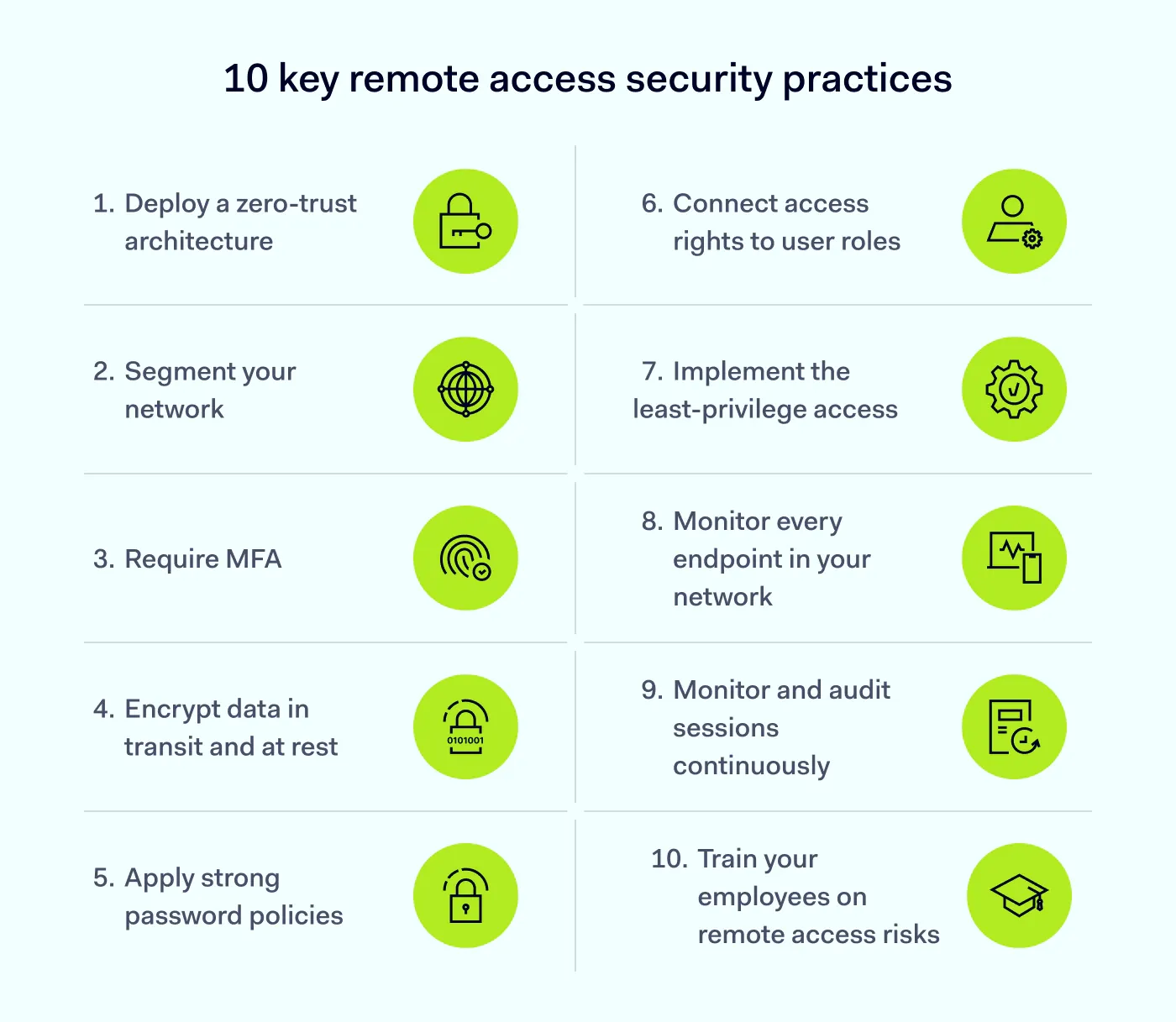
1. Deploy a zero-trust architecture
Zero trust is the foundation of modern remote access. It follows a simple principle: trust no one and nothing by default, whether they’re inside or outside your perimeter. Every access request is verified, every time. That means continuously validating the user’s identity, the health of their device, and the app or resource they’re trying to reach.
NordLayer’s zero-trust network access (ZTNA) connects users only to the specific resources they need based on their verified identity, device posture, and granular policies. If an attacker steals credentials from one employee’s account, their lateral movement across your network will be limited.
The ZTNA framework also supports session timeout controls, which prevent unauthorized access from unattended remote sessions.
2. Connect access rights to user roles
Instead of assigning permissions to each user, you can link access privileges to organizational roles with role-based access control (RBAC). For example, the sales and marketing teams could have full access to customer databases, while admins could restrict their access to HR data or administrative tools. This simplifies access management and strengthens security.
RBAC also helps:
Improve operational efficiency. New hires receive the privileges their role requires, with no manual assignment needed. And when employees change roles or leave the company, automated tools update or revoke their access rights accordingly.
Solve the problem of shared accounts. Users often share login credentials to collaborate on projects or access admin tools—a risky practice that can expose your entire network to attacks. RBAC defines user roles clearly and helps ensure every employee has access to the tools they need.
3. Segment your network
Network segmentation divides your network into smaller, isolated zones with virtual private gateways and cloud firewall rules. This way, if an attacker gets into your network, they can’t move freely. Restricted access to sensitive resources helps contain a breach and limit the damage.
Also, separating heavy traffic into sub-networks can reduce congestion and improve performance.
4. Implement the principle of least privilege
The principle of least privilege (PoLP) grants the bare minimum access users need for their role or task. As an important part of zero-trust solutions, PoLP shrinks the attack surface. Some compliance regulations, like HIPAA, mandate it as well.
Access control tools evaluate access requests and user behavior in real time. For example, if a marketing manager wants access to the accounting database, the system will deny the request.
By reviewing user rights regularly, PoLP prevents privilege creep, which is a step-by-step accumulation of unnecessary access rights over time. It also helps eliminate over-access, a common risk in legacy remote access solutions.
5. Require MFA
As a component of the identity and access management (IAM) system, multi-factor authentication (MFA) provides an additional layer of protection for user authentication.
After entering a password, users verify their identity with a second step, such as:
A one-time password (usually a 6-digit code) from an authentication app
Biometrics like fingerprints or retinal scans
An SMS code
Multi-factor authentication (MFA) requires an additional verification step beyond entering a password, which makes it harder for attackers to access an account using stolen credentials. Microsoft reports that MFA blocks over 99% of unauthorized access attempts.
However, threat actors can bypass SMS-based MFA through SIM swapping and email-based MFA through phishing pages that capture one-time codes in real time. For stronger protection, organizations should use phishing-resistant MFA, such as hardware security keys (FIDO2/WebAuthn) or passkeys.
If you pair phishing-resistant MFA with a zero-trust approach, you can verify every access request based on identity and protect your network from unauthorized users.
6. Monitor every endpoint in your network
Threat actors often target remote employees’ computers, laptops, and phones. Security gaps give them many opportunities for exploitation. For example, an endpoint may be running an outdated version of Windows, or its operating system may not have been patched in months. When compromised devices connect to your network, they can become entry points for attackers. Endpoint protection matters for that reason.
Endpoint detection and response (EDR) tools, antivirus software, and firewalls can strengthen endpoint security. Device posture security checks also confirm that only compliant and healthy devices can access your network resources.
7. Encrypt data in transit and at rest
Encryption changes data into a format that is not readable to unauthorized users. This keeps data confidential and secure, and reduces the risk of a breach.
When employees connect from home networks, airports, or coffee shops, encryption becomes the first line of defense against data interception. Every remote session should route through an encrypted tunnel, such as a business VPN, so that data in transit stays unreadable to anyone monitoring the connection, including man-in-the-middle attackers.
Encryption also helps you meet compliance requirements in regulated sectors like healthcare and finance. However, encrypted traffic should still be inspected for threats, and devices storing data locally need encryption at rest as well.
8. Monitor and audit sessions continuously
Logging every remote access attempt gives you visibility into who’s entering your network. You can also set up alerts for suspicious patterns that detect logins from unusual locations and times. For example, access attempts at 3 AM when your team should be sleeping. Sudden spikes in data downloads. Automated session monitoring catches these red flags before they become security incidents.
Regular audits also help you quickly remove unused accounts. Delayed deprovisioning is one of the most common gaps attackers exploit.
9. Apply strong password policies
For attackers, a password can be the key to your company data. According to NordPass’ research on the 200 most common passwords, many users still choose weak passwords like “123456,” “password,” or “admin.” These passwords can be cracked in less than a second, yet convenience often wins out over security.
Enforcing strong password policies is therefore key for every business. Here are recommendations for creating unique passwords:
Length. It should be at least 15 characters long.
Complexity. It must contain uppercase and lowercase letters, numbers, and special symbols.
Uniqueness. Each account should have a different password.
Prevent password reuse and prohibit shared accounts—they’re a security team’s nightmare because they make it impossible to track who did what.
Better yet, deploy a credential manager like NordPass. It eliminates password reuse and makes strong, unique passwords manageable for employees.
10. Train your employees on remote access risks
Your employees are your human firewall. Even the most advanced solutions will fail if your staff is not security-aware and trained to use them properly.
Here are the topics employee training should cover:
Threats like phishing, social engineering, and ransomware
Remote work basics, such as the proper use of public Wi-Fi and VPNs
Password hygiene and the importance of MFA
Regulatory compliance that applies to your organization
One employee who falls for a phishing email and gives attackers their password can compromise everything. Regular cybersecurity training, held quarterly rather than just once a year, makes employees aware of its importance.
How NordLayer helps secure remote access
Remote access security is a core aspect of your business. The best practices presented here are the minimum required to keep a distributed workforce safe.
The next step is implementing them using a platform like NordLayer that is built for modern security. NordLayer helps businesses secure remote access with:
Zero-trust network access (ZTNA). Grant your employees access only to the resources they need, based on their identity, device posture, and access policies.
Identity and access management (IAM). Enforce MFA, implement single sign-on (SSO) to reduce password fatigue, and centralize access control.
Device posture verification. Check that all devices connecting to your network meet security requirements, such as an updated OS and active antivirus software, before allowing access.
Business VPN. NordLayer’s proprietary NordLynx protocol, powered by WireGuard, provides secure, encrypted connections with granular control.
Does your team work remotely and need extra protection? Explore our secure remote access solutions and see how they fit your security stack.