Summary: Employees are behind 62% of cyber breaches. Learn 7 practical cybersecurity habits to protect passwords, data, devices, and remote work connections.
Good cybersecurity goes far beyond knowing which links to skip. Everyday decisions, from how people handle company data to how they connect to work systems, can create opportunities for cyber threats to reach an organization. As attackers focus on human behavior, good cybersecurity starts with simple habits that help employees recognize risks, protect company data, and respond quickly when something looks wrong.
The 7 cybersecurity best practices for employees include using strong, unique passwords, spotting phishing attempts, keeping software updated, handling company data carefully, and reporting suspicious activity fast. The full list below covers habits every employee can build into their daily routine.
Why employee cybersecurity habits matter
Organization protection is not only the IT and security teams responsibility. Employees are part of an organization’s security defenses because they make decisions about passwords, emails, files, devices, applications, and network connections every day.
The 2026 Verizon Data Breach Investigations Report (DBIR) found that the human element was present in 62% of cyber breaches analyzed. Social engineering accounted for 16% of the breaches, as did phishing. Verizon also found that simulated mobile social engineering attacks, such as those delivered through text messages or voice calls, were 40% more successful than email-based simulations.
These numbers don’t suggest that employees are the problem. Rather, they show why security awareness and practical employee training matter. Attackers deliberately look for ways to exploit human behavior, whether through convincing phishing messages, stolen credentials, malicious links, or social engineering.
Good cyber hygiene gives employees a practical way to reduce these risks. It also builds a culture where people feel comfortable asking questions and reporting mistakes instead of hiding them. Employees should be encouraged to report suspicious activity without fear of blame, because early reporting can help organizations respond before a small problem becomes a serious security incident.
How employee mistakes can lead to security breaches
Most security breaches start with a small, unintentional slip: a missed detail, a quick reply, a file sent to the wrong person. A rushed decision, an overlooked phishing message, or an accidentally exposed file can give attackers a way in.
These mistakes can take several forms:
Phishing. An employee clicks a malicious link and unknowingly gives an attacker access to their credentials or device.
Credential reuse. An employee uses the same password for multiple accounts. If one service is compromised, attackers can try the stolen credentials elsewhere. Nearly two-thirds of Americans reuse passwords across accounts, which makes this one of the most common paths to compromise.
Accidental data exposure. Someone sends a confidential document to the wrong recipient or uploads company data to an unauthorized service.
Unsafe remote access. An employee connects to an untrusted network or uses an unauthorized application to access company resources.
Lost or stolen devices. An unattended or unsecured device can expose company data if it isn’t protected with appropriate authentication and encryption.
Social engineering. An attacker impersonates a colleague, manager, supplier, or other trusted person and convinces an employee to reveal information or perform an action.
Cyber threats are designed to exploit normal human behavior. Attackers create urgency, impersonate trusted people, and use familiar tools and communication channels because these tactics can bypass even strong technical defenses.
Network security, built strong
From basics to advanced tactics, discover how to fortify your network against modern threats
How organizations can reduce the impact of mistakes
The mistakes are the reason why organizations need multiple layers of protection. Security awareness and employee training help people recognize threats, while multi-factor authentication (MFA), access controls, network security, endpoint protection, and other security tools can limit the damage when someone makes a mistake.
Organizations should also make reporting easy. When an employee realizes they clicked a suspicious link or sent information to the wrong person, reporting it immediately gives security teams more time to contain the problem. An incident response plan can then guide the organization through the investigation, containment, recovery, and follow-up processes.
Employee cybersecurity aims to reduce the likelihood of mistakes, limit their impact, and surface incidents fast when they happen.
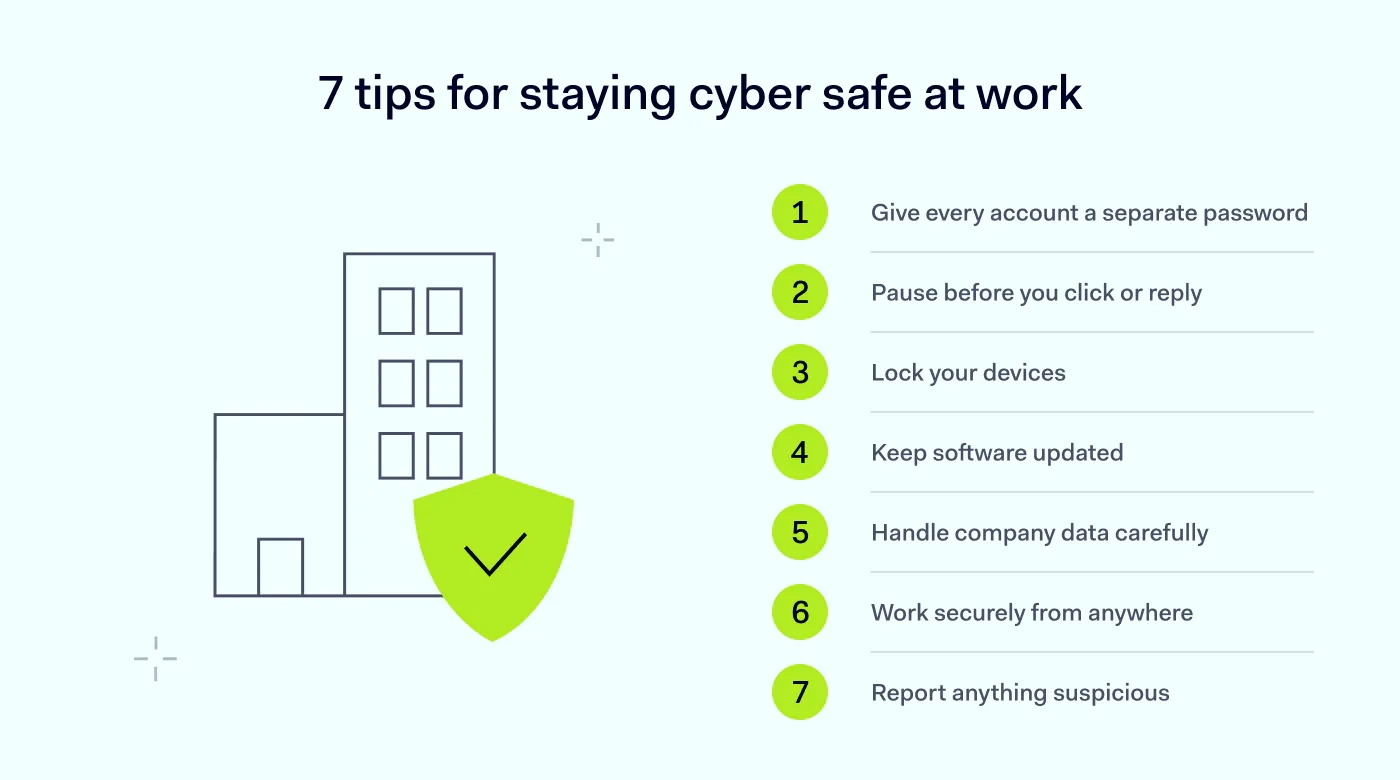
7 cybersecurity tips for employees
Several small habits, used together, can be more useful than any single defense. Therefore, employees should build several simple practices into their everyday work.
1. Give every account a strong password
Avoid using the same password for multiple work or personal accounts. If one password is compromised, attackers may try it on other services through credential stuffing. This is not a rare habit, and attackers count on it.
Use long, unique passwords for every account and store them in an approved password manager instead of reusing or writing down credentials. A strong password combines uppercase and lowercase letters, numbers, and symbols, and is long enough—consisting of at least 8 characters—to resist being guessed. Enable multi-factor authentication (MFA) wherever your organization supports it, so a stolen password alone isn’t enough to get in.
Password security is critical because compromised credentials remain a major entry point for cyber breaches. The 2026 Verizon DBIR found that credential abuse accounted for 13% of breaches, down from 22% the previous year, as vulnerability exploitation overtook it.
2. Pause before you click or reply
Phishing messages are designed to make you act before you have time to think. They may ask you to open an attachment, click a link, share credentials, transfer money, or provide other sensitive information. Don’t rely only on obvious spelling mistakes or strange-looking emails. Modern cyber threats can involve convincing messages that imitate real people, brands, or colleagues.
Before responding, check:
Who sent the message, and whether the email address is legitimate.
Whether the request is unexpected or unusually urgent.
Where links actually lead before opening them.
Whether the sender is asking for credentials, payments, or sensitive company data.
Whether the request makes sense in the context of your work.
Be especially careful with unexpected messages received through text or voice calls. Social engineering isn’t limited to email. If something feels off, report it to IT immediately rather than replying to the sender.
3. Never leave a device unlocked
A secure account doesn’t help much if someone can access an unlocked device. Set your work laptop and mobile devices to lock automatically after a short period of inactivity, and manually lock them whenever you leave them unattended. Don’t leave work devices unlocked in shared offices, public spaces, transport hubs, or other places where someone could access them.
Physical security is part of cyber hygiene. An unattended device can provide direct access to company data, applications, messages, and saved credentials.
4. Install updates as soon as they arrive
Don’t ignore operating system, browser, application, or security updates. These updates often include fixes for vulnerabilities that attackers could otherwise exploit. Enable automatic updates when your organization’s policies allow it. If a work device requires an update or security patch that you can’t install yourself, contact IT instead of continuing to use an outdated system.
This matters because attackers actively target known vulnerabilities. Verizon’s DBIR found that vulnerability exploitation became the leading initial access vector, accounting for 31% of breaches.
5. Treat company data like it’s your own
Think before downloading, sharing, copying, or uploading company data. Follow your organization’s rules for storing and transferring sensitive information, especially when working with customer records, financial information, credentials, intellectual property, or confidential documents.
The sheer quantity of data is reason enough to be careful: research by Varonis suggests employees have access to an average of 11 million files each, so one careless share could expose far more than a single document. Practice least-privilege access by only opening the information you actually need for your work.
Avoid sending company files to personal email accounts or uploading them to personal cloud storage simply because it’s convenient. Use approved applications and storage services instead of taking shortcuts. Back up important work files through your organization’s approved backup system, so data loss from ransomware or device failure doesn’t set you back.
Be equally careful with physical information. Don’t leave confidential documents unattended or dispose of them without following your organization’s procedures. Good data security depends partly on technology, but employees also need to understand what company data they handle and how they are expected to protect it.
6. Connect safely from any location
Remote work can expose employees to networks and devices outside the organization’s direct control. Home networks, public Wi-Fi, and personal devices can introduce additional security risks. When working remotely:
Use your organization’s approved VPN or secure access solution when required.
Avoid handling sensitive company data over unsecured public Wi-Fi.
Keep your home router and devices updated, and change the router’s default administrator password—default credentials are widely known and easily exploited.
Don’t connect work devices to unknown or untrusted networks unnecessarily.
Follow your organization’s rules for personal devices and BYOD.
7. Report: better safe than sorry
If you click a suspicious link, lose a work device, accidentally send data to the wrong person, or notice unusual account activity, report it as soon as possible. Don’t wait until you’re certain that something is a cyberattack. Your IT or security team can then investigate and determine what happened.
Fast reporting gives security teams more time to contain threats, reset compromised credentials, isolate devices, and begin the organization’s incident response plan. Organizations should make reporting straightforward and avoid a culture where employees are afraid to admit mistakes.
A suspicious message reported quickly is easier to deal with than a security incident discovered after an attacker has had time to move through the environment.
Security awareness works best when good practices become routine, not something employees think about only during annual training. Organizations can support this by providing regular employee training, keeping cybersecurity policies easy to find, and explaining why specific security measures exist.
Training should cover the cyber threats employees are most likely to encounter in their roles, from phishing and credential theft to unsafe data sharing and remote-access risks. Consistent data security practices—how information is stored, shared, and disposed of—should be placed at the center of that training.
Security teams can also use realistic examples and simulations to make training more practical. When employees understand what a suspicious request looks like and know exactly where to report it, they’re more likely to act quickly.
When cybersecurity becomes a shared responsibility, employees don’t need to be experts themselves—they need clear expectations, practical guidance, and the confidence to ask for help when something doesn’t look right. Even though habits and training reduce the odds of a mistake, employees still need the right tools working behind them.
How NordLayer helps protect employees
Employee awareness is an important layer of protection, but people shouldn’t have to defend company systems on their own.
NordLayer provides security tools that help organizations protect employees and company resources wherever they work. Secure remote access and network security controls protect connections to business resources, while access controls can restrict who can reach specific applications and systems.
The strongest defense pairs capable tools with aware employees: security technology reduces exposure and enforces policies, and good cyber hygiene helps people recognize threats and respond appropriately.
Agnė Srėbaliūtė
Senior Cybersecurity Copywriter
After spending a decade writing across media, PR, and advertising, Agne has been specializing in technology and cybersecurity content, focusing on IP address management, networking, zero trust, and internet infrastructure. She helps businesses understand complex technologies through clear, engaging, and sometimes creative content.