Summary: DLP monitoring tracks sensitive data, detects risky activity, enforces security policies, and helps prevent data leaks across devices, networks, and cloud apps.
Sensitive data is everywhere: endpoints, cloud apps, email, browsers, and personal devices, and it has never been more vulnerable to exposure than now. A file sent to the wrong recipient, an unauthorized upload to an AI tool, or an accidental share can expose confidential information and lead to a costly data breach. According to IBM, the average global cost of a breach in 2026 is $4.99 million.
Data loss prevention (DLP) monitoring helps organizations detect and prevent the unauthorized exposure of sensitive information. Below, we explain how it works, what it can detect, and where organizations can use it.
What is DLP monitoring?
DLP monitoring tracks, scans, and inspects sensitive data at rest and in motion, across networks, cloud environments, and endpoints. It helps detect suspicious activity and prevent unauthorized access to, sharing of, and exfiltration of data.
It also ensures confidential data, such as financial records, intellectual property (IP), or Personally Identifiable Information (PII), is handled according to the company’s security policies.
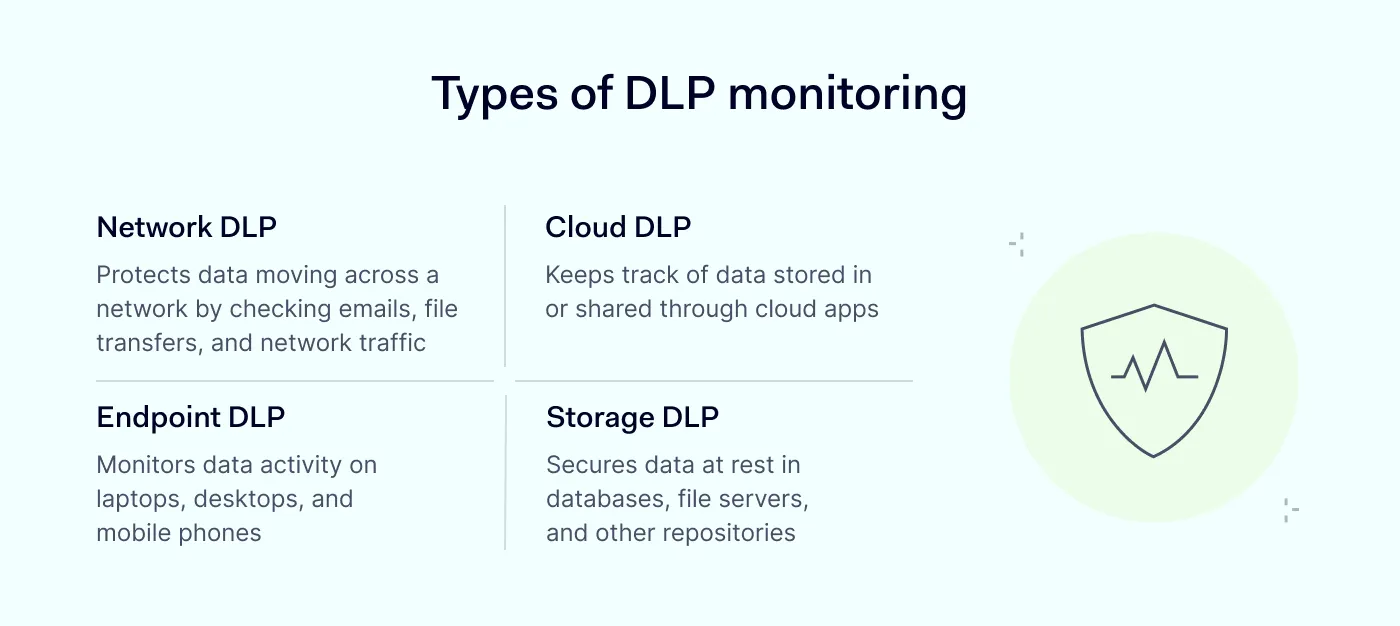
There are a few main types of DLP monitoring:
Network DLP
Protects data as it moves across your network by checking emails, file transfers, and network traffic.
Blocks data exfiltration, whether malicious or accidental.
Data can leave an organization in many ways. For example, an employee can email a file to the wrong person, paste source code into an unapproved AI tool, or deliberately copy company data before leaving the job.
DLP covers each of these vectors by detecting attempts to access, move, copy, or share protected data.
Common reasons for deploying DLP monitoring include:
Preventing unauthorized accessand data sharing. DLP monitoring can stop sensitive information from being sent through unauthorized channels, such as personal email, messaging apps, cloud storage, and external devices.
Reducing the risk of insider and human error. Insider threats and employee mistakes can lead to a data leak, but DLP can help detect it. If, for example, a confidential file is sent to the wrong recipient, DLP monitoring can stop it.
Helping with incident investigations. Security teams get logs, which they can use to review user actions, understand incidents, and assess whether existing policies are working as intended.
Reducing false positives. Effective DLP systems use context, such as the type of data, user, destination, and activity, to distinguish normal business use from high-risk behavior and, in this way, reduce false positives.
Supporting compliance.Compliance regulations, such as HIPAA, GDPR, NIST guidelines, and PCI DSS, expect businesses to implement security controls related to accessing, handling, monitoring, and logging sensitive data. DLP monitoring is one of the tools that helps provide records for security audits.
How DLP monitoring works
DLP tools inspect data and compare user activity against predefined rules. Some tools also use behavioral analysis or machine learning to identify unusual activity.
DLP monitoring typically relies on the following capabilities:
Content inspection. The tool scans files and data packets for sensitive information, such as credit card numbers, credentials, or other defined patterns.
Contextual analysis. It checks who is accessing the data, where the data is going, what device or application is involved, and how it is shared.
Policy enforcement. Based on company rules, DLP can block unauthorized data transfers, require a protective measure, or alert the security team.
The areas that a comprehensive DLP include:
Data at rest
It protects data stored in databases, file servers, cloud storage, endpoints, and other repositories.
DLP monitoring can identify sensitive files, check how they are classified, and help security teams find data stored in unauthorized or exposed locations.
Data in transit (or motion)
IT safeguards data that moves between systems or leaves a company through channels such as email, file transfers, messaging apps, or cloud services. Depending on the policy, DLP can allow, block, or alert the security team about these transfers.
Data in use
This covers data that users or applications are actively accessing or working with. DLP policies can restrict actions such as copying sensitive information to external devices, pasting it into unauthorized applications, or uploading it to unapproved services.
The moment DLP monitoring detects risky or suspicious activity, it alerts the security team or automatically blocks the action based on predefined policies.
Here are a few examples of where DLP solutions are useful:
Email and messaging
An employee attaches a spreadsheet with confidential customer information to an external email. The DLP tool detects the sensitive data and blocks the message before it is sent.
A user tries to send a Social Security number through a messaging service that company policy does not allow for sensitive data. The DLP system flags or blocks the message.
Cloud storage and SaaS apps
An employee tries to upload a folder of Protected Health Information (PHI) to a personal Dropbox account. DLP detects the sensitive file type and blocks the upload.
A sales rep shares a confidential pricing sheet via a public Google Drive link. The DLP tool sees the “Confidential” tag inside the file and restricts the transfer.
File transfers and USB devices
An employee plugs a personal USB drive into a work laptop and tries to copy a customer database. DLP recognizes the database format and blocks the copying.
A user tries to print a full list of employee salaries at a shared printer. DLP catches the printing job and cancels it.
Web traffic and browsers
A developer pastes source code into a public web forum or an AI chat tool. DLP identifies the code snippets and blocks clipboard use on that site.
An employee downloads a large export of CRM contacts to a personal file-sharing service on their last day. DLP flags the unusual download volume and alerts IT before the file leaves the system.
Network and endpoint monitoring
A compromised account slowly exfiltrates small files over several days using a technique called “low and slow.” DLP’s behavioral analytics spots the pattern and shuts down the transfer midstream.
A laptop is left on in an airport lounge, and an unknown device tries to access its shared folders. DLP detects the unauthorized access attempt and blocks the connection.
5 pain points DLP monitoring helps with
DLP monitoring can help security teams address several common problems related to sensitive data protection:
1. An expanding attack surface
Hybrid work, cloud services, BYOD, and distributed infrastructure spread sensitive data across more locations.
Browsers are a major part of this shift. According to recent NordLayer research, 82% of surveyed IT professionals say their company experienced a security incident connected to browsers, websites, or web apps in the past 12 months.
DLP monitoring gives security teams another way to control how sensitive information moves across these environments.
2. Shadow IT and the growing popularity of SaaS tools
Employees now often use new cloud applications, file-sharing services, browser extensions, and AI tools without telling IT. The 2026 Verizon DBIR also found that employee use of unapproved shadow AI reached 45%, tripling from the previous year.
When IT teams can’t see which tools employees use, they may also lose visibility into where company data goes. DLP controls can restrict data transfers to unapproved services and give IT more information about risky data movements.
3. Balancing data security and everyday work
If DLP policies are too strict, employees may try to bypass them. Security teams can reduce this risk by balancing security rules and user convenience.
Common data loss prevention best practices include classifying sensitive data, limiting access, monitoring data activity, reviewing policies, training employees, and maintaining an incident response plan.
4. Insider threats and human error
Insider threats are a big part of data breach risk, whether through malicious actions, compromised accounts, or simple mistakes.
According to the 2026 Verizon DBIR, mentioned earlier, internal actors were involved in 12% of all breaches. The report also found that the unintentional human element contributed to around 60% of breaches.
A user may send information to the wrong recipient, place a confidential file in public storage, or transfer data to an unauthorized service. DLP monitoring can detect these actions and either alert the security team or block them when they break company security policy.
5. Compliance requirements
Organizations that operate across multiple regions must comply with different privacy and data protection regulations, including the GDPR, the CCPA/CPRA, and China’s PIPL. Under the GDPR, certain violations can carry penalties of up to €20 million or 4% of a company’s annual worldwide revenue.
DLP supports compliance by recording data activity and restricting unauthorized transfers.
How browser DLP helps protect web-based work
More work now happens inside the browser. Employees upload files, copy and paste information, use AI services, join video calls, and access company systems through web apps. Gartner estimated in 2025 that fewer than 10% of organizations use a secure enterprise browser.
Traditional endpoint and network DLP can protect many data flows. However, some actions inside web applications—like an employee uploading a confidential document to an unapproved AI tool—are harder to detect. Browser DLP helps control how employees handle data within the browser.
File uploads and downloads. Admins can set rules by domain, app, user group, or transfer direction.
Clipboard activity. Copy-and-paste actions can be allowed for approved apps and blocked for restricted destinations.
Camera and microphone access. Company policies can block these permissions on restricted websites.
Browser activity visibility. Admins can see browser activity and identify risky SaaS use or data movement.
Extension monitoring and blocking. It prevents malicious extensions from exfiltrating data.
Beyond DLP controls, NordLayer offers web activity monitoring. It gives IT teams visibility into how data moves through the browser, helping identify risks early on.
Joanna writes about zero trust, network security, access control, and threat prevention, but her cup of tea is compliance and how regulations shape security controls.
Her work also includes the dark web topics and the methods cybercriminals use to target companies, such as social engineering or ransomware attacks, for example.