8 web security threats businesses must address in 2026
Anastasiya Novikava
Summary: Browsers are now the top attack surface for businesses. We discuss the 8 most common web threats and 7 steps to fight back.
Most business leaders still treat the browser as a productivity tool, and it is. But the browser is also a web security boundary.
People do more of their work in the browser every year, and that's where most business functions now live. NordLayer analyzed 504 widely used workplace applications identified through the Gartner platform across 18 business categories. All applications are available through the browser, and none of them requires a desktop version.
A compromised browser can expose everything that happens there: email, payroll, CRM, cloud storage, and admin consoles, all at once. Attackers know this, and they have built an entire category of threats around it. Web security threats include attacks that use browsers, websites, web apps, or browser sessions to steal credentials, spread malware, hijack access, disrupt operations, or move sensitive data out of your business.
In this article, we cover the 8 web security threats IT professionals encounter most often, along with concrete steps to reduce your organization's exposure.
The gap between confidence and protection
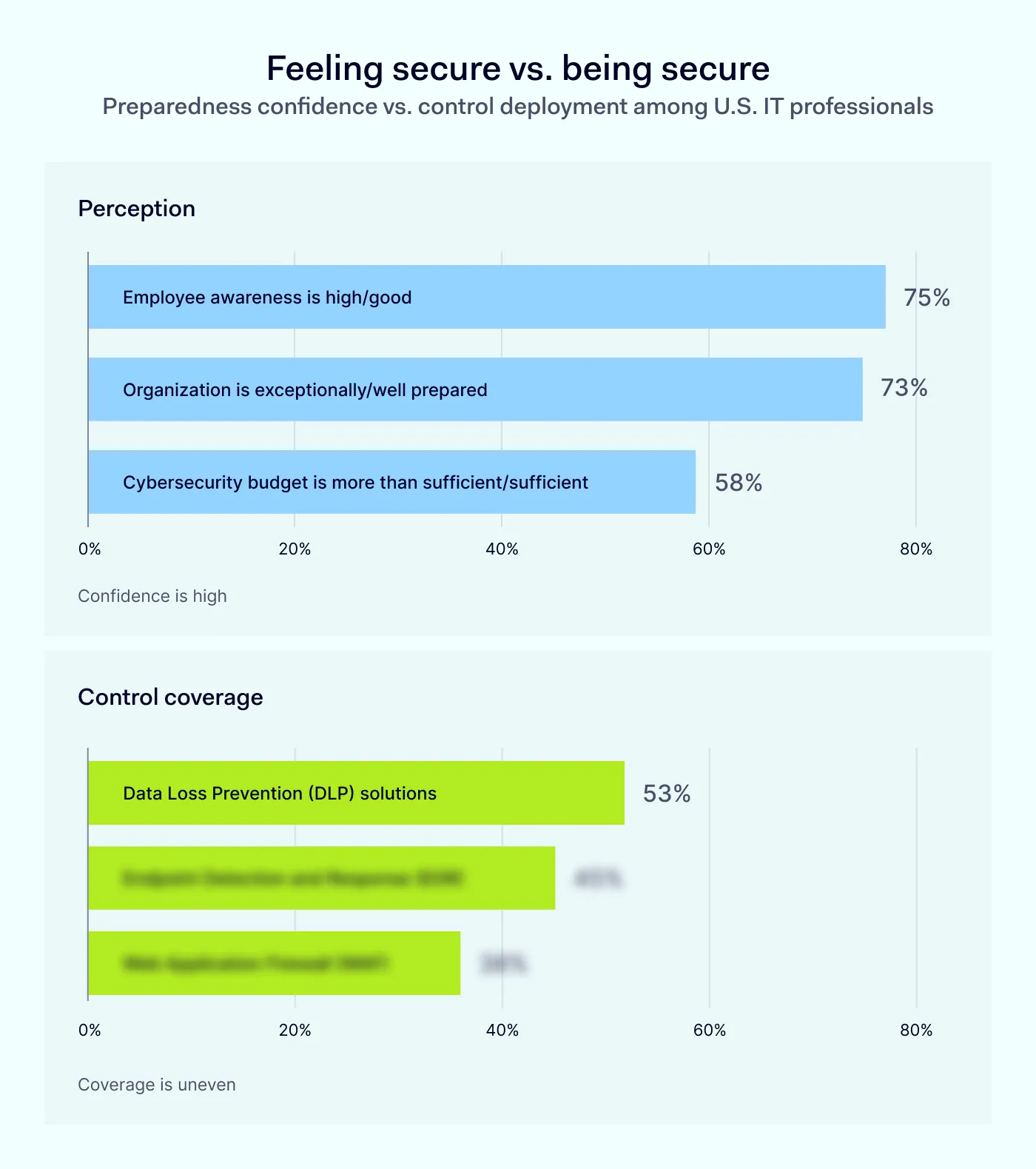
According to NordLayer's 2026 research, most IT professionals believe their organization is prepared for a cyberattack. But 82% of them also said their company had a security incident linked to browsers, websites, or web apps in the past 12 months.
Organizations report strong confidence in readiness for web-based threats, but deployment of key controls is less consistent.
Only 53% of organizations have deployed at least some of the key protections that would help monitor devices for suspicious activity, block employees from access to known malicious websites, or detect and prevent sensitive data leakage.
Some leaders may ask: “We've invested in antivirus and firewalls. Isn't that enough?” Not anymore, especially if your organization supports remote, hybrid, or bring-your-own-device (BYOD) work. In many cases, the browser session has replaced the office firewall as the web security boundary.
This article covers the highlights
The full report covers everything else: more data, deeper analysis, and a step-by-step action plan for your team.
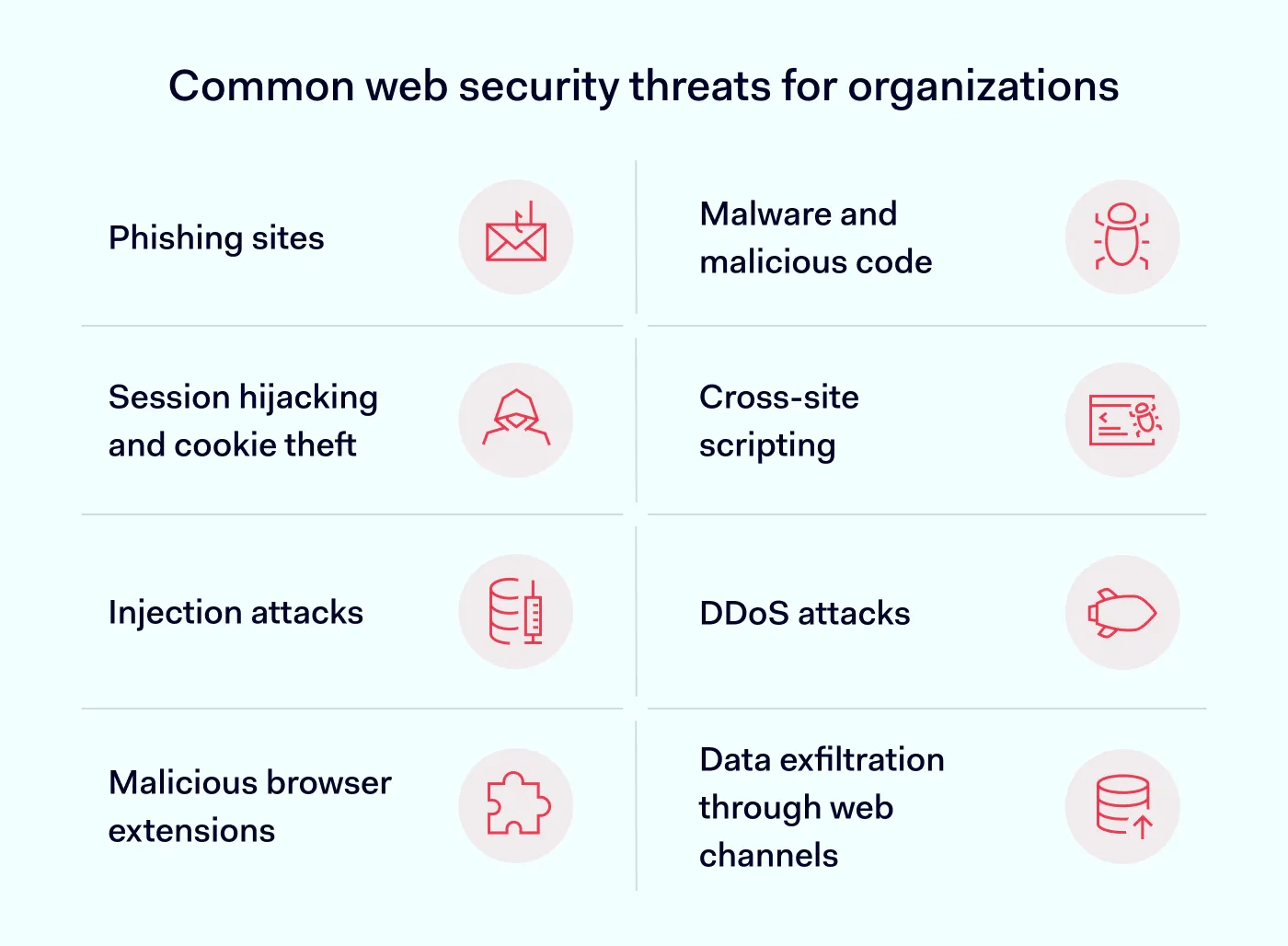
Our survey of IT professionals identified phishing, malware, ransomware, and data exfiltration as the top web threats by frequency and severity. Browser exploits and API vulnerabilities ranked in the middle, while supply chain attacks and zero-days were rated lower. Beyond the survey, we also include DDoS attacks, which can halt business operations within minutes. Together, these 8 threats represent the web security risks organizations are most likely to face in 2026.
1. Phishing attacks
Phishing attacks trick employees into entering credentials on fake websites. Criminals build login pages that replicate Microsoft 365, Google Workspace, or banking portals. The pages look authentic, but when an employee submits their username and password, attackers capture both instantly.
Smaller organizations face particular risk because employees at small businesses experience 350% more social engineering attacks than those at larger enterprises. Hackers know that phishing emails are more likely to succeed and less likely to be detected quickly. With email access, an attacker can reset passwords across connected services, intercept invoices, or send payment requests that appear to come from executives. One compromised inbox can unlock access to payroll systems, vendor accounts, and customer data. Phishing remains one of the most damaging web security threats because it requires no technical vulnerability, only a moment of misplaced trust.
2. Malware and malicious code
Browser-delivered malware arrives through multiple vectors: fake software updates, infected file downloads, compromised browser extensions, and exploit kits embedded in legitimate websites. Infostealer malware poses a critical web security threat to businesses because it extracts saved passwords, session cookies, and autofill data within seconds of infection.
The 2024 Ticketmaster breach demonstrates the scale of damage possible. Unauthorized activity was detected in a third-party cloud environment containing Ticketmaster data. Investigators and public reporting linked the broader Snowflake campaign to previously stolen credentials acquired with infostealers. Public reports said the breach could affect up to 560 million users. That’s how an infected endpoint can enable one of the largest data breaches of the year.
3. Session hijacking and cookie theft
When you log into a web application, the server issues a session cookie: a small file that proves you are authenticated successfully. Attackers who steal that cookie (usually through infostealer malware) can impersonate you without your password. Session hijacking allows attackers to bypass passwords, and often even multi-factor authentication (MFA), because the session was already verified by the browser.
The attacker's activity appears identical to legitimate employee behavior because they hold a valid session token. That's why session hijacking is very hard to detect. Many organizations discover session theft only after funds transfer, data disappears, or customers report fraudulent communications. Among web threats that bypass traditional defenses, session hijacking stands out because MFA alone cannot stop it.
4. Cross-site scripting
Cross-site scripting (XSS) attacks inject malicious code into web applications. When a user visits the compromised page, the script executes in their browser. It can steal session tokens, log keystrokes, capture form submissions, or redirect users to phishing sites.
XSS vulnerabilities typically exist in web applications rather than end-user systems. For instance, in 2018, attackers from the Magecart group exploited a cross-site scripting vulnerability on the British Airways website to inject a malicious script into its payment page. The script captured credit card details from approximately 380,000 transactions before the breach was detected. The failure resulted in a £20 million fine under GDPR and demonstrated how a single XSS vulnerability can compromise hundreds of thousands of customer records.
5. Injection attacks
Injection attacks manipulate how web applications process user input. SQL injection, the most common variant, inserts database commands into form fields or URL parameters. A successful attack can extract entire databases, modify records, or delete critical data.
One unpatched injection flaw in a trusted application can expand the attack surface and cascade across thousands of businesses that rely on the same software. In 2023, attackers exploited a SQL injection vulnerability in MOVEit Transfer, a widely used file transfer application. The Cl0p ransomware group used this single vulnerability to breach more than 2,500 organizations and expose the personal data of over 60 million individuals. These application security issues primarily affect organizations that build or use custom web apps.
6. DDoS attacks
Distributed denial-of-service (DDoS) attacks overwhelm websites with traffic until they become unreachable. Attackers coordinate thousands of compromised devices to flood a target simultaneously. For businesses that rely on e-commerce, online booking, or customer portals, even a four-hour outage can mean lost sales and damaged reputation.
DDoS activity rose sharply in 2025. Industry data shows that attack volumes more than doubled compared to 2024, and the largest attacks grew significantly in size and intensity. Any organization with an online presence can be targeted. Government agencies warn that DDoS attacks affect organizations across multiple sectors and can disrupt public-facing services and critical operations. Smaller organizations are particularly vulnerable because they often lack dedicated DDoS mitigation infrastructure.
7. Malicious browser extensions
Browser extensions often receive broad permissions by default. A malicious extension can read every page you visit, capture passwords as you type them, modify displayed content, or redirect payment transactions. Google and Microsoft review extensions before publication, but malicious code still reaches official stores through obfuscation and delayed activation.
One compromised extension can expose the entire attack surface of an employee's browser. Every website they visit, every credential they enter, every file they download becomes visible to the attacker.
For instance, in December 2024, cybercriminals used a phishing email to compromise a Cyberhaven employee's credentials, then published a malicious update to the company's Chrome extension. The compromised version was active for more than 24 hours, and the malicious code was designed to exfiltrate session cookies and authenticated sessions from affected browsers. Follow-up research found that the same campaign had compromised at least 36 Chrome extensions with a combined user base of 2.6 million people. Malicious extensions represent a growing category of web security threats because they operate with trusted access inside the browser itself.
8. Data exfiltration through web channels
Attackers who gain access to business systems extract data through the same channels employees use daily: email attachments, cloud storage uploads, and copy-paste to external sites. Without data loss prevention controls, sensitive information leaves the organization without any alert.
Customer lists, financial records, intellectual property, and employee data all carry value on criminal markets. Many organizations lack visibility into what data leaves their network, which means breaches go undetected until customers or regulators notify them. Data exfiltration is the end goal behind most web threats, and it is the stage where financial damage becomes irreversible.
7 steps to reduce your exposure to web-based threats
Businesses face frequent attacks because hackers view smaller organizations as easier targets. Limited web security budgets, leaner IT teams, and default configurations create opportunities that larger enterprises have closed. The following actions help address the web threats outlined above:
Deploy MFA on critical accounts. Protect email, identity providers, payroll, finance, CRM, and admin accounts with hardware security keys (like YubiKey) or passkeys. Authenticator apps also provide reasonable protection. However, SMS codes can be intercepted and should be avoided when alternatives exist.
Filter web traffic and restrict downloads. A secure web gateway blocks access to known malicious sites before employees can reach them. Configure browser policies to restrict downloads to approved file types and enable reputation checks that flag suspicious URLs and attachments. Web traffic filtering addresses several web security risks at the network level before they reach the endpoint.
Limit browser extensions to an approved list. To reduce the browser’s attack surface, block installation of unapproved extensions across all company-managed browsers. Review the permissions each approved extension requires and remove extensions that request access beyond their stated function.
Migrate passwords to a dedicated manager. Browser-stored passwords are a primary target for infostealer malware. Move employees to a business password manager that generates unique credentials for each account and does not store them in browser profiles.
Ensure endpoint protection covers every device. Confirm that EDR or antivirus software runs on all company devices and any personal devices used for work. Remove local administrator rights from everyday user accounts. Malware that runs without admin privileges causes less damage.
Create a clear incident response process. When an infection occurs, speed matters. Document steps for your team: isolate the affected device, reset passwords for all accounts accessed from that device, revoke active sessions in cloud applications, and review recent account activity for unauthorized access.
Review BYOD policies and enforce minimum controls. If employees access business systems from personal devices, they require current operating systems, active endpoint protection, and screen locks. Partial controls leave gaps that attackers exploit.
No single measure eliminates all application web security risks, but each step raises the cost for attackers and reduces the chance of a successful breach. The web security threats in this article are the ones that IT professionals report as frequent, real, and damaging. Start with the controls you can deploy this quarter, then expand coverage as your resources allow.
How NordLayer Browser addresses cyber threats
NordLayer Browser consolidates multiple web security functions into a single managed browser. Rather than using separate tools for web filtering, extension control, download restrictions, and data loss prevention, IT teams can manage these capabilities from one dashboard.
Phishing and malware protection. NordLayer Browser blocks access to known phishing sites and malicious downloads before they reach employees. The browser checks URLs against threat intelligence feeds in real time.
Extension management. Administrators restrict extensions to an approved list. Employees cannot install unapproved extensions, which eliminates a common entry point for malicious code.
Data loss prevention. Built-in controls limit how employees can copy, share, or transfer sensitive information. DLP policies apply consistently across websites and web applications.
Visibility into browser activity. IT teams gain insight into browsing patterns and can detect shadow IT (unapproved SaaS applications employees use without authorization).
Support for managed and personal devices. NordLayer Browser works on company-owned hardware and personal devices used for work. Policies apply regardless of where or how employees connect.
For organizations that lack resources to deploy and maintain five separate application security tools, NordLayer Browser reduces the attack surface through a single solution. It addresses the most common web threats in one platform rather than a patchwork of disconnected products. Want to see how it works for your business? Contact sales to schedule a conversation.
The browser has become the primary workplace interface. Protecting it directly addresses the web security threats that IT professionals encounter most often.
Anastasiya Novikava
Cybersecurity Copywriter
Anastasiya is a cybersecurity copywriter with a decade of experience in content marketing. She creates product comparisons, threat research and statistics, white papers, customer case studies, and educational content, with a focus on AI threats, data breach prevention, and compliance frameworks (DORA, GDPR, NIS2).