
Most organizations now run their work inside SaaS applications, and the security gap that creates is hard to ignore. In NordLayer’s 2026 web-based threats report 82% of IT professionals reported a browser-linked security incident in the past year and every work app in the study ran fully in the browser, with no desktop install. Email, files, customer records, source code, and HR data all reside in tools that a vendor hosts and the customer configures. This arrangement creates a problem: the vendor secures the platform, but the customer controls many of the settings that attackers target SaaS security posture management exists to close that gap.
What is SaaS security posture management?
SaaS security posture management (SSPM) is a security practice and tool category that regularly checks the security state of SaaS applications. It finds risky settings, excessive permissions, weak identity controls, exposed data, and unsafe third-party integrations, then helps teams fix those issues before attackers exploit them.
SSPM focuses on the configuration and access controls within each SaaS account, rather than the vendor’s infrastructure. It reviews how an application is set up, who has access, what admin roles exist, which connected apps and OAuth grants are active, how data is shared, and whether audit logs are turned on.
A SaaS provider can be secure and still leave the customer exposed. For example, Microsoft 365, Google Workspace, and Salesforce offer strong controls, but the customer must set up multi-factor authentication (MFA) admin roles, sharing rules, app consent, and logging correctly. SSPM tools collect and compare those settings across the whole SaaS portfolio, ranking the riskiest ones and surfacing applications that would otherwise become blind spots.
Why is SSPM important?
SaaS moved a large part of security responsibility onto the customer and many teams have not adjusted to that change. Under the shared responsibility model, the provider runs the infrastructure, but the customer keeps responsibility for data, identities, user accounts, access management, and application configuration. NIST is worth citing here because it gives the formal definition that the whole model rests on: NIST describes SaaS as a model where customers use provider-hosted applications without managing the underlying infrastructure, while still controlling user-specific settings. Attackers go after those customer-controlled settings.
The volume of SaaS apps makes the problem worse. A single company often uses tens or hundreds of SaaS applications, and the most sensitive data sometimes spreads across many of them. Each app usually starts with safe defaults, but risk builds over time as admins add users, connect third-party apps, create API tokens, grant OAuth permissions, open external shares, and change MFA rules. Accumulating changes are the core problem SSPM addresses.
Mandiant reports that many SaaS intrusions rely on valid access and native features, such as bulk exports and connected apps, rather than malware. In a June 2026 case, an attacker used a compromised legacy credential to obtain OAuth tokens that connected a vendor’s app to Salesforce, then reached data in connected customer environments. Salesforce disabled the affected app connection, and the issue was traced back to the integration, not a platform flaw. That is why SaaS security posture has to cover connected apps and tokens, not only human users.
How does SSPM work?
An SSPM platform connects to each SaaS application through its API, usually with read-only access at first. It then ingests configuration, identity, permission, sharing, and audit data, compares the current state against security baselines, and reports what it finds.
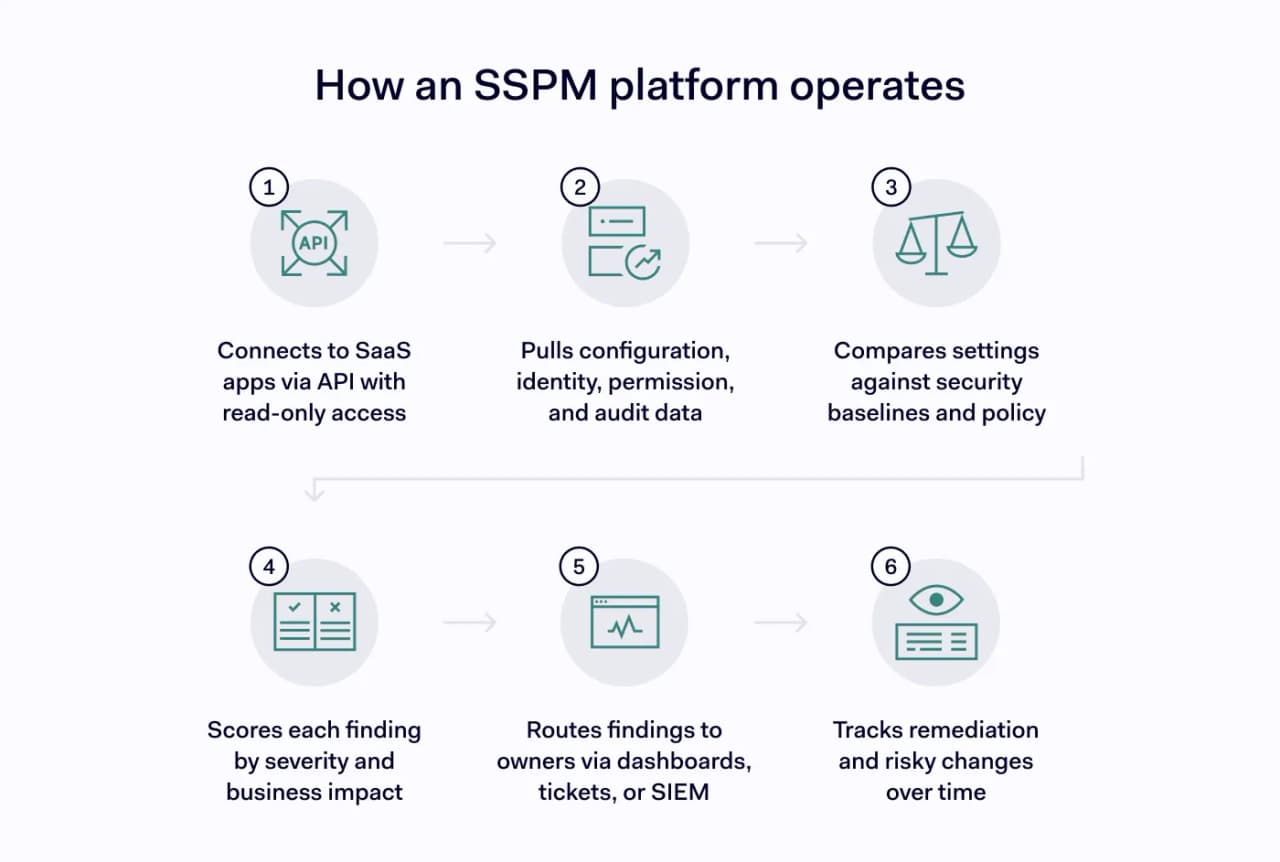
An SSPM program moves through 6 stages:
- Connect SaaS applications through API access or service accounts, with read-only permissions where possible.
- Pull configuration, identity, permission, data-sharing, integration, and audit-log data.
- Compare the current state against security baselines (such as CISA SCuBA, CIS benchmarks, and vendor recommendations) and internal policy.
- Score each finding by severity, exploitability, and business impact.
- Track remediation, accepted exceptions, and risky configuration changes over time.
SSPM turns SaaS security from a quarterly checklist into an ongoing system. A manual review is periodic, and a new admin role or OAuth app can introduce risk minutes after the review ends.
Features of SSPM
SSPM tools share a common set of capabilities that, together, give security teams an accurate picture of SaaS risk. The list below covers the functions most platforms provide.
- SaaS discovery and inventory find applications, tenants, owners, and connected systems, so that unmanaged apps stop creating hidden risks.
- Configuration assessment checks tenant settings against security baselines to catch unsafe defaults and risky changes.
- Identity posture checks review MFA, single sign-on, local accounts, admins, guests, and inactive users to expose weak access controls.
- Permission analysis finds excessive privileges held by users, admins, groups, and service accounts, so teams can apply least privilege
- OAuth and integration review inspect connected apps, consent grants, scopes, and tokens to limit third-party access.
- Data exposure checks flag public links, external sharing, broad report access, and bulk export risks before data leaks.
- Logging and audit checks confirm that audit logs are enabled, retained, and exported for investigations.
- Risk scoring and remediation guidance rank findings by impact and provide clear steps to resolve them.
Benefits of SSPM
1. Ongoing visibility across SaaS applications
Security teams get a single, current view of the security status of every connected application. That view reduces blind spots and helps surface shadow SaaS that no one approved. Because it covers the full portfolio, teams stop relying on memory or scattered spreadsheets to track risk. The result is a clearer sense of where the organization stands at any moment.
2. Faster detection of misconfigurations
SSPM tools surface unsafe settings soon after they appear. A new external share or a weakened session policy gets flagged while it can still be fixed quickly. This shortens the window in which a misconfiguration can be exploited and lowers the chance that small mistakes will compound into larger risks.
3. Stronger identity and access control
By flagging weak MFA, stale accounts, and over-permissioned roles, SSPM supports a least-privilege approach to access. It highlights former employees who still hold accounts and admins whose rights exceed their needs. Tighter identity controls lower the chance of account takeover and privilege abuse. Over time, this keeps the SaaS access model closer to what each role actually requires.
4. Better control over third-party access
Review of OAuth apps and connected integrations limits the persistent, non-human access that attackers favor. SSPM shows which apps hold broad scopes, long-lived tokens, or access to email, files, and admin APIs. Teams can then revoke or restrict grants that no longer serve a purpose. This directly addresses the integration risk behind many recent SaaS breaches.
5. Clearer compliance evidence
SSPM keeps current records of configuration, access, and control status across SaaS apps. Auditors can see how settings map to frameworks and baselines without a manual evidence hunt. Because checks run on a regular schedule, the evidence reflects the live state rather than a stale snapshot. This supports audit readiness and the ongoing validation of controls a customer is responsible for.
Limitations of SSPM
SSPM is a strong addition to a security program, but it has boundaries.
- SSPM does not replace other controls It reports posture but does not enforce authentication or block traffic on its own.
- Coverage depends on supported applications. A tool that only reviews Microsoft 365 and Google Workspace leaves other SaaS apps unchecked.
- Findings still need owners. Without a remediation process, alerts pile up unresolved.
- It relies on API access and the data each vendor exposes so some logs require specific licensing or setup.
- It does not catch every active attack. SSPM is preventive posture work and should complement, not replace, threat detection in a SIEM.
SSPM vs. CASB vs. CSPM
These 3 categories are related but solve different problems. Cloud security posture management (CSPM) focuses on cloud infrastructure, such as storage, compute, and networks. A cloud access security broker (CASB) acts as a policy enforcement point between users and cloud services. SSPM examines the application-layer settings within SaaS accounts. Some platforms combine all 3.
Category | Primary focus | Typical question |
|---|---|---|
SSPM | SaaS app configuration, identity, permissions, integrations, data exposure | “Is our Salesforce or Microsoft 365 tenant configured safely?” |
CASB | Policy enforcement between users and cloud apps | “Can we control user sessions, app access, and data movement?” |
CSPM | Public cloud infrastructure posture | “Are our AWS, Azure, or Google Cloud resources misconfigured?” |
SIEM | Central log collection and correlation | “Can we detect suspicious events across systems?” |
SSPM use cases
The value of SSPM is easiest to see in the everyday problems it catches.
- SSPM finds orphaned accounts by detecting former employees who still hold active Salesforce or Microsoft 365 access.
- Catches risky OAuth grants by flagging a third-party app that received broad permission to read emails and files across the tenant.
- Closes external sharing gaps by identifying document libraries set to share with everyone.
- Enforces strong admin authentication by surfacing admin accounts that can sign in without phishing-resistant MFA.
- Catches risky configuration changes by alerting you when a safe setting reverts to an unsafe state after approval.
- Confirms logging coverage by verifying that audit logging is enabled and retained long enough for an investigation.
Conclusion
SaaS now holds the data that matters most, but its security depends on settings the customer controls. SSPM gives security teams ongoing insight into configuration, identity, and integration risk across their SaaS applications, so problems get fixed before attackers find them.
NordLayer does not replace a dedicated SSPM platform, but it strengthens the controls SSPM depends on.
- Its zero-trust network access solutions help restrict access to SaaS and cloud resources by user, device, gateway, and policy, reducing the impact of misconfigured or overexposed applications.
- Device posture security verifies device health before access, so risky or noncompliant endpoints can be blocked from business apps.
- Cloud firewall lets teams define granular rules for who can reach resources, which limits lateral movement and unauthorized SaaS access.
- Dedicated IP and virtual private gateways support IP allowlisting for tools that accept trusted network locations.
- SSO, MFA, and SCIM-based provisioning support stronger identity governance, while custom integrations can connect NordLayer with SIEM, SOAR, EDR, XDR, or email security tools for faster response and workflow automation.