Zero-trust BYOD: securing personal devices at work
Agnė Srėbaliūtė
Summary: Zero-trust bring-your-own-device (BYOD) strategy protects personal and mobile devices through continuous verification, browser-level controls, and secure remote access.
The distinction between work and personal technology has largely disappeared. Employees use their own laptops, smartphones, and other mobile devices to access corporate resources from almost anywhere.
The remote work flexibility is a win for individuals, but it makes security harder to control for organizations that don’t properly secure bring-your-own-device (BYOD) environments.
What is zero-trust BYOD?
Zero-trust BYOD is a security approach that only allows personal devices to access corporate resources after strict verification checks are completed. Instead of automatically trusting a device because it belongs to an employee, a zero-trust security modelcontinuously evaluates who the user is, what device they use, where they connect from, and whether they meet company security policies.
In traditional BYOD environments, once users connect to the network, they often receive broad access to internal systems. A zero-trust model works differently. Access decisions are based on continuous validation rather than one-time login approval.
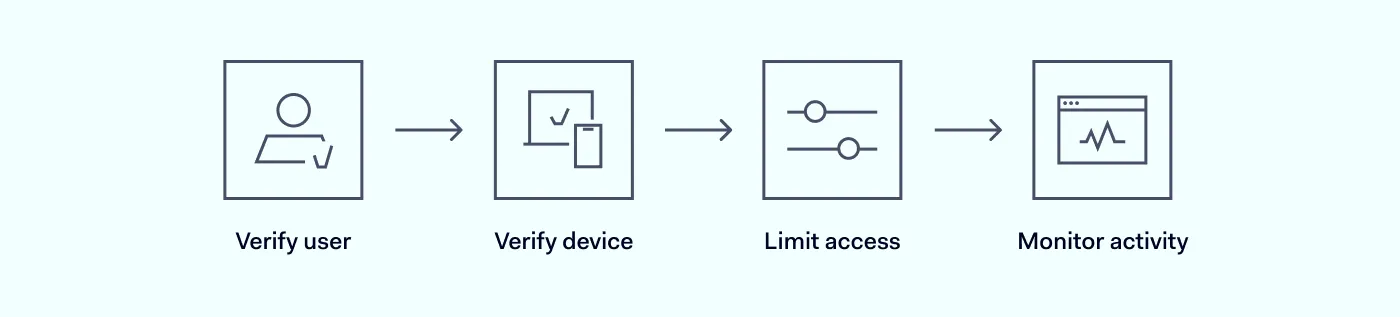
For example, before allowing someone to access company resources, a modern BYOD setup may verify:
User identity through multi-factor authentication (MFA)
Device posture, such as operating system updates or antivirus status
User location and network context
Access permissions based on job role
Whether the device complies with internal security policies
This approach helps organizations restrict access to sensitive systems and reduce unnecessary exposure across BYOD devices.
Why legacy BYOD protection no longer works
Traditional approaches to securing employee-owned devices were designed for a different workplace reality. In the past, many organizations relied on office networks, perimeter-based security, and company-managed devices. Today, however, employees work remotely, switch between networks, and use personal devices outside of IT oversight.
These traditional security models were built on the assumption that users and devices inside the corporate network could largely be trusted. In contrast, modern zero-trust security follows a “never trust, always verify” principle, where every user, device, and access request must be continuously validated, regardless of their location or network.
Limited visibility into personal devices
IT teams usually have less control over personal laptops and mobile devices than they do over corporate-owned hardware. Employees may delay updates, install unapproved software, or connect through unsecured Wi-Fi networks. Without visibility into device health, compromised devices can quietly enter the environment.
Overly broad access permissions
Traditional VPN access often connects users to large portions of the internal network. This makes it easy for attackers to gain access to multiple systems and move laterally across the environment if they compromise a single account or device.
Increased attack surface
Every unmanaged device added to the network expands the attack surface. Mobile devices and personal laptops can become entry points for phishing attacks, malware, or stolen credentials. Without proper controls in place, compromised BYOD devices can provide attackers with direct access to sensitive systems.
Security policies are harder to enforce
Employee-owned laptops and mobile devices make consistent enforcement more difficult. Different operating systems, browsers, and applications create security inconsistencies that traditional approaches struggle to manage.
As remote work continues to grow, organizations need security models that verify every connection instead of assuming that devices are trustworthy by default.
Core principles of zero-trust BYOD
Zero-trust BYOD is not a single tool. Rather, it’s a security strategy built around multiple layers of verification and access control.
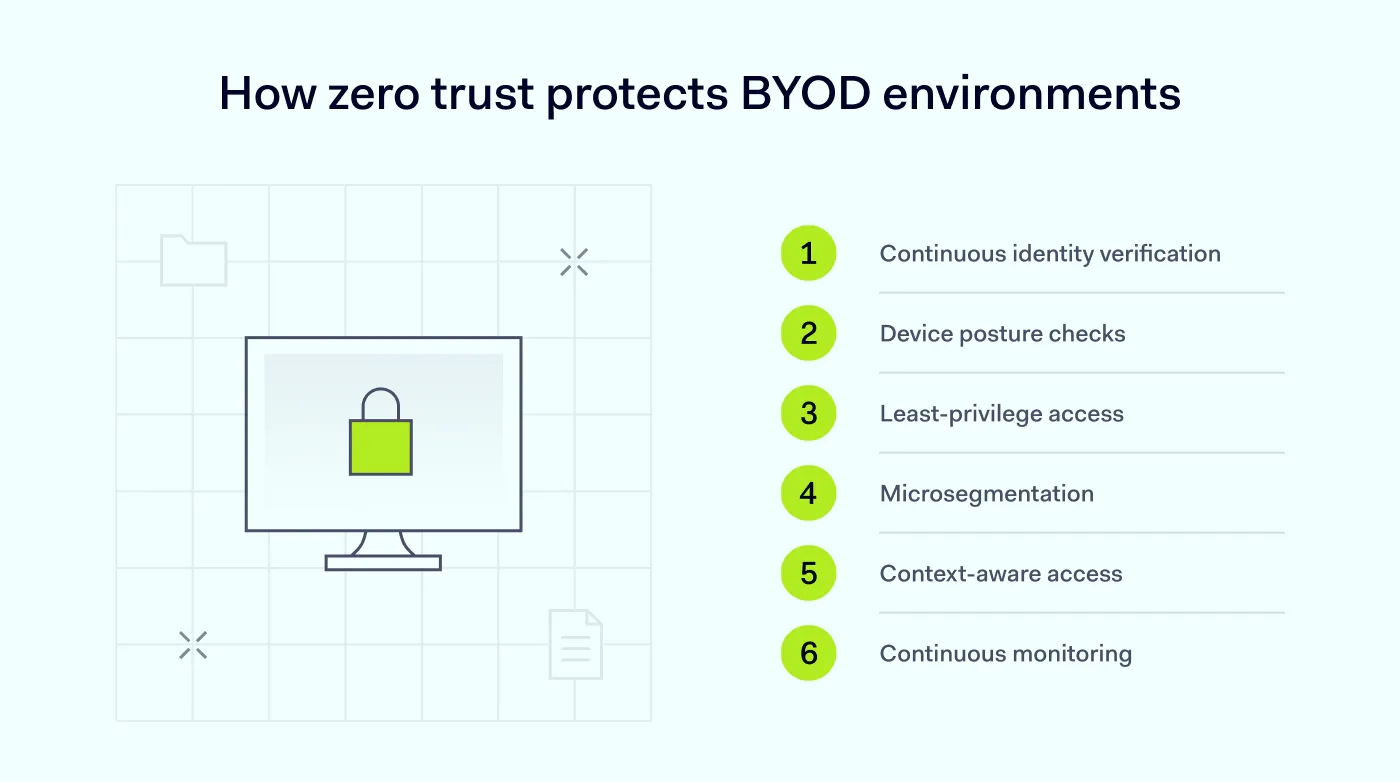
Continuous identity verification
Authentication should be continuous, not just at login. MFA, single sign-on (SSO), and contextual access policies help verify users throughout a session and reduce the risk of compromised credentials.
Device posture checks
Before users access corporate resources, organizations should verify whether their devices meet security requirements. This may include checking:
These checks are especially important for unmanaged mobile devices connecting from external networks. If a device fails compliance checks, organizations can deny access automatically.
Least-privilege access controls
Users should only have access to the systems and data they actually need. Limiting permissions reduces unnecessary exposure and helps contain potential threats if a device or account is compromised.
Many zero-trust architectures also use microsegmentation, which separates networks and applications into smaller, protected zones. This helps prevent attackers from moving laterally across systems.
Context-aware access decisions
Zero-trust security evaluates contextual signals continuously. Access policies may change depending on:
User location
Device type
Login behavior
Network risk level
Time of access
This allows organizations to adapt security policies dynamically instead of applying the same rules to everyone.
Continuous monitoring
Zero-trust BYOD environments require ongoing visibility into user activity, connected devices, and network behavior. This visibility is critical in environments where employees regularly switch between laptops, tablets, and mobile devices. Monitoring helps detect suspicious activity early and supports faster incident response.
Why browser-level protection matters in BYOD environments
For many employees, the browser has become the main workspace. They access cloud applications, SaaS platforms, collaboration tools, and internal dashboards through their browsers every day. That means device security now starts at the browser level.
Traditional endpoint security tools may not fully protect browser-based activity, especially when employees use unmanaged devices. Sensitive company data can still be copied, downloaded, uploaded, or shared through web applications. This has become particularly important as remote work continues shifting business activity into browsers and cloud platforms.
Browser-level security helps organizations apply zero-trust principles directly to where work happens. This may include:
Solutions like NordLayer’s zero-trust browser help organizations secure browser activity without adding unnecessary complexity for employees.
As modern work happens through browsers and cloud applications, browser-level visibility and controls become important for protecting company resources.
Doubt by default, secure with certainty
Implement Zero Trust principles to ensure every user and device is authenticated & authorized
Building a secure BYOD strategy requires more than simply allowing employees to use their devices. Organizations should establish clear policies, technical controls, and monitoring processes.
Here are several practical steps to strengthen a zero-trust strategy for employee-owned devices:
Define a formal BYOD policy that explains acceptable device usage and security requirements.
Require MFA for all remote access attempts.
Apply least-privilege access controls across company resources.
Verify device posture before granting access.
Segment sensitive systems from general user access.
Monitor device and user activity continuously.
Restrict access for noncompliant or risky devices.
Use browser-level controls for SaaS and cloud applications.
Review access permissions regularly.
Test security policies and response procedures on a recurring schedule.
A strong zero-trust strategy combines visibility, identity verification, and granular access controls across the entire environment.
How NordLayer supports secure BYOD access
Securing BYOD environments means balancing flexibility with control and supporting remote employees and their devices without raising risk. NordLayer brings the controls that make zero-trust BYOD work in practice, from identity checks to browser-level policy enforcement.
With NordLayer, organizations can:
Enforce identity checks with multi-factor authentication and single sign-on integrations (Google, Entra ID, Okta, OneLogin, JumpCloud).
Apply role-based access control (RBAC) through ZTNA, so users only reach the resources they need.
Segment network access with a cloud firewall to limit lateral movement.
Monitor connections, throughput, and device posture across users and devices.
Use NordLayer Browser for shadow IT visibility and browser DLP elements that control copy-paste actions, downloads, and uploads.
If a device fails compliance checks, DPS stops the user from connecting through it without locking down the device itself. When combined with the NordLayer Browser, IT teams get a clear view of what’s happening at the access layer, while employees keep using the devices they already own.
Zero-trust BYOD comes down to verifying every user, device, and session before granting access. NordLayer gives IT teams the tools to do so without slowing the business down.
Agnė Srėbaliūtė
Senior Cybersecurity Copywriter
After spending a decade writing across media, PR, and advertising, Agne has been specializing in technology and cybersecurity content, focusing on IP address management, networking, zero trust, and internet infrastructure. She helps businesses understand complex technologies through clear, engaging, and sometimes creative content.