Balancing secure connectivity with performance is one of the more practical challenges IT teams face today. Route everything through the VPN, and you protect all traffic, but some apps slow down. Route nothing through it, and you lose control.
NordLayer’s split tunneling gives you a middle path. It’s a flexible traffic management feature that lets your organization choose whether to protect only selected traffic or encrypt all traffic by default while defining exceptions.
Instead of an all-or-nothing setup, IT teams set centrally managed policies that fit how their workforce operates.
How does VPN split tunneling work?
A traditional business VPN routes all internet traffic through an encrypted tunnel via one of the provider’s VPN servers. That keeps every connection covered, but it can add latency for apps that don’t need the tunnel—Microsoft Teams and other collaboration tools, for example, or SaaS apps that already handle their own encryption.
Split tunneling changes that model. Instead of forcing every packet through the tunnel, it lets you split traffic into two paths: one that goes through the VPN and one that connects to the internet directly.
The split is defined by rules the admin sets, not by the user or the app.
VPN split tunneling with NordLayer
NordLayer’s split tunneling fits into your existing NordLayer setup without extra tooling. Configuration lives in the Control Panel alongside your other network policies.
To set up the include or exclude mode on the gateway, go to the “Network” section of the Control Panel, open “Gateways,” and choose the split tunneling mode you want. From there, add the IP addresses or subnets you want to include, or the IP addresses, subnets, and domains you want to exclude. The policy applies organization-wide from that point on.
To set up exclude mode on the browser extension, go to “Settings” in the Control Panel, then “Browser Extension Settings,” and add the domains, subdomains, or wildcards you want to exclude from the tunnel.
For popular collaboration services—Microsoft Teams, Zoom, and Google Meet among them—NordLayer offers ready-made presets. Instead of manually tracking every IP address and FQDN a provider uses, admins select the preset, and NordLayer keeps the underlying destinations up to date automatically as the provider changes its infrastructure. Presets can be combined with manual entries when an organization needs to add its own custom addresses on top.
Include and gateway-based exclude split tunneling are available on the Core and Premium plans. Exclude split tunneling through the NordLayer Browser extension is available exclusively on Premium plans. Premium subscribers can also combine gateway-based split tunneling with advanced networking capabilities, including site-to-site connectivity and a cloud firewall (FWaaS), for secure access to private network resources.
Differences between include and exclude split tunneling
Split tunneling isn’t a single feature—it’s two complementary modes, each solving a different traffic management problem. Here’s how they compare:
Include split tunneling
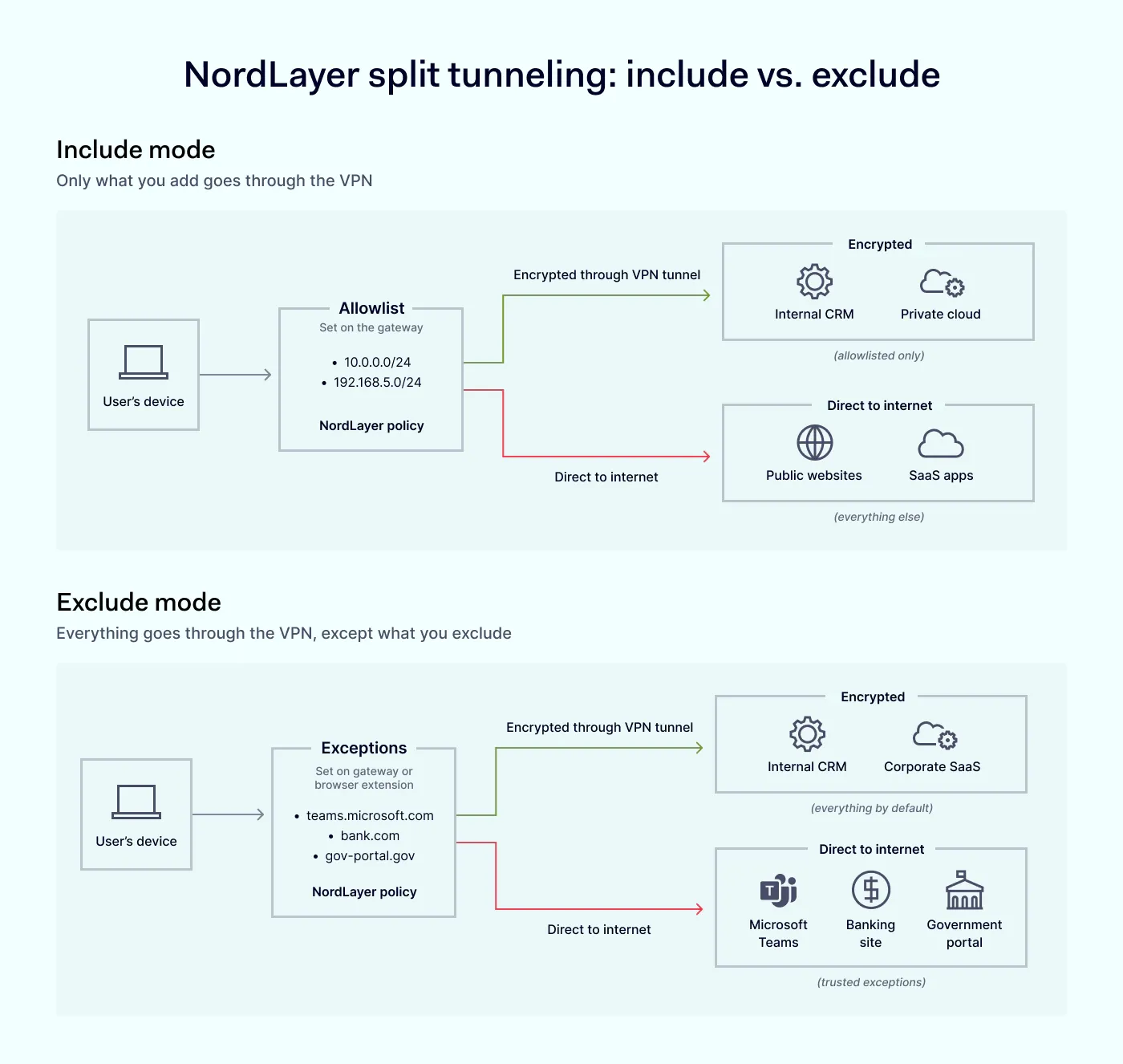
Include mode takes an opt-in approach: nothing goes through the VPN unless you specifically add it. Admins define the IP addresses or subnets that need VPN protection—typically internal resources like a private application, an admin panel, or a cloud environment. Everything else routes directly to the internet.
This mode keeps the VPN scope tight and minimizes the load on gateways, which suits organizations that only need the tunnel for a few resources. Include mode is configured on the gateway only.
Exclude split tunneling
Exclude mode takes an opt-out approach: everything goes through the VPN unless you specifically exclude it. Admins define the specified addresses that should bypass the tunnel and connect to the internet directly. On the gateway, exclusions can be IP addresses, subnets, or domains. On the browser extension, exclusions work at the domain level and support wildcards, which is useful when you want to exclude a whole domain family from browser traffic without listing every subdomain.
This is a good fit for organizations that want broad VPN protection as the default and only need to make exceptions for a few trusted services—a zero-trust approach for sensitive traffic, with a direct path for what’s already safe.
Together, the two modes give NordLayer’s split tunneling the flexibility to match the way your organization works, whether you want the VPN as the default with a few exceptions or as the exception with a specific scope.
Benefits of VPN split tunneling
Split tunneling is primarily a productivity and traffic management feature. The main benefits are:
Flexible, centrally managed traffic control. IT teams can set organization-wide policies that decide which traffic uses the VPN tunnel and which doesn’t—no device-by-device configuration.
Better VPN and app performance. Non-VPN traffic avoids unnecessary routing, which reduces latency for latency-sensitive apps.
Reduced load on VPN infrastructure. When only relevant traffic goes through the tunnel, gateways handle a smaller volume, and users get a more responsive connection.
Access to trusted services that block VPN traffic. Some banking and government sites reject VPN connections. Exclude mode lets those trusted services bypass the tunnel while sensitive traffic stays protected inside it.
Ready-made presets for popular services. Presets for Microsoft Teams, Zoom, and Google Meet update automatically as providers change their infrastructure, so admins don’t have to maintain long lists of IPs and FQDNs by hand.
For IT administrators
Split tunneling gives IT teams centrally managed control over how VPN traffic is routed across the organization. Instead of configuring each device manually, admins set organization-wide policies from the NordLayer Control Panel—defining which addresses bypass the VPN and which stay inside the tunnel. Presets remove the ongoing maintenance work of tracking provider IP changes. The result is fewer support tickets about slow apps, less time spent on individual device configs, and a clearer view of how traffic flows across the workforce.
For end users
End users get a faster, less disruptive experience. Latency-sensitive apps and collaboration tools run without the overhead of unnecessary VPN routing, and trusted services that block VPN traffic, such as banking or government websites, stay accessible. Users don’t have to toggle the VPN on and off during the day or ask IT to whitelist a specific site. It just works in the background.
For organizations
At the organizational level, split tunneling reduces the load on VPN gateways, improves the performance of cloud and collaboration tools, and lowers the operational cost of running a business VPN on a large scale. It also supports a zero-trust approach: sensitive traffic stays protected inside the tunnel, while trusted, low-risk traffic takes the fastest path. This balance of security for what needs it and performance for what doesn’t is what makes this feature worth adopting across mid-market and SMB environments.
Should you use NordLayer’s VPN split tunneling?
The answer depends on how your organization uses its VPN today. If routing all traffic through the tunnel is slowing down collaboration tools, generating support tickets about blocked banking or government sites, or putting an unnecessary load on your gateways, split tunneling is the fix.
It’s particularly useful for organizations with remote or hybrid teams that mix internal resources and public SaaS apps in the same workday. Include mode works when only a few internal apps need the tunnel. Exclude mode works when you want broad VPN coverage with a few trusted exceptions, either on the gateway or in the browser. For teams that spend most of their day in a browser, the browser extension side of exclude mode handles domain-based exceptions without touching gateway settings.
In regulated environments, split tunneling doesn’t remove your compliance obligations, but the centrally managed policy model gives administrators centralized visibility and control over which traffic bypasses the VPN.
Take control of your network traffic with NordLayer
With split tunneling in place, you can manage traffic the way your organization operates—not the way a default VPN configuration forces you to.
NordLayer’s split tunneling gives IT teams the flexibility to route what matters through the VPN, keep the rest fast and direct, and adjust the rules from a single Control Panel as needs change.
Want the full picture on Nord Security’s B2B suite? Watch the webinar video for 2025 updates and an exclusive look at what’s coming in 2026.
Agnė Srėbaliūtė
Senior Cybersecurity Copywriter
After spending a decade writing across media, PR, and advertising, Agne has been specializing in technology and cybersecurity content, focusing on IP address management, networking, zero trust, and internet infrastructure. She helps businesses understand complex technologies through clear, engaging, and sometimes creative content.