
A VPN server is a server that sits between a user’s device and the internet, encrypting their connection and routing their traffic through a secure tunnel to keep online activity private. It acts as a secure intermediary, shielding data from anyone trying to snoop on it.
That layer of encryption is especially valuable for businesses. With remote and hybrid teams now the norm, a VPN server lets employees access internal systems, databases, and files from anywhere, without exposing sensitive company data to the open internet. It keeps communications locked down, reduces the risk of data breaches, and gives IT teams control over who connects to the network.
How does a VPN server work?
Here’s what actually happens when you connect to a VPN server:
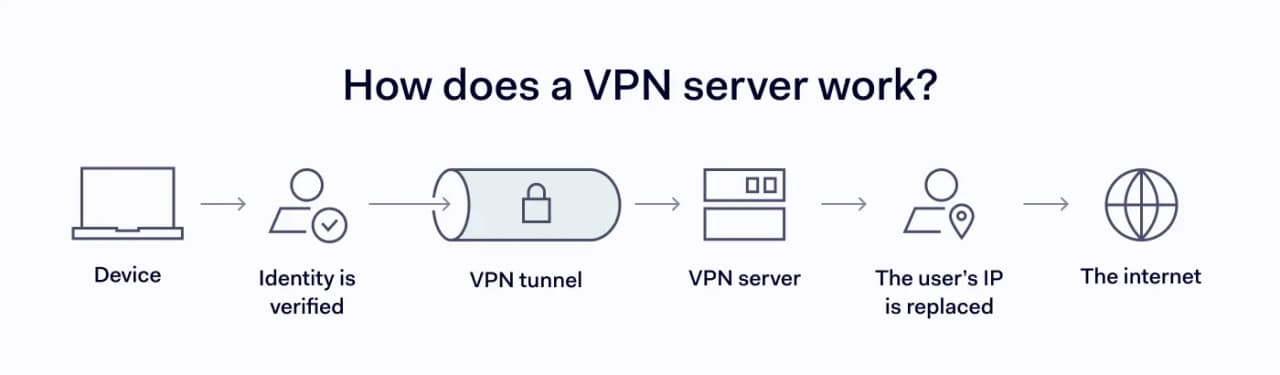
- Connection starts. When a user opens their VPN app, known as the VPN client, and selects a VPN server address, either a hostname (like vpn.company.com) or an IP address, the app knows which server to connect to. The app then reaches out to that server and requests a new session.
- Identity is verified. The server checks the user’s identity through a password, certificate, or multi-factor authentication. If the credentials don’t check out, the connection is refused. This step ensures that only approved users and devices gain access to internal systems or cloud resources.
- An encrypted tunnel is created. Once verified, the app and server agree on a VPN protocol like OpenVPN, WireGuard, or NordLynx. This protocol is a set of rules that determines how data will be scrambled and protected. With that in place, a secure VPN tunnel is built between the two sides, encrypting every piece of data that passes through it so no outsider can read it.
- Traffic flows through the server. Rather than reaching a website or service directly, the user’s requests pass through the VPN server first. The server forwards them to the destination and sends the response back through the same encrypted tunnel.
- The user’s IP is replaced. The destination only sees the VPN server’s IP address, not the user’s real one, making it much harder to trace activity back to a specific person or device.
Each of these steps runs through the VPN server. It checks identities, maintains the encrypted tunnel, handles requests, and serves as the public-facing address for the connection.
Encryption and tunneling
When a VPN connection is active, all data travels through what’s known as a tunnel. It’s a private, sealed pathway between the user’s device and the VPN server. Encryption makes this tunnel secure by scrambling the user’s data with a cryptographic algorithm before it leaves the device. In other words, it turns readable information into a string of characters that has no value without the right key. Only the VPN server on the other end holds that key and can decrypt the data back into its original form.
This process works the same whether the user is connected to a physical server or a virtual one. So, what is a virtual VPN server? It’s a software-based server running on shared hardware rather than a dedicated machine. It handles encryption and tunneling in the same way, but exists as a virtual instance, which lets VPN providers scale their server networks across more locations without needing physical hardware everywhere.
Together, tunneling and encryption work as a pair. The tunnel creates a private pathway, and encryption makes sure that, even if someone intercepts the data along the way, they can’t make sense of it.
How to choose a VPN server?
The VPN server you connect to has a direct impact on your connection speed, security level, and how well it supports your business operations. Here’s what to consider before making a choice.
Shared servers vs. servers with dedicated IPs
With a shared server, your traffic gets one of many IP addresses used by other users at the same time. This adds anonymity but can lead to blocklists, CAPTCHAs, and flagged access. A dedicated IP gives your business a single, consistent VPN server address that belongs only to you, keeping logins smooth and IP-allowlist tools working without interruption.
Managed business VPN vs. self-hosting
A managed business VPN gives you access to a provider’s existing server network, often spread across dozens or hundreds of locations worldwide. Setup is straightforward, updates and maintenance are handled for you, and your team can connect to servers in different regions without your IT department having to configure each one. For businesses that want wide geographic coverage without the overhead, this is the simpler path.
Self-hosting means running your own VPN server on hardware or a cloud instance you control. You decide where the server sits, what protocols it runs, and exactly who gets access. This level of control matters for industries with strict compliance requirements, but the trade-off is real: you’re responsible for setup, updates, monitoring, and scaling as your team grows.
Many businesses land somewhere in between, using a managed provider for everyday access and self-hosted servers for sensitive internal resources.
Other factors that matter
Server location coverage. The closer a VPN server is to your team or your company’s internal resources, the lower the latency and the faster the connection. If your business operates across multiple regions, a provider with wide geographic coverage ensures employees get consistent performance, whether they’re working from New York, Berlin, or Tokyo.
Scalability. A VPN setup that handles 20 users smoothly can start to buckle once you hit 200. As your team grows, you need a provider or configuration that supports more simultaneous connections without dragging down speed or reliability.
Security and compliance. Many businesses pair VPN servers with frameworks like zero trust, secure access service edge (SASE), or software-defined perimeter (SDP) for tighter access control. If your industry has standards like HIPAA or GDPR, make sure your setup aligns.
Central management. A centralized dashboard lets IT teams assign permissions, monitor connections, and revoke access from one place, saving time and reducing misconfigured access as your team grows.
VPN types: remote access and site-to-site VPNS
Talking about VPN types, the two most common ones are remote access VPNs and site-to-site VPNs. A remote access VPN creates a temporary, encrypted connection between a user’s device and a company’s central network through a VPN server. It only activates when the user connects, making it practical for employees who need to reach internal tools or sensitive files from anywhere. The downside is that routing traffic through a central hub can create bottlenecks, especially when most of your apps live in external data centers.
A site-to-site VPN works differently. It’s a permanent connection between multiple office networks, configured on routers or firewalls at each location, so every device operates as if it’s on the same local network. It’s cost-effective and secure, but less flexible since administrators typically don’t allow connections from networks they can’t control, leaving remote workers out.
The type that fits depends on how your business operates. If you have multiple offices sharing resources, a site-to-site VPN is the natural choice. If your team is mostly remote or distributed, a remote access VPN makes more sense. Many organizations run both, using site-to-site to connect their offices and remote access for employees working from home or on the road.
VPN protocols
VPN protocols are the rules that govern how data is packaged, encrypted, and verified as it travels through the tunnel. The protocol you choose directly affects both speed and security. Here are the most widely used ones:
- OpenVPN is an open-source protocol built on the SSL/TLS framework with added cryptographic layers. It comes in two versions: UDP for faster performance, and TCP, which mainly provides more reliable packet delivery. It’s widely supported and considered one of the most secure options, though setup can be inconsistent across devices.
- WireGuard is the newest major protocol and runs on a much leaner codebase than OpenVPN or IPSec, making it faster, easier to audit, and less prone to vulnerabilities. Proprietary implementations like NordLynx build on WireGuard’s speed while adding extra privacy features.
- IKEv2/IPSec reconnects quickly when switching between networks, making it a strong choice for mobile users who move between Wi-Fi and cellular networks. It pairs the IKEv2 key exchange with IPSec encryption for a fast, stable connection.
- SSL/TLS is the protocol behind HTTPS and serves as the foundation for SSL VPNs. In their browser-based form, SSL VPNs require no additional software and typically limit access to specific web applications or resources rather than the full network. This makes such SSL VPNs a common choice for remote access setups where simplicity and ease of deployment are priorities.
- SSH creates an encrypted channel with port forwarding to remote machines, useful for accessing an office desktop from a laptop at home. It offers flexibility but needs close monitoring since it can become a direct entry point if misconfigured.
The right protocol depends on your setup and what you’re optimizing for. Start by deciding whether you need a remote access or site-to-site configuration, then map out your traffic load, risk model, and who needs access to what. For a site-to-site configuration, your existing hardware can steer the decision, since switching protocols may mean replacing routers that don’t support the new one. The clearer that picture is, the easier it becomes to pick the right protocol and keep costs down.
What are the benefits of using a VPN server?
For businesses, a VPN server solves real, everyday problems that come with running distributed teams and protecting sensitive data.
- Securing remote access. Whether your team works remotely, in a hybrid model, or travels for business, there are times when employees need to access company systems from outside the office. A VPN server creates a secure, encrypted connection that lets them do that without leaving internal systems exposed to the open internet.
- Protecting data on public Wi-Fi. Employees working from coffee shops, airports, or hotel lobbies are connecting through networks they don’t control. A VPN server encrypts all traffic between their device and the company network, making it unreadable to anyone else on that shared connection. This is especially relevant given that man-in-the-middle attacks on public networks remain one of the most common ways business data gets intercepted.
- Connecting multiple offices. Businesses with branches in different cities or countries can use a VPN server to link those locations into a single, secure network. Every office operates as if it’s on the same local system, which simplifies file sharing, database access, and internal communication without exposing any of it to the public internet.
- Accessing internal company resources. Finance platforms, HR systems, proprietary databases, development environments: many of the tools businesses rely on are only meant for internal use. A VPN server lets authorized employees reach these resources from outside the office without opening them up to external access.
- Reducing the risk of data breaches. Every connection that passes through a VPN server is encrypted, which shrinks the attack surface for cybercriminals. According to IBM’s 2026 Cost of a Data Breach Report the global average cost of a breach reached $4.99 million, a 12% jump from the previous year and a new record high. A VPN server won’t eliminate that risk entirely, but it closes off one of the easiest paths attackers use to intercept business data.
Wrapping up
A VPN server is one of the most straightforward ways for a business to protect its data, connect its teams, and control access to its internal resources. Whether you’re running a managed setup or self-hosting, using remote access or site-to-site, the VPN server stays at the center of it all, encrypting traffic, verifying identities, and keeping sensitive information out of the wrong hands.
Frequently asked questions
What is the difference between a VPN server and a VPN client?
A VPN client is the software, often called the VPN app, installed on a user’s device, whether that’s a laptop, phone, or tablet. It’s what the user interacts with to start and manage the connection. A VPN server is what the client connects to. It sits on the other end, handling authentication, encrypting traffic, and routing data to its destination. In short, the client initiates the connection and the server does the rest.
What is the difference between a VPN server and a proxy server?
Both sit between a user’s device and the internet, but they work very differently. A proxy server acts as a middleman that forwards requests on the user’s behalf and can mask their IP address, but it doesn’t encrypt the traffic. A VPN server does both: it masks the IP address and wraps all data in encryption, making it unreadable to anyone who intercepts it.
What is a VPN server address?
A VPN server address is the hostname (e.g., vpn.company.com) or IP address that identifies a specific VPN server. It’s what you enter into your VPN client to tell it which server to connect to. Your VPN provider typically supplies this address, either through a list of available servers in the app or as a manual configuration detail. Each address points to a server in a specific location, and the one you choose determines the IP address your traffic will carry and the route your data takes.