What is user activity monitoring (UAM)?

Organizations spend a fortune to keep cybercriminals out. Yet they often have very little visibility into what happens once someone is already authenticated.
Perimeter defenses stay silent if a credentialed user copies a database to a USB drive, or if an attacker steals an employee’s password and starts exploring your network. This is where user activity monitoring helps. In plain terms, monitoring user activity tells you who did what, where they did it, and whether it worked; especially when sensitive data is involved.
UAM won’t prevent every incident on its own, but it gives you the evidence you need to respond to data breaches without guessing.
User activity monitoring (UAM) definition
User activity monitoring (UAM) is a security process that tracks, records, and analyzes user actions across endpoints, servers, networks, applications, and SaaS services. UAM creates an audit trail, which is a chronological record that lets you reconstruct what happened, step by step.
Modern UAM usually focuses on user activity tracking through event-oriented logs. This usually means logins, file access, admin commands, and permission changes. Keystroke monitoring exists, but it’s intrusive and usually treated as a special (and sensitive) case of audit trails.
A good user activity monitoring program captures enough context to tell the difference between a normal employee doing normal activity, and a compromised account trying to export your customer database.
User activity monitoring tools
UAM tools usually mean any technology that collects, centralizes, and analyzes activity logs.
Common tools pull signals from:
- Endpoint and server logs (Windows, Linux, macOS)
- Endpoint agents or sensors (lightweight collectors that forward security events)
- Identity and access logs (SSO, MFA prompts, sign-ins)
- Network access logs (VPN/ZTNA gateways, proxies, DNS)
- Application and SaaS audit logs (admin actions, exports, sharing links)
UAM tools don’t need to “watch your screen” to be useful. For most teams, reliable tracking plus good analysis beats creepy user monitoring features every day of the week.
Monitoring user activity vs user monitoring
This article focuses on monitoring user activity for security and data protection.
- Monitoring user activity (security UAM) focuses on risk: access to sensitive data, privileged commands, data exports, unusual logins, and indicators of compromise.
- User monitoring (employee surveillance) often focuses on productivity: screenshots, webcam checks, keystrokes, and “why were you idle for 3 minutes?” energy.
Security teams can run user activity monitoring without turning the office into a Big Brother reboot. The goal is to protect systems and data.
How does user activity monitoring work?
UAM is a pipeline: capture events, move them somewhere safe, store them in a searchable format, then analyze them for useful signals. In simple terms, it turns “a thing happened” into “here’s what happened, who did it, and whether we should worry.”
1. Data collection
Every time a user interacts with a system, the system produces events: authentication attempts, file reads and writes, privilege escalation, and changes to security settings. User activity monitoring collects those events and turns them into structured records for activity tracking.
A useful user activity monitoring record typically answers:
- Who did it (user/account and often the device)
- Where they did it (hostname, IP, app/service)
- When it happened (reliable timestamps)
- What they did (the user actions + the object: file, record, admin setting)
- Result (success/failure, “access denied,” error codes)
That “who + user actions + result” combo is what creates accountability. It ties employee activity to an identity, which means investigations don’t turn into finger-pointing or guesswork. It also makes it much harder for someone to claim “that wasn’t me” when the logs show their account, their device, and the exact action.
2. Transmission and aggregation
Logs scattered across 500 laptops are like receipts in 500 different pockets. Technically stored, practically useless.
Effective user activity monitoring forwards events to centralized storage. Even if an attacker wipes a compromised machine, the records still exist somewhere safer. The correlation becomes possible: you can connect identity events, endpoint activity, and SaaS audit logs into one story.
Good tools automate collection and normalization, so monitoring user activity doesn’t depend on someone remembering to export logs. Which, realistically, no one remembers until five minutes after something breaks.
3. Analysis and correlation
Raw logs are noisy; patterns are useful. Most user activity monitoring tools rely on a mix of:
- rules (known bad patterns),
- correlation (chaining events across systems), and
- behavior analytics (comparing user behavior to typical patterns)
Example: Bob from accounting usually accesses three folders between 9 and 5. That’s normal user behavior. If Bob’s account starts pulling engineering source code at 3 a.m., that’s odd user behavior. If it also triggers an unusual data export and a brand-new device sign-in, user activity monitoring has enough context to flag it.
The system looks at sequences of user actions. This helps reduce false alarms and keeps analysts focused on what actually matters.
Benefits of user activity monitoring
Cybercriminals love blind spots. The main benefit of UAM is visibility.
1. UAM for insider threats
Often, insider threats mean an employee who uploads sensitive data to a personal drive because it’s “faster,” or someone who exports customer lists before quitting.
Insider threats already have access. User activity tracking helps you spot risky employee activity: unusual downloads, unusual timing, suspicious destinations, and permission changes that suddenly open the door to more data.
2. UAM for incident investigation
Without UAM, incident response is expensive guesswork. You know data is missing, but you don’t know who touched it and what else they accessed.
With user activity monitoring tools, teams can reconstruct timelines and scope impact faster. That means fewer days of “we’re still investigating” and fewer repeat data breaches caused by missing context.
3. UAM for data protection policies and compliance
Many frameworks expect you to record and review activity, especially around sensitive data.
- PCI DSS requires daily log monitoring practices for payment environments.
- HIPAA requires audit controls to “record and examine activity” in systems containing ePHI.
User activity monitoring supports data protection policies by providing evidence. It doesn’t guarantee compliance, but it helps you demonstrate that your data protection program has “receipts.”
4. UAM for compromised credentials
Attackers using valid credentials tend to show different user behavior: unusual sign-in locations, odd hours, unfamiliar tools, and attempts to access data they normally never touch. User activity monitoring looks for those differences.
UAM helps teams lock accounts before attackers pivot into high-value systems and trigger data breaches.
Challenges of user activity monitoring
UAM sounds simple until you meet reality: too many logs, too many systems, and too many alerts. It’s also one of the few security controls that can annoy both attackers and employees. The technical challenges are solvable, but the trust and privacy questions require real planning.
Balancing data protection with privacy in employee activity
There’s a fine line between protecting assets and invasive user monitoring. Avoid capturing personal content by default. Focus on security-relevant user actions, especially actions involving sensitive information, privilege changes, and suspicious access patterns.
Good data protection policies explain what you collect and why. Transparent policies reduce fear and keep activity monitoring grounded in business risk.
Managing volume and alert fatigue in user activity monitoring tools
A medium-sized enterprise can generate millions of events per day. If your tools alert on everything, the team eventually ignores everything.
Alert fatigue often shows up when detections ignore context and normal user behavior. Tune thresholds, prioritize high-risk signals, and regularly review rules so monitoring user activity stays useful. The goal is “fewer, better alerts,” not “an inbox that looks like a slot machine.”
Shadow IT and off-network user activity tracking
Work happens everywhere: coffee shops, personal tablets, unmanaged browsers, direct-to-SaaS access.
If your user activity tracking depends only on endpoint agents, you’ll miss a lot of employee activity. Closing the gap often requires SaaS audit logs, identity provider logs (from Okta or Jumpcloud), and secure web access logs.
User activity monitoring best practices
The best UAM programs focus on the events that matter, protect the resulting data, and make it easy to investigate when something goes wrong. You also want UAM to feel like a safety belt: present, useful, and mostly unremarkable until the day it saves you from a very bad week.
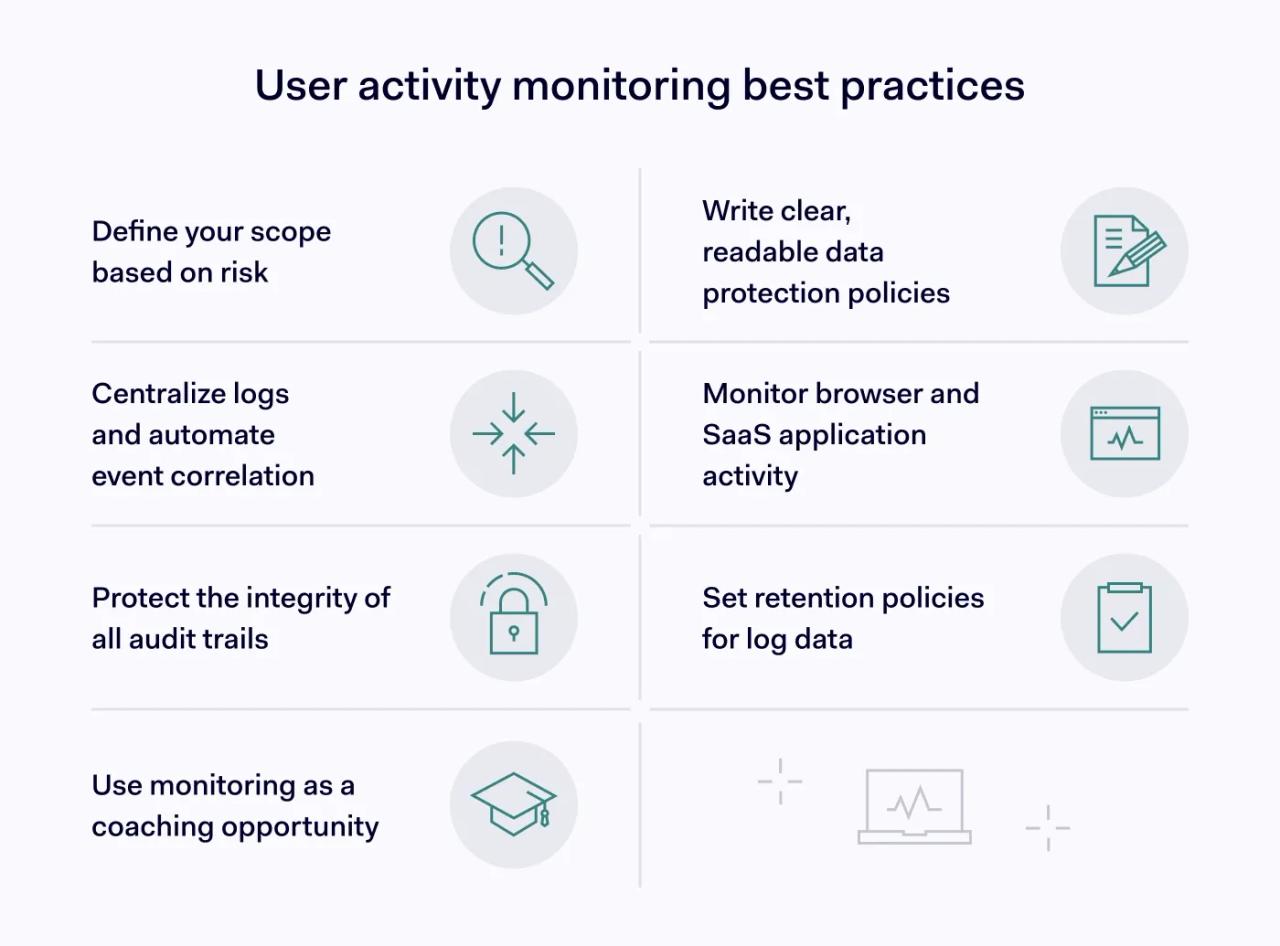
1. Define scope based on risk and sensitive data
Focus on sensitive information, privileged access, and systems that can cause real damage.
A simple tiered approach to user activity monitoring:
- General users: auth events, access to critical apps
- Privileged users: admin commands, permission changes
- High-value assets: detailed user activity tracking for reads/writes/exports
Example: A sales team exports reports all the time, so “export report” isn’t automatically suspicious. But if one user suddenly exports the entire CRM dataset at midnight, then uploads it to a brand-new cloud storage destination, that’s a different story. The scope should reflect that: log exports broadly, but add tighter monitoring and alerts for bulk exports, unusual timing, and unusual destinations.
2. Write data protection policies that people can actually read
No one likes to hear “by the way, we monitor everything.” Clear data protection policies should state:
- what user activity monitoring covers,
- which user actions you log,
- how long you keep logs,
- who can access logs,
- how the organization uses logs during investigations.
Also: say what you don’t do. If you don’t record keystrokes or capture screens, say so. If you restrict log access to specific roles, say that too. The fastest way to create distrust is vague policy language that sounds like it came from a lawyer who has never used a laptop.
3. Centralize logs with user activity monitoring tools and automate correlation
Centralization turns scattered events into real visibility. Use centralized platforms (often SIEMs) as user activity monitoring tools to aggregate audit records, then correlate events across identity, endpoint, network, and SaaS logs.
4. Cover browser and SaaS employee activity
If work happens in web apps, treat the browser and SaaS logs as first-class sources for user activity tracking and employee activity.
That means you should monitor things like mass downloads, unusual sharing permission changes, suspicious OAuth app grants, and repeated export actions. It also means you’ll rely more on SaaS audit logs and IdP events, because you can’t always control the device (contractors, BYOD, partners).
For unmanaged devices, some organizations look at enterprise browser approaches to apply policy and capture relevant audit signals closer to where the work happens. The NordLayer Browser is available and targets SMB needs, offering visibility and control without added complexity. It supports quick deployment, simple management, and a user experience that aligns with common browser workflows.
5. Protect audit trail integrity for data protection
User activity monitoring data is useless if it can be altered or deleted. Protect storage and access controls, and consider immutable storage/WORM where it fits your risk model. Treat logs like evidence: restrict who can view them, restrict who can manage the logging system, and separate duties where possible.
Also test your setup because “we store logs centrally” doesn’t help much if the retention is misconfigured and the key events disappear after 24 hours. The worst time to discover your logs are incomplete is during the incident postmortem.
6. Set retention that matches your data protection policies
Logs can become a liability if you keep them longer than you need. Set retention based on:
- investigation needs,
- compliance requirements,
- privacy expectations, and
- storage realities.
Example: Keep high-detail security logs for 30–90 days for fast incident response, then move older logs to cheaper archive storage for a longer period if regulations or internal requirements demand it. If you only need summaries for long-term reporting, store summaries longer and delete raw event detail earlier. Document the logic in your data protection policies.
7. Treat user activity monitoring as coaching, not punishment
When user activity monitoring tools flag risky actions (like emailing a sensitive spreadsheet to a personal account), use it as a teaching moment where possible.
Example: If someone tries to upload a customer list to a personal drive, show a message like: “This file contains sensitive data. Use the approved company storage instead.” Then provide the link or the approved workflow. Most people aren’t trying to cause a data breach; they’re trying to finish a task before the meeting starts in two minutes.
Overall, user activity monitoring helps you see what happens after someone authenticates, which is where many data breaches start to take shape. It works best when you focus on high-risk user actions, especially those tied to sensitive data and privileged access.
Centralize logs, correlate signals across endpoints, SaaS, and IdP events, and tune alerts so the team doesn’t drown in noise. Write clear data protection policies so employees understand what you monitor and why. When you treat UAM as both a security control and a trust exercise, you end up with faster investigations and fewer blind spots.