Secure remote access without VPN: a practical guide
Agnė Srėbaliūtė
Summary: Traditional VPNs weren’t built for cloud-first work. See how ZTNA, SASE, and application-layer tools deliver secure remote access without the legacy baggage.
Managing a distributed team means providing reliable, low-friction access to corporate resources. For years, the default strategy was deploying a traditional virtual private network (VPN) to route traffic through a central hub. But as organizations move to cloud-first environments and adopt hybrid work models, relying solely on legacy infrastructure can create performance bottlenecks, security risks, and increased management complexity.
The VPN still has a role, but on its own it can’t reduce the attack surface, enforce granular policies, or give employees the day-to-day experience they expect from cloud-first work. That’s why businesses are adding—or, in some cases, replacing—the traditional VPN connection with identity-centric remote access models.
Several well-tested alternatives now exist: some that replace a VPN entirely, others that complement it. This guide to remote access without VPN limits walks through why the model became the default, where it falls short in modern environments, and which alternatives fit which use case.
Why VPNs became the default for remote access
A traditional virtual private network was built for a different era, when company data was stored inside a physical office building. Its job was simple: extend the perimeter of the corporate network to off-site locations.
When remote employees connect to a corporate network using a standard VPN client, the system establishes an encrypted tunnel between their device and a central firewall or gateway. Once authenticated, the user’s device receives an internal IP address, effectively making it part of the local network.
Example scenario
Take a 300-person fintech with a hybrid work policy. An underwriter working from home opens her laptop, launches the VPN client, waits through the connection handshake, and authenticates with MFA. From there, she can reach the internal loan-origination system, the shared drive, and the on-prem reporting database—the same stack she’d use in the office.
Then, she opens Microsoft 365 to review a document, pulls a dashboard from Salesforce, and uploads a file to the company’s cloud data warehouse. All of that traffic is still being routed through the VPN gateway, even though none of those services actually live inside the corporate network. The result: slower apps for her, higher bandwidth costs for the company, and a security model that treats cloud traffic the same as internal traffic.
Why a VPN isn’t always the right fit for modern workplaces
While traditional gateways served an important role in network architecture, the shift toward software as a service (SaaS) and multi-cloud environments has exposed several operational limitations.
Key limitations of legacy connections
Excessive implicit trust. Traditional VPNs operate on a perimeter-based security model. Once a user passes the perimeter check, they often gain broad network access to the entire subnet, which raises the risk of lateral movement if credentials are compromised.
Performance bottlenecks and hairpinning. Routing all employee traffic, including cloud apps like Microsoft 365 or Salesforce, back through a central office or data center creates unnecessary latency and bandwidth congestion.
Scalability and maintenance overhead. Managing hardware appliances, updating gateway software, and scaling connection licenses for hundreds of remote users takes continuous administrative effort.
Unmanaged device risks. Remote employees frequently try to log in using personal or unmonitored devices. Standard VPNs do not natively verify continuous device compliance, which can expose internal assets to malware.
Limited visibility into user context. A traditional VPN authenticates once at connection time and then trusts the session. It cannot easily reevaluate whether a user’s device is still compliant, whether their location has changed mid-session, or whether their behavior looks anomalous.
How to get secure remote access without a VPN
Moving away from legacy architecture does not mean compromising security. Modern organizations use identity-centric frameworks designed around the principles of zero-trust network access (ZTNA), which enforces strict access controls: never trust, always verify.
It grants access only to authorized applications instead of the underlying network, which isolates resources and reduces the risk of lateral movement.
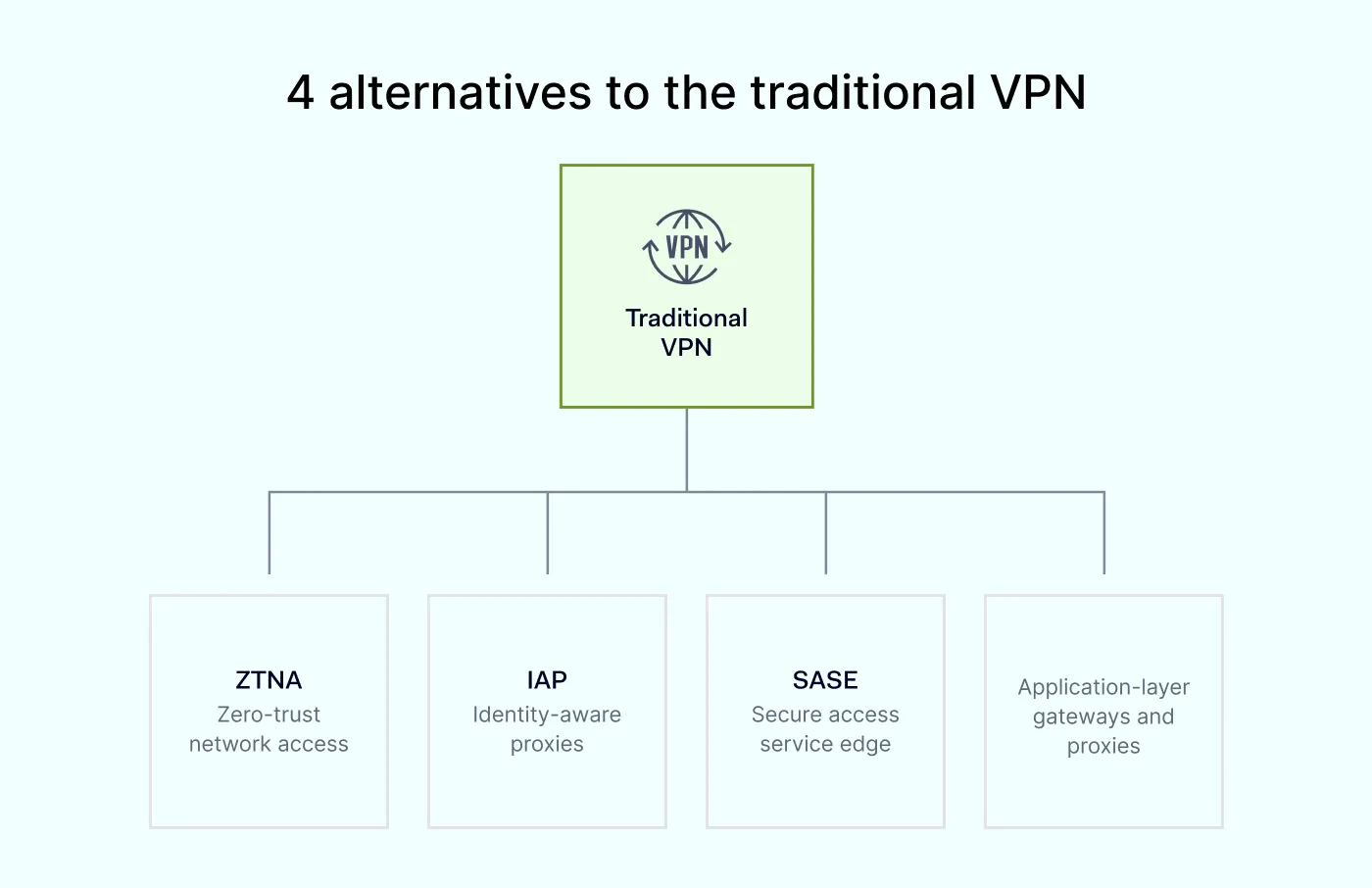
Remote access without VPN: 4 alternative methods
The approaches below address the same core problem in different ways, so the right fit depends on how many apps you need to protect, where they are located, and how much of your stack you want to consolidate.
1. Zero-trust network access (ZTNA)
ZTNA solutions create encrypted, micro-segmented tunnels between an individual user device and specific applications. They hide network resources behind a trust broker, keeping corporate resources invisible to unauthorized internet scans. Access decisions are made on a per-session and per-application basis, so compromising one credential does not grant access to the rest of the network.
2. Identity-aware proxies (IAP)
An identity-aware proxy guards applications by verifying a user’s identity and contextual factors, such as device compliance, user location, and time of day, before granting HTTP/HTTPS access. IAPs are a good fit for organizations that mostly need to protect a defined set of web apps and want to avoid the overhead of a full ZTNA rollout.
3. Secure access service edge (SASE)
SASE combines ZTNA, secure web gateways (SWG), cloud access security brokers (CASB), and firewall as a service (FWaaS) into a single, unified cloud framework. It delivers secure connectivity directly at the edge, closer to where users actually work. SASE is the right call for larger, distributed teams where network security, web filtering, and data loss prevention need to work from one policy set.
4. Application-layer gateways and proxies
Not every remote access problem requires a decision about the entire platform. For more specific use cases, consider these application-layer tools:
Remote desktop gateway tunnels RDP traffic over HTTPS on port 443, so admins avoid exposing RDP ports directly to the internet.
Reverse proxies only expose specific applications to external users, keeping the rest of the environment unreachable.
Web application gateways (and HTTP-streaming approaches) deliver desktop or app sessions through a browser, which removes the need for a client install and improves file transfer performance over slow links.
Cloud-hosted virtual desktops centralize management and keep data in the cloud, so a lost or compromised endpoint doesn’t automatically mean lost data.
It’s a reasonable question after seeing four alternatives on the table. Yes, when implemented correctly, remote access without a VPN can be meaningfully more secure than a traditional setup.
Organizations reduce their overall attack surface by replacing broad network-level trust with granular application-level permissions. Because users are never directly placed on the corporate network, unauthorized actors cannot move laterally to reach adjacent servers or databases.
Combined with continuous device compliance checks, real-time context verification, and centralized policy enforcement, modern alternatives provide a strong defense for cloud-forward enterprises. Picking the right one for your environment is the next step.
What to look for when evaluating alternatives
Before switching, run any candidate solution against a short checklist:
Identity integration. Does it work with your existing identity provider (Google Workspace, Okta, Entra ID, JumpCloud, OneLogin) without custom work?
Device compliance. Can it verify device compliance continuously, not just at login?
Granularity. Can you set policies per application, per user group, and per location, as opposed to one blanket rule?
Logging and audit. Does it produce logs your compliance team can actually use for SOC 2 Type 2,ISO 27001, or similar frameworks?
User experience. Does it add friction, or does it stay out of the user’s way once configured?
A checklist tells you what a good alternative looks like on paper, but the move itself is where most projects run into trouble.
Create a secure access policy
Define the right tools, responsibilities, and practices to help prevent security gaps.
Teams that move too fast tend to hit the same problems. 3 to watch for:
Trying to replace a VPN overnight. Most organizations run ZTNA and a business VPN in parallel during the transition period, moving apps across one by one.
Ignoring legacy apps. Older on-prem applications that don’t support modern authentication protocols often need a reverse proxy or an application connector to work with a ZTNA model.
Underestimating policy design. Rolling out the technology is usually quick. The slow part is sitting down with department heads to agree on who actually needs to reach what, from where, and on which devices—and that conversation is where most rollouts get stuck for weeks.
With these pitfalls in mind, the next step is choosing a platform that handles the transition without forcing a full infrastructure rebuild.
How NordLayer simplifies secure connectivity
You don’t have to replace your entire infrastructure to transition to modern security models. NordLayer provides flexible, software-defined tools that help organizations move toward zero-trust framework principles gradually.
Capability
Legacy VPN setup
NordLayer (zero-trust framework)
Access control
Broad corporate network access
Granular, application-level access
Trust model
Implicit trust after login
Continuous identity and device compliance checks
Architecture
Centralized hardware gateways
Cloud-native, distributed edge
User experience
High latency due to traffic hairpinning
Direct, optimized connections
Here’s how security teams use NordLayer to modernize remote access without a hard cutover:
Implement a zero-trust architecture. Move to ZTNA to secure individual application boundaries without managing complex hardware appliances.
Unify security policies. Establish consistent secure remote access across cloud environments, hybrid setups, and physical offices from an intuitive Control Panel.
Explore modern alternatives. Evaluate VPN alternatives for business designed to scale alongside your growing workforce.
Ready to move past the perimeter model? NordLayer combines VPN connectivity and zero-trust controls in a single platform, so you can transition gradually: one app, one team, one policy at a time.
Agnė Srėbaliūtė
Senior Cybersecurity Copywriter
After spending a decade writing across media, PR, and advertising, Agne has been specializing in technology and cybersecurity content, focusing on IP address management, networking, zero trust, and internet infrastructure. She helps businesses understand complex technologies through clear, engaging, and sometimes creative content.