
Every time you load a webpage, stream a video, or join a voice call, your device is sending and receiving data over the internet—routed to its destination using your IP address But how that data travels depends on the transport protocol in use. The two most common options—Transmission Control Protocol (TCP) and User Datagram Protocol (UDP)—take very different approaches to the same job.
TCP prioritizes reliability it sets up a connection, confirms delivery, and resends anything that gets lost. UDP prioritizes speed it fires off data without waiting for confirmation. Neither protocol is universally better. The right choice depends on what your application needs most.
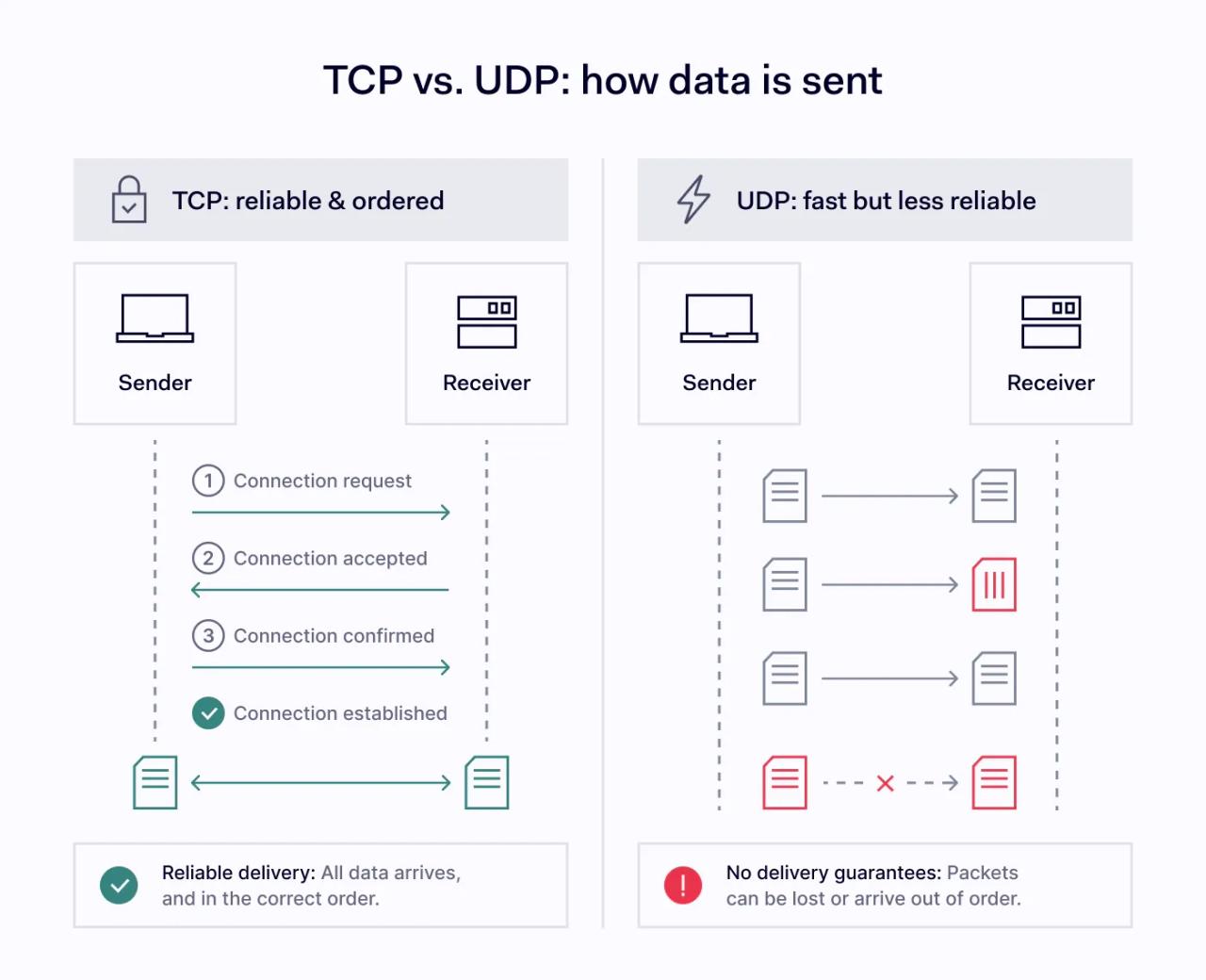
This article breaks down how each protocol works, where each one fits best, and how to decide between them.
Key takeaways
- User Datagram Protocol (UDP) enables faster data transmission by skipping connection setup and recovery of lost packets.
- Transmission Control Protocol (TCP) focuses on reliable data delivery with flow control and error correction.
- TCP and UDP differ mainly in speed, reliability, and how they handle data packets.
- TCP is best suited for accuracy-critical tasks like web browsing and email, while UDP suits real-time applications like streaming and gaming.
- Choosing between UDP vs. TCP depends on whether speed or reliability matters more for your use case.
What is UDP?
User Datagram Protocol (UDP) is a lightweight transport protocol that focuses on speed rather than reliability. Unlike TCP, UDP does not require establishing a connection or confirmation of delivery.
How UDP works
UDP sends data packets—called datagrams—directly from sender to receiver without establishing a connection first. There is no handshake, no tracking, and no retransmission of lost packets.
Because of this, UDP enables faster data transmission but does not guarantee that all data arrives or arrives in order. It also does not slow down its transmission rate when the network is congested. This keeps latency low but can lead to packet loss on busy networks.
UDP can also send a single packet to multiple recipients at once (multicasting), something TCP cannot do. This makes it especially useful for broadcasts and live streams where the same data goes to many viewers simultaneously.
Key features of UDP
These are the core characteristics that define how UDP handles data:
- No connection setup. UDP skips the handshake process, allowing data to flow immediately.
- Faster data delivery. With fewer checks and no retransmissions, UDP minimizes delays.
- No error correction. UDP does not verify whether data packets arrive correctly.
- Minimal overhead. Because it avoids complex controls, UDP uses fewer system resources.
- Multicast support. UDP can deliver data to multiple recipients in a single transmission.
In practice, these characteristics add up to a few clear advantages.
Benefits of UDP
- Low latency for real-time communication
- Faster performance for time-sensitive applications
- Efficient for streaming and broadcasting
- Well-suited for small, one-off transactions like DNS lookups
What is TCP?
Transmission Control Protocol (TCP) is a transport protocol designed to ensure reliable and accurate data transmission across networks. It is one of the core protocols used on the internet and works alongside IP (Internet Protocol) to deliver data between devices identified by their IP address.
How TCP works
TCP uses a structured process to guarantee that data arrives correctly and in order. Before any data is sent, it establishes a connection using a three-way handshake between sender and receiver. This establishes a stable communication channel.
Once connected, TCP breaks data into smaller segments and sends them sequentially. Each segment is tracked, and the receiver confirms receipt. If any segments are missing or corrupted, TCP automatically retransmits them.
This process ensures ordered data delivery, meaning information arrives exactly as it was sent.
Key features of TCP
TCP’s design centers on a few core mechanisms that keep data delivery reliable:
- Reliable data delivery. TCP ensures that all data segments reach their destination. If lost packets are detected, they are resent automatically.
- Error correction. Built-in mechanisms verify data integrity. If errors occur, TCP corrects them through retransmission.
- Flow control. TCP adjusts the rate of data transmission based on the receiver’s capacity, preventing overload.
- Congestion control. TCP monitors network conditions and slows down data transfer when congestion is detected, helping maintain stability.
Together, these mechanisms give TCP a clear edge in scenarios where accuracy matters.
Benefits of TCP
- Accurate and complete data delivery
- Stable connections for critical applications
- Well-suited for tasks requiring high reliability
UDP vs. TCP: key differences
The differences between TCP and UDP come down to a handful of design choices—each with trade-offs. Here's how the two protocols compare side by side:
Feature | Transmission Control Protocol (TCP) | User Diagram Protocol (UDC) |
|---|---|---|
Connection setup | Required (handshake) | Not required |
Speed | Slower | Faster |
Reliability | High | Low |
Data delivery | Ordered and guaranteed | Unordered and not guaranteed |
Error correction | Yes | No |
Flow control | Yes | No |
Congestion control | Yes | No |
Multicast support | No | Yes |
Use cases | Web, email, file transfer | Streaming, gaming, VoIP, DNS |
Connection setup
TCP requires a formal handshake before sending data, ensuring both sides are ready. UDP skips this step entirely, enabling faster communication. This difference alone gives UDP a measurable latency advantage—there is no round-trip delay before data starts flowing.
Data delivery and reliability
TCP guarantees data delivery and ensures segments arrive in order. UDP does not track or resend lost packets, meaning some data may be missing or out of sequence.
Speed and performance
Because TCP includes error checking, flow control, and congestion control, it is slower than UDP. UDP trades these features for faster data transfer. The result: UDP offers lower latency and higher throughput in scenarios where occasional data loss is acceptable.
Error handling
TCP includes strong error-handling mechanisms that detect and fix issues automatically. UDP sends data without verification, leaving error handling to the application.
Network efficiency
TCP adapts to network conditions using congestion control, while UDP continues sending data regardless of network state. On a congested network, TCP will throttle itself to reduce strain—UDP will not, which means faster delivery at the cost of potential packet loss.
TCP, UDP, and VPN protocols
TCP and UDP don't just matter for everyday apps—they are also related to how VPNs work. Every VPN protocol relies on one or both of these transport protocols to carry encrypted traffic between your device and the VPN server.
For example, one of the VPN protocols—OpenVPN—can run over either TCP or UDP. OpenVPN UDP is the more common choice because it offers lower latency and faster speeds, which is good for most business use cases.
OpenVPN TCP is useful when you need to get through restrictive firewalls, since TCP traffic is less likely to be blocked. NordLynx a protocol powered by WireGuard, uses UDP exclusively to deliver some of the fastest VPN speeds available.
If you are aware of how TCP and UDP affect VPN performance, it helps you pick the right protocol for your network.
TCP vs. UDP: which one should you choose?
There's no single answer to a TCP vs. UDP question—the best protocol depends on what your application values more: complete, accurate delivery or low-latency speed.
When to use UDP
UDP is the better fit when speed and low latency are more important than perfect accuracy. It is used for:
- Video streaming—viewers tolerate a dropped frame, but not buffering.
- Online gaming—real-time position updates need to arrive fast, even if a few are lost.
- Voice calls (VoIP)—a brief audio glitch is less disruptive than a delayed conversation.
- Live broadcasts—UDP's multicast support lets one stream reach many viewers at once.
- DNS lookups—small, one-off queries where speed matters and retransmission would add unnecessary delay.
- DHCP—devices requesting network configuration need quick responses, not guaranteed delivery.
In real-time applications, it’s often better to skip missing data than to wait for retransmission.
When to use TCP
TCP is the better choice when accuracy matters more than speed. Common applications include:
- Web browsing (HTTP/HTTPS)—a missing packet could break a page layout or leave content unloaded.
- Email services—messages must arrive complete and intact.
- File transfers—even one corrupted byte can make a file unusable.
- Database communication—queries and responses must be accurate and in sequence.
In these cases, losing even a small amount of data could cause errors or incomplete results.
Combining both protocols
Both TCP and UDP are important in transmitting data. A video conferencing app, for example, might send audio and video over UDP for low latency while using TCP for chat messages and file sharing within the same session. Understanding what’s behind TCP vs. UDP helps you choose the right protocol for each scenario.
What this means for your network
TCP and UDP are foundational protocols that shape how data moves across the internet. TCP ensures reliable, ordered data delivery. UDP enables faster communication with minimal delays. They serve different purposes, and most networks rely on both.
Knowing when to use each one helps you pick the right protocol for each application, reduce unnecessary latency, and keep your network running efficiently.