What is endpoint data loss prevention (DLP)?

Sensitive data rarely “leaks” through one dramatic moment. It slips out through ordinary work: someone copies a file to a USB drive, pastes a snippet into a browser, or prints a doc and leaves it on a printer.
If your company handles customer records, financial data, health data, or intellectual property, endpoint DLP matters because it watches what happens where people actually work: on their devices.
Endpoint DLP definition
Endpoint data loss prevention (DLP) applies data protection controls directly to endpoint devices, such as user laptops and desktops. It helps organizations monitor and restrict the actions users take on sensitive data stored on those devices.
Network-based DLP focuses on data crossing your perimeter. Endpoint DLP runs on the device itself, so it can catch risky behavior before data ever leaves the machine. That data protection stays relevant whether someone works from HQ, home, or a café Wi-Fi.
Endpoint DLP vs. other DLP types
NIST defines data loss prevention (DLP) as systems that detect and prevent unauthorized use and transmission of information. They protect data at rest, in use, and in motion, using methods like deep packet inspection and contextual analysis. The main difference between DLP types is where the controls sit.
Network DLP inspects data in motion as it travels across your infrastructure (think email gateways and web proxies).
Cloud DLP protects data stored in SaaS apps and cloud repositories (like Microsoft 365, Google Drive, Salesforce, Box).
Endpoint DLP focuses on what happens on the user’s device, including:
- files stored on disk (at rest),
- content being opened, edited, copied, or printed (in use),
- data being uploaded, synced, or transferred (in motion).
So, network DLP watches the wires, cloud DLP watches the apps, and endpoint DLP sits on the laptop itself. That matters because a personal USB drive, a local print job, or a copy/paste into a browser can happen without a network tool ever seeing the “before” moment.
Why is endpoint DLP important?
CIS Controls call for automated tools (including host-based DLP) to help you find and manage sensitive data across your devices. “Host-based DLP” often means things like:
- scanning endpoints to spot files that contain regulated data (for example, credit card numbers or health info),
- flagging or blocking moves to risky locations (like a personal cloud-sync folder),
- logging who accessed or moved sensitive files, and how.
Remote and hybrid work makes the problem harder because more work happens off-network. When employees work from home networks (or personal hotspots), traditional perimeter defenses like on-premise web proxies, network monitoring, and office-only firewall controls see less of the action. Endpoint DLP keeps controls closer to the user and the file, even when the “perimeter” is wherever their laptop goes.
A few real-world cases where endpoint DLP helps in ways other methods often can’t:
- Copy/paste into personal webmail: Network DLP might see the outbound email after it sends (if it can see it at all). Endpoint DLP can stop the paste before it becomes an email draft.
- Uploads to unsanctioned cloud tools: Cloud DLP can protect data inside approved apps, but it won’t protect the random “free file transfer” or other examples of shadow IT. Endpoint DLP can block or warn on the upload attempt.
- Printing and “print to PDF”: Network tools don’t stop a user from printing a sensitive document to a home printer or saving it as a PDF and re-sharing it. Endpoint DLP can control printing workflows (depending on platform).
Endpoint DLP benefits
Endpoint DLP earns its keep when you need control over everyday user actions that traditional network or cloud controls often miss.
Real-time detection to protect sensitive data
Endpoint DLP watches the actions users take with files and content and checks them against policy conditions in real time. If someone tries to copy customer credit card numbers into a document, endpoint DLP can warn or block immediately.
Granular control over sensitive data exfiltration paths
Modern endpoint DLP tools can monitor specific “exit points” where data leaves the device, such as:
- uploads to restricted cloud domains,
- paste actions to browsers,
- clipboard operations,
- copies to USB devices,
- transfers to network shares,
- printing,
- Bluetooth transfers,
- remote desktop sessions.
Control those paths and you close common gaps where data slips out by accident (or on purpose).
Flexible policies for different scenarios
Not every risky action needs a hard block. Endpoint DLP policies typically offer enforcement modes like:
- audit-only (log it, don’t interrupt),
- warn (tell the user what’s risky and why),
- block (stop the action),
- block with override (allow if the user gives a reason or gets approval).
This keeps work moving because you don’t force a support ticket every time someone tries to do something that’s normal in their role. Warning and override flows reduce “security vs. work” stand-offs. Audit mode helps you tune rules before you flip the big red “Block everything” switch.
Data protection support for compliance frameworks
If you handle regulated data, endpoint DLP helps you put safeguards into practice and prove you did it.
- The HIPAA Security Rule requires safeguards to protect electronic protected health information (ePHI), including confidentiality, integrity, and availability. As well as data protection against improper use or disclosure.
- NIST SP 800-171r3 applies to organizations that handle Controlled Unclassified Information (CUI) (often federal contractors and their supply chains). It includes requirements to restrict certain media use and control removable media.
Endpoint DLP can enforce policies around where regulated data can go (and create logs to support audits), which makes compliance work more provable.
Better data breach investigation capabilities
Even in audit-only mode, endpoint DLP generates telemetry: detailed event logs about what users did with sensitive content (copy, paste, print, upload, move, rename—depending on the platform).
Example: a security analyst investigates a suspected leak and sees a timeline like:
- user opened a file labeled “Confidential,”
- attempted to copy it to a USB device (blocked),
- then tried to upload it to a personal cloud domain (warned/blocked),
- then renamed a local copy.
That kind of breadcrumb trail can turn “we think something happened” into “we know what happened, when, and how.”
Endpoint DLP challenges
No technology is perfect. It helps to know where the endpoint DLP struggles so you can plan around it.
- False positives and false negatives:
- Unusual file formats (niche CAD files, proprietary exports, or weirdly encoded PDFs) can hide content from scanners.
- Partial data patterns cause confusion. A file might contain a few digits that look like a credit card number but aren’t. Or it might contain only part of a sensitive value that the detector can’t confidently match.
- Context-dependent sensitivity means the same data can be safe in one place and risky in another. An employee ID in an HR system is normal; the same ID pasted into a public ticketing tool is less normal.
- Performance and user friction: Real-time inspection uses CPU and memory. Aggressive rules can slow down workflows and annoy users fast. And annoyed users get creative, which is rarely an endpoint security win.
- Coverage gaps:
- Offline workflows: if an endpoint device stays offline, some controls that depend on cloud services or policy updates may lag (depending on the vendor setup).
- Encrypted containers: if someone stores files inside encrypted archives or volumes, endpoint DLP may struggle to inspect content unless it can scan after decryption at the app level.
- Screenshot-based exfiltration: if someone can view data, they can sometimes screenshot it (or take a photo with a phone). Some platforms can limit this in certain apps, but it’s not universal.
- Policy complexity: Too many overlapping rules create alert noise. Without tuning, endpoint DLP becomes that chatty system everyone learns to ignore.
Endpoint DLP always comes with a security-vs-usability trade-off. Overly strict rules block legitimate work. A policy might flag a normal sales contract as a data leak and block it because it contains the word “SSN” in a boilerplate clause.
Endpoint DLP best practices
Endpoint DLP works best when it behaves like a guardrail. Use these practices to stop data breaches without turning your help desk into a support group.
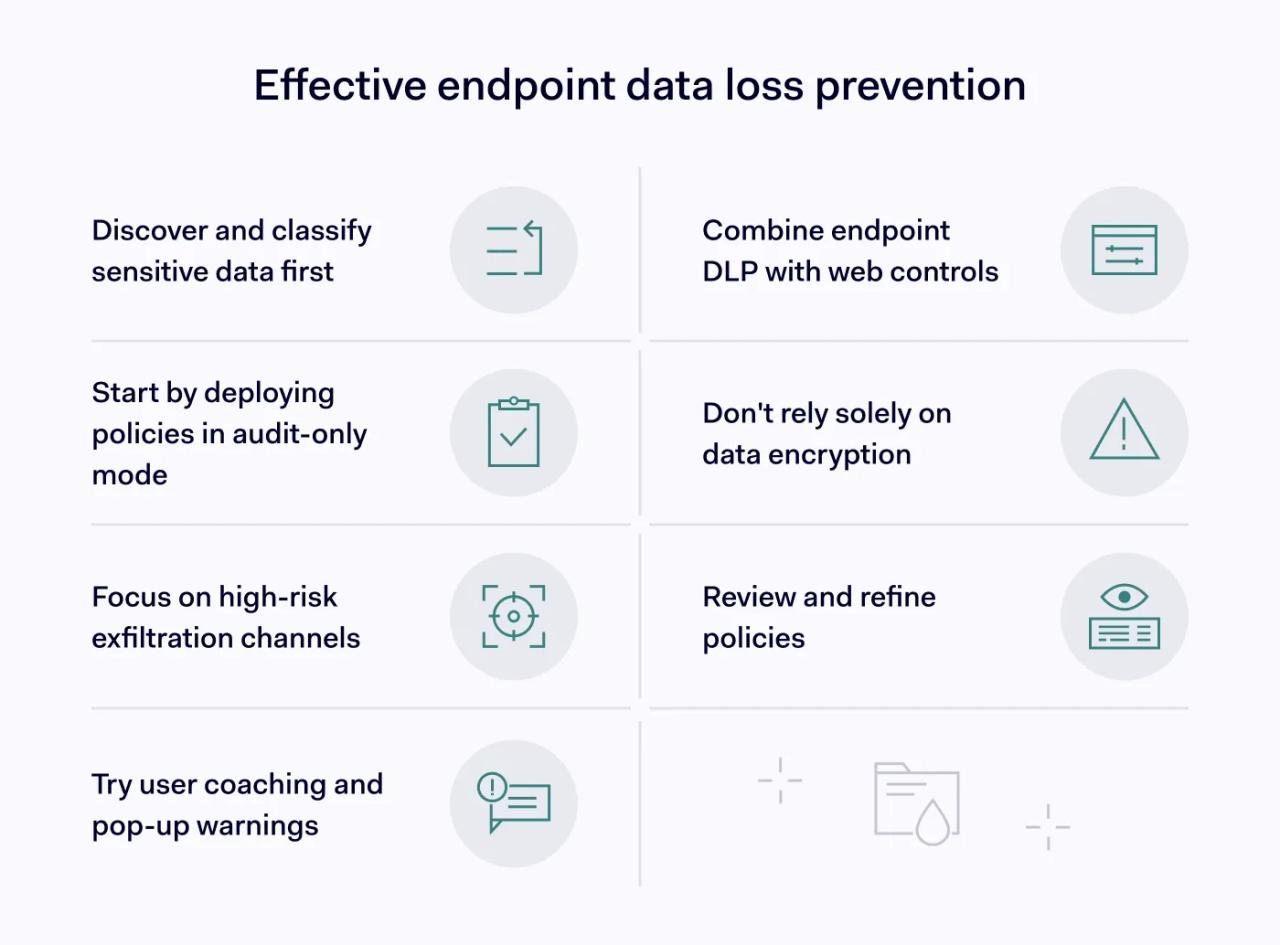
1. Start with sensitive data discovery and classification
Before you write policies, figure out what you need to protect and where it lives. CIS recommends keeping data inventories current using automated discovery tools. Endpoint DLP platforms often use classification methods like:
- Sensitive information types: patterns that match regulated data, like credit card numbers, national IDs, or bank account formats.
- Exact data match: you provide a known dataset (for example, a list of customer account IDs), and the system looks for exact or close matches.
- Trainable classifiers: models trained to recognize “this looks like a contract,” “this looks like source code,” or “this looks like an invoice,” even when no obvious number pattern exists.
- Named entity recognition: detection of entities like person names, addresses, company names, or locations inside text.
About that “tagging files” idea: these methods help the system identify sensitive content so policies can target it. Instead of blocking every spreadsheet, you target “spreadsheets that contain customer payment data” or “documents classified as confidential.”
2. Deploy endpoint DLP policies in audit mode first
Resist the temptation to block on day one. Start in audit-only mode with a pilot group so you can see what would trigger and why.
Fix the noisy rules while they only create logs, so you don’t break workflows later when you turn on warnings or blocks.
3. Focus data security on high-risk exfiltration channels
Start with the paths that cause the most trouble:
- removable media (USB),
- uploads to personal or unsanctioned cloud services,
- copy/paste into browsers and web apps,
- transfers to network shares.
Email attachments can be relevant too, but coverage depends on the endpoint DLP tool and the email client. If your endpoint tool can’t reliably control attachments, handle email with email security or gateway DLP. Use endpoint data loss prevention for what it sees best: device actions.
NIST SP 800-171r3 includes guidance that often translates into controls like disabling ports or limiting read/write capabilities for removable media in environments where CUI protection matters. It fits organizations that handle highly sensitive data and face strict requirements. Examples include defense contractors, certain government suppliers, and R&D environments with high-value intellectual property.
4. Implement user coaching for data protection
Warnings that explain why an action is risky often work better than silent blocks. User coaching also reduces the “I’ll just find another way” mindset. People can’t follow rules they don’t understand, and they definitely won’t follow rules that feel random.
5. Complement endpoint DLP with web controls
Endpoint data loss prevention controls what users do with sensitive content on their devices. Web controls focus on where traffic goes and what destinations users can reach.
A layered setup often pairs endpoint DLP with things like secure web gateway (SWG) controls and DNS-based protections. For example, NordLayer’s Business Browser can help reduce access to risky destinations. Other controls (like firewall policies) can limit outbound paths. They reduce exposure and make data exfiltration harder through known bad or unwanted routes.
6. Avoid the encryption-only trap for data security
Encryption protects data in transit and at rest, but it doesn’t stop authorized users from copying data they can access. If someone can open the file, they can often still move it somewhere else.
Endpoint DLP helps here because it focuses on behavior and exit paths, not just storage and transport.
7. Review and refine to prevent data breaches
Endpoint DLP isn’t set-and-forget. Schedule regular reviews, look at false positives, adjust policies as teams adopt new tools. Update classifications when your sensitive data types change (new markets, new customer data, new workflows).
A practical next step: run endpoint DLP in audit mode for a small group, review the top 10 triggers, and rewrite policies until the alerts match real risk instead of daily life on a laptop.
After that, roll it out in stages:
- Turn on warnings first for the riskiest actions (uploads to personal cloud domains, browser paste, printing sensitive files, USB copies).
- Save blocks for a short list of “we really can’t allow this” actions.
- Use overrides sparingly. If you allow “block with override,” require a reason.
- Track a few simple metrics: top triggered rules, top users/apps involved, how often overrides happen, and which rules generate the most false positives.
Endpoint DLP protects sensitive data where most leaks actually happen: on endpoints, through everyday actions like copy/paste, printing, cloud uploads, and file transfers. Start with audit mode, tighten policies until they match real risk, then move to warnings and selective blocking. This way, you can reduce exposure without turning normal work into a friction festival.