Best practices for SIEM integration with threat intelligence
Joanna Krysińska
Summary: SIEM integration with threat intelligence adds external threat context to internal data, which speeds up threat detection and incident response, and cuts false positives.
Security information and event management (SIEM) solutions give you internal visibility into data from across your network. However, SIEM alone may not provide enough information to detect external threats.
SIEM-native feeds don't cover dark web forums, stealer log markets, or criminal Telegram channels. Integrating threat intelligence with SIEM helps organizations identify external threats from these sources.
This article explains how SIEM-threat intelligence integration works, together with its benefits and challenges, and the main ways to integrate them.
Key takeaways
Most SIEM-native feeds don't reach dark web forums, stealer log markets, or criminal Telegram channels, so they miss many relevant threats.
A SIEM solution shows what's happening inside your network, while threat intelligence provides external context on who's attacking, how, and why.
SIEM and threat intelligence integration works in 5 steps: collecting raw threat data, data ingestion and normalization, real-time data correlation and enrichment, scoring and triage, and a feedback loop.
SIEM-threat intel integration reduces threat detection time and false positives.
The most common failure of the integration is alert fatigue.
Integration methods range from free OSINT feeds and commercial feeds to threat intelligence platforms.
Successful SIEM integration with threat intel starts with mapping your architecture, curating threat feeds based on relevance, and testing connectors against your environment, not the vendor's demo.
What is SIEM integration with threat intelligence?
First, the definitions.
Security information and event management (SIEM) solutions provide context for security incidents. They collect and analyze large volumes of security data from an organization’s entire infrastructure, which helps security teams detect and prevent threats early on.
Indicators of compromise (IOCs) like malicious IPs and file hashes
Tactics, techniques, and procedures (TTPs) that describe how attackers operate
Actor profiles that connect individual events to known campaigns
SIEM solutions can miss threats without enough context. Integrating threat intelligence with SIEM lets analysts compare security events against known IOCs and understand potential threats faster. No more manual checking each alert against a list of IOCs.
As Rokas Dambrauskas, Engineering Manager at NordLayer Intelligence, says, “A SIEM shows you blips on a radar. Threat intelligence gives you the map. Together, they give you the knowledge of what the attackers are really after and how they think.”
How SIEM integration with threat intelligence works
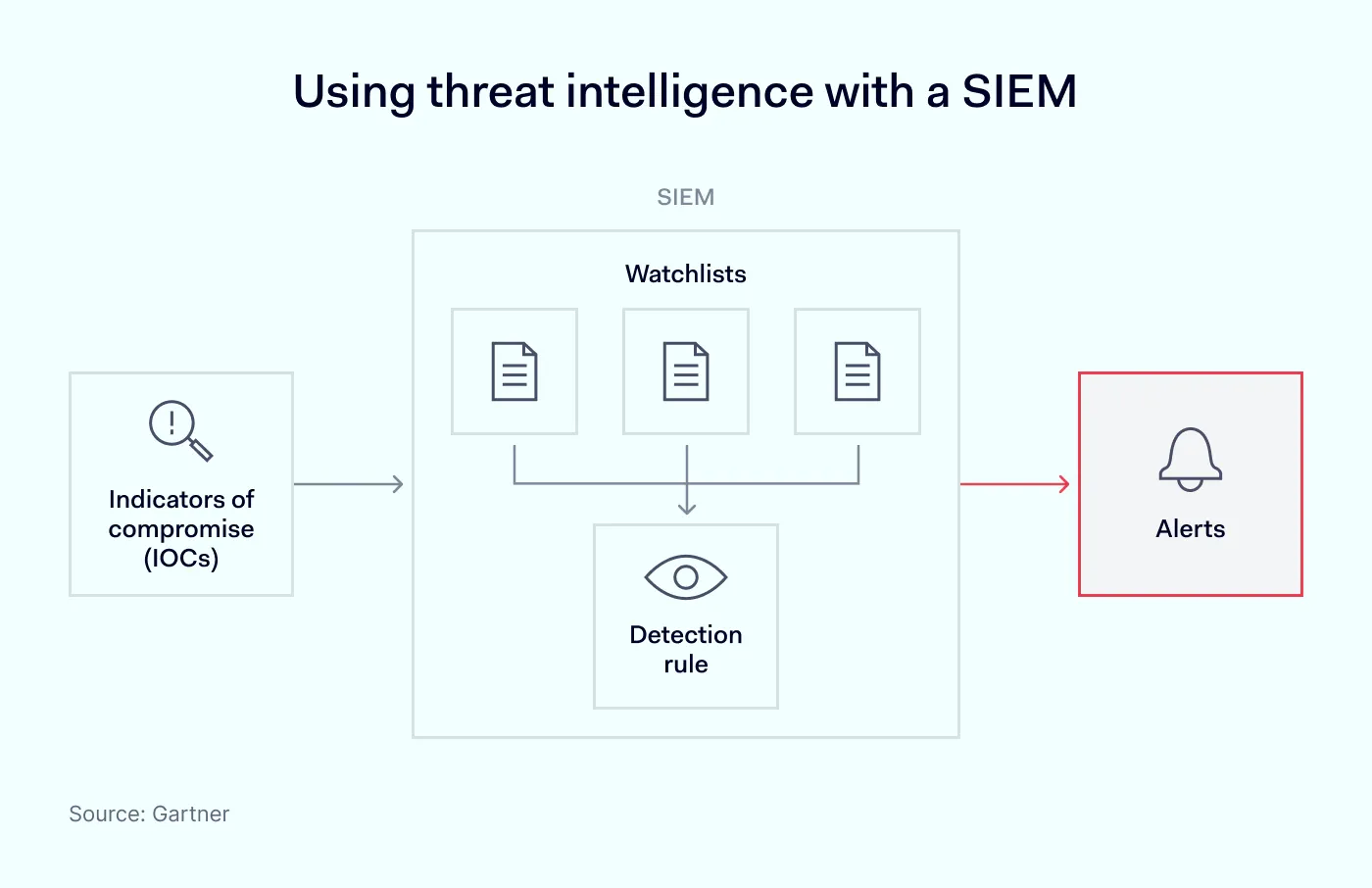
SIEM integration with threat intelligence feeds external threat data directly into your SIEM, giving you actionable insights. Here is how it works in 5 steps:
1. Collecting, importing, and loading raw data into threat feeds
External threat data reaches a SIEM in the following ways:
Anative connector built into the SIEM
An integratedthreat intelligence platform (TIP) that pulls the data using standards like STIX/TAXII
Next, the data is combined with threat intelligence from the following sources:
Commercial vendor intelligence
Open-source intelligence (OSINT)
Information sharing and analysis centers (ISACs)
Government or industry alerts
These sources provide tactical indicators of compromise (IOCs), such as IPs, domain names or hashes, and strategic intel on adversaries’ tactics, techniques, and procedures.
2. Ingestion and standardization of threat data
Threat intelligence tools deliver data in various forms. For example, a firewall log from a Windows server log looks different from an AWS login log. A SIEM integration with threat intelligence works like a “translator” and "filing cabinet” for these various formats. It organizes external and internal data into one format in 3 steps:
Normalization. The SIEM reformats data into a single, standard template. For example, whether a log calls an IP address src_ip, source_address, or IP_Src, the SIEM translates them all to a uniform field named source_IP.
Indexing. The SIEM tags and catalogs the data like a book index, so analysts can search through billions of logs in seconds.
Structuring threat data. While internal logs flow in, the SIEM also receives threat intelligence on external data, which is handled in one of these 2 ways:
Structured alongside internal logs. The threat data is formatted exactly like the internal logs, so the 2 can be compared directly.
Kept in a reference lookup list. The threat data is stored in a dedicated “watch list” within the SIEM.
3. Real-time incident correlation and enrichment
As logs stream in, the SIEM cross-references them against active IOCs. When a match is found, the SIEM attaches relevant context directly to the event, including:
The actor group behind the indicator
A risk score
The name of the campaign
This lets an analyst see who and why, not just what.
4. Scoring, triage, and response
Many raw SIEM alerts are just false positives. When relevant threat intelligence matches or correlates with a security event, it adds context that helps analysts assess the potential threat. This way, they can prioritize alerts based on risk rather than alert volume alone.
These priority matches can then trigger automated playbooks through security orchestration, automation, and response (SOAR). The goal is to stop a flagged threat, for example, by isolating the host, blocking a malicious IP at the firewall, or opening an incident ticket.
5. The feedback loop
Security teams use findings from confirmed incidents and false positives to adjust SIEM detection rules, risk scores, and allowlists. They can also review which threat intelligence sources provide useful data. This helps reduce false positives and improve alert accuracy.
Integration methods
Let’s now compare the main approaches to threat intelligence feeds:
Method
Coverage
Setup effort
Maintenance cost
Best for
Free/OSINT feeds
Broad but overlapping; heavy deduplication needed
Low
High; requires constant tuning
Teams that supplement or start out with commercial feeds
Commercial feeds
Can offer better context, curation, timeliness, or specialized coverage, but the quality still depends on the specific provider and data source
Low to medium
Medium
Security teams that need sector-specific threat intelligence and high-confidence IOCs
Threat intelligence platforms (TIPs)
Multiple customized feeds combined into one view; coverage is only as broad as the sources you connect
Medium
Medium
Organizations that need to aggregate, normalize, deduplicate, and manage threat intelligence from multiple sources
Free threat intelligence feeds are a good starting point, but they often contain the same data. This means security teams may end up spending more time removing duplicates than analyzing threats. Paid feeds cost more but offer customized data for your industry and security needs. Threat intelligence platforms help organize this data, remove duplicates, and prepare it for use in your SIEM.
Benefits of threat intelligence integration with a SIEM
Cross-referencing internal data with external threat intel lets you identify anomalies and unusual patterns that a SIEM alone could miss.
Fewer false positives
Most SIEMs integrated with threat intelligence add context to all raw alerts and rank them as actual risk factors. This reduces alert fatigue.
Effective threat hunting
Together, SIEM and threat intelligence help your security team spot cybercriminals hiding in your organization’s network. Staying updated on attackers’ TTPs and new vulnerabilities also helps businesses fine-tune their threat hunting methods.
Faster incident response
SIEM integration with threat intelligence is also valuable when an incident happens. A SIEM solution provides a timeline of the events that preceded the breach, and threat intel gives insights into the attackers’ TTPs, as well as the IOCs related to the incident. This speeds up the investigation, response, containment, and recovery processes.
How to avoid challenges when integrating threat intelligence with a SIEM
When connecting threat intel feeds with a SIEM, focus on filtering data, standardized formats, and aligning alerts with your workflows. Here’s what to watch for:
Alert fatigue from low-quality or redundant feeds. Fewer, curated feeds are better than generic ones. Each feed should be tuned for relevance to your sector and stack.
Integration complexity across legacy and hybrid-cloud tools. Before you buy a threat intel solution, map which systems need to connect to which, list their versions and deployment models (for example, cloud vs. on-prem), and test the SIEM integration against your environment.
Stale threat intelligence feeds. A feed that updates only once a week may miss ransomware infrastructure that attackers use for just 48 hours. IOC-based feeds should be updated at least daily, and more frequently when possible.
Raw IOCs without context. An IOC without actor attribution and a risk score doesn’t tell analysts much. Adding risk severity and confidence scores to IOCs shows which threats need attention first.
Data governance. Before automating security responses, check the quality of your threat intelligence data. For example, if your security orchestration, automation, and response (SOAR) tool automatically blocks every IP address flagged by a feed, a false positive could block access for a legitimate vendor.
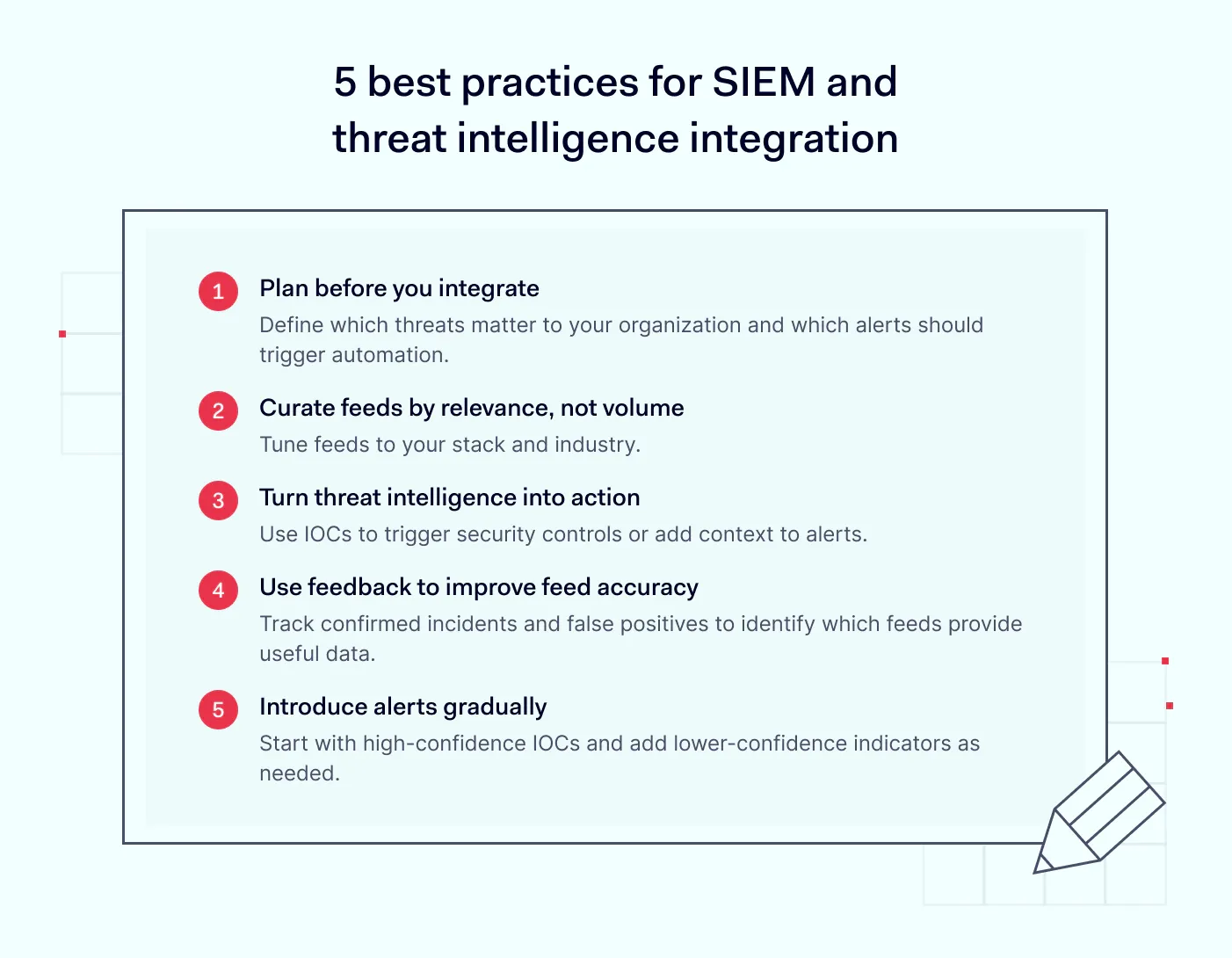
5 best practices for SIEM and threat intelligence integration
1. Plan before you integrate. Adding external feeds to your SIEM without structured requirements increases alert fatigue and noise. First, define which threats matter to your organization and which alerts should trigger automated action.
2. Curate feeds based on relevance, not volume. A few feeds tailored to your sector and security needs are more useful than 15 generic ones. Too many irrelevant feeds can overwhelm your team with alerts.
3. Turn threat intelligence into action. Use IOCs to trigger security controls or add context to alerts. Otherwise, you're just collecting raw data.
4. Use feedback to improve feed accuracy. Track confirmed incidents and false positives to identify which feeds provide useful information. Review and adjust your feeds regularly to reduce outdated or irrelevant alerts.
5. Introduce alerts gradually. Start with high-confidence IOCs and add lower-confidence indicators as needed. This helps prevent alert fatigue and gives your team time to fine-tune detection rules.
How NordLayer Intelligence supports SIEM integrations
NordLayer Intelligence integrates natively with these major platforms:
Microsoft Sentinel. Installs as a Sentinel solution from the Content hub or Azure Marketplace. Findings land in your Log Analytics workspace, where you can query them with KQL and build analytics rules, workbooks, and playbooks.
CrowdStrike Next-Gen SIEM. Connects through a NordLayer Intelligence data connector, so alert findings reach your SOC automatically.
Splunk. You install the NordLayer Intelligence app in Splunk, pick a target index, and generate an API URL and key. Then, add the integration in the platform and choose which projects and findings to forward.
Amazon Data Firehose. Available as a data streaming integration, so findings flow directly into your own data pipeline.
Other SIEMs (via Platform Integrations API). The API connects the platform's security monitoring features to your existing security tools, dashboards, or automated workflows.
By integrating SIEM with NordLayer Intelligence, you get threat insights directly to your SIEM or data pipeline. Want to see how NordLayer Intelligence helps you detect threats early? Contact our team to request a free demo.
Joanna Krysińska
Senior Cybersecurity Copywriter
Joanna writes about zero trust, network security, access control, and threat prevention, but her cup of tea is compliance and how regulations shape security controls.
Her work also includes the dark web topics and the methods cybercriminals use to target companies, such as social engineering or ransomware attacks, for example.