What is cookie theft?

A sales executive at a logistics firm opens a “sponsorship agreement” from a contact while on coffee shop Wi-Fi. The attachment installs an info-stealer that copies his browser’s active session cookies. Minutes later, an attacker reuses those cookies to access the victim’s web apps as if they were him. No password prompt, and often no multi-factor authentication (MFA) prompt either. This pattern has become common enough that Google describes cookie and authentication token theft as rising sharply and intensifying in 2025. In this article, let's explore the mechanics and prevention of cookie hijacking.
Cookie theft definition
Cookie theft is an attack where criminals steal authentication cookies (often session cookies) from a user’s browser and reuse them to access an account as that user. Criminals don’t even have to enter the password.
Attackers like this method because it can skip password guessing and can bypass MFA as the victim has already completed MFA for that session.
How does cookie theft work?
A website forgets who you are the moment you click a new link. So sites use cookies (and other tokens) to keep you signed in across clicks and page loads.
When you sign in, the service issues a session identifier and stores it in the browser as cookie data. On later requests to that service, the browser automatically includes the cookie so the server can recognize the already-authenticated session. It effectively says, “It is still me.”
Cookie theft happens when an attacker intercepts this exchange or extracts the file directly from the browser. It usually happens through one of these paths:
- malware or “info-stealers” that copy cookies from the browser’s local storage
- phishing proxies / browser-in-the-middle (BitM) techniques that capture session tokens after a victim signs in
- cross-site scripting (XSS) that reads cookies only if the site failed to set protections like HttpOnly for sensitive cookies
- network interception mainly when traffic is not properly encrypted, or when a user is tricked into accepting a malicious TLS certificate
The typical lifecycle of a cookie theft attack:
- Injection or interception: the attacker finds a way to access the victim’s session token (for example, an info-stealer on the device, an XSS flaw, or a BitM phishing flow).
- Exfiltration: the stolen cookie/token gets sent to the attacker (often to a command-and-control server).
- The replay: the attacker loads the stolen cookie or token into their browser (or uses it in scripted requests) to impersonate the victim’s session.
- Unauthorized access: the service accepts the token and grants access. Some services will still require reauthentication for high-risk actions, but many account takeovers start with the attacker landing inside an already-authenticated session.
Once inside, the attacker has the same privileges as the user. If the user is an administrator, the attacker is now an administrator. Cookie theft allows them to modify sensitive information. They can initiate bank transfers and pivot to other systems within the network. Cookie theft may be a gateway to total system compromise.
Real-world examples of cookie theft involving sensitive data
To understand the severity, we must look at how cookie theft manifests. It affects everyone from gaming giants to tech influencers.
"Genesis market": buying cookie data to gain unauthorized access
One of the most high-profile examples of session hijacking facilitated a massive breach at Electronic Arts (EA), a gaming giant. A hacking group known as Lapsus$ managed to purchase stolen session cookies on the dark web. They bought specific cookie data from a marketplace called Genesis. Genesis Market sold “bots” that bundled stolen credentials, browser fingerprints, and cookies so buyers could impersonate a victim’s browser session. Law enforcement later seized the market in 2023.
These cookies belonged to an EA employee who had been infected with malware. The malware had performed cookie theft silently in the background. Attackers claimed they bought stolen authentication cookies that let them access an EA internal Slack account, then used social engineering to expand access. They eventually stole hundreds of gigabytes of source code and game data.
So, you do not need to be a coding genius to compromise a giant; you just need to commit cookie theft.
The Linus Tech Tips YouTube takeover
In a highly publicized event, the massive YouTube channel “Linus Tech Tips” was hijacked. An employee at the company received a sponsorship offer via email. It contained a PDF disguised as a harmless document. In reality, it was a screensaver file containing malware designed for cookie theft.
Once executed, the malware scraped all the user's cookies and password data from the browser. It specifically targeted the user's cookies associated with Google services.
Reporting and post-incident analysis describe attackers using malware to steal session cookies, then reusing those cookies to access YouTube and Google sessions and run crypto-scam streams, despite MFA. Even tech-savvy organizations are vulnerable to cookie theft.
Google's war with “pass-the-cookie” malware
Google’s Threat Analysis Group has documented ‘cookie theft’ (also called pass-the-cookie) campaigns that target creators through fake collaboration offers and malware downloads. Once the victim runs the fake software, the malware steals cookies and uploads them to attacker-controlled servers, and hijacked accounts are often used for crypto-scam live streams.
In 2025, Google has said cookie and authentication token theft has risen rapidly and intensified, which is why it has pushed defenses like Device Bound Session Credentials (DBSC) to make stolen cookies harder to reuse from another device.
How to detect cookie theft?
Detecting cookie theft is notoriously difficult. Unlike a brute-force attack, there are no failed login attempts to trigger an alarm. The server sees a valid key and assumes the activity is legitimate. However, vigilant administrators and users can spot anomalies that suggest cookie theft has occurred.
Concurrent warnings and multiple sessions
Most legitimate users are not logged in from three different countries simultaneously. If a user is logged in from New York, and five minutes later a valid session becomes active from an IP address in Russia, this is a red flag. It strongly suggests cookie theft.
Security systems can be configured to flag “impossible travel” scenarios where cookie data is being used in geographically disparate locations. If the same account’s session shows activity from distant locations in an implausible timeframe, treat it as a takeover signal and force reauthentication.
Unrecognized browser or device fingerprints
A sudden change in device signals (user agent, OS, browser profile, device ID, managed or unmanaged status) can indicate someone replayed a token from another machine.
Even if an attacker successfully executes cookie theft, they might not perfectly replicate the user's “User-Agent". This is the string of text identifying the browser and OS. If a session cookie previously associated with a Windows 10 Chrome browser suddenly appears active on a Linux Firefox build, it suggests the cookie has been moved.
Detecting changes in the client fingerprint during a single active session is a strong indicator of unauthorized access via cookie theft.
Sudden changes in critical account settings
When attackers gain unauthorized access via cookie theft, they often try to establish persistence. They know the stolen cookie will eventually expire. Therefore, they might quickly add a new recovery email, phone number, passkey, or OAuth app.
Unexpected emails stating “Your security settings have changed” are often the only warning a user gets. This indicates their session has been hijacked through cookie theft.
Strange activity logs
On the user side, seeing activity history that doesn't match memory is a sign. If a user checks their “Last account activity” and sees file downloads that occurred while they were asleep, cookie theft is the probable cause. The session was active while the human was not.
Look for downloads, exports, permission changes, mailbox rules, payment changes, or API key creation that the user didn’t perform.
How to prevent cookie stealing?
Preventing cookie theft requires a defense-in-depth strategy. We must accept that users will click on things they shouldn't. Assume some malware might slip through. So, the goal is to make the results of cookie theft useless or difficult to obtain.
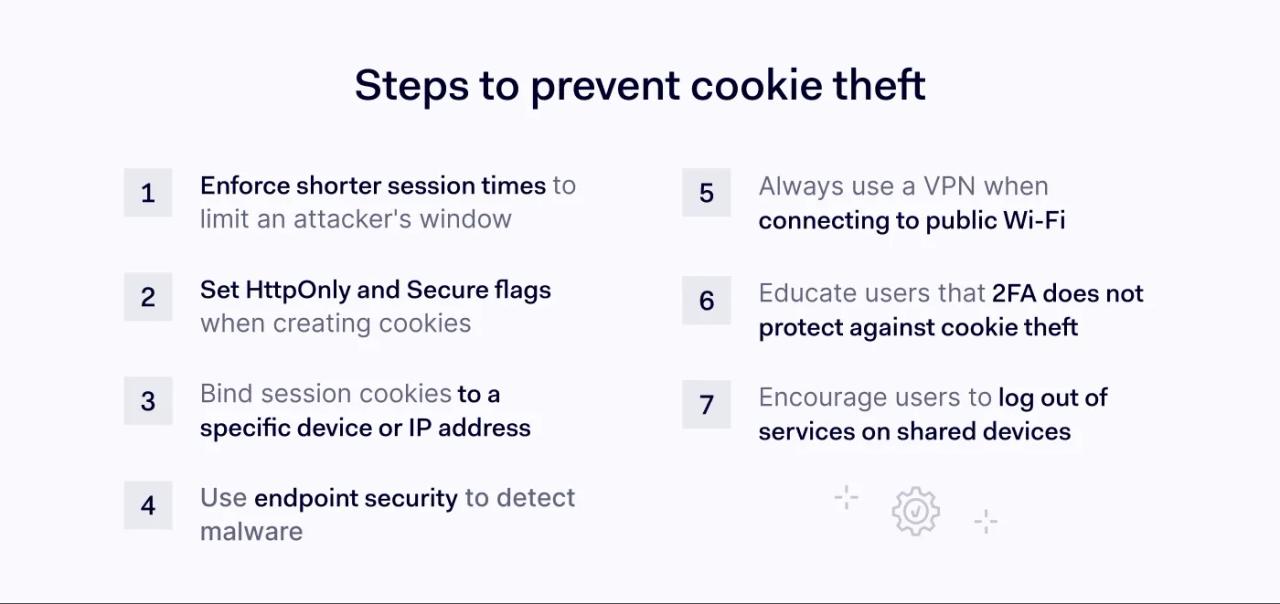
1. Enforce shorter sessions and revoke tokens aggressively
The most effective way to limit the damage of cookie theft is to shorten the window of opportunity. If a session cookie is valid for 30 days, an attacker has a month to use it. If it expires in 15 minutes of inactivity, the stolen data becomes worthless quickly.
Admins for critical web applications must enforce aggressive session duration controls. While this might annoy users, it drastically reduces the risk of long-term access resulting from cookie theft. Shorter idle timeouts, absolute session lifetimes, and server-side revocation reduce the value of a stolen cookie. Rotate session identifiers after sensitive actions.
2. Set cookie protections correctly
This is a vital step for developers to stop cookie theft. When web applications create cookies, they can tag them.
The `HttpOnly` flag prevents client-side scripts from accessing the cookie. This means that even if an attacker attempts an XSS attack, their script cannot read the session token.
The `Secure` flag ensures the cookie is only transmitted over encrypted connections. These don’t stop malware on the device, but help prevent man-in-the-middle attacks from common web paths like cookie theft via XSS.
3. Bind sessions to devices where possible
Advanced security architectures are moving toward binding session cookies to specific hardware. If a cookie is issued to IP address A, and suddenly IP address B tries to use it, the server should reject the request. This helps prevent session hijacking.
While this can cause issues for users switching networks, it is a defense against remote identity theft via cookie theft. It ensures the cookie data cannot be used on a different machine. Google and Chromium have pushed this direction with Device Bound Session Credentials (DBSC), designed specifically to reduce cookie theft impact.
4. Detect info-stealers on endpoints
Many instances of cookie theft originate from malware on the physical device, often delivered through phishing attachments, fake software updates, or “cracked” apps. The malware scrapes the user's cookies from the local storage. Standard antivirus software is often not enough. Endpoint detection and response (EDR) tools monitor behavior. If a process tries to access the browser's protected storage where login credentials and cookies are kept, the EDR can kill the process. This prevents the sensitive data from ever leaving the machine.
5. Treat public Wi-Fi as untrusted
To prevent man-in-the-middle attacks that lead to cookie theft, users should always use a VPN. It won’t stop malware on the device and won't fix a phishing or BitM attack, but it can reduce local network snooping risk.
Public Wi-Fi is a hunting ground for attackers looking to sniff packets. A VPN encrypts the entire tunnel and reduces the risk of local network snooping on untrusted Wi-Fi.
6. Educate on the limits of two-factor authentication (2FA)
Users often have a false sense of security. They believe two-factor authentication makes them invincible.
They need to understand that 2FA stops password attacks, not cookie theft. Training programs should emphasize that downloading executables can bypass their authenticator apps. A clear understanding of why they are being told not to save users’ cookies on public computers is crucial to stopping cookie theft.
7. Log out from shared devices and respond fast to alerts
This sounds simple, but it is effective against cookie theft. When a user actively clicks “Log out,” the server invalidates the session token. If an attacker stole the cookie five minutes prior, that cookie dies the moment the user logs out. Encouraging a culture of “logout when done” closes the window of vulnerability. It is a manual but powerful check against cookie theft.
All in all, cookie theft targets the very mechanism that makes the web usable: convenience. The attackers have realized that stealing the badge is easier than guessing the password. The reliance on session cookies for maintaining state in web applications will not diminish. Neither will the attempts to commit cookie theft.
For businesses, the assumption that “I have 2FA, so I am safe” is no longer valid. Cookie theft renders 2FA largely irrelevant once the session is established. The defense against cookie theft requires a combination of technical rigor and human vigilance.
We must flag our cookies correctly, shorten our session times, and protect our sensitive data from man-in-the-middle threats. Ensure your digital ID badges are expiring quickly and never leave them unattended.