Summary: A threat intelligence use case provides context to raw technical data, helping to turn it into an informed decision.
Raw threat data on its own has limited value unless it is tied to an organization’s assets, sector, and active adversary behavior. Threat intelligence use cases help turn it into decisions.
This blog post describes threat intelligence examples and maps its core use cases. Read on to learn which one is right for your business and get a practical checklist for choosing a threat intel solution that fits your needs.
Key takeaways
Threat intelligence use cases, such as incident enrichment or vulnerability prioritization, translate raw technical data into actionable information.
Strategic, operational, and tactical threat intelligence serve different purposes and are meant for different stakeholders.
Incident enrichment and prioritized feeds reduce alert fatigue by adding context and only pushing high-confidence indicators to SIEMs and controls.
According to the Evolution Toward an Alertness SOC Report, SOC analysts in 84% of organizations reexamine the same incidents multiple times a month, which shows why threat intel use cases matter.
Choosing a threat intel solution for your organization should be based on source coverage, integrations (SIEM/SOAR/case management), and alerting speed.
Cyber threat intelligence use cases explained
A threat intelligence use case is a specific security problem that threat intelligence helps address, such as vulnerability prioritization, incident enrichment, or threat hunting.
The number of applicable use cases grows depending on an organization’s reliance on digital infrastructure.
For example, both a 5-person SaaS startup and a global bank face credential leaks, but the bank also needs vendor risk monitoring, executive reporting, and threat hunting. The more infrastructure, users, and third parties an organization has, the more threat intelligence use cases apply.
There are 3 common types of threat intelligence, each focused on a different aspect of threat data:
Strategic threat intelligence
It is non-technical, strategic threat data presented in a digestible format for business decision-makers and executives.
Here is what strategic threat intelligence provides:
A broad view of industry trends, emerging threats, geopolitical changes, and cybercriminal motivations.
A foundation for security investments, company policies, and informed business decisions.
A common example is a report on ransomware that summarizes which industries or companies are at the greatest risk.
Operational threat intelligence
Focuses on specific, upcoming, or active campaigns—the “who, when, and why” of threats targeting your organization or sector. It helps security managers and vulnerability management teams see attacks as they happen and update security measures.
Examples of operational threat intelligence alerts:
Campaign alerts. Scattered Spider is actively targeting US insurance companies this quarter through help-desk social engineering.
Geopolitical event-driven alerts. Following the sanctions announcement, expect a spike in DDoS activity against European banks from pro-Russian hacktivist groups.
Leaked credential alerts for your domain. 1,200 employee credentials from your company appeared in an infostealer log dumped on a Telegram channel this week.
Tactical threat intelligence
This is the “how” behind attacks. Tactical threat intelligence explains how cybercriminals operate and provides their digital footprints, called indicators of compromise (IOCs).
Typical IOCs include:
File hashes
Malicious IP addresses
Phishing links
Virus signatures
Security analysts, threat hunters, and detection engineers can use this technical data immediately and, in this way, prevent or block threats.
A few examples of tactical threat intelligence:
Malware behavior reports. How LockBit 4.0 encrypts files, what registry keys it modifies, and which processes it spawns.
Phishing kit analysis. A breakdown of a new Evilginx template targeting Microsoft 365 credentials, including the lure format and the redirect chain.
MITRE ATT&CK mappings. APT29 uses T1566.001 (spear phishing attachment) followed by T1059.001 (PowerShell) for initial access and execution.
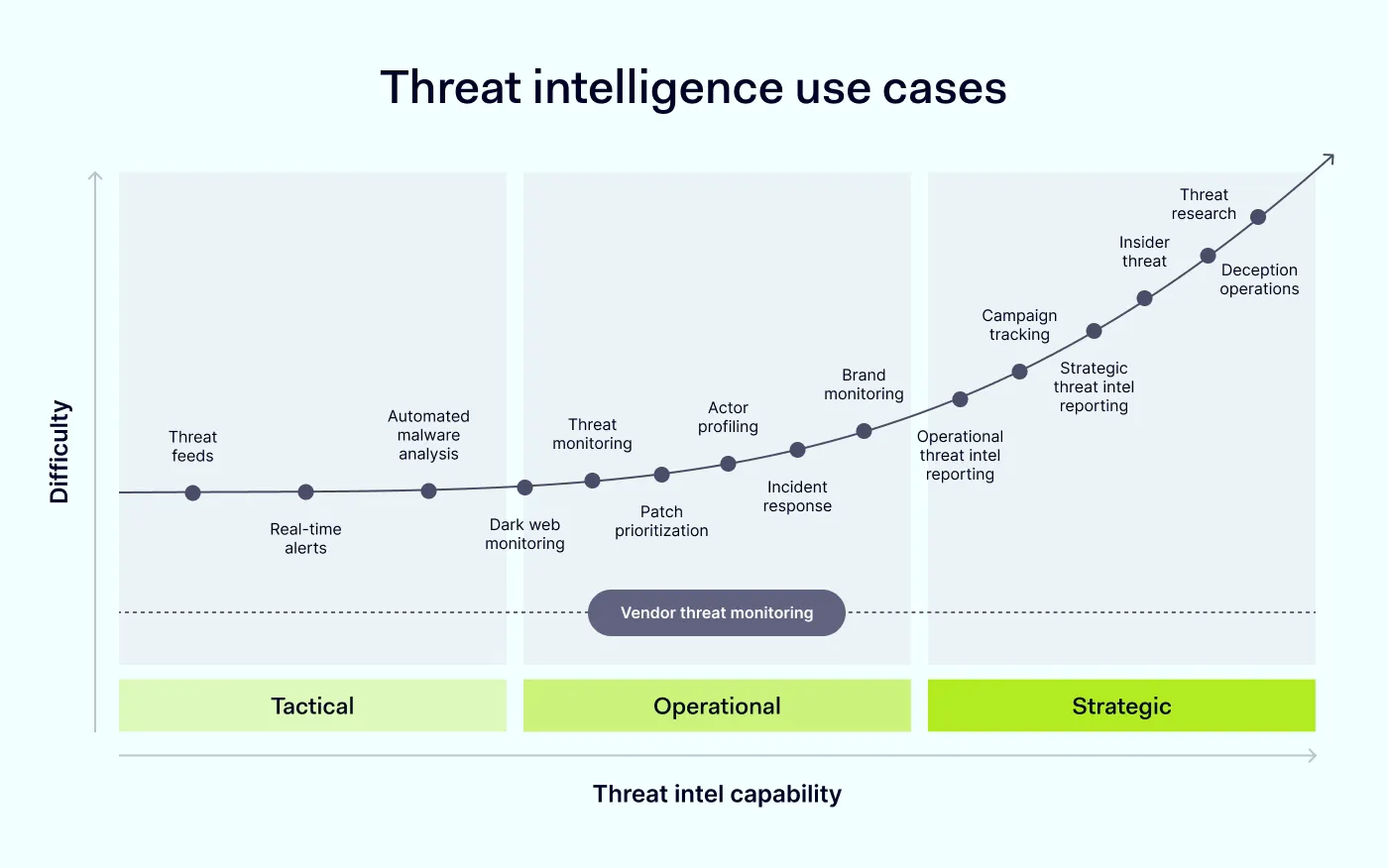
Now that we've covered the 3 types of threat intelligence, let’s look at how organizations use it in practice. The main use cases include:
Incident enrichment
Proactive threat detection
Vulnerability prioritization
Threat hunting
Dark web monitoring
Brand monitoring
Third-party risk monitoring
Threat intelligence reporting
How incident enrichment gives raw threat data context
Often, when security officers get alerts, they lack context. Without it, analysts waste time checking alert findings manually or deprioritizing alerts that need immediate action.
This is where incident enrichment helps. It adds context to raw threat data by taking an isolated data point, such as an IP address, domain name, or file hash, and providing background information, like geolocation, reputation scores, malware families, and asset criticality. It turnsa vague alert into an actionable finding, so analysts can quickly tell real threats apart from background noise.
Incident enrichment in practice
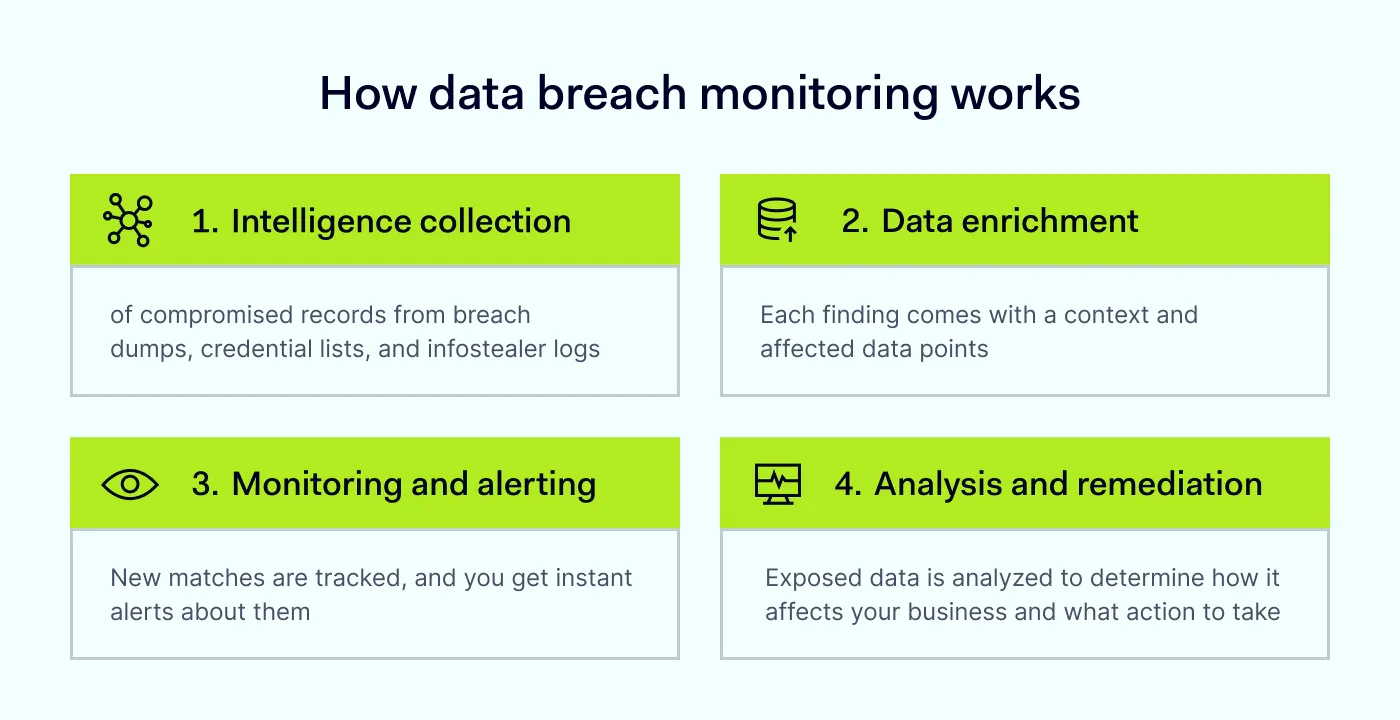
You don’t need a separate dashboard to incorporate incident enrichment into your workflow. Connecting data breach monitoring to your SIEM and case management tools via API allows dark web and breach exposure findings to flow directly into your existing incident response workflow.
NordLayer Intelligence surfaces exposed credentials, personal data, and other sensitive data from deep and dark web forums, marketplaces, and malware logs. Security analysts can then correlate these findings with existing alerts and act on them faster.
Proactive threat detection and prevention
Reactive defenses always leave organizations one step behind attackers. A proactive approach identifies threats before they can be exploited, which reduces breach risk, minimizes downtime, and protects brand reputation.
Threat intelligence feedssupport this proactive approach. These constantly updated lists of IOCs are loaded into security tools, which can then detect, alert on, or block them depending on how those tools are configured.
The challenge: too much data, not enough signal
Commercial and open-source feeds can deliver millions of IOCs daily. Without filtering, this volume overwhelms detection tools and buries analysts in false positives. According to the Evolution Toward an Alertness SOC report, SOC analysts in 84% of organizations reexamine the same incidents multiple times a month, and 60% report weekly duplication.
How to make threat intelligence feeds more effective
If security teams want to reduce alert noise and make threat intelligence feeds more useful, they should focus on indicator prioritization and playbook-driven automation.
Indicator prioritization
The same malicious IP can appear in 5 feeds in 5 different formats. Before they are usable, indicators must be:
Normalized: converted to one standard format.
Scored: a fresh, confirmed C2 server outweighs a 2-year-old IP from a low-quality feed
Pushed selectively to firewalls and SIEMs: fewer high-confidence indicators are better than long, unfiltered lists.
Playbook-driven automation
The basic approach is manual. For example, an analyst adds a bad IP to a blocklist manually. The mature approach is automated. When a high-confidence malicious IP appears in a feed, a playbook automatically pushes it to the firewall and alerts the SOC. The entry expires after 30 days, with no human involvement. Analysts only handle edge cases, like ambiguous scores or shared infrastructure that can’t be safely blocked.
This is what separates organizations that collect threat intel from those that actually use it to stop attacks.
Every year, dozens of thousands of new Common Vulnerabilities and Exposures (CVEs) are published—75,346 this year, with an average of 269 per day. A medium-sized company might have hundreds of open vulnerabilities at a time.
The problem is that CVEs scores alone don’t reveal which ones attackers care about. The Cyentia Institute’s EPSS study found that only about 6% of published vulnerabilities have ever shown exploitation activity. Threat intelligence helps you find that small slice.
Without intel on active exploitation, teams work through patch queues ordered by severity scores, spending time on theoretical risks while attackers exploit lower-rated vulnerabilities.
Effective vulnerability prioritization comes down to:
1. Identifying vulnerabilities attackers are actively exploiting
One of the clearest signals that a CVE poses an immediate threat is its inclusion in CISA’s Known Exploited Vulnerabilities catalog. Referring to this credible source of exploited vulnerabilities helps teams reprioritize their patch queues based on the actual risk.
2. Understanding which assets are exposed to attack
Prioritizing vulnerabilities only works if you know which of your assets attackers can exploit. Attack surface management gives you a full view of your exposed assets, including shadow IT and forgotten subdomains, by using DNS enumeration with advanced crawling. This allows teams to see exactly which internet-facing assets carry risk and need patching.
Threat hunting
Automated detection is alert-driven. Threat hunting is its human-led counterpart. Hunters form hypotheses about how attackers might operate. Then, they search through networks, endpoints, and datasets for malicious activity and hidden or unknown threats that bypass automated alerts.
The core methodologies of threat hunting include:
Hypothesis-driven hunting
Instead of IOC matching, analysts start with a theory about a potential malicious activity and try to prove or disprove it by querying telemetry logs.
Many organizations use the MITRE ATT&CK frameworkfor this type of hunting. For example, security teams match real-time events and documented techniques to understand attack patterns.
Intelligence-driven hunting
Guided by intelligence reports about active cybercriminals or campaigns, analysts search for similar behaviors in their own environment. This method helps identify and prevent relevant, active threats early on.
Analytics-driven hunting
The goal of analytics-driven hunting is to find anomalies. Instead of creating a theory, analysts use statistical analysis, behavioral analytics, and baselining to examine abnormal activity, like logins from unusual locations or times, or unusually large data transfers. This helps identify unknown threats.
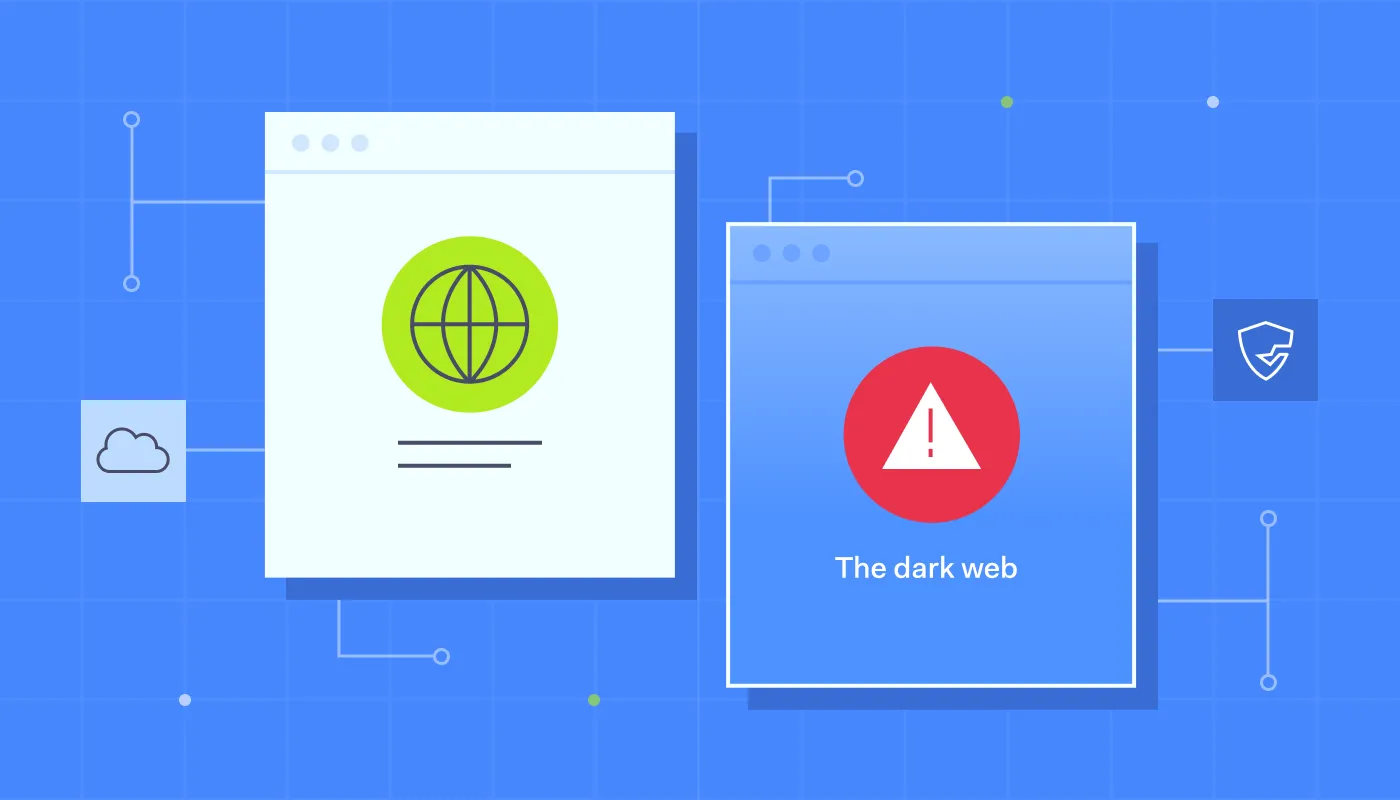
Deep and dark web monitoring
Dark web monitoring searches for leaked data and company mentions across many threat sources, such as:
Deep and dark web forums
Dark web marketplaces
Ransomware blogs
Telegram channels
It helps identify threats that could affect your organization, including:
Leaked credentials. Employee email and password pairs from third-party breaches, combo lists, and stealer malware logs.
Exposed session cookies. Cookies stolen by infostealer malware let attackers hijack active sessions and bypass some MFA protections.
Corporate data for sale. Stolen databases, internal documents, or network access offered by initial access brokers.
Forum and marketplace mentions. Discussions among threat actors that mention your company as a target.
What matters here is the timing. Dark web monitoring can give security teams an opportunity to act before stolen data is misused, but the data may already have been misused by the time it’s detected. When a match appears, the team can reset affected passwords, revoke active sessions, and check account activity for signs of unauthorized access. Acting can prevent future misuse.
The response also depends on where the threat appears and what it reveals:
Initial access broker (IAB) listings warn of an ongoing compromise. IABs advertise access to compromised environments, often to ransomware affiliates or other criminals. Detecting these listings may help an organization contain an intrusion before attackers cause further damage.
Ransomware leak site postings usually indicate that attackers have already stolen company data. The organization must then investigate the incident, contain any remaining access, assess legal and regulatory notification obligations, and begin recovery.
How dark web monitoring helps businesses respond to threats
Learning about leaked credentials, company mentions, or compromised data before cybercriminals exploit them gives you an advantage: time to react. Dark web monitoring tracks threat sources continuously, reducing the need for manual searches and helping security teams identify new exposures sooner.
NordLayer Intelligence monitors deep and dark web sources 24/7 and sends alerts via email, Slack, or Microsoft Teams when it detects new exposure linked to your business. Your team can then review the findings, assess the risk, and take action to prevent further damage.
Apart from leaked data, external threat monitoring can also help businesses detect brand misuse. That’s why brand monitoring is essential.
Brand monitoring
Brand monitoring tracks threats that can misuse your company’s identity rather than its infrastructure. Its goal is to detect brand misuseacross social media, websites, and app stores.
A lookalike domain registered on Monday can be harvesting employee credentials by Friday, and a spoofed executive account can run a convincing payment fraud scam within hours of appearing. These threats are outside the perimeter, so traditional security tools rarely see them, which is why brand monitoring matters. Catching an impersonation attempt or phishing kit means getting the domains taken down and the accounts reported before customers or employees interact with them.
So, what use cases are core for brand monitoring? Brand reputation protection and fraud prevention. This covers detecting:
Phishing domains
Executive impersonation
Fake social media accounts
Counterfeit product listings
NordLayer Intelligence extends brand protection by scanning the surface, deep, and dark web for brand abuse. It flags phishing domains, fraudulent profiles, and leaked brand assets the moment they appear, enabling companies to react to these threats before the reputation damage spreads.
Third-party risk and vendor monitoring
Supply-chain breaches are growing in number. According to KPMG’s 2026 Global Third-Party Risk Management Survey, 33% of organizations have experienced financial loss or reputational damage due to a third-party breach in the past 3 years.
When a vendor is compromised, the risk flows directly to your organization—along with the following risks:
Potential regulatory fines
Customer trust erosion
Operational disruption
That’s why third-party risk management is essential. Threat intelligence platforms go beyond one-time vendor questionnaires to give you continuous visibility into your partners’ security practices.
They monitor whether vendors have been breached, detect their IP addresses in botnets, and flag malicious activity on their networks in real time. This means you can spot issues early and isolate communication with a compromised vendor before the issue becomes yours.
Threat intelligence about threats targeting your supply chain, collected from dark web forums, adds another layer of protection. Integrating this intelligence into your vendor risk assessment process allows you to transition from a reactive incident response to an informed decision-making process regarding which partners can remain in your ecosystem.
Threat intelligence reporting
Effective threat intelligence reporting should turn raw technical data into digestible, actionable insights for stakeholders.
The same threat intel may be presented from different angles to serve different individuals. Here is how it breaks down:
Role
Core threat intel
Format
Objective
SOC analysts
Technical data, IOCs, and alert context
Real-time feeds, enriched alerts
Fast threat detection
Security managers
Sector trends, patch priorities, and resource bottlenecks
Weekly or monthly analytical reports and dashboards
An organization’s operational efficiency
CISOs
New risks, compliance implications, and benchmarking against industry peers
Strategic slides and executive briefing
Allocation of resources and security budget alignment
Computer security incident response team (CSIRT)
Attack vectors and immediate mitigation steps
Playbooks and technical advisory
Threat containment and removal
Executives/board
Strategic intel such as business or regulatory risk, ransomware trends, and sector vulnerabilities
Quarterly briefings, narrative reports, and memos
Making data-driven business decisions
The best practices for threat intelligence reporting include:
Tailor the reporting content to the audience. C-suite and board members might not understand a raw IOC list. Showing them how technical findings translate into business risks works better.
Avoid being vague. When you present analytical judgments, instead of generalizations, use clear probability terms, like “almost certainly” or “highly likely.”
Make reports more customized with stakeholders’ feedback. Learn if the report was relevant and adjust future reporting based on the feedback.
How to choose the right threat intelligence solution for your team
The answer depends on your organization’s size and level of security maturity.
Company size
Security maturity
Threat intelligence use cases
What you get
SMBs + lean teams
Early stage:
No dedicated threat intel or SOC staff
Core controls, such as MFA and password management, are in place
Dark web and breach monitoring
Vulnerability prioritization
Minimal overhead for the highest risk reduction per hour of effort
Medium-sized companies
Developing:
A small security team
SIEM and incident response processes are in place
Dark web and breach monitoring
Vulnerability prioritization
Incident enrichment
Proactive threat prevention
Relevant, de-duplicated threat intel flowing into your SIEM for faster triage
Large companies and enterprises 1,000+
Advanced:
Dedicated SOC and threat intel functions
Formal third-party risk program
Dark web and breach monitoring
Vulnerability prioritization
Incident enrichment
Proactive threat prevention
Threat hunting
Third-party risk monitoring
Threat intel reporting
Threat visibility across internal assets and third parties, with executive-ready reporting
Then, evaluate the providers based on 3 criteria:
Source coverage. Does it cover open, deep, and dark web sources?
Integration options. Can the findings be integrated with your SIEM/SOAR and case management systems via an API, or does your team have to use yet another dashboard?
Alerting speed. For credential and session cookie exposure, the time between when they appear and when you receive a notification.
Pick a platform whose use cases match the risks your team can act on today, with room to grow as you mature—not the one with the longest feature list.
Joanna writes about zero trust, network security, access control, and threat prevention, but her cup of tea is compliance and how regulations shape security controls.
Her work also includes the dark web topics and the methods cybercriminals use to target companies, such as social engineering or ransomware attacks, for example.