Summary: Remote work security entails protecting data across decentralized networks and devices. This guide identifies key threats like credential theft and shadow IT, offering a strategy for mitigation through zero-trust access, MFA, and endpoint management.
Remote work security protects company data across non-traditional environments like home networks and public spaces. The primary risks come from an expanded attack surface where personal devices used under bring your own device (BYOD) policies and unsecured Wi-Fi increase exposure to credential theft, phishing, and shadow IT.
Managing these risks requires a shift from location-based security to identity-centric protection, including:
Zero trust network access. Verifying every connection regardless of its origin.
Strong identity management. Enforcing multi-factor authentication (MFA) and transitioning toward passkeys.
Endpoint control. Ensuring remote devices meet security compliance before accessing the network.
In this guide, we’re going to look at the specific threats that keep IT teams busy—phishing that bypasses standard filters, the reality of credential stuffing, and how to tighten things up without making your employees’ daily workflow impossible.
Key takeaways
Top remote work security risks are expanded attack surfaces through unsecured home/public Wi-Fi, unmanaged personal devices (BYOD), and
social engineering.
Security categories:
Identity. Account takeover due to weak passwords and lack of MFA.
Network. Data interception (man-in-the-middle) on unencrypted connections.
Device. Vulnerabilities from outdated software and shared family use.
Data. Visibility gaps caused by shadow IT and misconfigured cloud sharing.
Enforce multi-factor authentication (MFA), move to zero trust network access (ZTNA), and use dedicated tools like NordPass Business and NordLayer to secure credentials and network traffic.
Key security risks
It would be nice if we could just hand out a laptop and trust that the home environment is as secure as the office, but that’s rarely the case. In reality, remote work forces you to account for variables that simply don’t exist within four company walls. To keep your sensitive data where it belongs, you first need to identify where the cracks are starting to show.
Unsecured networks
Most home routers are set to “good enough” rather than “enterprise-grade.” Without WPA3 encryption or strong firewalls, home Wi-Fi—and especially public hotspots—becomes a playground for man-in-the-middle (MitM) attacks. If your remote employees aren’t using virtual private networks (VPN) or zero-trust network access (ZTNA), their traffic is essentially an open book for anyone savvy enough to intercept it.
Personal devices (BYOD)
We all love the convenience of checking email on a personal phone, but BYOD (bring your own device) policies are notoriously difficult to control. When a staff member uses a laptop shared with family members, you’re suddenly exposed to unpatched software and a total lack of endpoint protection. This expansion of the attack surface means one accidental download by a teenager can lead to a full-blown security incident on your network.
Phishing and social engineering
Remote workers are often more isolated, which makes them prime targets for social engineering. Without a colleague nearby to double-check a suspicious request, it’s much easier to fall for a clever phishing attempt. These cyber attacks are targeted efforts to steal credentials and deploy malware or ransomware.
Weak authentication
Reused passwords remain one of the biggest cybersecurity risks out there. If you aren’t enforcing multi-factor authentication (MFA) and encouraging the use of password managers, a single leaked credential from a third-party site can give an attacker a direct path to your most sensitive information.
Data exposure
When people work from home, they tend to find the path of least resistance. This often leads to unencrypted file transfers or “temporary” cloud storage folders that stay public long after they should have been deleted. These misconfigurations are a leading cause of data breaches, as they leave company assets sitting in the open.
Shadow IT
When the official tools feel clunky, employees find their own. Whether it’s an unauthorized file-sharing service or a “helpful” browser extension, shadow IT creates unmonitored gaps in your remote work security.
Outdated software
In an office, you can push updates and know they’ve landed. With a distributed team, you’re often relying on the user to click “update” on their OS or browser. Outdated software is a gift to hackers, providing known vulnerabilities that allow for everything from browser hijacking to remote code execution.
Related articles

Agnė SrėbaliūtėApr 29, 202414 min read
Agnė SrėbaliūtėFeb 20, 20256 min read
Common attacks
While the risks we’ve discussed are the underlying vulnerabilities, these attacks are how those gaps are actually exploited. In most cases, it’s just an automated script finding the one remote employee who hasn’t updated their security settings.
Malware and ransomware. Usually triggered by a deceptive link or attachment, these programs are designed to quietly exfiltrate sensitive information or encrypt local files. For a distributed team, ransomware is logistically very tough. You can’t exactly walk over to someone’s desk to re-image a machine, which makes remote security incidents much harder to contain. This is where endpoint detection and response (EDR) becomes a necessity, as it can stop a process before it spreads through your network.
Credential stuffing. If a staff member uses the same login for their personal accounts as they do for work, they are a target. Using lists from previous data breaches, hackers run automated attempts to gain access to corporate accounts. It’s a low-effort cybersecurity threat that works too often if security policies don’t strictly enforce unique credentials.
Man-in-the-middle attacks. This is a major concern for remote workers using public or poorly configured Wi-Fi. By sitting between the user and the destination, an attacker can intercept everything from login credentials to sensitive data. Without a VPN or an encrypted tunnel, your data is out in the open.
What remote work changes for security
The shift to a distributed team has done more than just empty out offices. It has fundamentally fractured the control IT once took for granted. In a traditional setup, you had a clear line of sight into every byte of data moving through the building. However, once that workforce moves to their own homes, that centralized control disappears, leaving a significant gap between your official security policies and the messy reality of daily remote life.
This decentralization is exactly where the most persistent remote work security risks begin to take root. Take the concept of “mixed usage,” for instance. It starts innocently enough—a remote worker checks a personal email or lets family members borrow their laptop for a quick search. But because that device is no longer behind a corporate firewall, that one simple act can bridge the gap between a sketchy website and your internal network, potentially inviting malware into a space it should never be able to reach.
Building on that, this lack of physical oversight naturally leads to an uptick in shadow IT. When a staff member is working in isolation and encounters a clunky official process, they’re far more likely to bypass it using an unauthorized third-party app that “just works.” While it might help them finish their task faster, it simultaneously creates an unmanaged pocket of data that is completely invisible to your security team.
Ultimately, these factors culminate in an environment where detecting security incidents is much harder to spot in real time. Because you’re no longer managing a single network but rather a hundred tiny, individual ones, a minor breach can sit quietly for weeks without triggering an alarm. It’s a shift that requires us to start focusing on protecting the individual user—wherever they happen to be sitting.
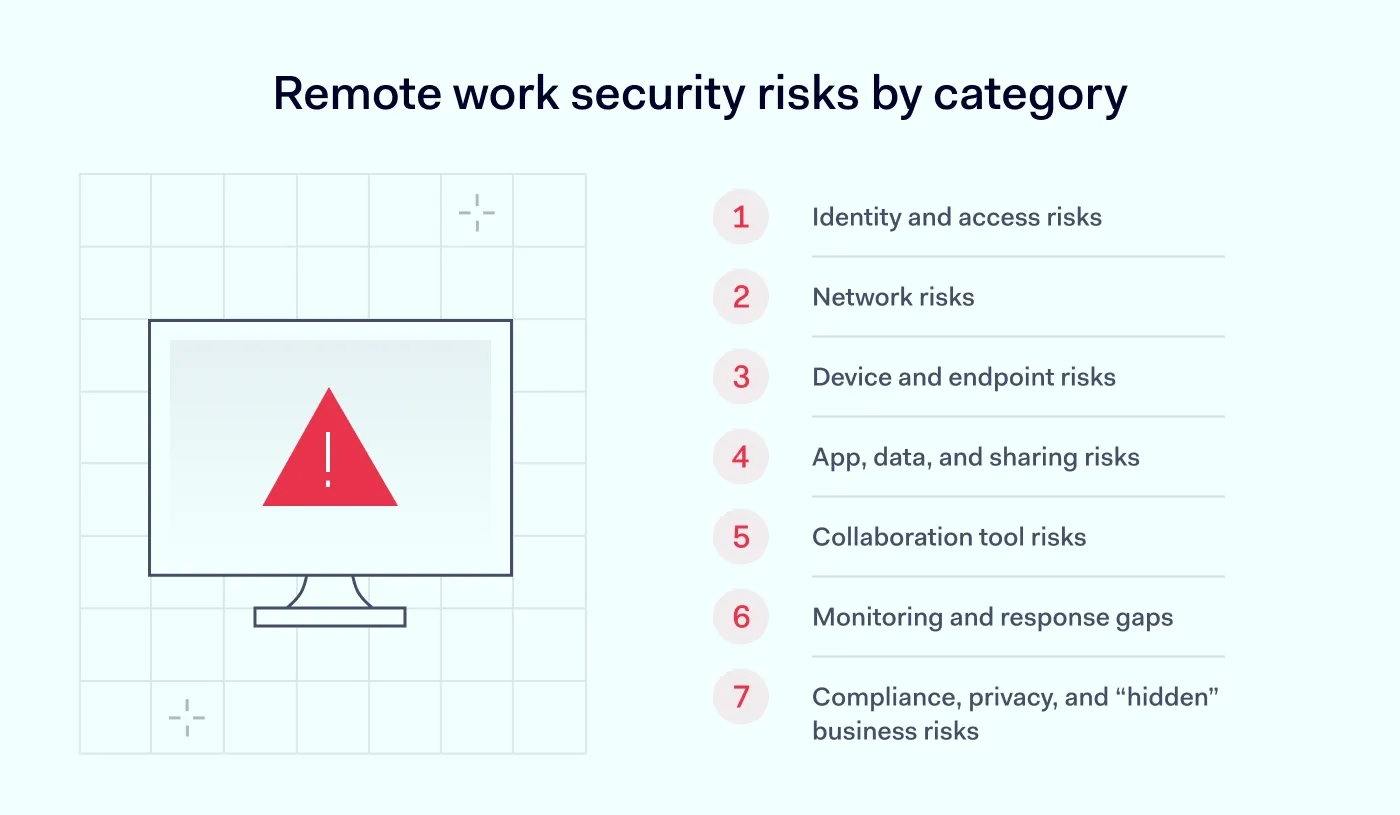
Remote work security risks by category
To make sense of these threats, it helps to stop looking at them as one big “remote problem” and start breaking them down into categories. After all, a weak password and a hijacked Zoom call require different solutions.
Identity and access risks
Everything starts with identity. This is why cyber attacks like phishing and social engineering are so effective; they don’t have to break into your system if they can just trick a remote worker into handing over their credentials. If that worker is reusing a password from a compromised site and hasn’t enabled MFA, an account takeover can happen in seconds. Once an attacker is inside your SaaS tools, they look just like a legitimate employee, making them incredibly hard to boot out.
Network risks
Most home networks are running on outdated firmware or default settings that are trivial to bypass. If your team is working from a café without protection, they’re inviting man-in-the-middle exposure where an attacker can essentially “sniff” the traffic. Without an encrypted tunnel, every document sent and every password typed is potentially being broadcast to anyone on that same public Wi-Fi.
Device and endpoint risks
When “work from home” actually means “work from the family iPad,” cybersecurity risks increase. Unmanaged BYOD devices often miss critical patches and lack the EDR tools you’d usually rely on to catch malware or ransomware before it spreads. Beyond the digital threats, there’s the physical reality of remote work: a laptop left in a car or a phone stolen at an airport can lead to a data leak if that device isn’t encrypted and remotely wipeable.
App, data, and sharing risks
When official file-sharing methods feel too slow, employees often turn to shadow IT—using personal Dropbox accounts or “quick” file-transfer sites to get the job done. This creates a visibility vacuum. If a cloud storage bucket is misconfigured with weak permissions, your sensitive data is sitting in a public folder, waiting for a crawler to find it.
Collaboration tool risks
We spend half our lives in video calls now, but those tools bring their own issues. Meeting hijacking—where uninvited guests crash a session—is still a thing, but the bigger risk is often human error. It’s so easy to overshare sensitive data via a screen share or leave a recording public. If your conferencing clients aren’t kept up to date, they can also become a backdoor for attackers to gain a foothold on the machine.
Monitoring and response gaps
When a device is off-network, IT often loses the telemetry needed to spot a breach in real time. This delay in detection means that by the time you realize there’s a security incident, the attacker has already had weeks to move laterally.
Compliance, privacy, and “hidden” business risks
Remote work creates significant friction with compliance standards like GDPR or HIPAA, especially if data is being stored on local drives in different jurisdictions. You also have to watch for “human” fraud, like payroll redirection scams that exploit the fact that you can’t just walk over to HR to verify a change. Even a misconfigured VPN can become a risk if it’s overloaded and causes employees to bypass it just so they can actually get their work done.
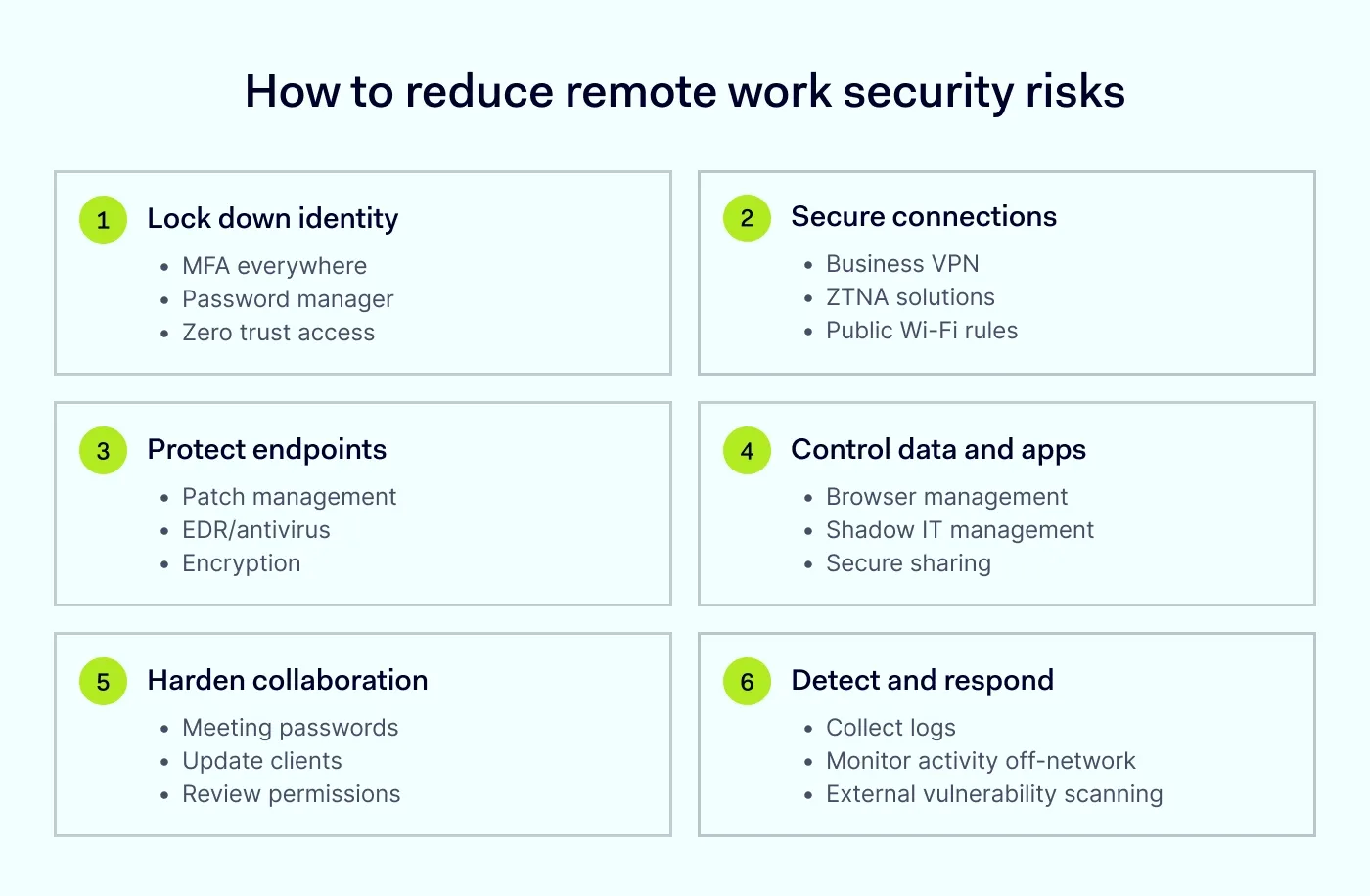
How to reduce remote work security risks
Knowing the risks is one thing, but actually closing the gaps without interrupting your team’s workflow is where the real work happens. You need a set of practical layers that make it harder for an attacker to get in and easier for your IT team to stay in control.
Set policies people can actually follow
Your goal here is to create clear guidelines for remote work that cover the basics: which apps are approved, how to handle sensitive data, and why using personal email for work creates a blind spot you can’t defend. If you’re allowing personal devices, set hard rules on what’s required before they can connect to the network.
Lock down identity first
Start by enforcing MFA across every single entry point—no exceptions. Since we know humans aren’t great at remembering complex, unique strings, providing a tool like the NordPass Business password manager helps eliminate password reuse while keeping access smooth. To further tighten controls, use NordLayer to manage secure remote access and implement session timeouts so an abandoned laptop doesn’t stay logged in to your core systems.
Secure remote connections
For most teams, a remote access VPN is the baseline for encrypting traffic on public or home Wi-Fi. However, as you grow, moving toward ZTNA is the smarter move. It allows you to grant access to specific applications rather than the whole network, ensuring that even if one account is compromised, the damage is contained.
Empower productive flexibility
Customize remote work rules for maximum efficiency—clear policies, streamlined access, and airtight security
Manage and protect endpoints
Every device—whether company-owned or BYOD—needs to meet a minimum security standard before it touches company data. This means automated patch management and endpoint protection matter. For a more modern approach, tools like NordLayer Browser add another control point: it helps IT enforce security policies inside the browser, including data loss prevention (DLP) controls like restricting copy/paste or limiting downloads to reduce accidental exposure.
Protect data where it moves
Data is most vulnerable when it’s in transit or sitting in unmonitored SaaS apps. To combat this, you need visibility into shadow IT—those unauthorized apps employees use to get work done. NordLayer Browser helps you set and enforce browser-level policies that reduce risky behavior in web apps, so you can steer the team back toward approved, encrypted storage. Pair this with strict permission hygiene for shared links to ensure sensitive work isn’t left sitting in a public-facing cloud folder.
Harden collaboration tools
Your video conferencing and messaging apps need more than just a “join” button. Always use meeting passwords and waiting rooms to prevent hijacking, and ensure your team knows how to manage the technology they’re using. Regular updates for these clients are critical, as conferencing software is a frequent target for exploits that can give an attacker a foothold on a remote machine.
Detect and respond faster
You can’t stop every single attempt, so your ability to see an attack in progress is vital. Use NordLayer’s Network Visibility (activity logs, Dashboards, Device Posture Monitoring) to detect failed logins and unusual activity off-network. To take it a step further, NordStellar can provide Attack Surface Management (including external vulnerability scanning) and dark web monitoring, alerting you if company credentials show up for sale before they’re even used against you.
High-risk roles and scenarios to watch
While everyone on the team needs to follow the rules, the stakes aren’t the same for every seat. Some roles naturally carry more weight because they hold the keys to your most sensitive assets, making them the targets for anyone looking to get inside.
Finance, HR, and admins. These are the primary targets for cyber attacks because of their access to payroll, bank accounts, and employee PII. A single compromised admin account can bypass almost every security setting you’ve put in place, which is why privileged access needs to be strictly gated with MFA and shorter session timeouts.
Contractors and third-party vendors. Freelancers often jump between different clients’ networks using their own, unmanaged hardware. This creates a gap in your visibility. If they aren’t required to meet your security policies before logging in, they can inadvertently act as a bridge for malware to enter your environment.
Frequent travelers. Working from airports, hotels, and conferences is the ultimate test of remote work security. Between the risk of physical device theft and the reliance on untrusted Wi-Fi, these employees need the strongest encryption and a strict “
always-on VPN” rule to stay safe.
Early warning signs of remote work compromise
Before we wrap up, it’s worth noting that compromises are often subtle. More often, it’s a series of small, technical oddities that don’t quite add up. If you or your team notice any of the following, it’s time to trigger your incident response playbook:
Impossible travel logins. Seeing a sign-in from London just 20 minutes after a successful one from New York.
New or unrecognized device sign-ins. Alerts for “New Device Detected” when the employee hasn’t upgraded their tech.
Unusual OAuth grants. A request for an unknown third-party app to “access your inbox” or “read your files.”
Repeated MFA prompts. “MFA fatigue” attacks where an employee is bombarded with push notifications until they accidentally hit “Approve.”
Mass downloads or exfiltration. A sudden spike in file downloads from your cloud storage that doesn’t align with the user’s typical workload.
FAQ
Is it possible to be 100% secure when working remotely?
No, absolute security doesn’t exist in any environment, but you can significantly reduce your risk. By implementing the right technical controls and keeping your team informed, you move from being an easy target to a highly resilient organization.
Is a VPN enough for remote work security?
A VPN is a great starting point for encrypting traffic, but it isn’t a complete solution. It doesn’t protect against compromised credentials or unpatched devices. For more granular control, you should look into combining a VPN with ZTNA.
How do I secure remote access without slowing people down?
The key is reducing friction through automation. Using a business password manager for one-click logins and enabling single sign-on (SSO) ensures that security happens in the background, rather than becoming a hurdle for your employees.
How do I secure contractors and partners?
Treat every third-party connection with “least-privilege” access. Grant them only the specific permissions they need for their task and ensure they are accessing your data through a secure, encrypted gateway rather than giving them full run of the network.
What should remote employees do on public Wi-Fi?
If a remote worker must use public Wi-Fi, they should follow these 4 rules:
Stick to known networks. Avoid “Free Airport Wi-Fi” clones.
Always use a VPN. Never browse without an encrypted tunnel.
Turn off file sharing. Ensure “AirDrop” or “Nearby Share” is disabled.
Don’t ignore certificate warnings. If a browser warns that a connection isn’t private, disconnect immediately.

Aistė Medinė
Editor and Copywriter
An editor and writer who’s into way too many hobbies – cooking elaborate meals, watching old movies, and occasionally splattering paint on a canvas. Aistė's drawn to the creative side of cybercrime, especially the weirdly clever tricks scammers use to fool people. If it involves storytelling, mischief, or a bit of mystery, she’s probably interested.