Summary: OpenClaw offers powerful automation but introduces security risks. Learn key threats and practical steps to deploy and manage AI-driven workflows with confidence.
OpenClaw is quickly becoming a go-to for automating tasks, connecting tools, and streamlining workflows. Moreover, AI adoption is accelerating fast. According to recent industry reports, over 78% of organizations are already using AI in some form, with many incorporating AI agents for daily work automation.
Because OpenClaw operates directly in your environment—with access to systems, files, and apps—it can expand your attack surface if not managed carefully. As more teams experiment with it, one question keeps coming up: Is OpenClaw safe to use?
The short answer is yes—but only if proper security controls are in place. Like many AI agents, OpenClaw introduces new security risks that traditional tools weren’t designed to handle. Understanding these risks is the first step to using it securely.
What is OpenClaw?
OpenClaw is an open-source framework designed as a personal AI assistant that can execute tasks across different systems. It connects AI models with real-world tools, which allows users to automate workflows such as managing files, interacting with APIs, or running system commands.
Since its launch, OpenClaw has attracted attention for its flexibility and developer-friendly approach. Unlike traditional AI tools that operate in isolated environments, OpenClaw enables deeper environment-level access. This makes it more powerful—but also more sensitive from a security perspective.
Because it can interact with local environments, cloud services, and internal tools, it behaves more like an autonomous agent than a simple chatbot. This shift—from assistant to autonomous operator—is exactly what makes understanding its security implications so important.
OpenClaw AI security issues
OpenClaw security concerns stem from how AI agents operate—making decisions, executing commands, and interacting with multiple systems.
In fact, as AI tools become a standard part of day-to-day work, security teams are becoming concerned about the loss of visibility and control—two areas where AI can introduce new blind spots.
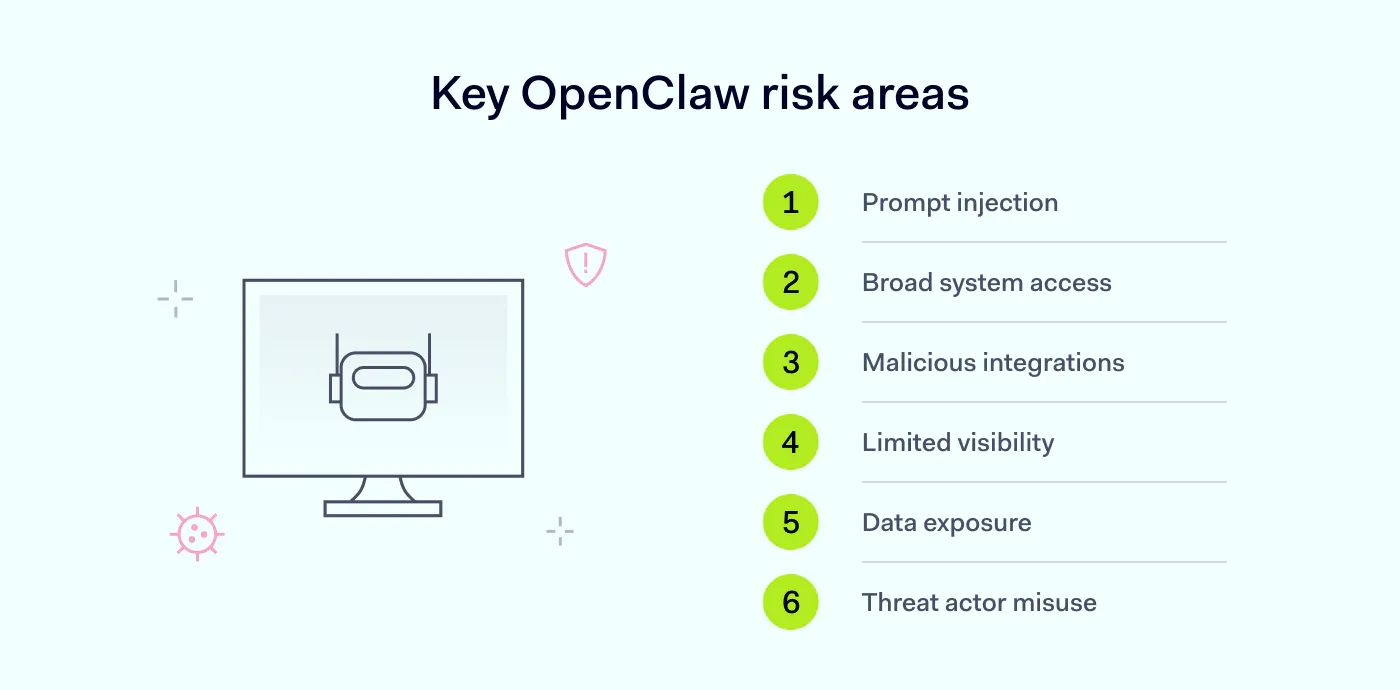
Below are the most common OpenClaw security risks organizations should be aware of:
Prompt injection attacks
One of the most critical OpenClaw security issues is prompt injection. This occurs when threat actors manipulate the input given to an AI system to override its intended behavior.
For example, a malicious prompt could trick the AI into revealing sensitive data, executing unintended commands, or even ignoring existing safeguards.
Because OpenClaw relies on instructions to perform tasks, it can be vulnerable if those inputs are not properly validated or restricted.
Excessive system access
Another common concern is how much access OpenClaw requires to work effectively. This includes access to files, APIs, and internal tools.
Without strict access controls, organizations may face unauthorized data exposure, accidental data modification, and increased risk if the AI is compromised.
This type of OpenClaw vulnerability is especially risky in business environments where sensitive data is involved. Beyond its core functionality, every integration introduces another layer of risk.
Malicious skills and integrations
OpenClaw supports extensions, plugins, or “skills” that expand its capabilities. However, not all integrations are trustworthy.
Malicious skills can:
Execute hidden or harmful actions
Exfiltrate data to external systems
Introduce backdoors into your environment
Since these integrations often run with the same permissions as the AI agent, they can pose significant security risks if not properly vetted.
Lack of visibility into AI actions
OpenClaw may execute multiple actions across systems without clear logging or oversight, which results in no visibility into what the AI assistant actually does.
This creates difficulty tracking what actions were taken, limited ability to audit behavior, and delayed detection of suspicious activity.
Without visibility, even small security issues can escalate quickly. This is especially problematic for smaller teams that rely on limited monitoring tools.
Data leakage and exposure
As a personal AI assistant, OpenClaw may process sensitive inputs such as internal documents, credentials, or business data.
If not properly controlled, it may result in accidental sharing of confidential information, exposure through third-party integrations, and insecure data storage or transmission.
This is one of the most common OpenClaw vulnerabilities, especially when used in business workflows.
Abuse by threat actors
If an OpenClaw instance is misconfigured or exposed, it can be exploited by hackers.
Attackers may attempt to gain access to internal systems, use the AI agent to automate malicious actions, and escalate privileges within the environment.
Because AI can execute tasks quickly and at scale, misuse can have an impact. In other words, automation can amplify both productivity—and risk.
Related articles

Agnė SrėbaliūtėApr 17, 202510 min read

Anastasiya NovikavaFeb 5, 20266 min read
Additional risks to be aware of
While the risks above are the most visible, there are also less obvious issues that can quietly increase exposure over time.
Sensitive data stored in plain text
Depending on the configuration, sensitive data can be stored in local files such as Markdown or JSON. If these files are not encrypted, they can become easy targets for malware or unauthorized access, especially on shared or unsecured devices.
Exposure through combined capabilities
What makes OpenClaw powerful also makes it risky. It combines:
access to private data
interaction with external content
ability to send and receive data
This combination increases the likelihood of unintended data exposure, especially if safeguards are not in place.
Hidden malicious instructions
Attackers can embed harmful instructions in content that the AI reads—such as web pages, files, or messages. These instructions may not be obvious to users, but they can influence how the system behaves.
In some cases, this can lead to sensitive data being shared externally without clear intent or visibility.
Bypassing traditional security controls
Because OpenClaw operates at the application level, it may bypass traditional security tools like data loss prevention (DLP) or endpoint monitoring systems.
This creates blind spots where activity may go undetected unless additional controls are implemented.
Untrusted third-party extensions
Community-driven platforms like ClawHub can offer useful integrations—but they can also introduce risk. Some extensions may include hidden code that can harm your system or expose data.
Carefully reviewing and limiting what you install is essential.
Secure complex connections
Ensure smooth third-party access with NordLayer
How to secure OpenClaw use across your company
The good news is that the risks can be managed. Using OpenClaw safely doesn’t mean avoiding it altogether—it means applying the right controls.
Validate and control inputs. Reduce exposure to prompt injection by filtering inputs and avoiding direct execution of untrusted instructions.
Vet all integrations and skills. Carefully review any third-party tools or malicious skills before enabling them. Avoid using unverified extensions.
Monitor activity and logs. Track what your AI agents are doing across systems. Visibility helps detect unusual behavior early.
Segment environments. Run OpenClaw in isolated environments where possible. This limits the impact of any potential AI vulnerability.
Control data flow. Define what data the AI assistant can access, process, and share. Avoid exposing sensitive information unnecessarily.
Educate your team. Make sure employees understand the security concerns associated with AI tools and how to use them responsibly.
These risks and safeguards have practical implications, especially for businesses of various sizes.
Best practices for deploying OpenClaw safely
To put these principles into action, here are practical ways to reduce risk in business environments:
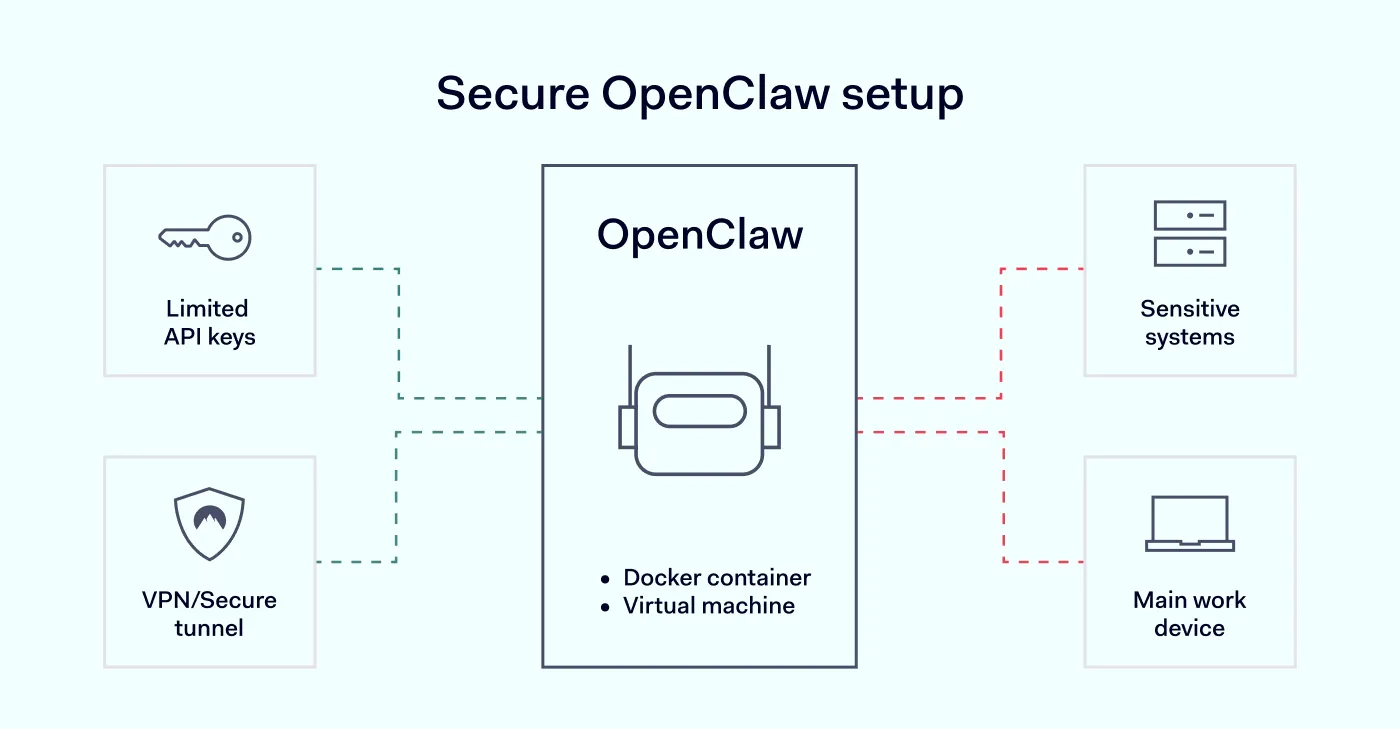
Use separate API keys with limits. Avoid using primary account credentials. Instead, create dedicated API keys with strict usage and spending limits.
Restrict network exposure. Bind services to localhost (127.0.0.1) and avoid exposing them directly to the internet. For remote access, use a VPN or secure tunnel instead of opening ports.
Run OpenClaw in isolation. Use a Docker container or a dedicated virtual machine. This helps contain any unexpected behavior and prevents it from affecting other systems.
Avoid using sensitive environments. Do not install OpenClaw on your main work device or connect it to critical accounts such as email, internal systems, or cloud environments.
Limit permissions and data access. Run it with non-privileged credentials (i.e., credentials with the lowest level of access) and restrict access to only the data required for testing or specific tasks.
Monitor activity continuously. Keep track of what the system is doing and be prepared to reset or rebuild the environment if needed.
Treat it as untrusted by default. Even if you’re experimenting, assume the system could behave unpredictably. This mindset helps prevent risky configurations.
How NordLayer helps secure OpenClaw environments
Tools like OpenClaw have become integrated into everyday workflows. That makes securing the underlying environment just as important as configuring the AI tool itself.
NordLayer helps organizations secure OpenClaw environments by adding more control at the network level. Organizations can restrict access to internal resources with single sign-on (SSO), multi-factor authentication (MFA), user provisioning, and Device Posture Security. They can also use Cloud Firewall to support a network segmentation strategy and limit exposure across environments.
NordLayer also gives IT teams better visibility into network connections, connected users and devices, and device posture. That helps maintain oversight as they test new tools, deploy self-hosted assistants, and expand AI-driven workflows.
This way, teams can move faster with AI—while keeping their systems and data protected.
Agnė Srėbaliūtė
Senior Creative Copywriter
Agne is a writer with over 15 years of experience in PR, SEO, and creative writing. With a love for playing with words and meanings, she crafts content that’s clear and distinctive. Agne balances her passion for language and tech with hiking adventures in nature—a space that recharges her.