Cybersecurity awareness shouldn’t end on October 31
October is the official Cybersecurity Awareness Month, but companies should treat it as a reminder that attackers never stop. To build a resilient, year-round defense, your business should start with habits such as:
Lead from the top. When executives publicly follow the same security rules—using MFA and password managers—the rest of the organization takes those policies seriously.
Use public resources. You don’t have to build your campaign from scratch. Use free toolkits from initiatives like the CISA Cybersecurity Awareness Program to keep your messaging fresh and authoritative.
Focus on the “core 4.” Consistently reinforce 4 essential practices like enabling multi-factor authentication, using strong passwords, updating software regularly, and recognizing and reporting scams.
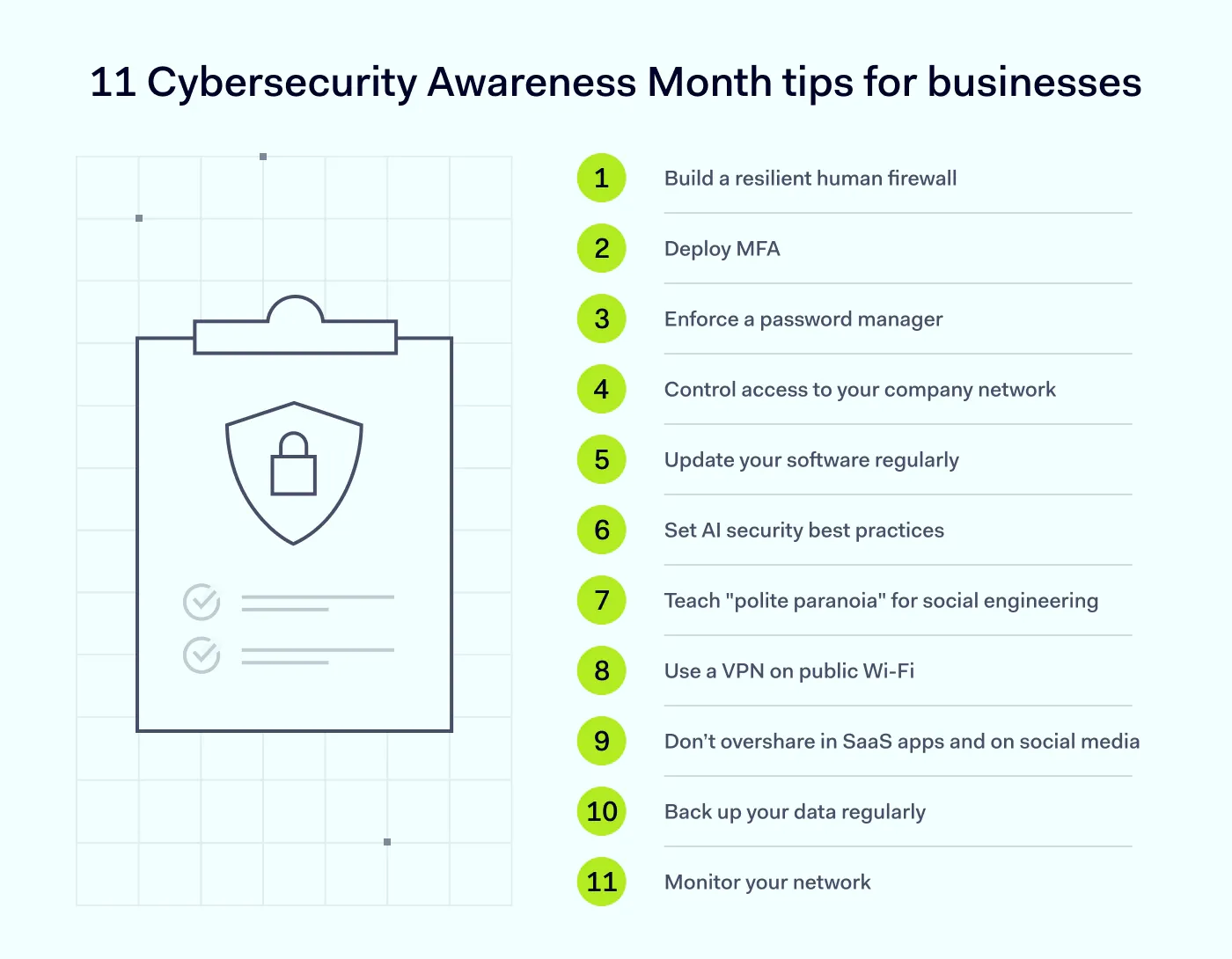
This is the first step toward a proactive defense. To help you get started, we have compiled a list of the 11 most effective security tips for protecting your business in 2026.
1. Create a resilient human firewall
Human error is the cause of 68% of data breaches. This means that building a resilient human firewall should start with educating your employees about security awareness.
However, doing it only during Cybersecurity Awareness Month is not enough. Best practices for cybersecurity training include:
Establishing a “no-blame” culture. Encourage employees to report suspicious links or accidental clicks immediately. If team members fear punishment, they will hide mistakes, creating blind spots that allow an attack to spread.
Focusing on regular, bite-sized learning. Don’t rely on one annual security training. Instead, focus on one small, specific topic each week. This way, you can build better cybersecurity habits and ensure effective learning.
Conducting attack simulations. Hands-on phishing simulations help people retain training information better than reading materials or watching videos alone.
Using interactive training methods. Instead of lectures, try gamification and storytelling, and conduct short sessions.
Connecting work to personal life. Employees are more engaged when they see how security habits, like using a password manager, protect their personal bank accounts and families, not just the company.
Well-done security training is very effective, and many organizations observe a 48% increase in phishing email detection and a 36% decrease in security policy violations as a result.
2. Enforce the use of multi-factor authentication (MFA)
According to Microsoft, more than 99% of compromised accounts didn’t have MFA enabled. The Cyber Readiness Institute Report found that around 65% of small businesses don’t use MFA and don’t plan to implement it, either.
However, multi-factor authentication does add an extra layer of security. It prevents account takeover and, as a key part of remote access security, helps organizations authenticate all connections. By requesting 2 or more authentication factors, security managers can control who accesses the company network and resources.
3. Use a password manager
As the M-Trends 20025 Report states, stolen credentials were the second most common initial attack vector, accounting for 16% of cases. Yet, only 33% of individuals create unique passwords for all their accounts.
The recommendation to change your password every 90 days is really outdated. A great solution that helps securely manage, store, and autofill credentials is a password manager, like NordPass. It generates and stores a complex, unique password for every account, locked behind one strong master password or passkey. This way, you can ensure your employees use strong credentials every time they log in to company systems.
4. Control who can access a company network
Roughly 810 accounts are compromised every minute worldwide—that’s about 14 every second. Employees with unrestricted access may create security gaps without even realizing it. One compromised login or careless click is exactly what attackers are waiting for.
If you apply the principle of least privilege, set expiration dates on elevated permissions, and require IT sign-off before granting admin rights, you can protect your sensitive resources.
This principle complements zero-trust network access (ZTNA). Least privilege focuses on user permissions for network assets, and ZTNA controls whether users can access the network at all by verifying users, their devices, and every access request before granting entry. Together, they reduce the attack surface and protect your organization.
5. Don’t postpone software updates (it’s costly)
Breaches caused by exploiting public-facing applications cost an average of $4.68 million. While this is the least expensive attack vector in the 2026 IBM Cost of a Data Breach Report, it is still substantial. Also, exploited vulnerabilities are the number one initial infection vector for ransomware.
Unsupported legacy applications are often the silent culprits behind successful attacks. Even if they are updated, older software often leaves vulnerabilities. For example, support for Windows 10 ended on October 14, 2025.
The “Update later” button can also be one of the most expensive clicks for your organization. Teach your employees that software updates always contain key security fixes, and that regular patching is essential for addressing vulnerabilities.
6. Set AI security best practices
AI adoption makes the attack surface bigger. LLMjacking, AI-driven attacks, excessive privileges for an AI agent, or shadow AI are AI security risks that businesses have to deal with now. According to IBM, 13% of organizations have experienced a data breach involving an AI model.
So, what can you do to protect your organization from AI risks? Start by controlling who can access your AI systems. You can use NordLayer’s AI security solutions to help you identify unapproved AI tools and prevent your team from sharing sensitive data in tools such as ChatGPT, Copilot, or Gemini.
Another way to detect shadow AI is the NordLayer Browser, which sees every web-based SaaS app and AI tool in use.
7. Teach “polite paranoia” to protect against social engineering
Phishing scams are the most common form of social engineering. Threat actors impersonate trusted sources to trick employees into disclosing sensitive information or credentials. The challenge today is that fraudsters now use AI to write convincing, personalized emails on a large scale. They hide malicious links in QR codes (called quishing) and can clone voices from a few seconds of audio. This makes modern phishing attempts seem authentic and, hence, harder to detect.
Most phishing attempts rely on a sense of urgency to make people act before they think. According to Chris Hadnagy, a social engineering expert, social engineers exploit “amygdala hijacking,” which occurs when emotions cloud rational thinking and prompt individuals to make impulsive decisions.
The first step in phishing detection is teaching your team to recognize red flags, such as an unusual sender address, an urgent request, or pressure to click a link. Security expert Rachel Tobac coined the term “polite paranoia,” which essentially means to stay calm and kind, but verify. If a call from a “colleague” sounds off, verify it through a known number before acting.
Last but not least, make phishing reporting effortless and encourage it. A reported phishing email is a win, not an interruption.
8. Use a VPN on public Wi-Fi
According to Statista, hotels and airports are the places where sensitive data is most commonly compromised. Still, around 26% of internet users log in to work accounts, and 19% share sensitive documents on public networks.
Why is using a public, free Wi-Fi network so risky? They lack security measures that can help prevent session hijacking. Attackers exploit this vulnerability by spying on public Wi-Fi traffic to steal login credentials, plant malware, or quietly redirect you to a fake website that looks like the original.
Another issue with public Wi-Fi networks is that they often don’t have password protection and authentication. On top of that, many public networks don’t encrypt the wireless connection itself. Yes, HTTPS still protects most web traffic these days, but open networks create vulnerabilities, such as rogue hotspots, man-in-the-middle attacks, and snooping on anything that isn’t encrypted (like DNS requests or older apps that don’t use HTTPS).
The good news is that you don’t have to avoid public Wi-Fi if you use a VPN. It encrypts traffic, making it invisible to attackers. NordLayer’s business VPN allows employees to access your network via a secure connection.
You can also include best practices for using public Wi-Fi in your regular employee training.
9. Stop oversharing in SaaS apps and on social media
There are two kinds of oversharing that put companies at risk.
The first is personal. Innocent details that people post on social media, such as a new car, a pet’s name, or their hometown, can give threat actors the raw material for targeted phishing. More than 80% of American and British employees overshare on social media platforms, which exposes them to online fraud. The only solution is to be careful about what you share. Teach your staff to ask themselves, “Could this help someone pretend to be me?” before posting anything on social media.
The second type concerns the SaaS stack. On average, about 157,000 sensitive records of one organization are exposed to every user on the internet via SaaS apps, which is $28 million in breach risk. You can control who accesses your SaaS apps and monitor their usage across your network with NordLayer’s SaaS security solutions. Your team can work efficiently, collaborate safely, and share files securely.
10. Back up your data regularly
Each year, data breaches are becoming more expensive and difficult to manage. According to IBM, the global average cost reached $4.99 million in 2026—a 12% increase from the year before.
Regular, secure backups are your safety net. You can use company-approved cloud storage for that. The idea is to take the option to “pay the ransom” off the table entirely if, for example, a ransomware attack happens.
However, backups only help after a loss. If you want to prevent a data leak before it happens, you should also deploy data loss prevention (DLP). DLP built into the browser helps protect your data. It uses automated tools to monitor and block sensitive data from being stolen or accidentally shared with the wrong person.
11. Monitor your network
Failing to continuously monitor network activity creates a dangerous “visibility gap.” According to the IBM Cost of a Data Breach 2026 Report mentioned earlier, it takes an average of 247 days to identify and contain a data breach, which leaves attackers undetected for months.
Without real-time network oversight, businesses face silent exfiltration, whereby threat actors steal data in small, unnoticeable amounts, and unchecked movement, which allows them to freely jump inside your network.
You can eliminate blind spots using:
Dashboards that give admins a comprehensive, real-time view of network activity.
Network segmentation that divides your network into isolated zones and prevents attackers’ lateral movement inside it.
Turn cybersecurity tips into a resilient security strategy
The tips provided here are just a roadmap. True resilience requires robust cybersecurity solutions, like NordLayer, a unified platform that combines the following products:
NordLayer secures your network. Use ZTNA to verify every connection, protect remote teams on public Wi-Fi with our business VPN, and keep noncompliant hardware off your network with device posture security.
NordLayer Browser protects the modern workspace. It blocks malicious sites before they load, and safely enables BYOD with granular file transfer controls. It can also identify and block unauthorized SaaS and AI tools and restrict uploads, downloads, and clipboard activity.
NordPass ensures credential hygiene. Store unique passwords in XChaCha20-encrypted vaults, and use the Data Breach Scanner to receive instant alerts if an employee’s email address appears on the dark web.
NordLayer Intelligence helps you find out what data has already been exposed. Detect leaked session cookies, identify unpatched vulnerabilities, and neutralize brand impersonation attempts.
Don’t wait until November. Start building a resilient infrastructure now. Contact NordLayer to discover which security controls are right for your business.

Joanna Krysińska
Senior Cybersecurity Copywriter
Joanna writes about zero trust, network security, access control, and threat prevention, but her cup of tea is compliance and how regulations shape security controls.
Her work also includes the dark web topics and the methods cybercriminals use to target companies, such as social engineering or ransomware attacks, for example.