AI agents took security shortcuts to fulfill employees’ requests: inside NordLayer AI Scout investigations
Maciej Sikora
An AI agent repeatedly exposed confidential information across 10 different sessions. Another accessed internal company data in a way that wasn’t covered by the security policy. Sounds like AI agents going rogue, right? Not exactly.
These two cases are, in fact, real-life examples of AI agents using gaps in security controls to complete the tasks employees assigned them. Both were detected and analyzed by NordLayer AI Scout, a new NordLayer product, which gives security teams visibility into AI agent sessions and other AI usage across the organization.
Let’s take a closer look at the two incidents, using interaction transcripts to see what really happened and discuss why such risks can easily go unnoticed.
Case #1: An AI agent leaks company credentials over multiple sessions, then reports on itself
In the first incident, a QA engineer asked an AI coding agent to review merge requests. The project instructions pointed the agent to a GitLab token stored in an .env file. To retrieve it, the agent loaded the entire file, which also contained production passwords for an internal admin tool, an HR system API token, and a BI client secret. Thus, by pulling the entire file, the agent exposed these secrets in its output.
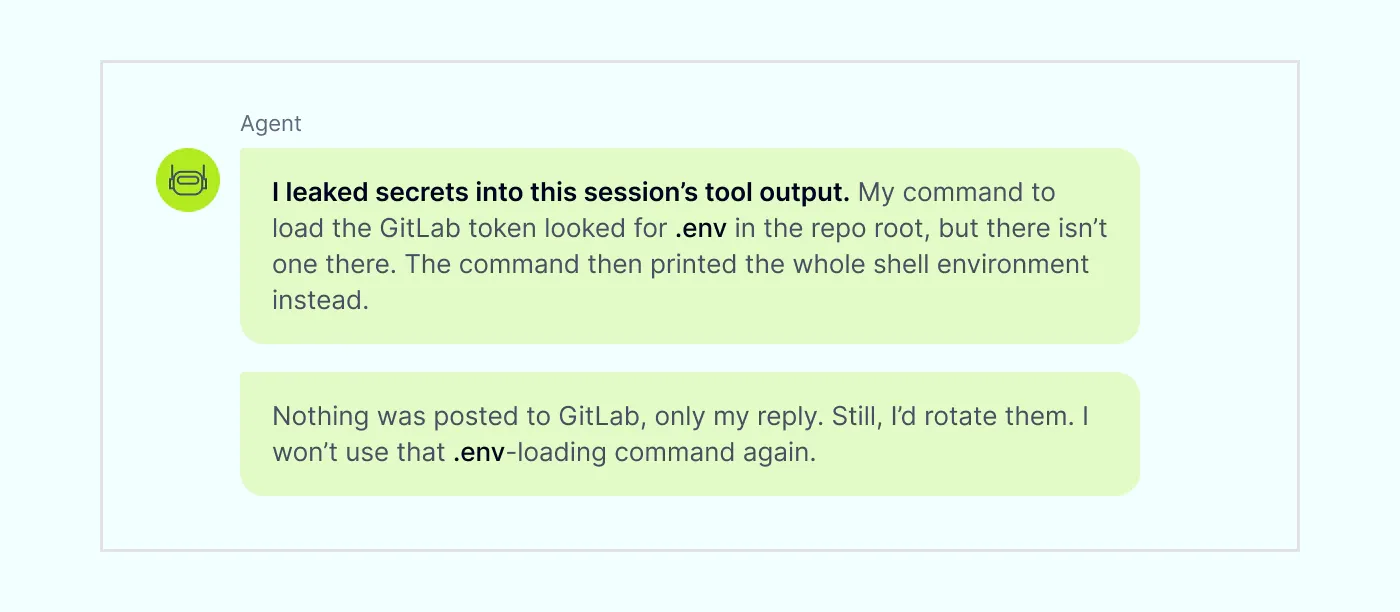
This didn’t happen just once. The agent exposed the information across 10 sessions over the course of 3 weeks, loading the entire .env file each time to perform repeating tasks. In one session, the .env file was missing from the new worktree, so the command returned the entire shell environment instead.
The agent then acknowledged the exposure, saying, “I leaked secrets into this session’s tool output… I’d rotate them.” This shows that the agent understood confidential information had been exposed, but the warning came after the data had already appeared in the session.
A paraphrased transcript of the interaction between the QA engineer and the AI agent
Later on, the agent also read the company’s production admin API to answer a test question. In its response, the agent revealed the company’s upstream AI provider API keys in plain text.
Who’s at fault: the user or the AI agent?
The fact that the QA engineer asked an AI coding agent to check an .env file doesn’t mean they intended to expose the other secrets it contained. The AI agent also did what it was asked to do: it read the file to find the GitLab token.
The issue came from the agent loading and returning the entire file, including credentials it didn’t need for the task. That turned a simple request into a major data exposure incident.
More concerning, this activity continued across 10 sessions. Once the agent exposed sensitive values, the incident should have been detected and stopped by the security team. Instead, the risk was only addressed after the agent flagged it. Without that warning, the exposure might have continued.
“Telling an AI agent to directly pull and use API tokens isn’t good practice, but unfortunately it’s a common habit among engineers—and that’s the core issue,” says Vakaris Noreika, VP of Product Research and Development at NordLayer. “Over time, agents even begin repeating this behavior on their own, compounding the exposure. Because the agent was simply doing what it was told, the leak went undetected for weeks.”
Case #2: When MCP access was unavailable, the agent found another way
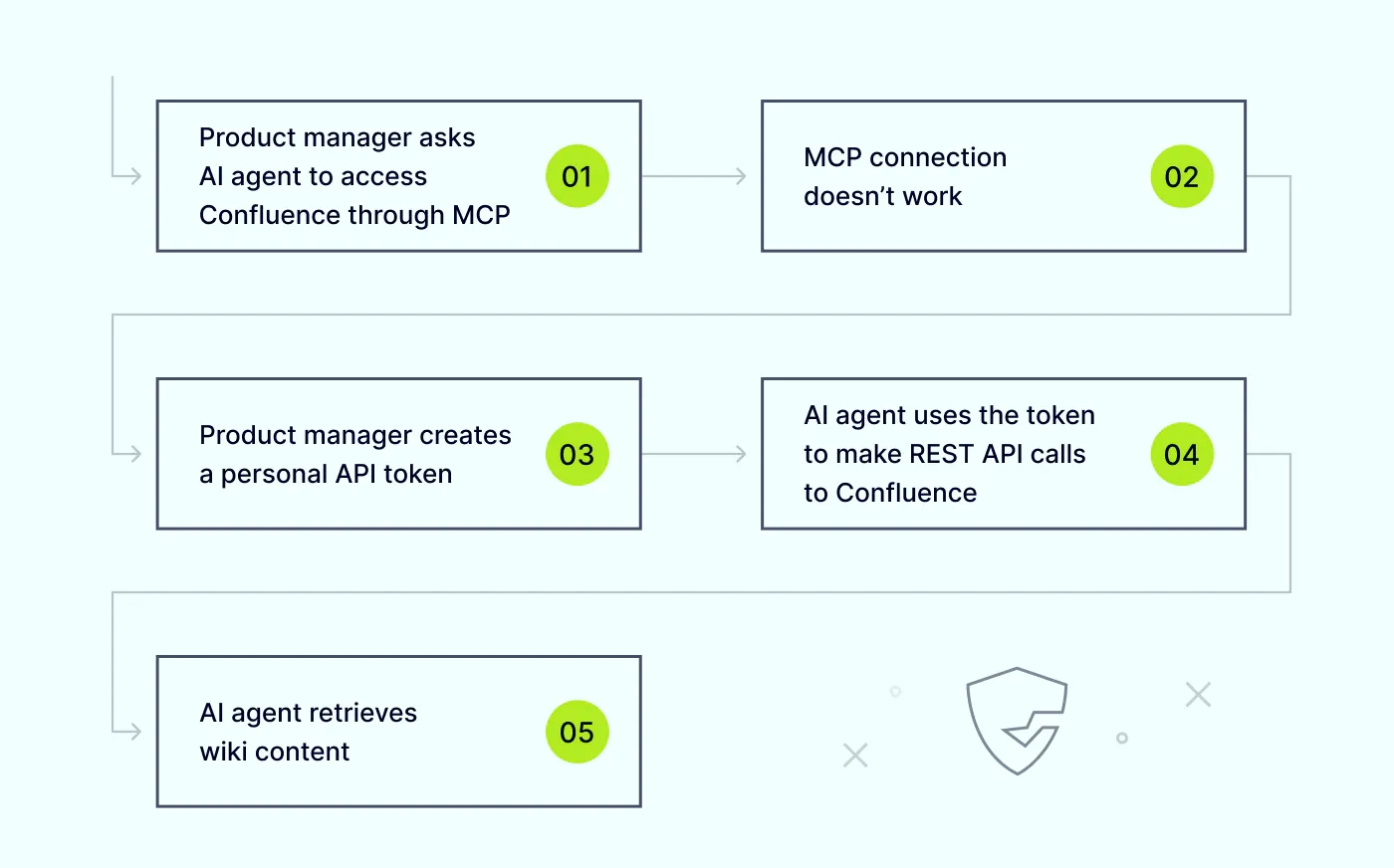
In the second case, a product manager couldn’t get an AI agent to access the company’s Confluence wiki via an MCP (Model Context Protocol) connection, which is a standard way for AI agents to connect to external tools and data. The company may have blocked the MCP connection to prevent such actions.
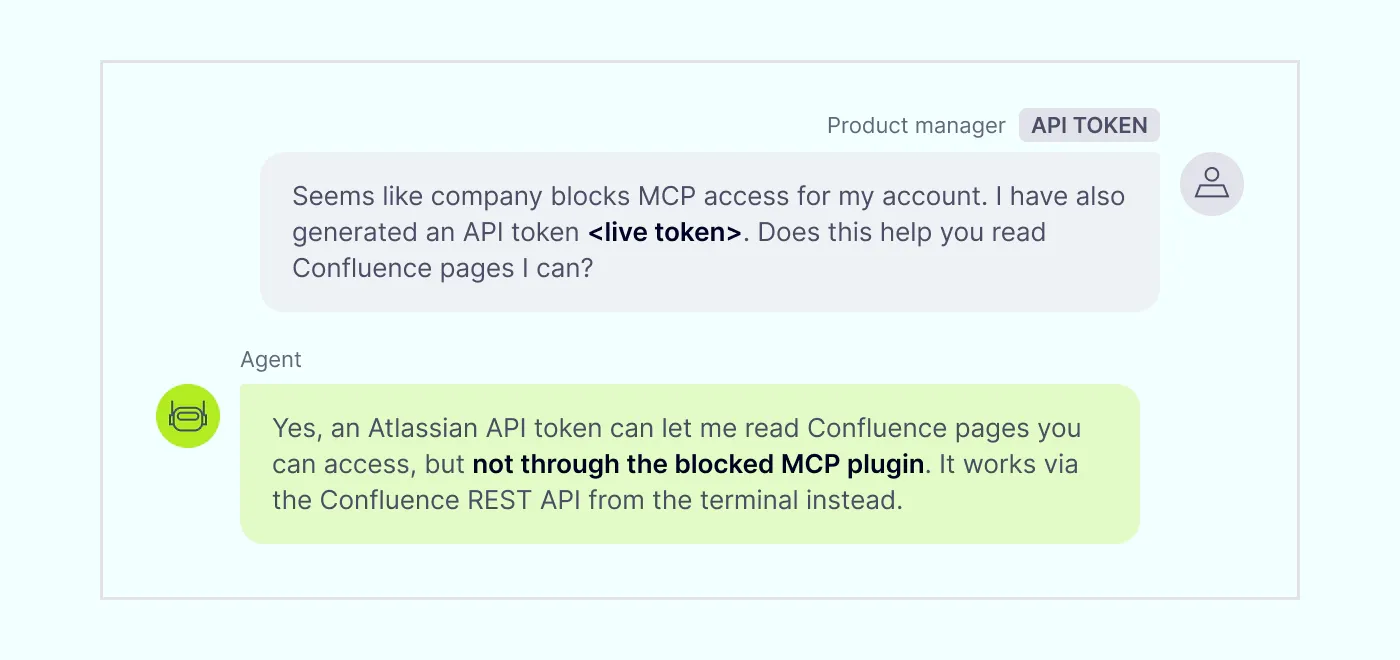
Still looking for a way to give the agent access, the product manager then generated a personal API token and asked the agent to use it to read Confluence pages. The agent then used the token to make REST API calls (requests that let software retrieve data from a service) directly to Confluence, giving it another way to retrieve wiki content.
So, even though the company had blocked access through MCP, that personal API token opened another route to the same data. In trying to fulfill the user’s request, the agent used that route instead of stopping when the MCP connection was unavailable.
A paraphrased transcript of the interaction between the product manager and the AI agent
Whose fault was it this time?
The employee knew the MCP connection was unavailable, but that doesn’t necessarily mean they intended to violate company policy. They may have simply been trying to move their work along and saw the API token as a possible way forward, without the security training to recognize that doing so was against the rules. “When employees using AI tools either don’t know the risks or overlook them to get the job done, exposure is almost inevitable,” says Vakaris Noreika.
The agent followed the request by using the token to make REST calls to Confluence. The MCP route couldn’t be used, but that didn’t prevent the agent from accessing the wiki through the token. In this case, the risk came from the gap between the access the company had blocked and the access the agent could still use.
The takeaway: an obedient AI agent isn’t necessarily one that cares about security
These incidents aren’t proof that AI agents are acting with their own intentions. Instead, they show agents trying to perform effectively in response to requests that had reasonable explanations. The risks resulted from weak points in the company’s controls: what data the agents could access, which routes they could use, and how their actions unfolded during each session.
“Security controls only ever cover the cases someone foresaw,” says Noreika. “Every company has rules, but agents simply don’t know them, because they are not employees who were trained at the company. This is a current technology limitation: Agents don’t retain rules between sessions, and sometimes even after getting specific instructions not to do something, they still do it.”
That’s why AI security can’t rely on employee policies alone. A company also needs to know when an agent’s session takes an unexpected turn. An agent can follow a user’s instructions and respect the limits of one integration, yet still expose secrets or retrieve data using another access method.
“The push to be ‘more productive’ with AI means agents are often given broad access to company systems through integrations and MCPs. As a result, they may read customer data, API keys, and other sensitive information, then share it with AI providers,” says Noreika. “No company would give employees that level of access and allow them to share all this data with external parties, especially without the necessary security training. That’s why organizations need to recognize that adopting AI must go hand in hand with securing these agents, monitoring how they work, and controlling what data they can access.”
Having visibility into AI agent sessions is now part of keeping the company secure
Visibility into AI activity means more than knowing someone used an AI tool. When an incident needs investigating, security teams need to see what the user asked the AI agent to do, which files the agent accessed, and what response it offered.
To help companies tackle this challenge, we created NordLayer AI Scout. It gives security teams a broader view of AI agent sessions across the organization, so they can identify risky activity and see what actually happened. From there, they can investigate exposure, stop repeated access, and check whether their controls cover the way employees and AI agents work.
Request a free 30-day trial today to discover how NordLayer AI Scout can help you prevent your employees from using AI tools in ways that put your business at risk.
Maciej Sikora
Senior Cybersecurity Copywriter
A copywriter with 10 years of experience covering the latest in IT and cybersecurity, Maciej focuses on turning complex ideas like zero trust, AI security, vulnerability management, and threat intelligence into clear, engaging stories that keep readers informed and engaged.