Man-in-the-browser attack

The website looks perfect, the URL is correct, and the address bar shows the padlock indicator: the connection uses HTTPS. A payroll manager types in the transfer amount, checks the account number, and hits “Send.” Five minutes later, the money lands in a cybercriminal’s wallet. This is a man-in-the-browser attack (MitB), and it happens inside applications users trust most.
Because MitB occurs on the user’s device rather than the network, it’s difficult to detect. It can enable fraudulent transactions even over HTTPS. Organizations often spend millions securing their servers, but a man-in-the-browser attack bypasses those defenses by compromising the endpoint.
What is a man-in-the-browser attack?
A man-in-the-browser attack is a threat where malware infects a web browser to modify web pages or transactions in real time without the user knowing. It allows attackers to eavesdrop, modify data, and perform unauthorized actions from within the trusted browser session.
A man-in-the-browser attack is designed to subvert the trust mechanisms of the internet. Unlike other threats that might try to crash a system or lock files, a man-in-the-browser attack wants the user to successfully log in so it can piggyback on their authenticated session.
How does MitB work?
In traditional man-in-the-middle attacks (MitM), the adversary positions themselves on the network path to intercept traffic between your computer and the bank. However, MitM attacks struggle against modern encryption like SSL/TLS. (Properly implemented TLS blocks most on-path interception, but MitM becomes possible when certificate trust or validation is compromised.)
With correctly validated TLS, an on-path attacker can’t read or alter the traffic. If certificate validation is bypassed or broken, they can.
A man-in-the-browser attack targets the endpoint. It strikes before the encryption happens or after decryption occurs.
The infection phase usually starts with a trojan horse. The victim’s device gets infected, often through phishing emails, malicious downloads, or a bundler that installs trojan malware alongside legitimate software. A man-in-the-browser attack relies on this initial compromise to plant the seeds for future theft.
Once inside, the trojan malware hooks into the web browser. The malware may install itself as a malicious browser extension, an add-on, or by injecting code directly into the browser’s executable process or API calls. This allows the man-in-the-browser attack to read and modify the Document Object Model (DOM) of a page. This is the core engine of MitB attacks.
And now is the scary part. When you navigate to a banking site, the malware wakes up.
- You type your password or transaction details.
- The attack captures that data.
- Before your browser wraps that data in encryption to send it to the bank, the man-in-the-browser attack swaps the destination account number for the hacker’s account number.
- When the server sends back a receipt saying “Transferred $5,000 to a Cybercriminal’s Account,” the man-in-the-browser attack intercepts that receipt, rewrites the HTML page, and displays “Transferred $5,000 to Vendor Account” on your monitor.
Because the malware lives on the endpoint, the browser creates a perfectly valid TLS connection. MitB attacks effectively betray both the user and the server because the request looks legitimate. It came from your PC and with your cookies.
Signs of a man-in-the-browser attack
Detecting a man-in-the-browser attack is difficult because the malware controls what you see. However, because MitB attacks rely on scripts and injections, there are often subtle behavioral warning signs.
- Unusual authentication prompts.
If your standard login process changes, it might indicate an attack. For example, if your bank usually asks for a password and then a code, but suddenly asks for just a code, or asks you to input a one-time password (OTP) repeatedly, a man-in-the-browser attack may be trying to harvest codes for a parallel transaction. - New or undeletable extensions.
Check your extensions list. A man-in-the-browser attack often persists via a malicious extension. If you see a “PDF converter” you didn't install, or if a legitimate extension suddenly requires permissions to “read and change data on all websites,” you are likely facing a MitB attack. - Sluggish browser performance.
MitB attacks require processing power to inject scripts and modify page elements in real time. If your browser lags significantly when loading financial sites, it might be churning through the malicious code of a man-in-the-browser attack. - Unexpected transaction alerts.
This is often the first concrete sign of a man-in-the-browser attack. If you receive an SMS or email alert from your bank confirming a transaction you didn't make (or a transaction for a different amount) trust the alert, not what you see on your computer screen. MitB attacks can hide the truth on the desktop, but they usually cannot control your customized SMS alerts. However, alerts can be compromised as well. Verify the alert via a separate trusted channel. Call the bank or check from a known-clean device. - Pop-ups on sites that usually don’t have them.
If a clean corporate portal suddenly starts throwing pop-up windows asking for sensitive personal information, an attack is likely in progress. This is classic “webinject” behavior, a common feature of MitB attacks where the malware overlays a fake form on top of a legitimate site. - Automatic logging out not functioning.
Sometimes, a man-in-the-browser attack will keep a session alive to continue performing actions in the background. If you click log out but the web browser hangs or doesn't confirm the action, an attack might be hijacking the session termination process.
Recognizing these subtle red flags is often the only way to catch a man-in-the-browser attack in progress. If you spot any of these signs, disconnect immediately to prevent MitB attacks from finalizing fraudulent transactions.
How to protect from a MitB attack?
You cannot rely solely on network security because the enemy is already on the endpoint. While TLS plus correct certificate validation reduces man-in-the-middle attack risk, MitB still works because it runs on the endpoint. So you must protect the device and browser.
Since this threat is directly addressed by the browser's security policies and permissions controls, solutions like NordLayer’s Business Browser can be pivotal. Organizations can reduce a common entry point with strict extension policies and centrally managing the browser.
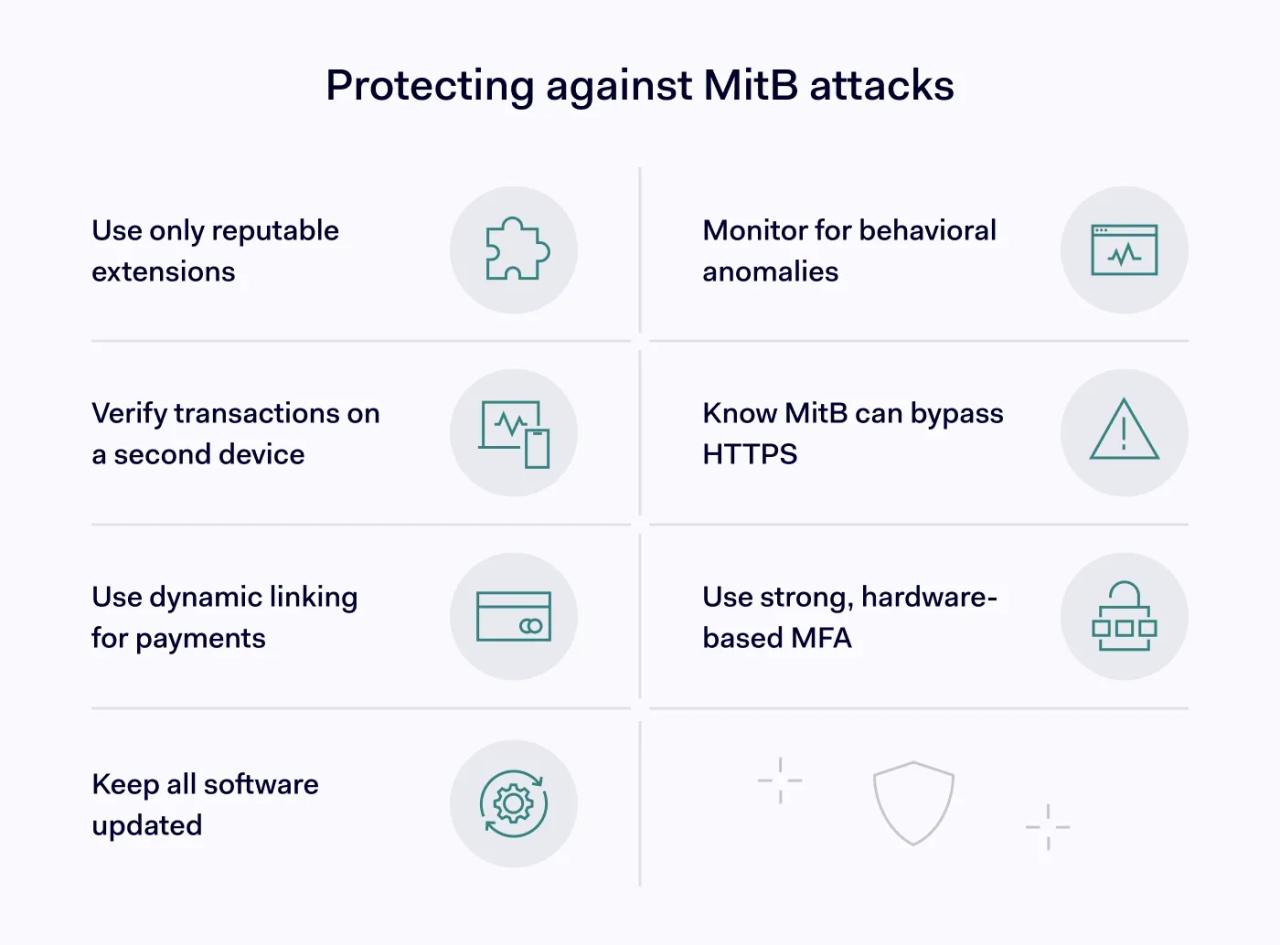
1. Practice strict extension hygiene
A common route is a risky or unvetted browser extension. Once installed, a malicious (or later compromised) extension can read and modify what happens in the browser, which opens the door to man-in-the-browser behavior.
Only install extensions from reputable sources. Organizations should use policy tools to block unauthorized extensions entirely to prevent a man-in-the-browser attack from taking root.
2. Use out-of-band verification
Since a man-in-the-browser attack can manipulate what you see on the monitor, you need a “second opinion” from a different device. If you are sending money, verify the transaction details on your mobile banking app or via an SMS summary. If the SMS says you are sending $10,000 but your screen says $100, an attack is occurring.
3. Implement “dynamic linking” for payments
For financial institutions, complying with standards like the EU's PSD2 is vital to stop a man-in-the-browser attack. This regulation requires “dynamic linking,” where an authentication code is generated specifically for that amount and that payee. If an attack changes the amount in the background, the code you generated for the original amount will fail.
4. Keep endpoints locked down
This sounds basic, but it prevents the trojan malware necessary for a man-in-the-browser attack. Keep the operating system and the browser updated. MitB attacks often rely on unpatched vulnerabilities to inject their code. Also, use reputable endpoint detection and response (EDR) software, which is more effective at spotting an attack than standard antivirus.
5. Monitor for anomalies
Security teams should look for “impossible travel” or unusual behavior patterns that suggest a man-in-the-browser attack. A user typically logs in from London but executes a high-value transfer with a slightly different device fingerprint? Is the submission speed inhumanly fast? It may be a script-based attack at work. However, “impossible travel” can also indicate compromised credentials, not necessarily a MitB attack.
6. Educate users on the difference between MitM and MitB
Users sometimes know about man-in-the-middle threats and avoid public Wi-Fi. They need to understand that a man-in-the-browser attack can happen even on secure home Wi-Fi if they download malicious files. Understanding that MitM attacks differ from MitB attacks helps users realize why “looking for the lock icon” isn't enough anymore.
7. Utilize multi-factor authentication (MFA) wisely
MitB attacks can sometimes bypass basic MFA by tricking the user into entering a code. But hardware tokens and FIDO2 keys are harder for an attack to spoof compared to SMS codes. Moving away from phishable credentials helps reduce the success rate of a man-in-the-browser attack.
Stay secure from man-in-the-middle attacks
Seeing shouldn't always lead to believing. Cybercriminals can bypass traditional network security measures that normally stop MitM attacks. However, businesses and users can keep their sessions secure if they maintain strict control over browser environments, scrutinize extensions, and verify transactions through independent channels. Be skeptical, be updated, and don't let a man-in-the-browser attack turn your own computer against you.