Summary: Learn how to secure your server using our best practices and simple steps for protecting your data and controlling access.
A single misconfigured server can expose thousands of records in seconds. Not because of advanced hacking, but because of a weak setup. In fact, many data breaches happen because servers are left unpatched, overexposed, or poorly monitored.
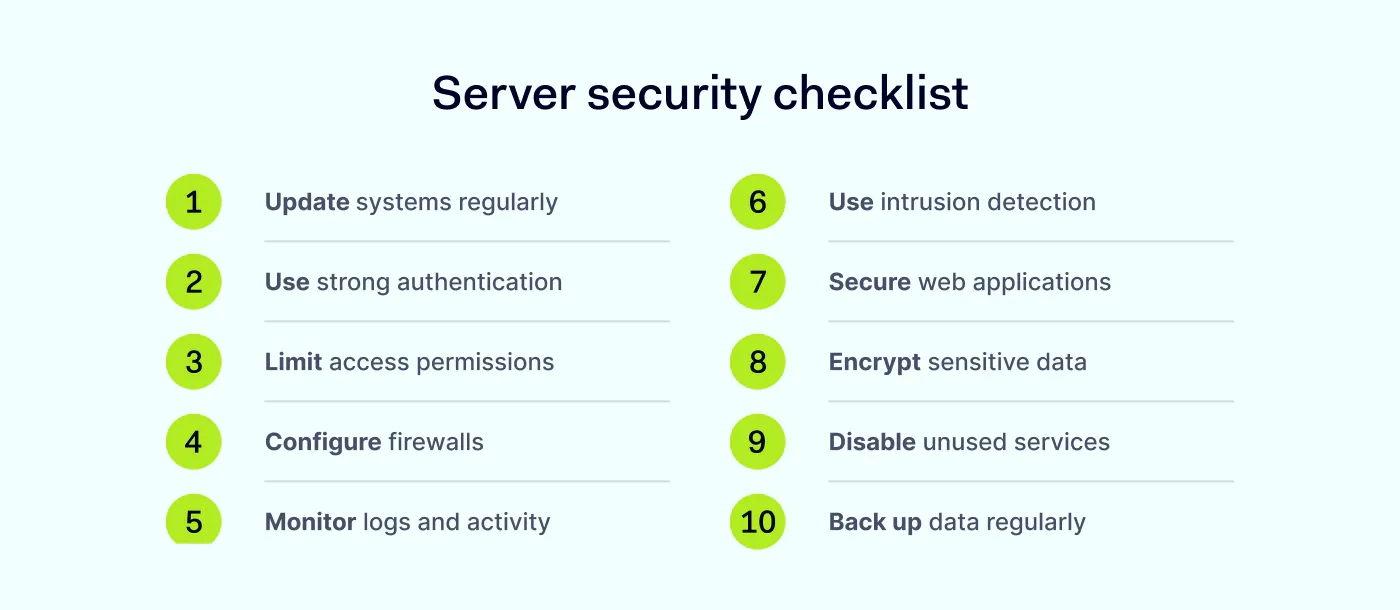
To secure a server, follow these key steps:
Keep your system and software updated.
Use strong authentication methods.
Limit access and permissions.
Configure firewalls and network security rules.
Monitor server logs and activity.
Use intrusion detection and network monitoring tools.
Secure web applications.
Encrypt data in transit and at rest.
Disable unused services and ports.
Set up regular backups and recovery plans.
These steps form the foundation of effective server security. Let’s break down what that means and how to implement it.
What is server security?
Server security refers to the processes, tools, and configurations used to protect a server from unauthorized access, data breaches, and other cyberattacks. It applies to any type of server, including a web server, application server, or database server.
Web server security focuses on 3 things:
Protecting data
Controlling access
Maintaining system availability
This is especially important because servers store sensitive information and power critical business operations. If a server is compromised, attackers can access data, disrupt services, or move deeper into the network.
For example, weak server security can lead to:
Data leaks from web applications
Service outages caused by malware
Unauthorized access through brute force attacks
That’s why securing your server is a fundamental part of any cybersecurity strategy.
Common server security threats (and how they work)
Servers are constantly scanned by automated tools looking for weaknesses. In many cases, attackers don’t target you specifically—they look for any server that is easier to break into than the next one.
Understanding how these threats work helps you prioritize the right defenses.
Brute force attacks
Brute force attacks rely on automation to guess login credentials by trying thousands—or even millions—of username and password combinations. Cybercriminals often use lists of commonly used passwords or credentials leaked from previous breaches.
If a server allows unlimited login attempts or relies on weak passwords, it becomes an easy target. Once access is gained, attackers can escalate privileges, install malware, or move laterally across the network.
Exploitation of vulnerabilities
Most successful attacks don’t rely on new exploits—they use known vulnerabilities that were never patched. Attackers scan the internet for servers running outdated versions of operating systems, web server software, or applications, then use known exploits to gain access.
In many cases, organizations are breached because a known vulnerability was left unpatched for too long.
Malware and ransomware
Malware can enter a server through several channels, including infected files, compromised applications, or unauthorized access. Once inside, attackers may use it to steal data, monitor activity, or gain persistent access. Ransomware takes this a step further by encrypting server data and demanding payment for its release.
For businesses, this can mean downtime, data loss, and financial damage. Without proper backups and security controls, recovery can be slow and costly.
Misconfiguration is one of the most common causes of server breaches. This includes issues like open ports, default credentials, excessive permissions, or publicly exposed storage. For example, a web server with unnecessary services enabled or improperly configured access controls can unintentionally expose sensitive data to the internet.
This is why server hardening matters. It is the process of reducing a server’s attack surface by removing unnecessary services, closing unused ports, and tightening configurations. Reducing unnecessary exposure is one of the fastest ways to improve security.
Insider threats
Not all risks come from external attackers. Employees, contractors, or partners with legitimate access to the server can also pose a threat. These threats may be intentional—such as data theft—or accidental, like misusing credentials or falling for phishing attacks.
Without proper access controls and monitoring, insider activity can be difficult to detect and may lead to serious security incidents.
Lack of monitoring
Even well-secured servers can be compromised if there is no visibility into what’s happening.
Without proper network monitoring and analysis of server logs, unusual activity—such as repeated login attempts, unauthorized access, or unexpected data transfers—can go unnoticed.
This delays detection and response, allowing attackers more time to cause damage. Continuous monitoring and alerting are essential for identifying and stopping threats early on.
10 ways to secure a server
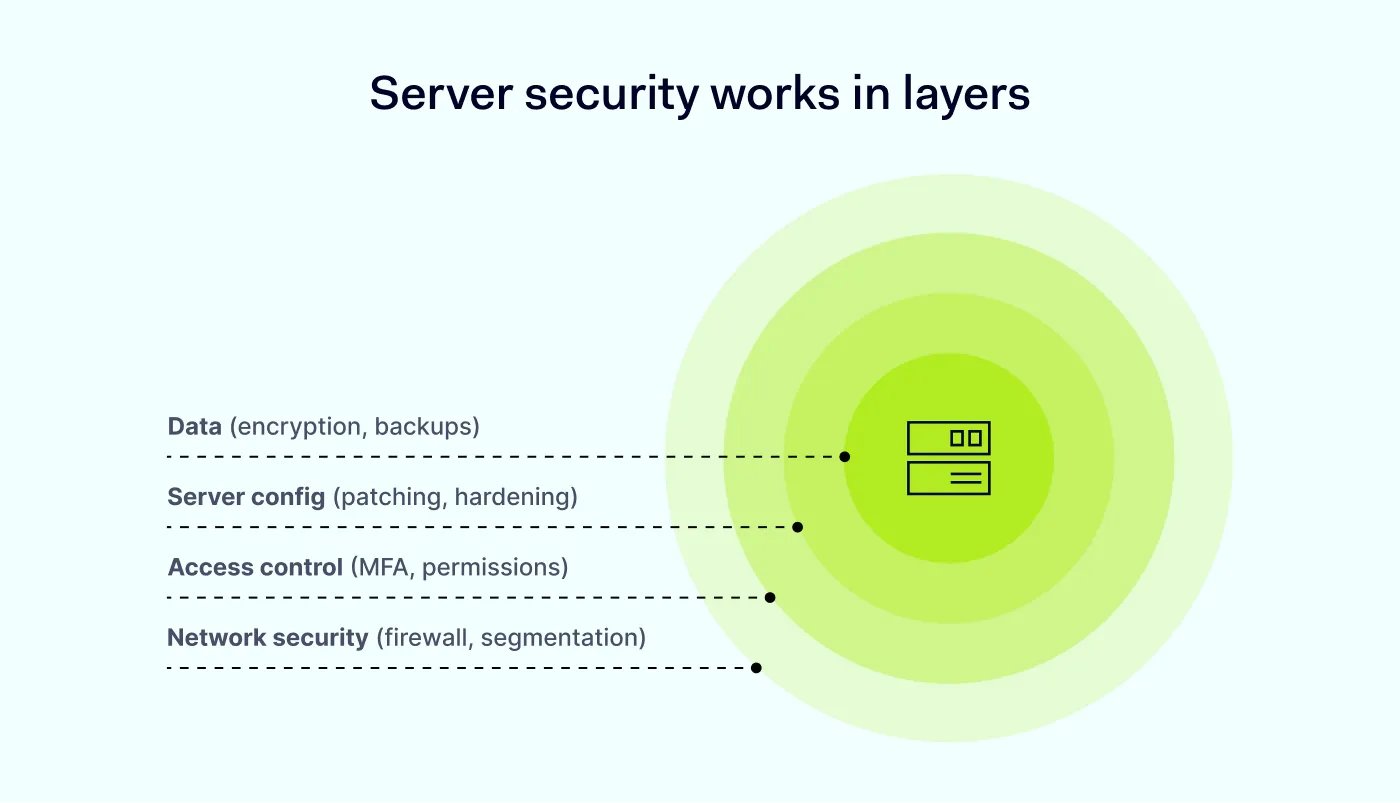
There’s no single solution for server security. Instead, it requires a layered approach combining multiple controls and best practices. To secure a server, follow these key steps:
1. Keep your system updated
Regular patching closes known vulnerabilities before attackers can exploit them. Always run the latest versions of operating systems, web apps, and server software.
When a server is up to date, it means the newest web server security patches are in place and that any issues found in older versions are fixed.
2. Use strong authentication methods
Passwords alone are not enough. Implement strong password policies and enable multi-factor authentication (MFA) wherever possible. MFA should be mandatory for all accounts, especially administrative ones, with a focus on phishing-resistant methods.
You can also set up public key authentication, which uses asymmetric encryption instead of passwords. This type of encryption uses a pair of keys—a public key to encrypt data and a private key to decrypt it—so access is granted without ever transmitting a password. This method is more secure and is commonly used for server access (e.g., SSH keys).
3. Limit access and permissions
Not every user needs full access, and most breaches exploit excessive permissions. Apply the principle of least privilege (PoLP) and role-based access control (RBAC) so that users only have access to the resources they need.
Restrict administrative privileges and avoid using shared accounts. This reduces insider risk and supports zero-trust network access (ZTNA).
4. Configure firewalls and network security
Firewalls help control incoming and outgoing traffic by blocking everything that isn’t explicitly allowed.
Only allow the necessary ports and services. Segment your network to limit exposure. For example, separate your web server from your internal systems to reduce the impact of a breach.
5. Monitor server logs and activity
Activity logs provide valuable insight into your system’s activity. Regularly review logs to detect unusual behavior, such as repeated login attempts, suspicious access patterns, or unauthorized changes.
Automating log analysis and anomaly alerts can help reduce manual effort and identify threats faster.
6. Use intrusion detection and network monitoring
Intrusion detection systems (IDS) and monitoring tools help identify suspicious activity in real time. They can detect:
Unusual traffic patterns
Unauthorized access attempts
Potential lateral movement
The goal is to shorten detection and response time.
7. Secure web applications
Many attacks target vulnerabilities in web apps rather than the server itself.
To protect against these attacks, use secure coding practices, validate inputs, and regularly test for vulnerabilities. Web server security should protect applications from common cyberattacks like SQL injection and cross-site scripting (XSS).
8. Encrypt data
Encryption protects sensitive data both in transit and at rest. Use HTTPS (TLS) to secure communication between users and your web server, choose strong encryption protocols, and ensure proper key management.
HTTPS uses public key encryption to establish a secure connection. Once the connection is set up, it switches to symmetric encryption (like AES) for faster data transfer. For data at rest, symmetric encryption is typically used to protect stored files and databases.
Encryption that adapts as threats evolve
Reduce risks with NordLayer’s comprehensive encryption approach
Every active service is a potential entry point. Server hardening includes disabling or removing any unnecessary services, applications, or open ports.
Reducing exposure decreases the number of potential entry points for attackers.
10. Set up backup and recovery plans
Regular backups are essential for recovery after an incident. Follow the 3-2-1 rule:
3 copies of data
2 different storage types
1 copy stored offsite
Store backups securely, and test them regularly to ensure they work. In case of ransomware or system failure, backups can help restore operations quickly.
What about cloud server security?
The practices above apply to any server, but cloud environments come with their own considerations. If you’re running servers on AWS, Azure, Google Cloud, or another provider, you’re working within a shared responsibility model.
In short, the cloud provider secures the underlying infrastructure—physical servers, networking hardware, and the hypervisor layer. Everything above that is your responsibility: the operating system, applications, data, access controls, and configurations.
This split is where mistakes happen. Organizations sometimes assume the cloud provider handles more than it does, leaving gaps in areas like:
Access management. Cloud consoles and APIs are high-value targets. Use MFA for all cloud accounts, enforce least-privilege policies, and audit permissions regularly. A single overprivileged service account can expose your entire environment.
Security groups and network rules.Cloud firewalls (security groups, network ACLs) need the same default-deny approach as traditional firewalls. Avoid overly permissive rules like allowing inbound traffic from 0.0.0.0/0 on sensitive ports.
Storage and data exposure. Misconfigured cloud storage (such as publicly accessible S3 buckets or open blob containers) remains one of the most common causes of data leaks. Audit storage permissions and disable public access unless it is explicitly required.
Logging and visibility. Enable cloud-native logging (e.g., AWS CloudTrail, Azure Monitor) and feed those logs into your monitoring setup. Without this, you lose visibility into API calls, configuration changes, and access events.
Encryption. Most cloud providers offer encryption at rest by default, but verify that it’s enabled and that you control the keys. For data in transit between services, confirm that TLS is enforced—don’t assume internal cloud traffic is automatically encrypted.
The core principle stays the same: reduce exposure, control access, and monitor everything. Cloud environments just give you different tools to do it.
How NordLayer helps secure your servers
Securing a server requires more than just individual configurations. It also demands strong network-level protection and access control.
NordLayer helps organizations strengthen server security by adding an additional access layer between users and critical resources. With NordLayer, you can:
Control access to servers using role-based permissions, multi-factor authentication (MFA), and device posture security checks.
Reduce exposure by limiting who can connect to your servers and from where.
Segment your network with cloud firewall rules to isolate servers and minimize the impact of potential breaches.
Monitor activity and maintain visibility into who is accessing your infrastructure.
This approach aligns with zero-trust principles, ensuring that access to servers is continuously verified rather than assumed. Even small improvements, like reviewing activity logs or enabling MFA, can make a real difference.
By combining strong server-level practices with network-level protection, organizations can reduce the risk of cyberattacks and improve their overall security. Start with the basics, stay consistent, and build your security strategy over time.
Agnė Srėbaliūtė
Senior Cybersecurity Copywriter
After spending a decade writing across media, PR, and advertising, Agne has been specializing in technology and cybersecurity content, focusing on IP address management, networking, zero trust, and internet infrastructure. She helps businesses understand complex technologies through clear, engaging, and sometimes creative content.