Summary: A practical guide explaining shadow IT, its risks, how to detect it, and the best strategies to control it.
Shadow IT is one of the fastest-growing challenges your organization can face. It is especially relevant as cloud services, personal devices, and remote work introduce more tools outside traditional IT oversight. While some of these help employees work more efficiently, shadow IT exposes businesses to security risks, data leakage, and compliance gaps.
This guide explains what shadow IT is, why it matters, how to identify it in your environment, and what steps your business can take to prevent risks.
Key takeaways
Shadow IT refers to any unsanctioned IT resources: tools, apps, devices, and cloud services used without approval from the department.
Employees turn to shadow IT for convenience, speed, and functionality that official company tools do not provide.
Risks of shadow IT include data breaches, regulatory violations, misconfigurations, and the exposure of sensitive data across unmanaged systems.
Some forms of shadow IT offer benefits, such as improved productivity or faster innovation—but only when appropriately managed.
Identifying shadow IT requires a combination of monitoring, network visibility, employee communication, and strong access controls.
Organizations can reduce risks by establishing policies, securing endpoints, enforcing multi-factor authentication (MFA), and using tools like Cloud Access Service Brokers (CASBs) or DNS filtering.
NordLayer supports shadow IT management with SaaS security, DNS filtering, Application Blocker, and a Business Browser.
What is shadow IT?
Shadow IT is the practice of using devices, applications, cloud services, or other IT resources without the knowledge or approval of the IT department. It ranges from unauthorized third-party software to personal devices connecting to company systems.
However, shadow IT doesn’t usually happen with evil intent. In most cases, employees are simply trying to work more efficiently. The problem is that these tools create blind spots that security teams can’t protect against.
Why is shadow IT a growing concern?
A typical organization has hundreds of approved cloud services—and almost ten times as many operating under the radar. On average, enterprises rely on around 300 SaaS applications, with over half adopted without IT authorization. This creates blind spots across the environment, increasing exposure to data leaks, misconfigurations, and compliance risks.
Several trends have accelerated the risks of shadow IT throughout the years:
1. Rapid adoption of cloud services
Cloud tools are easy to sign up for, often requiring only an email address and a password. Without centralized oversight, employees may store files, transfer data, or collaborate in unsecured environments.
2. Hybrid and remote work
Employees rely heavily on personal devices and external services to stay productive. This includes their own laptops, messaging apps, and file-sharing platforms.
3. Slow internal approval processes
IT departments prioritize safety and compliance, which can mean longer approval cycles. Employees bypass these delays by choosing whatever tools solve their immediate problems.
4. Gaps in official IT services
When IT-provided tools lack features or usability (for example, no real-time editing, slow remote access, or outdated user interface), employees search for more convenient alternatives—often unaware of the risks of shadow IT.
5. Increased specialization of roles
Teams such as marketing, development, design, and sales use specialized tools that IT departments may not be familiar with. This leads to unauthorized SaaS applications spreading across the organization.
Together, these factors mean that shadow IT is no longer an occasional issue — it’s an ongoing challenge that every modern organization must manage proactively.
Everyday examples of shadow IT
A common real-life example can be this: a marketing team signs up for a free project-management app because their official tool feels too rigid. Within weeks, campaign briefs, customer data, and internal files end up stored in that external platform, without IT ever knowing it exists. What started as a quick productivity fix quietly creates a new security risk.
Shadow IT appears in familiar, everyday situations such as:
Employees storing files in personal Google Drive or Dropbox accounts
Teams using messaging apps like WhatsApp or Telegram for internal communication
Developers deploying cloud services on AWS, GCP, or Azure using personal accounts
Staff using personal laptops, tablets, or phones for work tasks
Departments adopting niche SaaS tools without a security review
Marketing teams using public AI tools to process company data
Staff bypassing corporate VPNs because they are “too slow”
Browser extensions installed without IT oversight
Each of these situations creates potential pathways for data compromise, misconfigurations, or unauthorized access.
Related articles

Anastasiya NovikavaMar 9, 20269 min read

Agnė SrėbaliūtėJan 26, 20267 min read
Risks of shadow IT
Once unsanctioned tools are in use, the impact can quickly extend beyond individual teams.
Data breaches: Sensitive data stored in unmanaged systems can be leaked or exposed to external parties.
Data loss: Personal devices or unsanctioned cloud services often lack strong encryption or access management.
Compliance failures: Tools may violate
GDPR,
HIPAA, or industry-specific regulations.
Security risks: IT teams cannot protect what they cannot see, creating blind spots in threat monitoring.
Malware exposure: Unverified software or browser extensions may contain malicious code.
Credential theft: Using the same passwords across personal and work applications increases the risk of attack.
Operational disruptions: Tools may not integrate properly with authorized systems, leading to inconsistencies or failures.
Because these risks often develop quietly, the first step toward reducing them is understanding where shadow IT exists and how it shows up in everyday work.
How to spot shadow IT
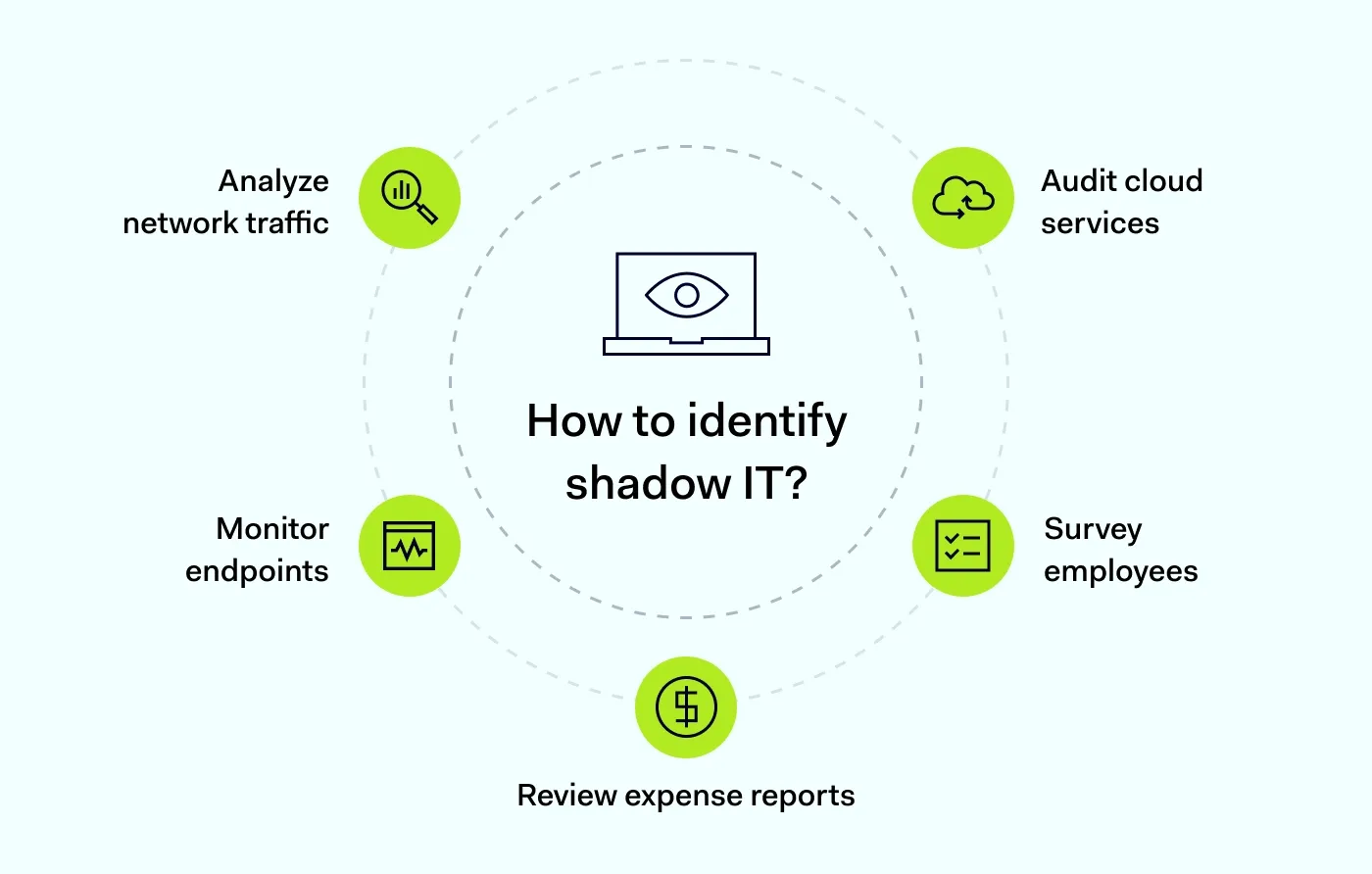
Detecting unauthorized IT requires visibility and continuous monitoring. Organizations typically identify it through:
Network traffic analysis
Unusual DNS queries, unknown applications communicating externally, or unexpected cloud connections often indicate the presence of shadow IT. This method helps the IT department detect risky behaviors early, even when employees are unaware that they are using unsanctioned tools.
Cloud service audits
Reviewing SaaS activity logs helps reveal accounts or services the IT department didn’t authorize. These audits also highlight how widely certain cloud platforms are adopted, allowing IT teams to decide whether to block, replace, or formally approve them.
Endpoint monitoring
Security teams can spot unauthorized software installed on devices, especially on personal ones used for work. Continuous endpoint visibility also helps detect outdated, vulnerable, or high-risk apps before they can cause security incidents.
Expense reports
Subscriptions or app purchases that fall outside approved tools can reveal shadow IT adoption within departments. Finance and procurement data often surface patterns (such as recurring monthly charges) that point to tools employees consider essential but never submitted for approval.
Employee surveys
Direct conversations often uncover tools teams rely on unofficially. Surveys also help IT understand why employees turned to shadow IT in the first place, exposing gaps in functionality, usability, or speed in current systems.
Taken together, these methods show where shadow IT appears and why employees adopt it. The next step is turning this insight into a structured, repeatable way to find and manage shadow IT across your organization.
Identifying shadow IT in your organization
To move from ad-hoc discovery to consistent shadow IT detection, companies should:
Map all network-connected devices, user groups, and cloud environments.
Analyze outgoing traffic for communications with unsanctioned third-party software and services.
Review user permissions and access patterns regularly to detect anomalies and over-privileged accounts.
Monitor high-risk categories such as file-sharing apps, messaging tools, AI tools, and data storage services.
Use automated tools to detect unmanaged SaaS adoption and expose shadow IT at scale.
This structured approach turns scattered signals—logs, network data, invoices, and feedback—into a clear picture of shadow IT. With better visibility, IT teams can prioritize high-risk areas, stop shadow IT from spreading, and address potential data exposure early.
Don’t treat symptoms—detect issues
Proactive network monitoring from NordLayer prevents problems before they occur
7 best practices for managing shadow IT
Organizations need a balanced strategy that secures the environment while maintaining productivity. Below are seven practical measures.
1. Establish shadow IT policies
Set clear guidelines on which tools are allowed, which require approval, and how employees should request new IT solutions. Policies must be easy to understand and aligned with business goals to ensure adoption.
2. Monitor IT assets regularly
Use automated tools to track devices, SaaS applications, and network activity. Continuous monitoring helps detect hidden risks and prevent shadow IT from spreading unnoticed.
3. Use cloud access security brokers (CASBs)
CASBs provide deep visibility into cloud usage. They help IT department inspect traffic, detect unsanctioned cloud solutions, enforce policies, and protect sensitive data across the cloud ecosystem.
4. Enforce access control
Strong access controls ensure that only authorized users and devices can reach company resources. This limits risks from personal devices and helps prevent unauthorized apps from accessing sensitive data.
5. Educate employees
Most shadow IT arises from convenience, not negligence. Regular training helps employees understand the risks of unauthorized IT and guides them toward safer alternatives.
6. Implement multi-factor authentication (MFA)
MFA reduces the risk of compromised credentials by requiring multiple forms of verification. Even if employees use personal or unmanaged software, MFA provides an additional layer of security.
7. Secure endpoints and access
Ensure all employees’ devices—including personal ones—are protected with antivirus, EDR, encryption, and secure remote access solutions. Strengthened endpoint security limits the chances of data loss or exposure.
These steps help reduce shadow IT risks, but having dedicated security controls in place can significantly strengthen your visibility and protection.
How NordLayer can help
NordLayer gives organizations practical tools to spot and control shadow IT without slowing down workflows.
DNS Filtering
DNS Filtering blocks access to malicious or unapproved domains before users reach them. By controlling which destinations employees can connect to, IT teams can limit the use of risky cloud apps and reduce everyday shadow IT.
Application Blocker
Application Blocker uses Deep Packet Inspection (DPI) to block specific applications, protocols, or categories at the network level when users connect through Virtual Private Gateways. It helps stop the use of unauthorized or high-risk tools—like consumer VPNs—without disrupting approved workflows.
Secure Business Browser
NordLayer’s Business Browser is designed to give IT teams policy-based control over how employees access SaaS and web applications, especially in hybrid or bring-your-own-device (BYOD) environments. It focuses on enforcing access and data-handling controls directly in the browser.
Together, these solutions help organizations maintain oversight, reduce exposure to unauthorized software, and let employees work safely across cloud services.
Frequently asked questions
What risks arise from shadow IT?
Shadow IT introduces security, compliance, and operational risks. Because unsanctioned tools operate outside IT visibility, they can expose sensitive data, weaken access controls, and create blind spots in threat monitoring.
Does shadow IT violate any regulations?
It can. When employees use tools that haven’t been reviewed for compliance, organizations may unknowingly violate regulations such as GDPR, HIPAA, or industry-specific standards, especially if personal or customer data is involved.
What does shadow IT lead to?
Over time, shadow IT can lead to data leaks, misconfigurations, inconsistent workflows, and increased security incidents. It also makes it harder for IT teams to enforce policies, respond to threats, or maintain a clear view of the organization’s technology landscape.
Are there any shadow IT benefits?
In the short term, shadow IT may help employees solve problems faster, work around a missing feature, or experiment with new ideas or tools before they are officially adopted by the IT department. However, these situations usually highlight unmet needs rather than advantages.
The goal is to identify where shadow IT exists, understand why it’s being used, and bring those needs into a secure, approved environment.
Agnė Srėbaliūtė
Senior Creative Copywriter
Agne is a writer with over 15 years of experience in PR, SEO, and creative writing. With a love for playing with words and meanings, she crafts content that’s clear and distinctive. Agne balances her passion for language and tech with hiking adventures in nature—a space that recharges her.