Summary: Protect your data without the tech-headache. Learn why a VPN is your best friend for remote work and how to set up a secure connection in just a few clicks.
Working from a home office, a quiet library, or a local coffee shop has its perks—mainly the short commute and the freedom to work where you feel most productive. But once you step outside the office's "safe zone," the way you connect to the internet changes.
Without the right tools, your sensitive company files and personal passwords are more exposed than you might think. Cue a VPN for remote workers.
In this guide, we’re going to cover how a virtual private network (VPN) actually keeps your data secure, what you should look for when choosing one, and how to get everything up and running.
Why is VPN important for remote workers?
You’re at a café, the coffee is great, and the "Free Guest Wi-Fi" is right there. It’s tempting. But the reality is that public Wi-Fi is a bit of a free-for-all—especially on open or poorly secured networks. When you’re working remotely and hop onto one, you’re basically shouting your data across the room. If you’re lucky, nobody is listening. If you’re not? That’s where things get messy.
This is exactly why a virtual private network matters. Think of it as a private, soundproof tunnel for your data. Instead of your emails and passwords floating around for any bored person with a laptop to see, a VPN encrypts your traffic between your device and the server. So, even if someone is trying to snoop, all they’ll see is a bunch of garbled nonsense.
But it’s not just about stopping eavesdroppers. Here’s why having a secure VPN for remote employees is actually a bit of a lifesaver:
First off, it’s about your IP address. Normally, your IP is like a digital trail that shows roughly where you are. When you connect to a VPN server, you're masking that trail and replacing it with the server's info instead. It’s a simple way to keep your physical location to yourself.
Then there’s the issue of getting access to company resources. Most offices have internal stuff—spreadsheets, databases, HR portals—that you can't (and shouldn't) reach from the open web. You need secure remote access to get in. In this case, a remote access VPN acts as a digital keycard. It tells the company network, “Hey, it’s really them, let them in.”
Now, some folks might tell you to just use a proxy server and call it a day. Our recommendation is not to do that. A proxy is a cheap mask—it might hide your face, but it usually doesn't protect your body (i.e., traffic with the same level of encryption). A VPN is the better default. For remote employees who actually care about their passwords and their company’s safety, that encrypted tunnel is hard to beat.
Empower productive flexibility
Customize remote work rules for maximum efficiency—clear policies, streamlined access, and airtight security
Benefits of a VPN for employees working remotely
Beyond the technical security stuff, using a VPN makes your workday a lot more predictable. When you aren't sitting at a desk in a corporate HQ, you have to deal with things like spotty café Wi-Fi or regional login issues. A VPN helps smooth over those bumps so you can focus on your job.
Here are a few ways a virtual private network makes life easier for remote employees:
Prevent ISP bandwidth throttling
Did you know some internet providers slow down your connection if they see you’re doing something data-heavy, like a long video call or downloading massive company resources? It’s called bandwidth throttling. When you use a VPN server, your internet service provider (ISP) can’t see which services you’re using—just that you’re online. Since they have less visibility into your activity, they’re much less likely to throttle you based on what you’re doing.
Access company resources from any location
If you're working remotely from a different country, you might find that some of your essential tools—or even your bank—suddenly stop working because they don't recognize your location. By using a remote access VPN, you can connect to a server in your home country. To the internet, it looks like you never left your living room, keeping your access consistent and your IP address familiar to the systems that need to trust you.
Establish a work-life boundary
When you’re at home, the lines between "work time" and "couch time" get blurry. Many remote employees use their VPN as a psychological trigger. When the VPN is on, you’re in the office. When you switch it off, you’ve officially left for the day. It’s a simple way to reclaim your work-life balance in a world where your desk is 10 feet from your bed.
Secure file sharing and collaboration
When you send a confidential project over a public connection, there's always a little flicker of "Is this safe?" Using a secure VPN takes that weight off your shoulders. Because your data is tucked inside an encrypted tunnel, you can collaborate freely without worrying about who might be snooping on the network.
Related articles

Maciej SikoraJan 21, 20267 min read

Agnė SrėbaliūtėApr 11, 20246 min read
What should you look for in a VPN provider?
You want something that’s easy for you to use but an absolute nightmare for anyone else to get through. Since your VPN is essentially the "secure tunnel" that connects your home office to your company resources, you want to make sure it’s built for performance, not just marketing.
Here are the non-negotiables to keep an eye on:
Strong encryption. Look for terms like ChaCha20 or
AES-256. You don't need to know exactly how the math works, but these are the standards that ensure your data stays unreadable to everyone else.
Modern VPN protocols. Options like WireGuard, OpenVPN, or IPSec are common in business-grade VPNs and can offer a solid mix of speed and security.
High-speed server network. Every VPN slows you down a tiny bit, but a good one has enough
VPN server capacity that you won't even notice. If you’re constantly seeing a spinning loading wheel during meetings, it’s the wrong VPN.
Apps that just work. If it takes 10 minutes and a manual to get connected, you won't want to use it. Look for a provider that offers a clean, one-click interface for all your devices.
Kill switch protection. If your VPN connection drops for a second, a kill switch automatically blocks your internet access so no "unprotected" data leaks out onto the public web.
Multi-factor authentication (MFA). To ensure secure remote access, your VPN should support MFA. This adds an extra layer of identity verification, making it much harder for unauthorized users to compromise your account.
Proven track record. Check for independent security audits. It's one thing for a company to say they’re secure, and another for a professional third party to come in and prove it.
How to set up a VPN for remote work
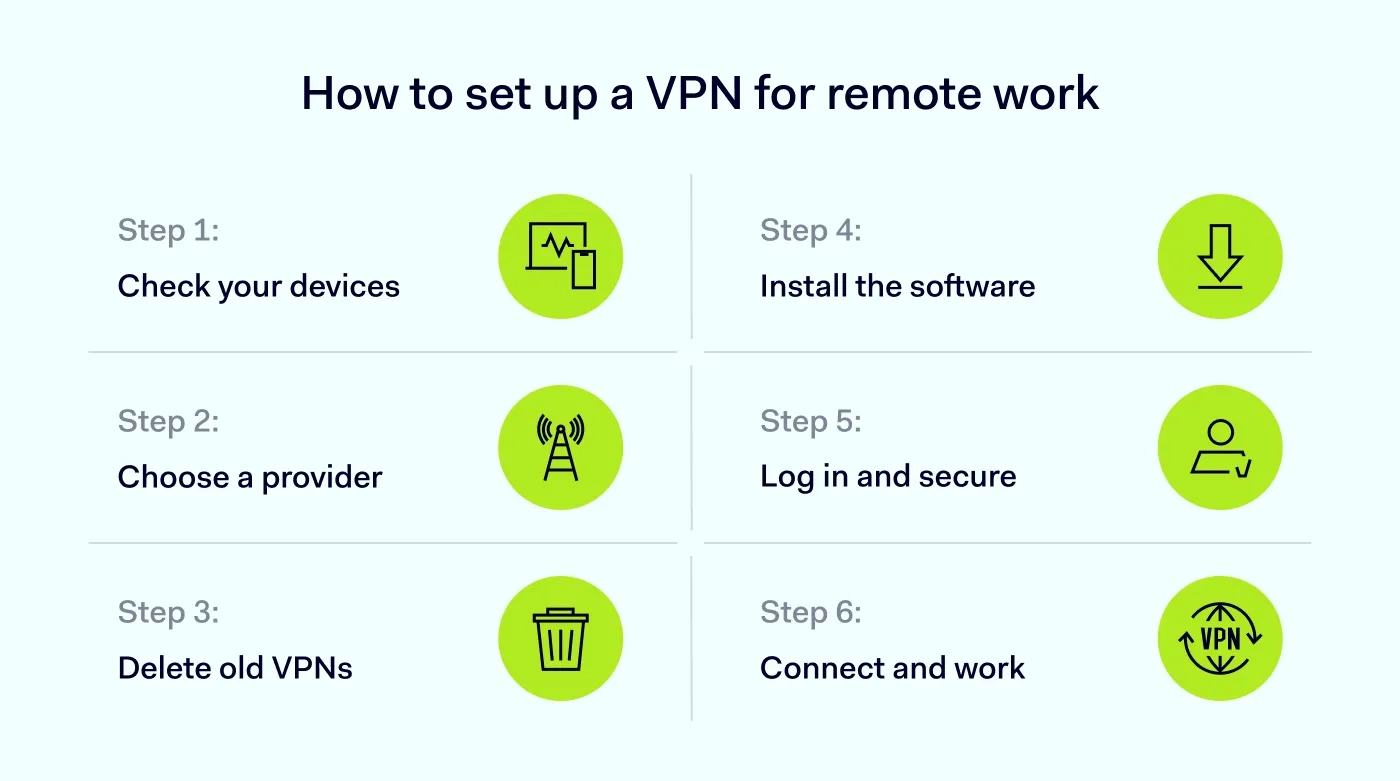
Whether you’re a team of one or managing a group of remote employees, the process usually follows these 6 straightforward steps:
Step 1. Map out your needs. Think about how many devices you’re using and what kind of company resources you need to reach. Planning for a bit of future growth now saves you a reconfiguration later.
Step 2. Pick your provider. Look for a service built for remote work—one with a solid reputation, high-speed VPN server locations, and a support team that actually answers.
Step 3. Prep your system. Clean house by removing any old, legacy VPN software that might cause conflicts. If you’re at a
home office, ensure your router is ready to play nice with your new provider.
Step 4. Install the software. Download the official app on every device you use for work—laptop, phone, and tablet. Keeping everything under one secure remote access setup is key.
Step 5. Log in and test. Set your security settings (like turning on MFA) and fire it up. Run a quick check to make sure your IP address has changed and everything is running smoothly.
Step 6. Fine-tune your protocol. Choose the connection protocol that fits your day (or let the app choose automatically).
Key VPN use cases for remote work
Most of the time, we talk about a virtual private network in terms of high-level security. While that's true, it’s also a practical tool that helps you get around the frustrating little roadblocks that come with working remotely.
Here are a few ways remote workers actually use a VPN in the real world:
Regional research without the travel bill. If you’re a marketer or developer, you often need to see how a website or ad looks to someone in a different country. Instead of guessing, you can hop onto a server in London or Tokyo to see exactly what the locals see.
Connecting your home office to the main one. For teams split between a main office and several home offices, a
site-to-site VPN can link the whole network together. This lets you access local file servers as if you were sitting right there in the main building, eliminating the friction of constant file-sharing links.
Avoiding the limitations of a basic proxy. While some people try to use a basic proxy server to mask their location, those often fail when it comes to actual work tools. A proxy might
hide your IP, but it lacks the encryption needed for sensitive tasks. A VPN provides a dedicated, encrypted tunnel that supports everything from video calls to complex databases.
Stable connections for remote workers. Sometimes, local ISPs or foreign networks can be picky about which services they allow. Using a VPN for remote work helps you bypass these local speed bumps, ensuring that your connection to your team stays consistent, no matter how the local infrastructure is behaving.
How NordLayer can help
Security is often a trade-off—the more you protect, the harder it is for people to actually do their jobs. NordLayer is designed to eliminate that friction. It’s a remote access VPN for businesses built for the reality of modern work: fast deployment, simple management, and protection that follows the user, not just the office.
Instead of a complex hardware setup, NordLayer provides an approach that integrates with your existing workflow. Here are the practical ways it helps remote workers stay both secure and productive:
Fast, light connectivity with NordLynx. Powered by WireGuard,
NordLynx is designed for speed. It allows you to maintain a high-performance connection for video calls and heavy file transfers without the lag typically associated with older
VPN protocols.
Granular access control. Not everyone needs access to every resource. You can set specific permissions so that team members, contractors, or vendors only see the company resources relevant to their roles, reducing the risk of accidental exposure.
Encrypted public Wi-Fi protection. NordLayer acts as an encrypted tunnel for every connection. Whether an employee is at a hotel or a transit hub, their data remains unreadable to anyone else on the network while in transit.
Simplified identity management. Security is only effective if people use it. With single sign-on (SSO) integrations for providers like Google Workspace, Okta, Microsoft Entra ID, and others, NordLayer allows users to sign in with their existing credentials, keeping the barrier to entry low.
Global reach with local performance. With servers in over 40 locations, your team can maintain a stable, high-speed connection regardless of where they are working. This is particularly useful for teams needing to access region-specific tools or sites without performance drops.
Ready to secure your remote team? Contact us and let’s talk about building a strategy that works for you.

Aistė Medinė
Editor and Copywriter
An editor and writer who’s into way too many hobbies – cooking elaborate meals, watching old movies, and occasionally splattering paint on a canvas. Aistė's drawn to the creative side of cybercrime, especially the weirdly clever tricks scammers use to fool people. If it involves storytelling, mischief, or a bit of mystery, she’s probably interested.