Summary: Master endpoint security management by centralizing device visibility and automating your defense to protect a distributed team.
Traditional network security focuses on the entry points to a physical office. This approach, on the other hand, uses endpoint security and management tools, including endpoint detection and response (EDR) to enforce detailed endpoint management policies no matter where a user is. IT teams can manage remote access and protect sensitive data without slowing down the system by combining patch management, access control, and real-time monitoring.
Why is endpoint security management critical for modern operations?
Checking a box for an audit isn’t the primary justification for centralizing your security. That’s because when every employee functions as their own branch office, every unpatched laptop or unauthorized phone becomes a risk that eventually forces you into manual, one-off fixes. The only way to break that cycle and move toward a predictable setup is by using endpoint management solutions.
Lower operational effort and cost
The sheer volume of devices in a remote team makes manual management a drain on your resources. Since you can’t afford to treat every laptop as a standalone project, you need endpoint management solutions that let you oversee the entire inventory from one place. This consolidated view naturally cuts down on the hours spent on basic maintenance, which in turn keeps your overhead from spiraling every time a new device enters the mix.
Better efficiency through automation
Once you’ve regained that time, you can use automation to keep your standards consistent without extra effort. This speed is a major factor in maintaining control, especially since you don’t want to be configuring devices one by one during a hiring surge or after a newly discovered vulnerability. By using endpoint security solutions to enforce policies automatically, you reduce the repetitive tasks that usually stall IT operations, freeing up your team for work that actually moves things forward.
Faster mitigation of threats
With those automated policies running in the background, your ability to shut down an actual attack becomes much more immediate. Every second counts during an incident, and having endpoint protection and EDR active means your systems can identify unusual behavior the moment it happens. Because you’re alerted in real time, you can isolate a compromised device or push a critical update in minutes rather than hours.
The old idea of a “secure office” doesn’t mean much when your team is scattered across home offices and transit hubs. Now that the central office isn’t the only place people work from, the idea of just building a wall around it doesn’t cut it. Endpoint security management is less about those physical boundaries and more about addressing the security gaps that happen when your team is spread out.
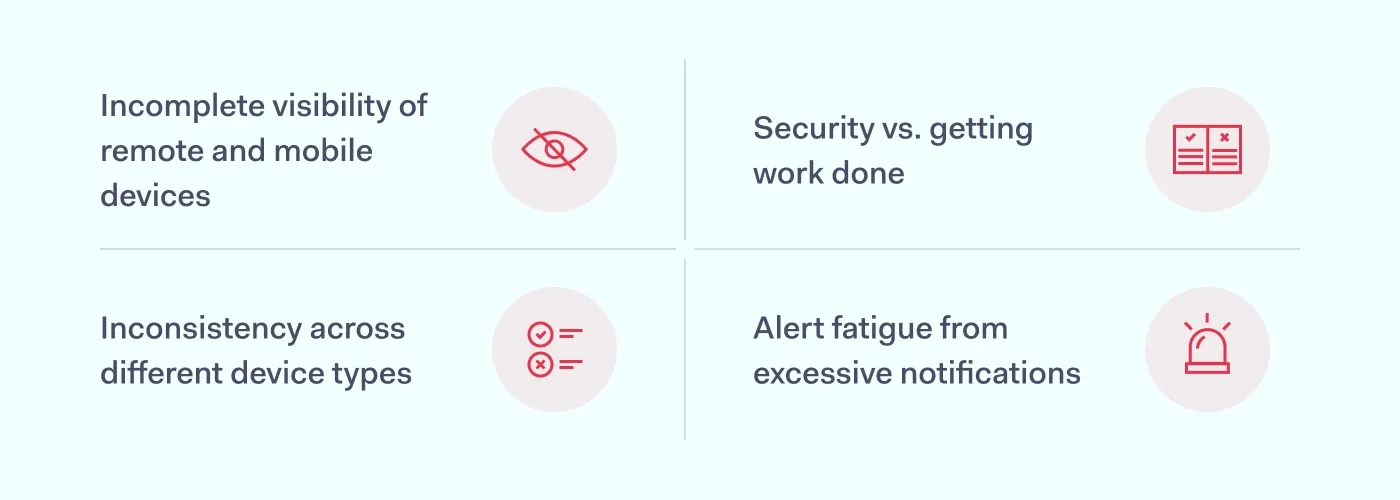
Incomplete visibility of remote and mobile devices
Because remote work makes it so easy to lose track of which laptops or mobile devices are currently interacting with your data, blind spots naturally start to form where unpatched software can stay for months. This lack of oversight eventually turns a single forgotten tablet into a breach, simply because nobody knew it was still connected.
Inconsistency across different device types
Consistency is nearly impossible to maintain when your network is flooded with a mix of company-issued gear and BYOD equipment. Since every smartphone brand and OS version handles security management in its own way, your team inevitably ends up wasting time on manual workarounds for individual users. This stalls your broader device management because you’re too busy troubleshooting a single person’s compatibility issues to enforce high-level protections across the board.
Security vs. getting work done
Strict endpoint management policies only work if they don’t actually get in the way of a deadline. If your security measures feel too intrusive—like slowing down system performance or requiring constant re-authentication—employees will eventually look for ways to get around them. This move toward shadow IT is a direct reaction to that frustration, and it typically results in the transfer of private information into unprotected accounts where you have no visibility.
Alert fatigue from excessive notifications
Even a solid endpoint security setup can become a risk if it generates more data than your team can actually process. When your system is constantly flagging minor configuration changes alongside genuine threats, it’s only a matter of time before a critical alert gets buried in the noise. This fatigue slows down your response time, which is exactly what a hacker is counting on to move through your network before anyone thinks to look.
Best practices for endpoint security management
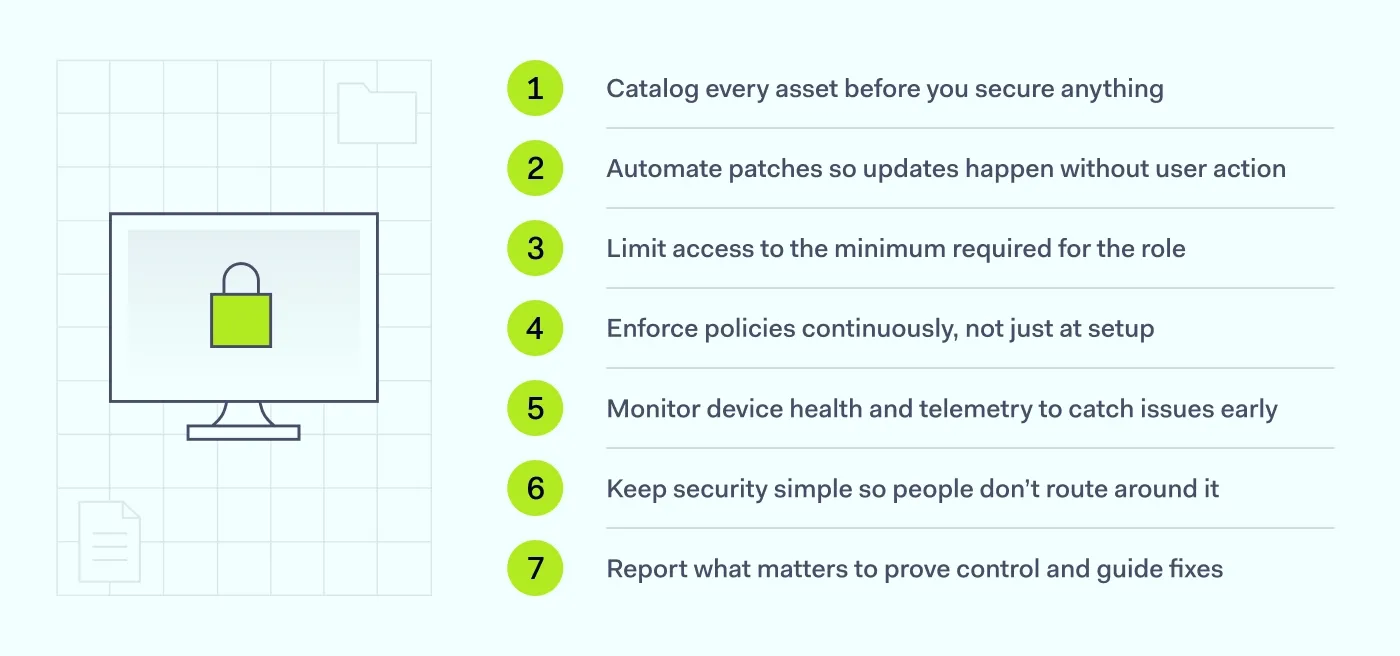
Endpoint security management works best when the system does the work instead of your users. Start with complete visibility, add automation where humans slow things down, and enforce controls that keep incidents contained. These best practices translate the approach into actions you can apply every day:
Catalog every asset before you secure anything
Enable automated discovery to log every endpoint device the moment it requests access. Once that list is real-time and complete, unmanaged laptops and mobile devices stop slipping through, and your policies finally apply to everything that’s connected.
Automate patches so updates happen without user action
Relying on employees to click “update” slows everything down, so push critical fixes through your endpoint management tools in the background. When patches deploy automatically, known vulnerabilities close across the fleet at once, and you avoid the backlog that usually builds up during remote work.
Limit access to the minimum required for the role
Enforce least privilege across accounts and devices. Tighter access prevents a compromised endpoint from accessing systems it doesn’t require, making containment—rather than a scramble—the default result.
Enforce policies continuously, not just at setup
Initial configuration isn’t enough, so keep endpoint management policies active and monitored. When compliance checks run in the background, devices that drift from standards get corrected or blocked, and your baseline stays intact without constant manual reviews.
Monitor device health and telemetry to catch issues early
Even up-to-date devices can go sideways, so watch behavior indicators alongside basic status. When telemetry flags anomalies, you move from guessing to evidence, and EDR can identify problematic endpoints before they impact anyone else.
Keep security simple so people don’t route around it
Complicated workflows create workarounds, so integrate protections into everyday use—single sign-on (SSO), silent health checks, and clear prompts only when needed. When the secure path is the easy path, remote work stays productive, and BYOD doesn’t become an issue. Usability should be a priority in any enterprise endpoint security strategy.
Report what matters to prove control and guide fixes
Generate reports that show coverage, compliance, and exceptions. With clear summaries, audits stop being a fire drill, and trends point you to where device management needs attention next.
Endpoints vs. endpoint security vs. endpoint management
These terms get mixed up often, and that’s usually where gaps start. Clarifying them matters because each one solves a different problem, and mistaking one for another leaves parts of your setup exposed.
Endpoints: the devices you’re actually managing
Endpoints are the assets themselves—laptops, desktops, phones, tablets, and other endpoint devices that connect to your systems. Because they’re the touchpoints where work happens, they’re also where risk enters, which is why identifying and tracking them is the first job. Once you know exactly which devices are involved, the rest of your process has something concrete to protect and control.
Endpoint security: the protection layer on those devices
Endpoint security is the set of controls that actively defend those devices—malware detection, isolation, and policies that stop unauthorized access. Since attacks target the endpoints where users operate, this layer needs to run continuously and respond quickly when behavior looks off. With the protection live on the device, you’re preventing and containing issues where they start.
Endpoint management: the administration that keeps everything consistent
Endpoint management is how you run the fleet—deploying software, applying configurations, and enforcing standards so devices stay in line. Because consistency breaks without ongoing administration, management keeps settings, updates, and policies aligned across every endpoint. When administration is reliable, security controls land correctly, devices remain usable, and your environment stays predictable rather than drifting over time.
Connecting endpoint and network security with NordLayer and CrowdStrike
The biggest problem with having separate tools for your network and your devices is that they usually don’t talk to each other. For example, if a laptop gets infected, it might still have a perfectly valid connection to your private servers because the network layer has no idea the hardware is compromised.
When you use NordLayer and CrowdStrike, the network finally knows what’s happening on the device. NordLayer handles the actual access—deciding who can reach which data—while CrowdStrike provides endpoint protection on the device.
The main advantage here is centralized management—you can manage your CrowdStrike Falcon licenses directly through the NordLayer platform to keep your billing and seat management in one place, while the tools themselves work together to handle threats.
Using NordLayer’s Custom Integrations feature, you can set up automated responses between the two services. For example, if CrowdStrike detects a threat on a device, the integration can automatically log the affected user out and disconnect them from your gateways. This stops a threat from moving through your network in seconds, cutting out the manual work that usually slows you down during an incident.
FAQ
What’s the difference between EDR and endpoint security management?
Endpoint security management is the broad framework used to handle the day-to-day administration of devices, including patch management, software updates, and endpoint management policies. Endpoint detection and response (EDR) is a specific security tool within that framework that focuses on monitoring for active threats and automatically reacting to suspicious behavior in real time.
Do small businesses need endpoint security management?
Yes. Smaller teams often have less visibility into how employees are using personal devices or mobile devices for work, making them an easy target for credential theft. Centralizing your device management helps a small IT team maintain a consistent security standard across the company without needing to manually check every machine.
What should endpoint security management cover for remote workers?
At a minimum, it should include automated patch management to keep software updated without user intervention, and strict access control to verify a device’s health before it connects to the network. It also needs to cover mobile devices and bring-your-own-device (BYOD) equipment to ensure that personal hardware doesn’t turn into a breach.

Aistė Medinė
Editor and Copywriter
An editor and writer who’s into way too many hobbies – cooking elaborate meals, watching old movies, and occasionally splattering paint on a canvas. Aistė's drawn to the creative side of cybercrime, especially the weirdly clever tricks scammers use to fool people. If it involves storytelling, mischief, or a bit of mystery, she’s probably interested.