Summary: Zero Trust's “never trust, always verify” principle reduces the attack surface. It ensures secure access to resources and protects your remote workforce without compromising flexibility.
Zero trust for remote work is like a continuous digital checkpoint. Every user, device, and access request is verified each time someone tries to connect to the network or a company resource.
This “never trust, always verify” approach reduces the attack surface, ensures secure remote access, and strengthens security without compromising the flexibility of remote work.
Key takeaways
Zero trust is a security model that verifies every access request, assuming that no user, device, app, or connection is trustworthy by default.
The zero trust framework relies on continuous monitoring, least-privilege access, and micro-segmentation.
Zero trust effectively manages remote work risks, such as BYOD vulnerabilities, shadow IT, credential theft, and compliance challenges.
Successful implementation of zero trust involves mapping assets, strong identity verification, adaptive access controls, and continuous monitoring.
What are the 5 zero trust principles for remote work?
Traditional security relied on a perimeter model that automatically trusted any connection made from within the office network. Zero trust does the opposite. It assumes that no user, no device, and no connection is trusted by default. Every network access request must be verified before it is authorized.
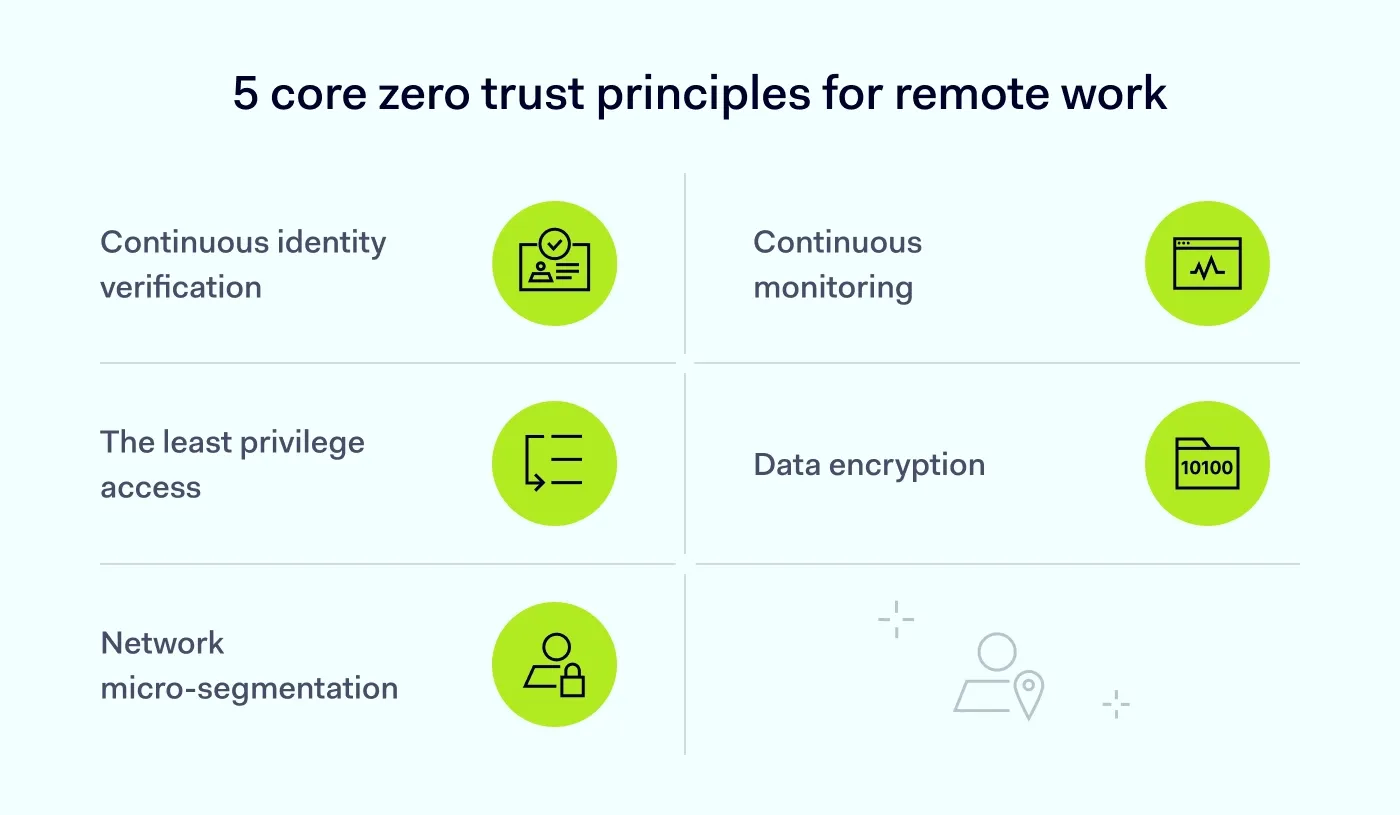
So, what exactly is zero trust? Here are the 5 core principles of this security model:
Continuous verification of identities. Identity and access rights are verified every time a user or device attempts to connect. The system never assumes a connection is safe just because it was authenticated previously.
Least-privilege access. Users receive only the minimum access required for their specific roles. Expanded permissions are provided only when necessary and for a limited time.
Network micro-segmentation. The network is divided into small, isolated zones. If one zone is breached, the rest of the system remains protected.
Continuous monitoring. User and device behavior is constantly assessed for anomalies, such as a login from an unexpected location. This allows for early detection of security breaches.
Data encryption. Encrypting sensitive data both at rest and in transit ensures it remains unreadable even if it is intercepted by unauthorized parties.
The bottom line? The zero trust model ensures that remote access remains a gateway to productivity, not a vulnerability.
What are the common misconceptions about zero trust?
Zero trust isn’t a single tool, but a comprehensive security approach to network access. Understanding it is the first step to successful deployment.
Here are 6 misconceptions about zero trust:
Misconception. Zero trust is a single product you buy.
Fact. It is a strategic framework, not a plug-and-play tool. Implementation involves a combination of identity management, device security, and network access policies.
Misconception. Zero trust will frustrate my employees and slow them down.
Fact. It uses adaptive access, which means if a user is on a known device at their usual home office, they aren't constantly pestered for logins. It only triggers extra security when something looks suspicious.
Misconception. Zero trust is only for large enterprises.
Fact. Zero trust provides scalable, cloud-based protection that can work for businesses of different sizes.
Misconception. Implementing a zero trust architecture is complex and expensive.
Fact. Many zero trust solutions are easy to set up and affordable. Also, reduced breach risks often result in long-term savings.
Misconception. Zero trust slows down network performance.
Fact. With proper deployment, zero trust can improve network performance by cutting unnecessary traffic and focusing resources on verified connections.
Misconception. A business VPN is enough for remote work security.
Fact. A business VPN helps protect traffic in transit, but zero trust adds continuous verification and granular access controls.
The real risks of the hybrid attack surface
The post-pandemic “nowhere office” is a fluid workplace where employees move between home, public places, and headquarters. In this hybrid environment, the perimeter is a complex web of personal devices, company endpoints, and cloud services, making the attack surface expand fast. Data shows that breaches involving remote work cost organizations over $1 million more than office-based incidents.
Here are the risks associated with it:
Dispersed perimeters. Connecting from an unsecured public Wi-Fi in a coffee shop or a home network can increase the risk of a breach.
Bring Your Own Device (BYOD) vulnerabilities. Personal devices often lack enterprise-grade security patches.
Shadow IT. The use of unapproved cloud tools and devices may expose sensitive company data, especially if access controls are not in place.
Credential theft. If an employee reuses passwords from a compromised site or hasn’t enabled phishing-resistant multi-factor authentication (MFA), attackers can take over the account more easily.
Growing complexity of compliance. Meeting strict standards like
GDPR or
HIPAA becomes harder when data moves across remote devices.
Go beyond "never trust, always verify"
Redefine your defense with cutting-edge Zero Trust segmentation. Get your free PDF.
How zero trust solves remote work risks
For any modern enterprise, implementing a zero trust architecture is one of the most effective ways to manage remote work risks.
Strengthen your security posture with access controls
The first line of defense for a remote workforce is rigorous authentication. Here is what zero trust workflows should incorporate:
Context-aware signals. Use login context, such as geolocation, local time, and anomalous behavior, to evaluate remote access requests.
Privileged Access Management (PAM) solutions. Deploying just-in-time access and session recording helps prevent users from misusing privileges.
Phishing-resistant MFA. SMS codes are vulnerable to interception and SIM-swapping, and push notifications can be abused in MFA fatigue attacks. Hardware security keys or passkeys based on FIDO2 provide stronger phishing-resistant protection.
Related articles

Anastasiya NovikavaMar 3, 202610 min read

Agnė SrėbaliūtėJan 26, 20267 min read
Manage your BYOD policies
How can you enhance security when employees use their personal devices for work? Deploy zero trust and enforce continuous verification of their access requests. This way, every device is thoroughly checked before it connects to the network. For example, outdated or vulnerable operating systems, unsupported apps, and missing security patches would all require immediate updates before access is granted.
Continuous monitoring and least privilege
Personal devices, even once compliant, rarely meet enterprise-grade security standards and can increase the risk of data exposure. This is precisely why zero trust principles, such as least-privilege access and granular network segmentation, are critical: they limit what a verified device can access, minimizing lateral movement and potential damage even if an endpoint is compromised.
Under zero trust, authentication also means continuous verification. Even after a user logs in, their activity is continuously monitored. This helps detect anomalies and terminate remote sessions if malicious activity is discovered.
Strong end-to-end encryption
A remote workforce often accesses company resources from untrusted public or home Wi-Fi. Encrypting data both in transit and at rest can stop a breach. Even if sensitive data is intercepted by an attacker, it remains indecipherable to them without the decryption key.
Zero trust implementation for remote work: a step-by-step plan
Transitioning to a zero trust architecture doesn’t have to happen overnight. You can roll it out in stages to keep your team productive while you strengthen remote access security.
Here is your roadmap to secure remote access for your workforce:
Map your digital assets. You can’t protect what you can’t see. Identify your most sensitive data, applications, company endpoints, and personal devices used by your team.
Deploy robust identity verification. Enforce multi-factor authentication. Whether it’s an app notification or a biometric scan, ensure your continuous verification process is consistent and secure..
Restrict access to your resources. Apply the principle of least privilege. If, for example, your marketing team doesn't need to see the server backend, don't give them access to it.
Segment your network. Divide your network into smaller zones. This helps stop a breach from spreading through the rest of the system if one zone is compromised.
Turn on continuous monitoring. Use automated tools that monitor your network for suspicious behavior 24/7 and flag it instantly.
Make remote work secure with NordLayer
Zero trust security is ideal for hybrid and remote work environments because it’s modular, scalable, and easy to integrate. Protect your team, data, and business with NordLayer’s zero trust solutions for:
Identity verification. Multi-factor authentication (MFA), single sign-on (SSO), and biometric authentication help verify users before they access your resources.
Device security.
Device Posture Security ensures only trusted devices can access your network and automatically blocks non-compliant access attempts.
Data protection. AES-256 and ChaCha20 encryption make data in transit unreadable if it is intercepted by unauthorized users.
Network access. Cloud Firewall helps you implement network segmentation by defining who can connect, through which gateways, and to which resources.
Network monitoring. Continuous monitoring of your network helps IT teams spot and respond to threats faster.
Secure browsing.
NordLayer Browser includes built-in controls that take zero trust further. It allows IT teams to manage security policies centrally in the environment where employees work every day.
Need to protect your remote workforce? Contact us today to explore how NordLayer's zero trust solutions can help improve your security posture.

Joanna Krysińska
Senior Copywriter
Joanna's family has a history in math and engineering, and she has dedicated her life to simplifying complicated technical ideas. She helps people understand how hackers think and how to stay ahead of them by concentrating on the human side of cybersecurity.