AI DLP: know what sensitive data your employees send to AI
- Detect sensitive data in prompts across AI chats and coding agents.
- See which user, AI tool, and data type triggered each finding.
- Use data loss prevention controls in web AI tools to warn, redact, or block.

Try every feature risk-free for 30 days
15,000+ businesses trust NordLayer to stay secure, compliant, and in control


THE RISK
Every unmonitored AI tool creates a new way for data to leave
Employees use AI tools to work faster, but any prompt can carry customer records, code, or contracts to a third party you don’t control and can’t audit.

Sensitive data leaks through prompts
An employee pastes a customer list or contract into a chatbot to save time, and that data now sits with a third-party provider, outside your access controls and with no way to pull it back.

There’s no record of what gets shared
Even when you know which AI tools your team uses, you can’t see what goes into each prompt, so if sensitive data leaks there’s no way to tell what was exposed, who sent it, or how far the damage goes.

Compliance breaks without warning
When regulated data like PII, health records, or card details reaches an unvetted AI provider, it can break GDPR, HIPAA, or PCI DSS obligations before your security team knows it happened.
FROM PROMPT TO FINDING
What happens after an employee submits a prompt
The prompt is captured locally
A browser extension captures prompts from ChatGPT, Microsoft Copilot, Gemini, Claude or other web tools. For Cursor and Claude Code, the desktop sensor rebuilds conversations from local session files.
The content is scanned on the device
Regex and pattern detectors scan content locally, with checksum validation where possible. Scanning happens after a prompt is submitted, so nothing is intercepted, slowed, or blocked during detection.
The finding appears on your dashboard
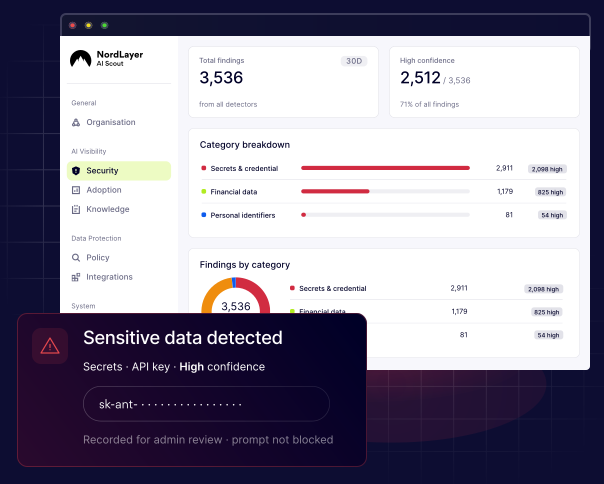
The dashboard shows the category, matched rule, snippet, confidence level, user, and source app. You can also search for findings by user or app within your organization.
What on-device detection never does
Detection always runs locally in the background without changing how employees use AI. Requests follow their normal path, while raw prompt content stays on the device. In practice, that means NordLayer AI Scout never:
- Routes AI traffic through a proxy or intercepts it
- Sends raw prompt content off the device to be scanned
- Adds an inline gateway that could delay requests
- Silently alters the prompt without the user’s knowledge
BUILT-IN & CUSTOM DETECTORS
The sensitive data types NordLayer AI Scout detects
Built-in detectors are ready to use for common sensitive data. Create custom detectors with validated RE2 patterns for identifiers only your organization recognizes, then run them alongside the built-in detectors.

Secrets and credentials
API keys, tokens, passwords, database connection strings, private keys, and JWTs across 221 vendor formats.

Financial data
Payment card numbers, IBANs, and bank account numbers.

Personal identifiers
Names, postal addresses, sensitive dates, and Social Security numbers.

Contact details
Email addresses and phone numbers.

Network and private URLs
Private and sensitive links identified by the on-device AI scanner.

Employee and customer IDs
Identifiers based on employee, member, staff, or customer ID formats.

Project and product codenames
Confidential internal project names, product names, or release codenames.

Ticket and case references
Identifiers used for support tickets, incidents, cases, or CRM records.

Contract and invoice numbers
Identifiers used across finance and legal documents.
Find out how your employees are using AI right now
ENFORCEMENT OPTIONS
Choose how sensitive data is handled in web AI apps
Detection runs everywhere. With monitored web AI tools, you can also act on a risky prompt before it’s sent.

Block
Prevent prompts containing data covered by your policies from being sent. Users are told what needs to be removed before they can continue.

Redact
The detected value is replaced with a placeholder while the rest of the prompt goes through. Users can see what was redacted.

Warn
Alert users when a prompt may expose sensitive data and give them a chance to review or revise it before continuing.
Retention modes
Decide how much context each finding keeps
Retention rules are applied on the device before a finding is stored. Choose how much context to keep, balancing investigation needs with data minimization to support GDPR, HIPAA, and PCI DSS requirements.
MOST CONTEXT
Full

Stores the full prompt, matched values, and event metadata, giving admins the complete context behind each finding.
Balanced
Detections only
Discards the surrounding prompt, but keeps the matched values and metadata. Admins see what triggered the finding without storing the full conversation.
MINIMUM DATA
Categories only
Stores only the detected category and event metadata. Neither the prompt nor the matched sensitive values are retained.
ANATOMY OF A FINDING
Every detection becomes a record you can review
A finding isn’t just a flag. It contains everything a reviewer/admin needs to triage it – and everything your retention policy allows you to keep. Each one stays in the dashboard as a searchable record, not an alert that disappears.

Category
The type of sensitive data detected, such as secrets, financial information, network data, or a custom category created by your organization.

Matching rule
The exact detector that triggered the finding, whether it was a built-in key pattern or a custom policy created by your team.

Matched snippet
The matched value and its location in the prompt, unless excluded by your retention settings. Sensitive values appear masked, such as sk-ant-•••••.

Confidence
A high or medium confidence level set by the detector. Adjust the minimum confidence level by category to reduce noisy findings while keeping stronger matches visible.

Source
The detection method behind the finding: regex, custom policy, or AI scanner. Currently, findings are generated by regex and custom policy detectors.

Record status
Every scanned record is marked as clean, detected, or error, so a failed scan is never mistaken for a clean result.
Stop sensitive data from entering AI tools and apps
Additional info
Frequently asked questions
AI data loss prevention (AI DLP) detects sensitive information employees share with generative AI apps and coding agents. It strengthens data protection by helping security teams identify exposed data, review findings, and apply controls, such as warnings, redaction, or blocking, in supported web AI tools.
Yes. AI DLP can detect sensitive information in prompts submitted to ChatGPT and apply web controls based on your policies. As part of a broader data security strategy, NordLayer AI Scout can warn the user, redact detected values, or block risky prompts from being sent.
Not really. You decide how sensitive data is handled in AI tools and apps. NordLayer AI Scout can warn employees, redact only the detected value, or block a risky prompt without preventing access to ChatGPT or another AI tool entirely.
Yes, if web controls are enabled. Employees can receive a warning, see what was redacted, or be told that a prompt was blocked. NordLayer AI Scout does not silently modify what they send, while security teams receive a structured finding in the security dashboard.