Protect access to critical systems with policy-based routing
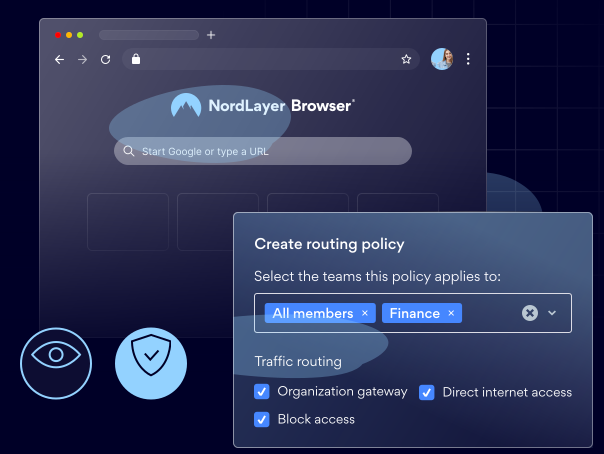
Direct browser traffic to internal resources through secure gateways, while allowing public websites to load without restrictions for faster performance.

14-day money-back guarantee
Featured in


CHALLENGES
Security gaps emerge when you don’t control your browser traffic

Sensitive data travels unprotected
Without secure browser routing, employees may access internal systems via unsecured connections, putting sensitive business data at risk.
Web and cloud resources are exposed to risks
When all browser traffic is treated equally, internal resources end up receiving the same level of security as everyday web activity.
Internal access isn’t properly isolated
If you cannot separate browser traffic by destination, it becomes much more difficult to secure internal systems and control who can access them.
OVERVIEW
How policy-based routing helps your team stay in control
What is browser policy-based routing?
Browser policy-based routing is a feature that automatically routes browser traffic through secure gateways or straight to its destination based on rules defined by your IT team.
It ensures that access to sensitive systems always goes through a protected connection, while everything else loads directly – so everyday browsing stays fast and unrestricted.

Ensure sensitive systems always use secure paths
Route access to your internal tools through secure, monitored gateways. This ensures sensitive data is always handled in line with your security and compliance requirements.

Enforce network segmentation directly at the browser level
Define clear traffic boundaries and enforce routing segmentation directly in the browser, without deploying or maintaining extra infrastructure.

Apply consistent routing policies for all users and environments
Introduce uniform routing rules across your entire organization, so internal systems are always accessed through secure connections and external traffic follows optimized routes.

Improve your security posture while maintaining efficient connectivity
Balance strong security controls with a smooth user experience by routing sensitive traffic through secure gateways while letting low-risk connections flow directly.
Explanation
How does browser policy-based routing work?
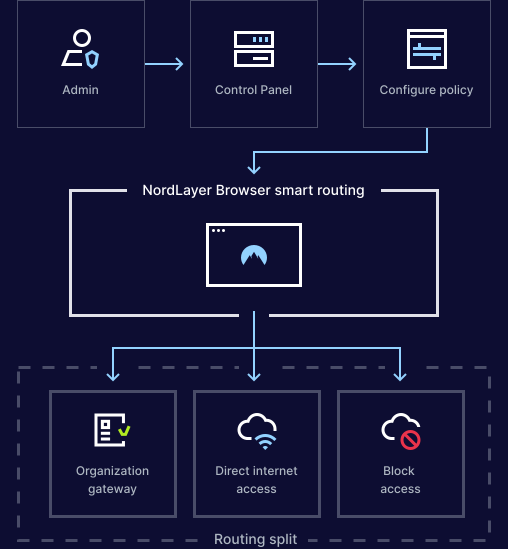
First, your IT team defines routing rules by specifying which domains must be accessed through a secure gateway and to which users, roles, or teams the rules apply.
Once the rules are active, when an employee tries to access a given website, the browser checks if it is a protected resource and, if so, automatically routes traffic through the right secure gateway.
Keep access secure without slowing down your team
benefits
Why choose the NordLayer Browser to secure your business

Get built-in protection
Protect sensitive data shared in the browser without installing add-ons, agents, or extra software.

Ease the IT workload
Quickly secure BYOD and remote access without requiring any complex network setups that drain IT resources.

Streamline compliance
Gain full visibility into in-browser SaaS activity and get clear audit trails to simplify compliance and reporting.

Keep security consistent
Enforce strict browser policies for all users to simplify management and improve visibility.

Eliminate risky workarounds
Ensure employees only use approved tools through secure access and browser-level controls.
Additional info
Frequently asked questions
Admins can define routing policies based on domains, applications, user groups, or risk levels. This allows for precise control over how different types of traffic are routed.
Browser policy-based routing helps organizations balance security and performance. It ensures sensitive traffic is inspected and controlled, while less critical traffic flows directly to its destination.
No. The browser makes routing decisions instantly in the background, so users experience seamless access with no manual steps or noticeable delays.
Yes. Organizations can apply different routing rules to specific users, roles, or teams. This ensures flexibility while maintaining security standards.