Enterprise browser policies you deploy before the day ends
Get Chromium-based policies in the NordLayer Browser, from screen capture and cookie hardening to developer tools and startup pages, then apply these policies company-wide or by team from one Control Panel.

14-day money-back guarantee
Built on the compliance standards your business depends on
SOC 2 compliant
ISO 27001 compliant
PCI-DSS compliant
HIPAA compliant


WHAT’S AVAILABLE
Browser policies you can control from day one

Choose from 23 Chromium-based policies available now

Browse 4 policy categories, from screen capture to startup pages

Access 500+ configuration options per workspace

Find and apply the policy you need in less than 2 min

Set microphone access
Choose whether sites can ask for microphone access, or block it everywhere except for the URLs you’ve approved.
AudioCapture

Allow microphone for specific sites
Skip the microphone prompt on approved URLs only, so calls can connect at the exact moment that users join.
AudioCapture

Set camera access
Choose whether sites can ask for camera access, or block it everywhere except for the URLs you’ve approved.
VideoCapture

Allow camera for specific sites
Turn on the camera for approved video tools automatically, with no permission pop-up before each meeting.
VideoCapture

Set screen capture access
Set the browser-wide rule for screen sharing, either letting sites request it or switching it off entirely.
ScreenCapture

Allow screen capture for specific sites
Make exceptions for sites you trust, letting them capture the full screen, a window, or a tab, even when sharing is blocked.
ScreenCapture

Allow tab capture for specific sites
Limit approved sites to sharing a single browser tab and keep everything else on screen private.
TabCapture

Allow window capture for specific sites
Let approved sites capture individual windows and tabs, so demo and support tools work without access to the full screen.
WindowCapture

Allow same-origin tab capture
Let trusted web apps record only their own tabs so teams can capture what they need while every other tab stays private.
SameOriginTabCapture

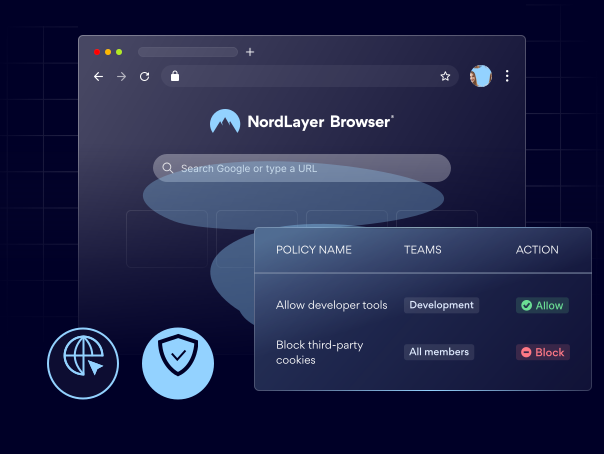
Block third-party cookies
Block third-party cookies to help limit trackers and advertisers from following your employees across sites.
BlockThirdParty

Allow cookies for specific sites
Make exceptions to your cookie rules for sites you trust, so stricter defaults don’t break the tools your team relies on.
CookiesAllowed

Block cookies for specific sites
Block cookies on sites you don’t trust to limit how they track or store data, even when cookies are allowed by default.
CookiesBlocked

Set session-only cookies for specific sites
Clear cookies from sensitive sites as soon as the browser closes, so their sessions don’t carry over to the next launch.
CookiesSessionOnly

Set cookie behavior
Set the default cookie rule (allow, block, or keep only for the session) for every site without its own exception.
DefaultCookies

Control developer tools
Allow developer tools, turn them off completely, or block them only for extensions installed by policy.
DeveloperTools

End processes in Task Manager
Stop users from ending browser processes in Task Manager, so managed extensions and processes keep running.
TaskManagerEndProcess

Control built-in password manager
Turn the built-in password manager on or off, for example when your team uses SSO or a dedicated vault.
PasswordManager

Enable printing
Allow or block printing, including saving pages as PDFs, to help prevent data from leaving the browser.
PrintingEnabled

Set startup pages
Open a set list of URLs, such as your intranet or SSO portal, each time the browser launches.
RestoreOnStartup

Set new tab page URL
Replace the default new tab page with a URL of your choice, such as an internal portal or dashboard.
NewTabPage

Use new tab page as homepage
Make the homepage match your new tab page, so users land in the same place, whether they click Home or open a new tab.
HomepageIs

Show Home button
Show or hide the Home button in the toolbar, giving users a one-click route back to the homepage you’ve set.
ShowHomeButton

Show bookmarks bar
Keep the bookmarks bar visible, so the work bookmarks you’ve set up for your team stay one click away.
BookmarkBar
Make NordLayer Browser work by your own rules
Set enterprise policies for every team in the NordLayer Browser from the Control Panel, or talk to a specialist to discuss what works best for your business.
BENEFITS
What a stronger browser security policy gives your team

Protect sensitive data in live browser sessions
Control which sites can use the microphone, camera, screen sharing, and cookies, helping limit what work data leaves a live session.

Secure the browser against local tampering
Switch off developer tools, printing, and other built-in features users could use to change the browser or move data out of it.

Control every session, not just the network
Enforce your rules inside the browser session, where most work happens, not through an extension users can casually switch off.

Apply policies once and roll out at scale
Set each policy once in the Control Panel and apply it company-wide or by team, so every employee starts from the same setup.
Additional info
Frequently asked questions
Enterprise browser policies are organization-wide rules that control how the NordLayer Browser behaves, and each enterprise policy in a browser covers one setting, such as which sites can use the camera, how cookies are handled, or whether printing and developer tools are available.
Security and DLP policies decide what your users can access and what data can move, while browser policies decide how the browser itself behaves during those sessions.
Yes, you can apply enterprise policies to the whole organization or to specific teams, for example, with different rules for the finance and marketing teams.
No, everything is set up in the NordLayer Control Panel with plain-language descriptions, so you don’t need GPO, Intune, or JSON.