Protect your privacy with browser camera and microphone control
Prevent audio and video capture on untrusted or non-essential websites, so nothing your team says or does gets exposed to unauthorized third parties.

14-day money-back guarantee
Featured in


What is camera and microphone control?
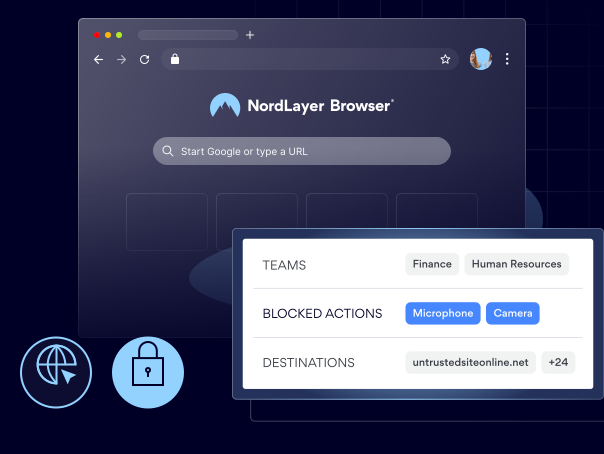
It’s a browser DLP feature that controls which websites and online applications can access a user’s camera or microphone based on policies set by your administrators.
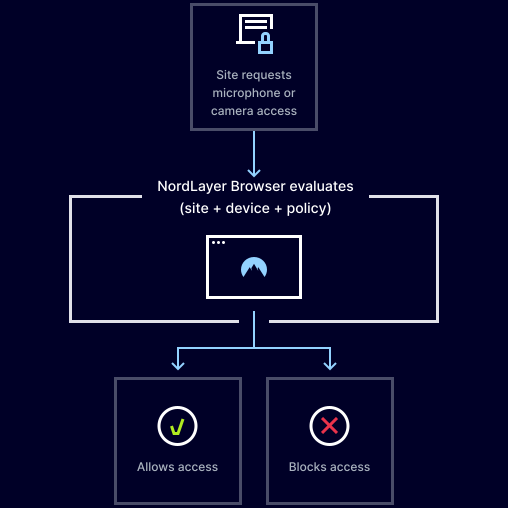
When a site requests camera or microphone access, the feature checks that request against your organization’s policies. If the site isn’t approved, the access is blocked automatically.
How do you control camera and microphone access in the NordLayer Browser?
Administrators can easily create rules that limit camera and microphone use inside the browser. They can:
- Allow or block camera access by domain
- Allow or block microphone access by domain
- Create lists of websites where camera and microphone access is allowed
benefits
4 reasons to control camera and microphone access in the browser

Blocks unauthorized audio/video capture
Prevents websites from accessing the camera or microphone unless they’re approved by company administrators.

Limits the attack surface in the browser
Reduces exposure to browser-based threats that exploit camera and microphone access.

Strengthens protection of confidential data
Gives you more control over sensitive information shared in camera and microphone feeds.

Helps enforce consistent security policies
Allows you to apply the same camera and microphone access rules across all teams, so security doesn’t rely solely on users’ judgment.
Keep conversations private with the NordLayer Browser
WHAT YOU GET
Why choose NordLayer Browser to secure your business?

Get built-in protection
Keep sensitive data shared inside the browser protected—without installing add-ons, agents, or extra software.

Reduce IT resources
Quickly secure BYOD and remote access without requiring any complex network setups that drain IT hours and budget.
Streamline compliance
Centralize governance with full visibility of in-browser SaaS activity and get clear audit trails to simplify compliance and reporting.

Keep things consistent
Standardize and enforce strict browser policies across all users and devices, and give your admins full visibility over what’s happening in your SaaS workspace.

Eliminate risky workarounds
Deploy a browser with every rule, permission, and approved apps built in, so users never need to use personal accounts, unauthorized extensions, or risky workarounds.
Additional info
Frequently asked questions
When a website requests access to the camera or microphone, the NordLayer Browser checks that request against the policy and either allows or blocks it based on the defined rules.
No. If a request is blocked by policy, users can’t manually grant access.
Yes. As an administrator, you can set policies that allow camera and microphone access only on the websites you’ve approved.
Not when it’s properly configured. Trusted conferencing and collaboration platforms can be added to your approved list, so users can continue working with their usual tools.
Yes. The policy applies across all browser-based environments, including SaaS tools, third-party apps, and unknown or newly created websites.