Set access boundaries by team with browser traffic segmentation
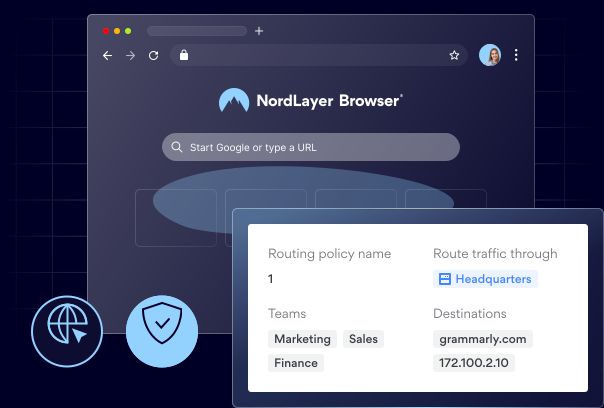
Route each team through its own Private Gateway, so users only reach the internal resources you've approved and everything else stays invisible.

14-day money-back guarantee
Featured in


THE CHALLENGE
What happens when every user’s browser can reach everything?

Access can’t be scoped to specific roles
Without per-team routing, any user’s browser can reach every internal system the business runs, far beyond what their role actually needs.
One compromised session is all an attacker needs
When all browser traffic shares one path, a single hijacked session or stolen login can pivot straight into the rest of your environment.
Audits sprawl across the whole network
With regulated and general traffic mixed together, compliance work and incident hunts have to cover everything instead of one specific area.
THE SOLUTION
4 things that change once browser traffic is segmented
What is browser traffic segmentation?
Browser traffic segmentation is a NordLayer Browser control that routes each team’s browser traffic through an assigned private gateway, so internal resources only accept connections from gateways they explicitly trust, and stay invisible to everyone else.

Threats are contained before they spread
Browser-level segmentation keeps malware confined to the segment it lands in, so a compromised session can’t pivot into the rest of your environment or reach internal resources.

Each team or user only sees what they need
Sensitive apps, admin tools, and high-risk extensions sit behind their own gateway, isolated from general browsing and reachable only by the teams that genuinely need them.

Routing to critical apps is fast and predictable
Routing traffic through team-specific gateways cuts congestion on shared paths and gives priority apps a cleaner lane, so latency stays low even when general browsing spikes.

Audits and troubleshooting get simpler
Compliance audits (GDPR, PCI) are limited to the teams that handle regulated data, and issues are resolved quickly where they arise.
How does browser traffic segmentation work?
NordLayer Browser routes each user’s requests through the private gateway assigned to their team, and internal resources only accept connections from gateways they explicitly trust, so users reach the applications approved for their segment and nothing else.
- Map each team to a dedicated private gateway.
- On each internal resource, allowlist only the gateway IPs of the teams that genuinely need access.
- Unapproved resources stay invisible to the user.
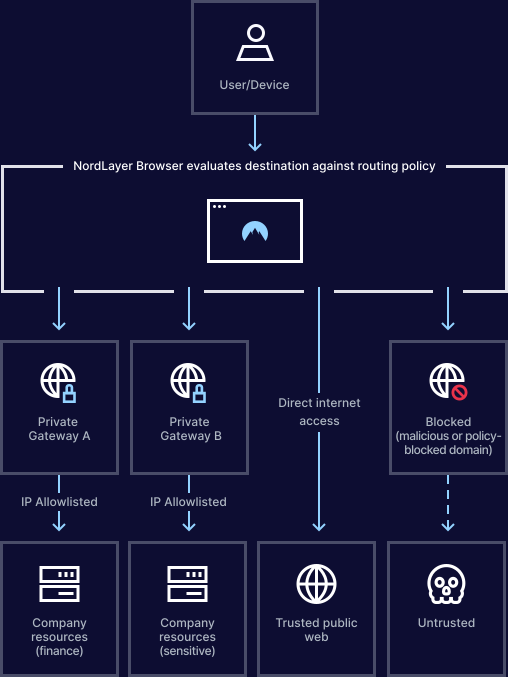
Give each team the access it needs and nothing else
benefits
The payoff of running NordLayer Browser

Your entire business is protected in minutes
Deploy NordLayer Browser across every team and device in minutes, without any staged migrations or months of planning.

Your security stack stays, we layer on top
NordLayer Browser plugs into your IdP and existing security tools, so browser traffic segmentation runs alongside everything you already have.

Your IT managers get more time to focus on other jobs
Centralize governance with full visibility of in-browser SaaS activity and get clear audit trails to simplify compliance and reporting.

Your team never even notices the switch
NordLayer Browser looks and feels like the browser your team already uses, so there’s nothing new to learn and no habits to change.

You eliminate the need for risky workarounds
Deploy a browser with every rule, permission, and approved apps built in, so users never need to use personal accounts, unauthorized extensions, or risky workarounds.
Additional info
Frequently asked questions
It acts as a controlled access point that represents a team’s identity when reaching internal resources, enforcing segmentation by deciding which applications a user can access based on their assigned gateway.
No. Users can only reach the internal applications permitted for their assigned private gateway, restricted by the segmentation policies your organization defines.
If a resource doesn’t recognize the gateway’s IP, the connection is blocked, and the site stays unreachable, which prevents any access outside your defined segmentation rules.