Keep your browsing activity private with browser IP masking
Prevent external websites from seeing user location and infrastructure details by routing all browser traffic through a private gateway.

14-day money-back guarantee
Featured in


What is browser IP masking?
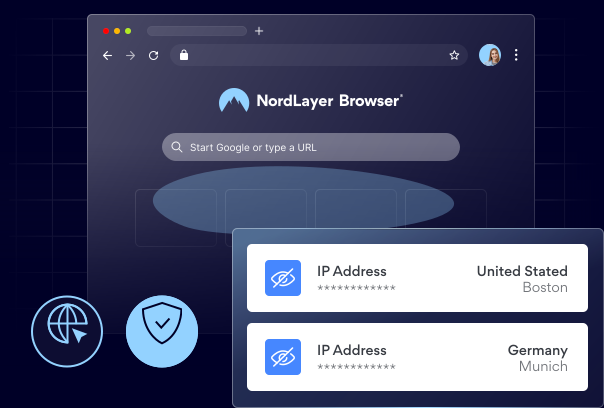
Browser IP masking is a feature that hides a user’s real IP address by routing all browser traffic through a private gateway. It helps protect user and network information from being exposed online, reduces visibility into company infrastructure, and adds privacy for remote and hybrid teams.
How does browser IP masking work, exactly?
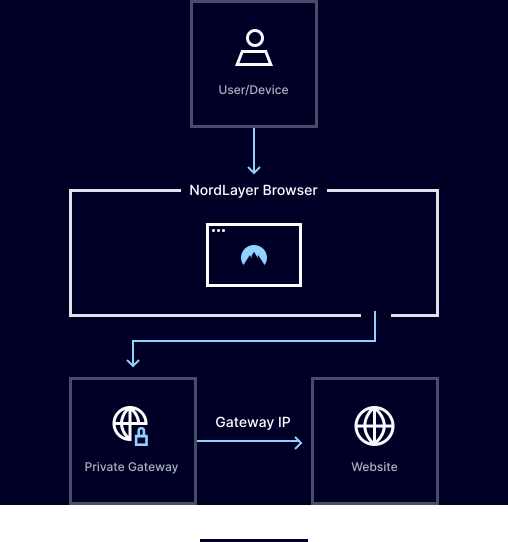
It routes browser traffic through a private gateway instead of sending it directly from your device, so websites only see the gateway’s IP address, not your real one. This hides your location and makes your company’s network harder to detect. Admins can enable it for specific users or groups. Once the policy is applied, traffic is automatically routed with no user action required.
USE CASES
How browser IP masking helps protect your company

Hides employee location while browsing
Makes it harder for websites and outsiders to see where employees are working from or which network they use.

Adds more privacy for remote teams
Helps remote and hybrid employees browse with less information exposed online.

Makes tracking users more difficult
Prevents third parties from easily identifying, profiling, or targeting users based on visible IP data.

Keeps the company network details hidden
Hides the company’s real IP address to reduce exposure of internal infrastructure and network information.
CHALLENGES
Browsing can expose information that can be used to target you
When browser traffic connects directly to websites, those sites can identify where it originated and the network it came from.
A direct connection can give threat actors more material to map out your network and identify weak points.
The same network details showing up again and again can make it easier to identify, track, or profile users.
Prevent company IP exposure with NordLayer Browser
benefits
Why choose the NordLayer Browser to secure your business

Get built-in protection
Protect sensitive data shared in the browser without installing add-ons, agents, or extra software.

Ease the IT workload
Quickly secure BYOD and remote access without requiring any complex network setups that drain IT resources.

Streamline compliance
Gain full visibility into in-browser SaaS activity and get clear audit trails to simplify compliance and reporting.

Keep security consistent
Enforce strict browser policies for all users to simplify management and improve visibility.

Eliminate risky workarounds
Ensure employees only use approved tools through secure access and browser-level controls.
Additional info
Frequently asked questions
The security service components of a thorough SASE (pronounce "sassy") strategy are offered by SSE. One cloud-delivered solution from SSE combines features for access control, threat prevention, data security, security monitoring, and acceptable usage control. A full SASE platform is created when SSE and SD-WAN are joined. This platform offers monitoring and policy enforcement with integrated network controls, application APIs, and endpoint-based controls. In 2019, Gartner introduced the cybersecurity concept of SASE. SASE is a cloud-delivered service paradigm that unifies network security services like CASB, FWaaS, and ZTNA with software-defined wide area networking or SD-WAN.
No, it doesn’t affect the user’s internet connection. It routes browser traffic through a private gateway so the real IP address stays hidden from external websites, while the browsing experience itself remains the same.
Yes, admins can assign browser IP masking to specific users or groups. Once configured, their browsing traffic is automatically routed through the selected private gateway.
Yes. IP anonymization means hiding a user’s real IP address, so websites can’t directly see where the browser traffic is coming from. Browser IP masking does that by routing browser traffic through a private gateway, which makes external websites see the gateway’s IP instead of the user’s real IP address.
Browser IP masking focuses on browser traffic only, whereas a virtual private network usually protects the broader network connection.
It helps protect the user’s real IP address, network details, and browser-based online activity from being directly exposed. It gives teams more privacy when they connect from different locations.