Keep sensitive data secure with browser file download control
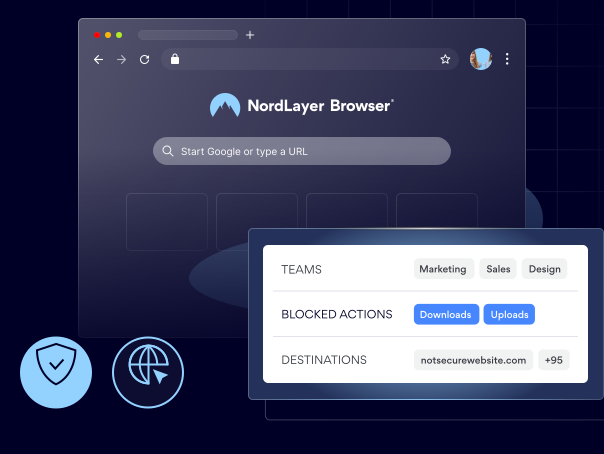
NordLayer Browser enforces your download and upload policy at the point of action, so unauthorized transfers stop, and your data never leaves the environment you trust.

14-day money-back guarantee
Featured in


THE CHALLENGE
Your most sensitive files leave the same way every other web request does

Data flows to personal accounts and AI tools
Employees move files to personal emails, file-sharing sites, and AI tools as easily as any approved app, so confidential data leaves your environment without anyone noticing.
You can’t see what’s moving until it’s too late
File activity across web-based SaaS applications stays invisible to IT, so the first sign of a leak often arrives after the data has already gone.
No way to enforce who can move what
Without a policy at the browser level, every employee can transfer any file they can open, so you’re relying on trust instead of rules to keep data in place.
THE SOLUTION
5 things that change once browser file download control is on
Set the rules once and let the browser enforce them on every transfer, so sensitive data stays where it belongs without slowing your team down.
What is browser file download control?
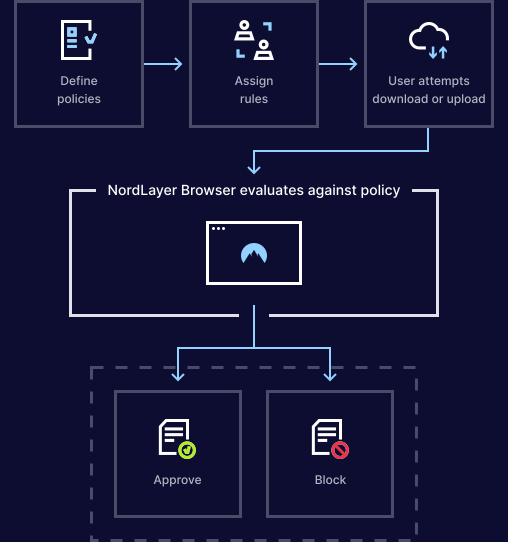
Browser file download control is a feature of the NordLayer Browser DLP solution that checks every download and upload against your organization’s policies, allowing the transfers you permit and blocking the ones you don’t.

Keep sensitive files inside your environment
Uploads to unapproved or personal sites and tools are blocked automatically, so confidential data stays inside the environment you control.

Prevent both accidental and intentional leaks
Both careless mistakes and deliberate exfiltration are caught before they happen, because unmanaged file movement is closed off by policy.

Stay ready for regulated data compliance audits
Data-handling rules for customer records, internal documents, and regulated information are enforced consistently, so compliance is built into daily activity.

See every file move across your web-based SaaS apps
Each transfer across web-based SaaS applications is logged and visible, so you can spot risky file activity early instead of discovering it after a breach.

Shut down high-risk shadow IT data transfers
Uncontrolled movement between corporate and personal or unapproved services is reduced, so business files stop leaking into tools you never sanctioned.
Explanation
How does browser file download control work?
NordLayer Browser routes each user’s requests through the private gateway assigned to their team, and internal resources only accept connections from gateways they explicitly trust, so users reach the applications approved for their segment and nothing else.
- Map each team to a dedicated private gateway.
- On each internal resource, allowlist only the gateway IPs of the teams that genuinely need access.
- Unapproved resources stay invisible to the user.
Take control of every file moving through the browser
benefits
The payoff of running NordLayer Browser

Your entire business is protected in minutes
Deploy NordLayer Browser across every team and device in minutes, without any staged migrations or months of planning.

Your security stack stays, we layer on top
NordLayer Browser plugs into your IdP and existing security tools, so browser traffic segmentation runs alongside everything you already have.

Your IT managers get more time to focus on other jobs
Centralize governance with full visibility of in-browser SaaS activity and get clear audit trails to simplify compliance and reporting.

Your team never even notices the switch
NordLayer Browser looks and feels like the browser your team already uses, so there’s nothing new to learn and no habits to change.

You eliminate the need for risky workarounds
Deploy a browser with every rule, permission, and approved apps built in, so users never need to use personal accounts, unauthorized extensions, or risky workarounds.
Additional info
Frequently asked questions
Admins define policies that decide which uploads and downloads are allowed or blocked, and the browser enforces those rules automatically during everyday user activity.
Yes, policies can restrict uploads to specific platforms, such as personal email services, file-sharing sites, AI tools, and other unapproved applications.
The browser stops the action immediately and shows the user a clear message explaining why, so the block feels intentional rather than accidental, and workflows aren’t left guessing.
Yes, it applies to all browser-based activity, including SaaS applications, such as CRMs, email platforms, and cloud storage services.
Yes, policies can include exceptions for specific users, groups, or trusted applications where file transfers are permitted.